
New Biometric Solution Biolock 333 Bedienungsanleitung

BIOLOCK 333
Keyless Fingerprint Lock
Trademark 2008 New Biometric Solution (NBS) LLC. All rights Reserved.
www.biolockusa.com
Customer Service Hotline: 1-866-572-LOCK
User Manual
(5625)

User Manual
-1-
Content
CHAPTER1. INTRODUCTION.............................................................2
1.1 MODEL NUMBER..............................................................................2
1.2 MAIN FEATURES ..............................................................................2
1.3 STRUCTURE & COMPONENTS.........................................................3
1.4 DIMENSION......................................................................................3
1.5 PACKING LIST..................................................................................4
1.6 WEIGHT ...........................................................................................5
1.7 TECHNICAL SPECIFICATION ............................................................5
1.8 POWER SUPPLY FOR EMERGENCY ..................................................5
CHAPTER2. OPERATION INSTRUCTION........................................6
2.1 KEYPAD DESCRIPTION.....................................................................6
2.2 USER GRADES ................................................................................6
2.3 HOW TO ENROLL YOUR FINGERPRINT.............................................7
2.4 REVIEW THE USERS.......................................................................10
2.5 DELETE THE USERS.......................................................................10
2.6 CLEAR ALL USERS ........................................................................11
2.7 ACCESS MODE ..............................................................................12
2.8 NORMAL OPEN & NORMAL CLOSE SETTING...............................13
2.9 LOW BATTERY ALERT....................................................................13
CHAPTER3. INSTALLATION.............................................................14
3.1 TOOLS REQUIRED FORINSTALLATION...........................................14
3.2 DOOR REQUIREMENT.....................................................................15
3.3 LATCH SIZE....................................................................................15
3.4 INSTALLATION STEPS ....................................................................16
3.5 INSTALLATION DIAGRAM................................................................18
3.6 TIPS FOR INSTALLATION................................................................18
CHAPTER4. MAINTENANCE............................................................19

User Manual
Chapter1. Introduction
1.1 Model number
Model BIOLOCK 333
Picture
1.2 Main features
Durable Fingerprint Reader Adopt optical fingerprint sensor
Fingerprint can't be duplicated
IR Remote Control
Zinc alloy die-casting body
Simple user interface (Easy operation keys)
Compatible with cylinder door
Users capacity up to 99 users
Working temperature -13°F to 125° F
4 (AA) alkaline battery, external power supply port (emergency)
Fingerprint sensor resolution 500DPI
Reversible Handle (Handle can be converted to be used
on either a right-hand or left-hand door)
-2-

User Manual
1.3 Structure & Components
1.4 Dimension (In CM)
Front View Back View
-3-

User Manual
1.5 Packing List
2-3/8” or 2-3/4”(1pc)
Square spindle ( 1pc)
Part #5. Rubber gasket (2pcs)
Part #9. Manual & template (1pc)
-4-
Part #2. Adjustable single latch
Bag A Includes:
Strike (1pc)
Strike plate (1pc)
1.2” Screw
for strike plate (2pc)
Bag B Includes:
1.2” Screw
for Adjustable latch (2pc)
(2 Extra 1.2” screws included for
replacement)
Bag C Includes:
Long Connector Screw (3pc)
(for use if your door
width is 1.6 - 2 inches)
Bag D Includes:
Mechanical Keys (3pc)
Alan Wrench (1pc)
Part #7. IR Remote (1pc)
Loose Parts:
Part #1. Short connector screw
( 3 pcs)
Part #3. Front Panel(1pc)
Part #4.Back Panel(1pc)Part #6. Iron fixing board (1pc)
Iron fixing board screw (2pc)
Part #8. Batter cover screw
(1pc)

User Manual
1.6 Weight
Parts N.W. (Lbs)
Front plate 2.27
Back plate 1.54
Latch 0.26
Accessories 1.10
Total 5.17
1.7 Technical Specification
Item Description
Sensor Optical
Resolution 500DPI
Scanning time <1s
FRR(False Rejection Rate) 0.01%
FAR(False Acceptance Rate) 0.0001%
Users capacity 99 (Each user one fingerprint)
Battery 4 AA Alkaline battery
Working current 0-150mA
Standby current 0uA
Opening method Fingerprint, Mechanical key,
Remote control (Optional)
Working temperature -13 °F to 125 ° F
Working humidity 20%-80%
Humidity 15%RH to 95% RH
1.8 Power supply for emergency
When battery voltage is low, you can unlock with external power supply
or mechanical key
-5-

User Manual
Chapter2. Operation Instruction
2.1 Keypad description
Front Key Back keys
Front Body Key
The power key on front is to power the system and light the reader.
Back body Keys
The power key on back body is to power the system and operate the lock.
There are also other 4 keys, Add key, Delete key, Confirmation key, Clear key,
2.2 User Grades
There are three grades user: Super Master (S), Master (M), User (U)
Super Master (S) – “Super Master” is No.1 user who registers the fingerprint
in the lock.
The “Super Master” can add or delete users from No.2to
No. 99..
Master (M) – “Master” is No.2 or No.3 user who registers the fingerprint
in the lock
The “Master” can add or delete users from No.4 to No.99.
The master could not add or delete mutually.
User(U) –“User” is No.4 to No.99users who can only open the
door with fingerprint registered under the permission of the
Super Master or the Master.
-6-

User Manual
2.3 How to enroll your fingerprint
2.3.1 Enroll the super master
1.Press the indoor Power Key 2.Press the Add Key
3.The reader will light after the beep 4. Place your finger once
5. After the beep, place your finger
one more time, then the red light &
the green light will shines 3 times in
sequence.
6. The super master is registered.
Operation is complete
-7-

User Manual
2.3.2 Enroll the master
1.Press the indoor Power Key 2.Press the Add Key
3.The reader will light after the beep. 4. Verify the finger of the super
master(N°1) to get access.
5. First available master number will
display.(N°2 or N°3) 6. Select the master number.
Then press OK
7. Place the finger of the master once
for registration.
8. Then place the finger of the master one more
time. The light will flash 3 times in
sequence. The Operation is complete.
-8-
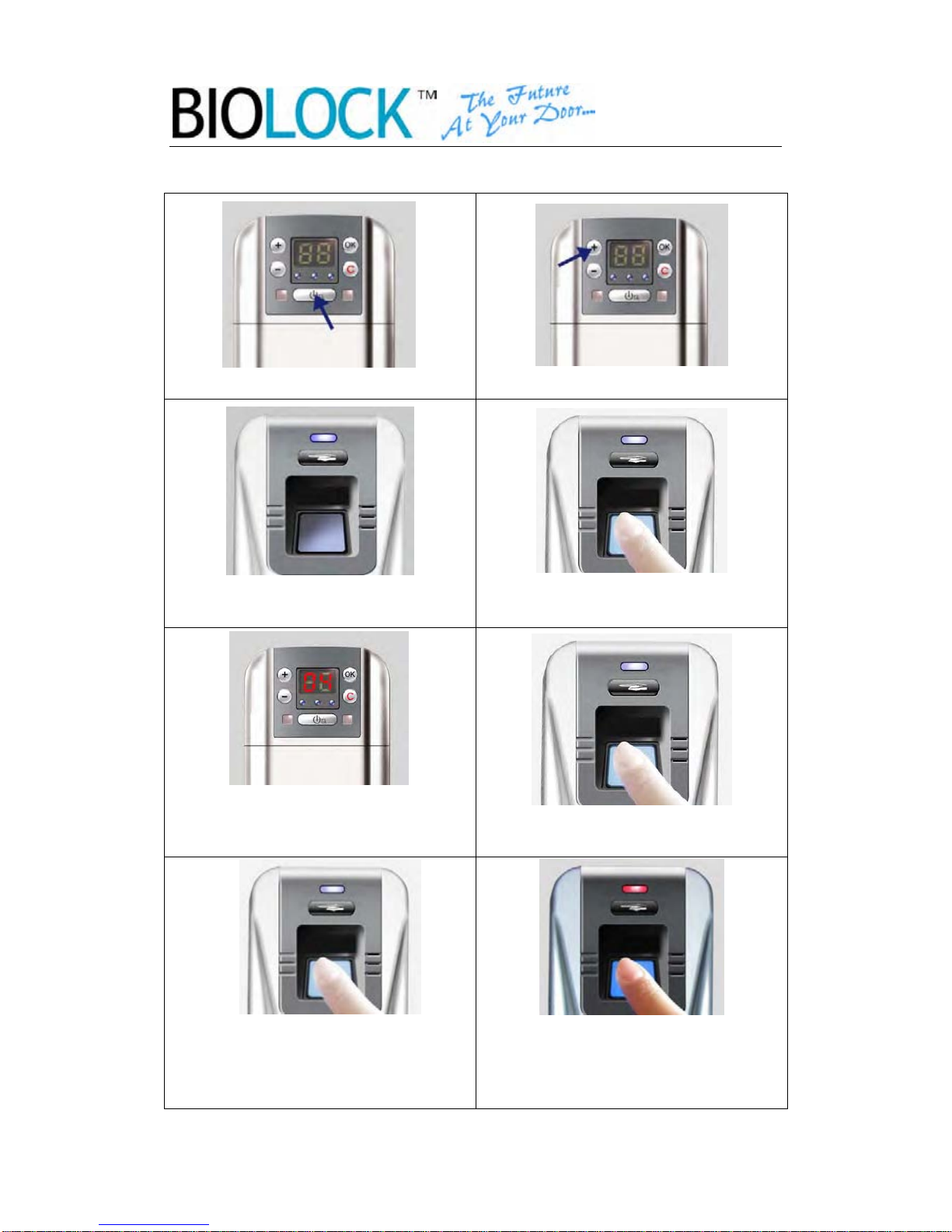
User Manual
2.3.3 Enroll the user
1.Press the indoor Power Key 2.Press the Add Key
3.The reader will light after the beep. 4. Verify the super master or master
finger to get access
5. First available user will display.
Choose the user number by “+” or “-”
key. Then press OK (N°4 or N°99)6. The reader will light, place the
finger of the user once
8. The registration is not complete if
the red light flash..
Remarks: The master could not be reregistered as a user.
-9-
8. Then place the finger of the user
one more time. The light will shine 3
times in sequence. The Operation is
complete.
Inhaltsverzeichnis


