
Odys PDV 67003 Bedienungsanleitung


ODYS PDV 67003 DVB-T
1
EN
Table of contents
1 Safety instructions...................................................................................2
2 Product properties...................................................................................7
3 Controls...................................................................................................9
3.1 DVD player...............................................................................................9
3.2 Using USB memory and SD cards ............................................................14
3.3 Buttons of the Remote Control ...............................................................15
4 Connecting the DVD player...................................................................18
4.1 Connecting to a television set.................................................................18
4.2 Connecting to an amplifier......................................................................18
4.3 Connecting to an external A/V source .................................................... 19
4.4 Connecting headphones.........................................................................19
4.5 Connecting to DVB-T Antenna ...............................................................20
4.6 Power supply unit ................................................................................... 20
4.7 Car adapter ............................................................................................21
5 Rechargeable battery pack ...................................................................22
5.1 Notes on using rechargeable batteries ...................................................22
5.2 Connecting the rechargeable battery pack .............................................23
5.3 Charging the battery pack ...................................................................... 23
5.4 Removing the rechargeable battery pack ...............................................24
6 DVB-T functions ....................................................................................25
6.1 Using the Setup Wizard..........................................................................25
6.2 TV programme selection and video text .................................................27
6.3 Additional DVB-T settings....................................................................... 27
7 Disc information ....................................................................................34
7.1 Compatible disc formats......................................................................... 34
7.2 Using discs............................................................................................. 35
8 Playback operation................................................................................36
8.1 Getting started........................................................................................36
8.2 DVD playback ........................................................................................38
8.3 CD playback (Audio, MP3, VCD, SVCD) ................................................40
8.4 Picture CD playback...............................................................................42
8.5 DivX playback ........................................................................................45
9 System settings.....................................................................................48
9.1 General Setup ........................................................................................49
9.2 Audio Setup............................................................................................51
9.3 Digital Setup........................................................................................... 52
9.4 System Setup.........................................................................................53
10 Glossary................................................................................................57
11 Trouble-shooting ...................................................................................58
12 Specifications ........................................................................................60
Warranty condition .......................................................................................61

ODYS PDV 67003 DVB-T
2
EN
1 Safety instructions
Thank you for choosing our product. Please read this manual carefully
and observe all safety and operating instructions. Store the manual in a
safe place for later reference.
The flash symbol displayed in a triangle warns the user of
dangerous electrical voltages inside the device that could lead to
electrical shocks with harmful effects to health if the device is used
incorrectly.
or
The exclamation point displayed in a triangle in the
documentation indicates dangers when using and
maintaining the device.
The information symbol in the documentation indicates useful
information and tips for using and maintaining the device.
Caution The device is a class 1 laser product. The
corresponding label is located on the rear side of
the device. When the housing has been opened
and the lock is not engaged, visible laser
radiation can escape. Avoid looking into the
laser beam by all means.

ODYS PDV 67003 DVB-T
3
EN
Caution
The product contains a low-power laser device. In order to ensure
the safety of the laser device, do not remove any cover and
attempt to repair the unit. If any service is needed, please contact
the distributor or its authorized service center.
To reduce the risk of electric shock, do not remove the cover (or
back). No user-serviceable parts inside. Refer servicing to qualified
service personnel. Unplug the product from the wall outlet before
servicing or when it is unused for a long period of time.
The manufacturer should not hold responsibility for the damage
caused by any substitutions and modifications of the product
without authorization from the manufacturer or authorized unit.
Power supply
Connect the power supply cable to the DC 9.5V IN jack on the
right side of the device. Connect the power plug to an earthed
socket AC 100-240 V. If you have problems when plugging the
mains plug into the socket, rotate the plug by 180° and plug it in
again.

ODYS PDV 67003 DVB-T
4
EN
Caution
Read, keep and follow these instructions and heed all warnings.
xDo not open the casing of the device under any circumstances, and do
not attempt to repair or modify the device. Malfunctions, damage, electric
shocks and fires can occur as a result.
xNever expose the device to rain, moisture or humidity. Malfunctions,
damage and electric shocks can occur as a result.
xWhen cleaning the device, do not use any volatile substances, such as
solvents, to avoid damaging the surface. Clean the device only using a
soft, dry cloth.
xEnsure adequate air circulation around the device. Do not place the
device on soft furniture, carpets or other materials while in operation, as
this may restrict the air from properly circulating around the device.
xThe device may not be excessively heated or operated near heat sources
(e.g. heaters). Malfunctions, damage, smoke and fires can occur as a
result.
xConnect the device only to mains sockets that are properly earthed
(protective earth). The mains voltage must correspond to the operating
voltage of the device indicated on the device housing. When connecting
the device to other electric devices, always follow the manufacturer's
instructions.
xMake sure that the cables are not damaged, stretched or twisted and that
no short circuits occur.
xUse only accessories specified or supplied by the device manufacturer.
This also applies to any attachments and fasteners.
xPlace the device in a secure spot where it cannot shift or fall. If
used in a vehicle, the device must be securely fastened to avoid
injuries or accidents resulting from the device shifting or falling
down.
xDuring a thunderstorm, disconnect the device from the mains. Do not use
the device during a thunderstorm. Malfunctions, damage and electric
shocks can occur as a result. Disconnect the power plug from the socket
when you do not use the device for an extended period of time. Keep the
device in a clean, dry location where it is not exposed to direct sunlight.

ODYS PDV 67003 DVB-T
5
EN
Caution
xIn case of malfunctions or damage, maintenance or repair work may be
required. Do not use the device if there is visible damage to it. All
maintenance and repair should be conducted by qualified service
technicians only.
xDo not place any heavy objects and objects that contain liquids, such as
vases, on top of the device..
xMake sure that no objects or fluids can penetrate into the device though
openings or venting slots. This could lead to short circuits, damage,
electric shocks and fires.
xDo not touch the TFT LCD screen with your bare hand.
xObserve the safety instructions on rechargeable batteries in chap. 5.1.
Operating the device in a vehicle
xPlease note that the device may not be used while the vehicle is in
motion. It may only be used when the vehicle is parked!
xWhen operating the device in a vehicle, make sure that it does not inhibit
the driver's forward or rear view and that it does not interfere with the safe
operation of the vehicle. Otherwise injuries or accidents may result. The
driver must not operate the device or look at the screen while driving. Do
not allow your children to loosen or disengage their safety belts to operate
the device.
xDo not place the device near the airbag in the vehicle, thus avoiding
functional disorders. When the airbag deploys, the device or accessories
may be flung through the vehicle and thus can cause injuries and
accidents.
xInstall the cables so that they do not present an obstacle to operating the
vehicle or to getting into or out of the vehicle. Make sure that no cables
can accidentally wrap around the steering wheel, the pedals or any
passenger's feet. Tie the cables together.
xIf operating the device inside a vehicle, do not set the volume level too
high so that you are still able to hear sounds occurring on the inside and
outside of your vehicle. Otherwise accidents can occur.

ODYS PDV 67003 DVB-T
6
EN
Note
DVD players and discs are coded by region. Your DVD player will
only play back discs whose region code matches that of the player.
The region code of your DVD player is 2 (Europe).
Note on copyrights
This device is equipped with technology for the protection of
copyrights that is protected by patents in the United States of
America and by other laws regarding the protection of intellectual
property. Use of this copyright protection technology must be
approved by Macrovision. This approval is granted exclusively for
personal use and other limited visual presentations, unless
Macrovision has expressly permitted a more extensive use. Reverse
engineering and disassembly are forbidden.

ODYS PDV 67003 DVB-T
7
EN
2 Product properties
xExcellent sound quality:
Dolby Digital technology ensures outstanding sound.
xHigh resolution:
More than 500 lines of horizontal resolution with MPEG-2
xAV In: Input for external audio and video signals. Can be connected
to a variety of external AV sources.
AV Out: Analogue audio/video output
xPlayable formats: DVD, VCD, SVCD, MVCD, Audio-CD, MP3, WMA,
JPEG, Kodak Picture CD and DivX
xHigh resolution 7" LCD colour screen
xSwitchable power supply unit:
Automatic adjustment to different voltages in different countries.
xOn-screen menu in English, French, Spanish, German etc.
xShock resistance:
Electronic shock resistance allows the device to be operated in a
vehicle
Special playback functions:
xVarious playback speeds (fast forward, fast reverse, slow play,
Search By Time), supports several playback languages and repeat
functions. Multiple display formats and camera perspectives, zoom
in/zoom out, multilingual subtitles
xRemember the last playback position and resume playback when
turned on without opening the disc cover (Resume).
xParental control: Blocking of certain scenes or entire discs.
Support
URL: http://www.odys.de
See our website for the latest information on this DVD player, on other
products by our company and on our company itself. If you have
questions or problems, please read the FAQs on our website or contact

ODYS PDV 67003 DVB-T
8
EN
Contents of package
1 x DVD player + carrying bag 1 x rechargeable battery pack
1 x remote control 1 x battery for remote control
1 x operating manual 1 x mains cable with power
supply unit
1 x audio/video cable 1 x car adapter
Note
Accessories and their corresponding part numbers are subject to
change without notice due to technological progress.
ODYS PDV 67003 DVB-T
9
EN
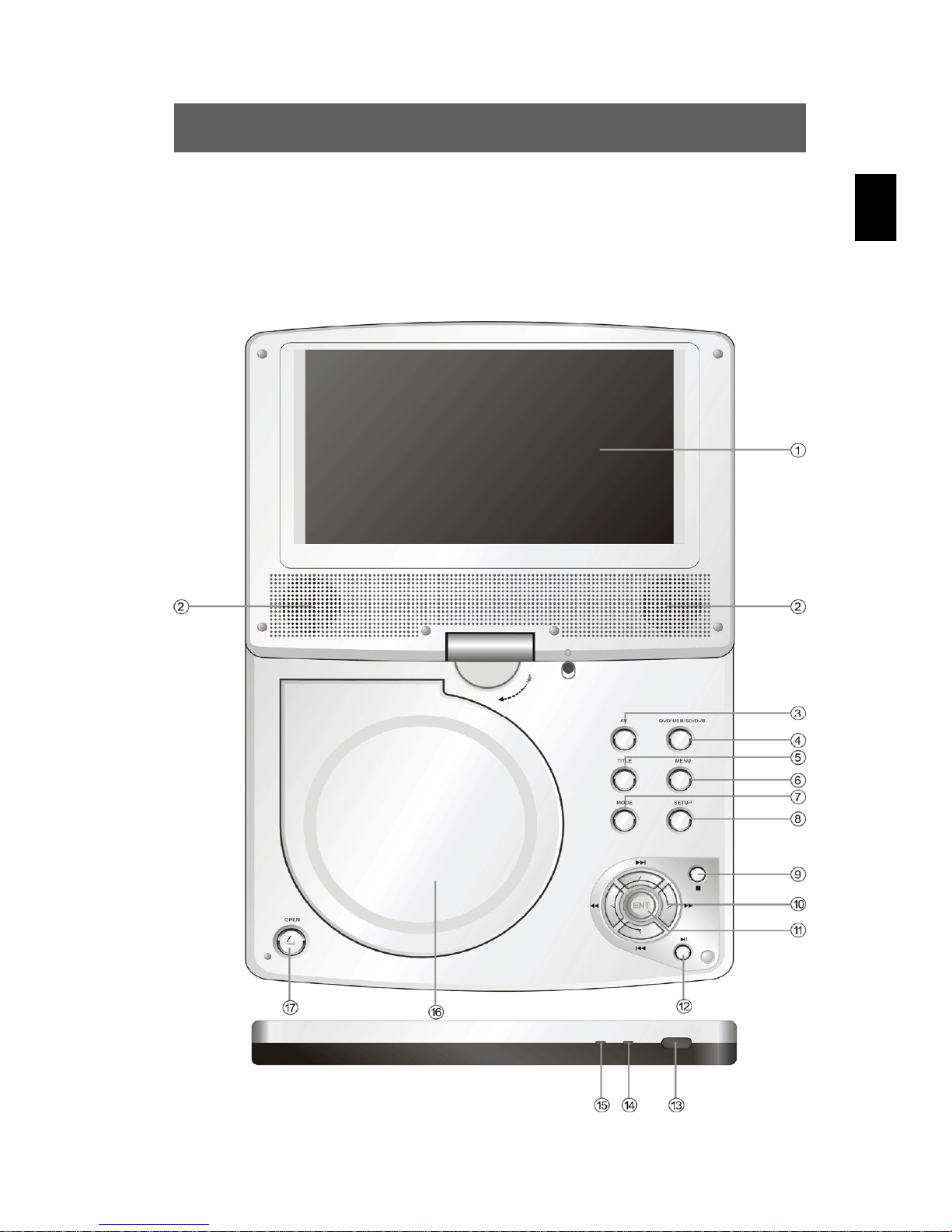
3 Controls
3.1 DVD player
Front view
Inhaltsverzeichnis
Andere Odys Tragbarer DVD-Player Handbücher


