
Paoluy Silicone Technology BL-84M Bedienungsanleitung

Bluetooth Keyboard Manual
Contents
1、Mini Bluetooth Keyboard
2、Manual
3、Compact Disc
4、Charging Cable
Product features
1, Broadcom 20730 main control chipset, Bluetooth3.0 interface.
2, Built-in unique power management software, can be in Microsoft's Windows system automatically displayed usable
capacity.
3, Ultra-thin design: effectively improved the fingers and wrist weary condition
4, Mute design: can effectively avoid disturbing others (especially suitable for the same room inhabited people)
5,Anit- pollution , prevent acid-base, prevent dust, waterproof (only silicone gel part)
6, Leading bluetooth solutions, WIDCOMM BTW Microsoft officially designated (software) bluetooth software.
7, While supporting the computer and business mobile, makes more convenient for your job.
8, Working environment: temperature - 20 degrees to 55 degrees humidity 20% - 80%
9, Using built-in lithium battery design saves the because of frequent change the battery consumption
Specifications
Execution standard: 1, Bluetooth V3.0
2, Operation distance: 10 meters
3, Modulation mode: 2.4 G straight sequence fh (FHSS)
4, Transmission power: scale-up 2 levels
5, Working voltage: 1.9-3.3 V
6, Working current: 1.7mA
7 Standby current: 0.8mA
8, Dormancy current: 52uA

9, Product size: long 315mm * * 113mm high 11mm wide
System requirements
Computer operating system requirements: Windows 98 / ME / 2000 / XP/Vista/WIN7 and Apple operating system.
Mobile operating system requirements: Symbian 6.0 second edition above phone, such as Nokia, 3230 6260, 6630, 6680
6670, N72 N70 6681,,,, N90
Suitable for Windows mobile 6.0 and above version system. If Dopod mobile phones, Samsung mobile phones
Applicable to Android 2.2 system. (temporarily only support samsung mobile phone Android2.2 above system, if you are
using an Android1.5 version system can installation CD self-contained Android driver software can connect with the
keyboard and use, support all Android3.0 above version system mobile phone)
Applicable to Iphone4 above mobile phones.
Note: Bluetooth keyboard in Symbian system with mobile phone connection when using, must be installed corresponding
mobile bluetooth driver software.
Installation bluetooth keyboard
1, keyboard and computer matching steps:
(1), as the chart shows, the keyboard Power switch clicked ON place, the LED lights solid for 5 seconds and goes off, hints
you already boot.

(2)、As the chart shows, according to a keyboard keys, Connect a few Low lights flashing, hints you keyboard
has entered for yards state.
Step 2: Connect the keyboard and adapter (dongle)
The stochastic enclosed bluetooth adapter (if your keyboard not installed with bluetooth adapter, or your
bluetooth adapter has been lost, please at your local electronics mall purchase bluetooth adapter) is inserted
into the computer to the USB interface, now computerautomatically install adaptor drive, if you buy themselves,
may bring a adapter to drive, right now you need to put your computerwith CD cd-rom, then install adaptor driver.
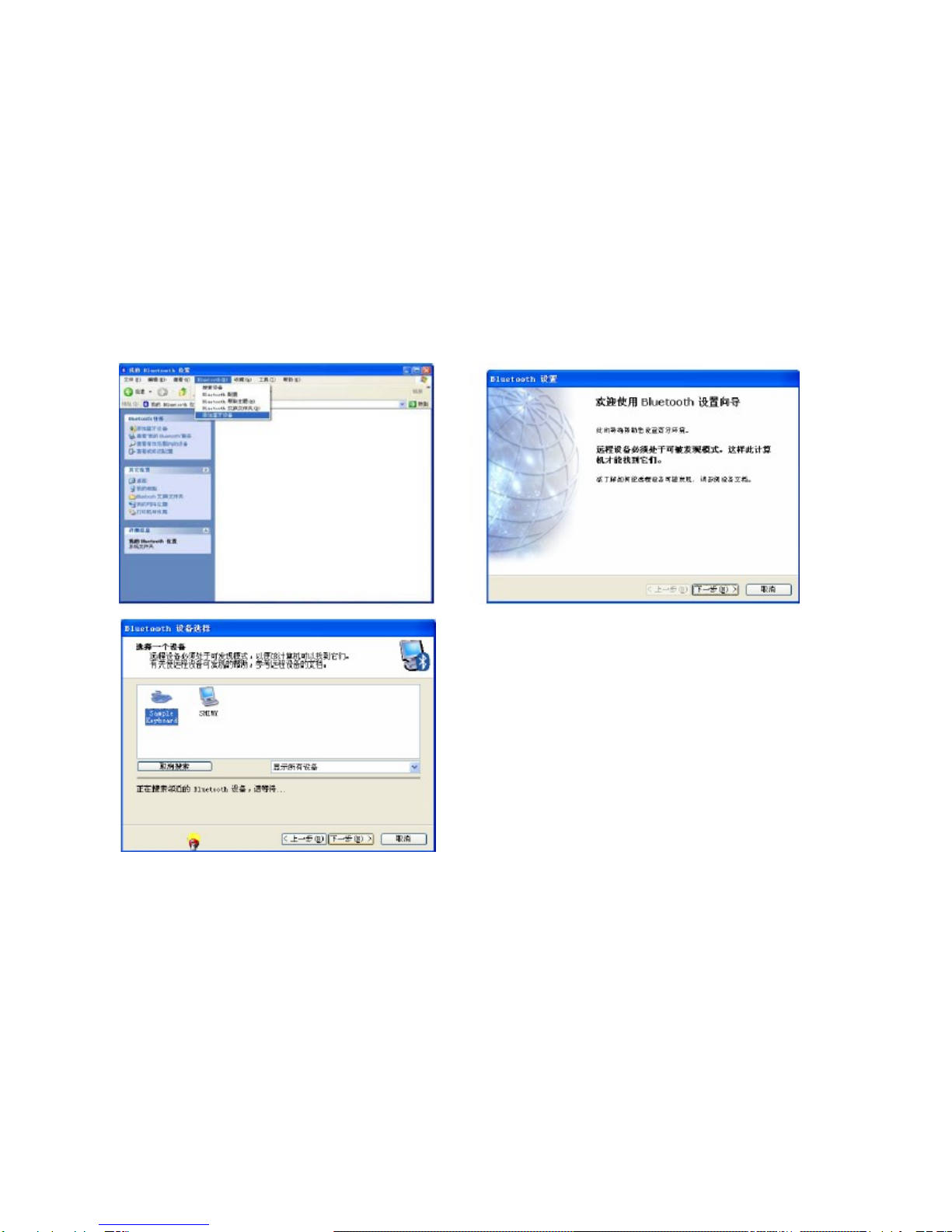
(if your computer cabin bluetooth, simply send your computer bluetooth open) at this point in the lower right side
of the computer taskbar icon will appear.
Note: Bluetooth in clavier brings the Cd-Rom in the use of the keyboard with cell phone connection should be
installed into cell phones driver.
Widcomm bluetooth stack on the keyboard matching steps (recommended)
(1) Double-click the desktop icon "my Bluetooth position" open applications, select menu Bluetooth - add
equipment, in setting the wizard in click next.
(2), Find the keyboard program after, selects the keyboard and click next.
(3), Use bluetooth keyboard input randomly generated pairing code (input no hint, please ensure input the
correct), and press enter confirmation.
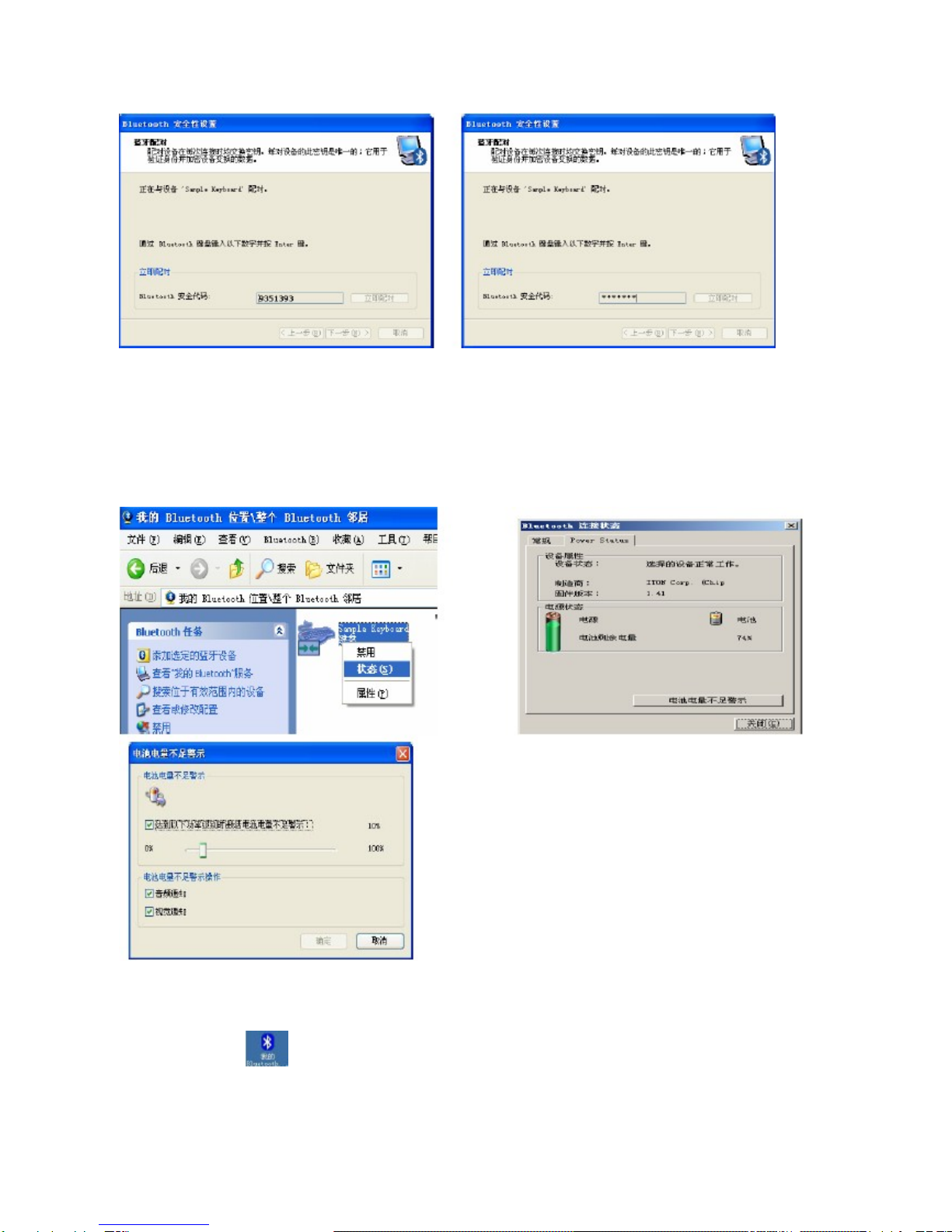
4), let the system installation is complete keyboard after your keyboard can use.
Tips:
If you are using Widcomm bluetooth program, right-click on the keyboard icon enters the Status bar in Power,
they can be seen in the battery Power, and Settings electricity shortage warning.
B. in Windows XP bluetooth stack on the keyboard matching steps
(1), determination of computer bluetooth has been activated. Double-click the taskbar lower-right or the ICONS
in the control panel, open bluetooth management interface, click "add", check equipment ready, click
next.
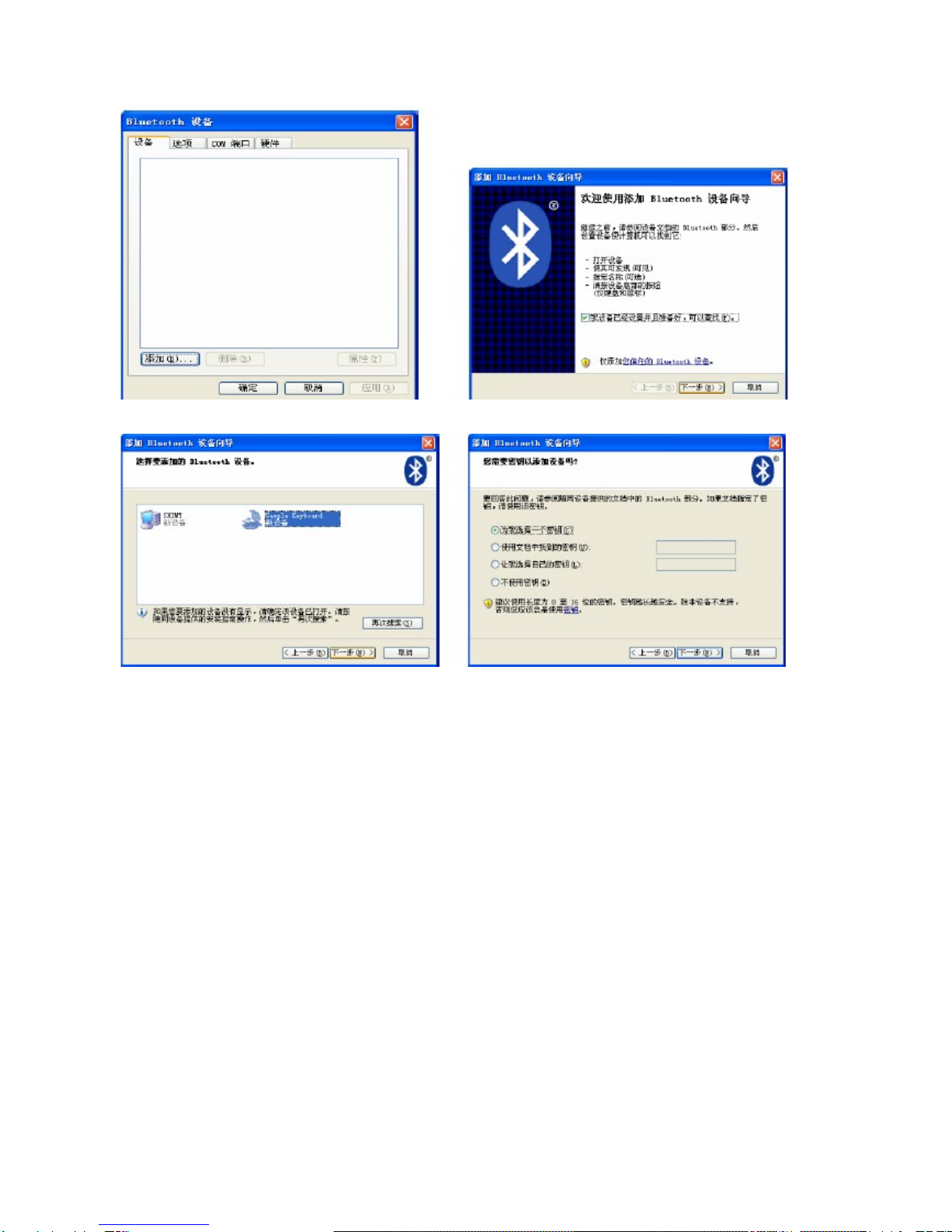
(2)、等待蓝牙设备找到键盘,然后选择键盘,点击下一步。
(3), Choice for I chose a key (you can also choose to from already set of keys, or not to use a key), and then click
next.
(4), Use bluetooth keyboard input randomly generated keys or input from the set of keys and press the return
key confirmation (input key when no hint, please ensure input the correct), if is chosen not to use a key, then no
input keys, click next, the system will automatically complete the installation of new equipment.
(5) And finally click finish, wait for new equipment installation is completed, you can use the keyboard.

C.I VT Bluetooth stack on the keyboard matching steps
(1), Determination of computer bluetooth has been activated, double click desktop bluetooth icon, open IVT
operates management interface, choose my bluetooth columns of search bluetooth device, or click the sphere
began to search the keyboard interface.
(2), Click search to keyboard equipment, click the right choice "refresh" services.
(3), Then selected bluetooth keyboard, click the right choice "connected" of the "bluetooth man-machine input
device service", use bluetooth keyboard input randomly generated pairingcode, and return confirmation (input),
please ensure that no hint input the correct), the system will to new bluetooth HID automatic equipment
complete installation, wait for new equipment installation is completed, you can use the keyboard.
2, the keyboard and mobile matching steps:
(1), will disc into computer, then the corresponding bluetooth driver software copy to your phone and then in
your phone installed in the bluetooth driver software.
(2), open bluetooth keyboard the power switch, then click a keyboard matching button.
(3) and on your phone open bluetooth, and search, wait for mobile phone search to a keyboard, press the
bluetooth specification of your mobile phone and matching steps keyboard connection, (keyboard in the input
password, there is no hint, please ensure input the correct and press the return key).
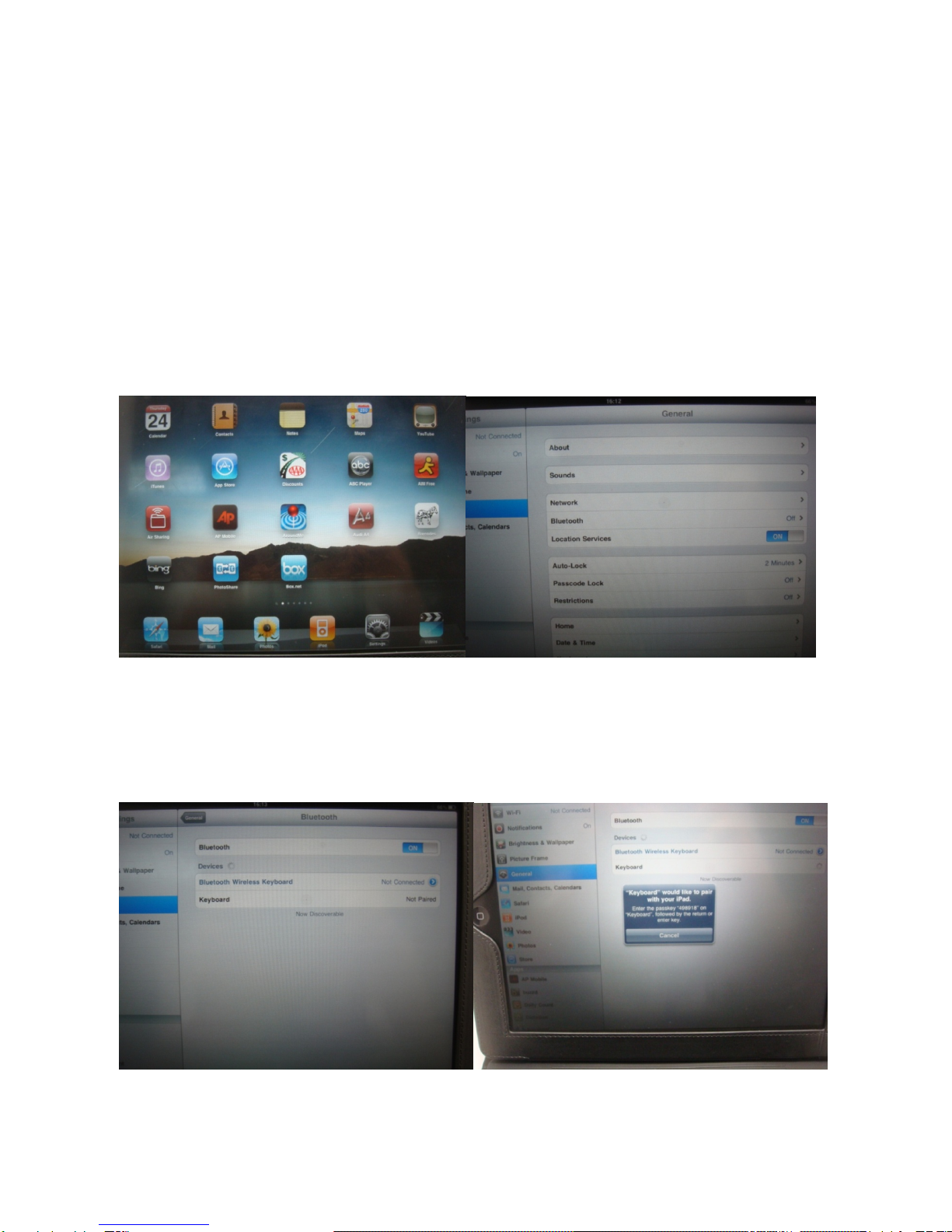
3, keyboard and IPAD connection steps (only used in belt IPAD control key function of the keyboard) BKB84M
BL -
(1), repeated "installation bluetooth keyboard; 1; (1), (2) step operation.
(2) and click on the button, IPAD enter setup area, Then select Bluetooth option; Then, when IPAD Bluetooth
open into a Bluetooth device search state, looking for Bluetooth devices.
(3), input password and establish a connection, IPAD into search state, looking for bluetooth devices and
search to bluetooth keys, search to bluetooth keyboard after hints you on the keyboard input password, right
now you need to IPAD on tips according to on the keyboard input corresponding password and press the ok
button on a keyboard.
Tip: on the keyboard input password is, without warning, please correct entry and then press the return key

(4), connection succeeds, the use of the keyboard, Ipad keyboard and connection succeeds after a few low
indicator quenched, said the keyboard to code success.
Keyboard and IPAD connection with hotkeys specifies:
Press this button can return home page, click on "IPAD FN" again when click this button can be
in the computer to realize "ESC" function,
Press this button can control IPAD screen brightness drop, hold "FN" again when click this
button can be in the computer to realize "F1" function;
Press this button can control IPAD screen brightness increases, hold "FN" again when click this
button can be in the computer to realize "F2" function,
In IPAD locked state press this button, IPAD into the screen saver pictures interface, hold "FN"
again when click this button can be in the computer to realize "F3" function,

In the use of IPAD edit the document press this button to call up and hidden IPAD virtual
keyboard, hold "FN" again when click this button can be in the computer to realize "F4" function,
IPAD at boot state, press this button can enter IPAD search page, click on "FN" again when click
this button can be in the computer to realize "F5" function,
IPAD in sowing into music, click this button can control a music upwards, hold "FN" again when
click this button can be in the computer to realize "F6" function,
IPAD at boot state, press this button can control broadcast/pause music, hold "FN" again when
click this button can be in the computer to realize "F7" function,
IPAD in sowing into music, click this buttoncan control the music down a, hold "FN" again when
click this button can be in the computer to realize "F8" function;
Press this button can be mute, click again cancel mute, hold "FN" again when click this button
can be in the computer to realize "F 9" function;
Press this button can reduce the volume, hold "FN" again when click this button can be in the
computer to realize "F10" function,
Inhaltsverzeichnis
Andere Paoluy Silicone Technology Tastatur Handbücher


