Parrot RKi8400 Bedienungsanleitung

Parrot RKi8400
User guide

2
Contents
Installation................................................................................................................. 4
Before you begin ..................................................................................................................................... 4
Checking the necessity of an ISO adapter.................................................................................... 4
Checking the necessity of an antenna connector ......................................................................... 4
Removing the original car stereo .................................................................................................. 4
Installing the Parrot RKi8400................................................................................................................... 5
Installation ..................................................................................................................................... 5
Final check .................................................................................................................................... 6
Installing the microphone .............................................................................................................. 6
Removing the Parrot RKi8400................................................................................................................. 8
Getting started.......................................................................................................... 9
Navigating through the menus................................................................................................................. 9
Turning on / off the Parrot RKi8400 .............................................................................................. 9
Commands.................................................................................................................................... 9
Setting the language ................................................................................................................... 10
Using the vocal menus................................................................................................................ 10
Establishing a Bluetooth connection with a phone................................................................................ 11
Using a phone with the Parrot RKi8400 for the first time............................................................ 11
Managing Bluetooth devices....................................................................................................... 12
Synchronizing the phonebook ............................................................................................................... 14
Display settings ..................................................................................................................................... 16
Modifying the display settings ..................................................................................................... 16
Changing the wallpaper............................................................................................................... 16
Phone....................................................................................................................... 18
Making a call.......................................................................................................................................... 18
Making a call manually................................................................................................................ 18
Making a call via voice recognition.............................................................................................. 19
Displaying the call history............................................................................................................ 20
Receiving a call ..................................................................................................................................... 21
Receiving a call manually............................................................................................................ 21
Receiving a call via voice recognition ......................................................................................... 21
Using the Parrot RKi8400 while on call................................................................................................. 22
Settings.................................................................................................................................................. 23
Ringtone...................................................................................................................................... 23
Phonebook .................................................................................................................................. 23
Call .............................................................................................................................................. 25

3
Music ....................................................................................................................... 26
Using the radio ...................................................................................................................................... 26
Selecting a station....................................................................................................................... 26
Mute / unmute ............................................................................................................................. 26
Modifying the radio parameters................................................................................................... 27
Using the Parrot RKi8400 with an external source................................................................................ 28
Using the Parrot RKi8400 with an iPod / iPhone ........................................................................ 28
Using the Parrot RKi8400 with an SD card................................................................................. 29
Using the Parrot RKi8400 with a USB device............................................................................. 30
Using the Parrot RKi8400 with an audio player connected via Bluetooth................................... 31
Using the Parrot RKi8400 with an analogue audio player .......................................................... 32
Commands ............................................................................................................................................ 33
Settings.................................................................................................................................................. 34
Album artwork ............................................................................................................................. 34
Modifying audio settings.............................................................................................................. 34

4
Installation
WARNING: We recommend our customers to have the Parrot RKi8400 fitted by a professional.
Before you begin
Checking the necessity of an ISO adapter
Try to connect the audio and power connectors of the Parrot RKi8400 to the connectors of your
vehicle. If this connection is impossible, you have to obtain an ISO adapter before installing the
Parrot RKi8400.
►We recommend you seek professional assistance in this regard.
Checking the necessity of an antenna connector
Compare the Parrot RKi8400 antenna connector
to the antenna connector of your vehicle.
►If an adapter is necessary, contact your local
car audio specialist.
DIN / Fakra antenna adapter
Removing the original car stereo
Remove your car stereo from you vehicle. You may need release keys to do so.
►Refer to your car stereo user guide or contact your car dealer for more information.
.
Remove the audio system from your vehicles dashboard to access the wiring harness.

5
Installing the Parrot RKi8400
Installation
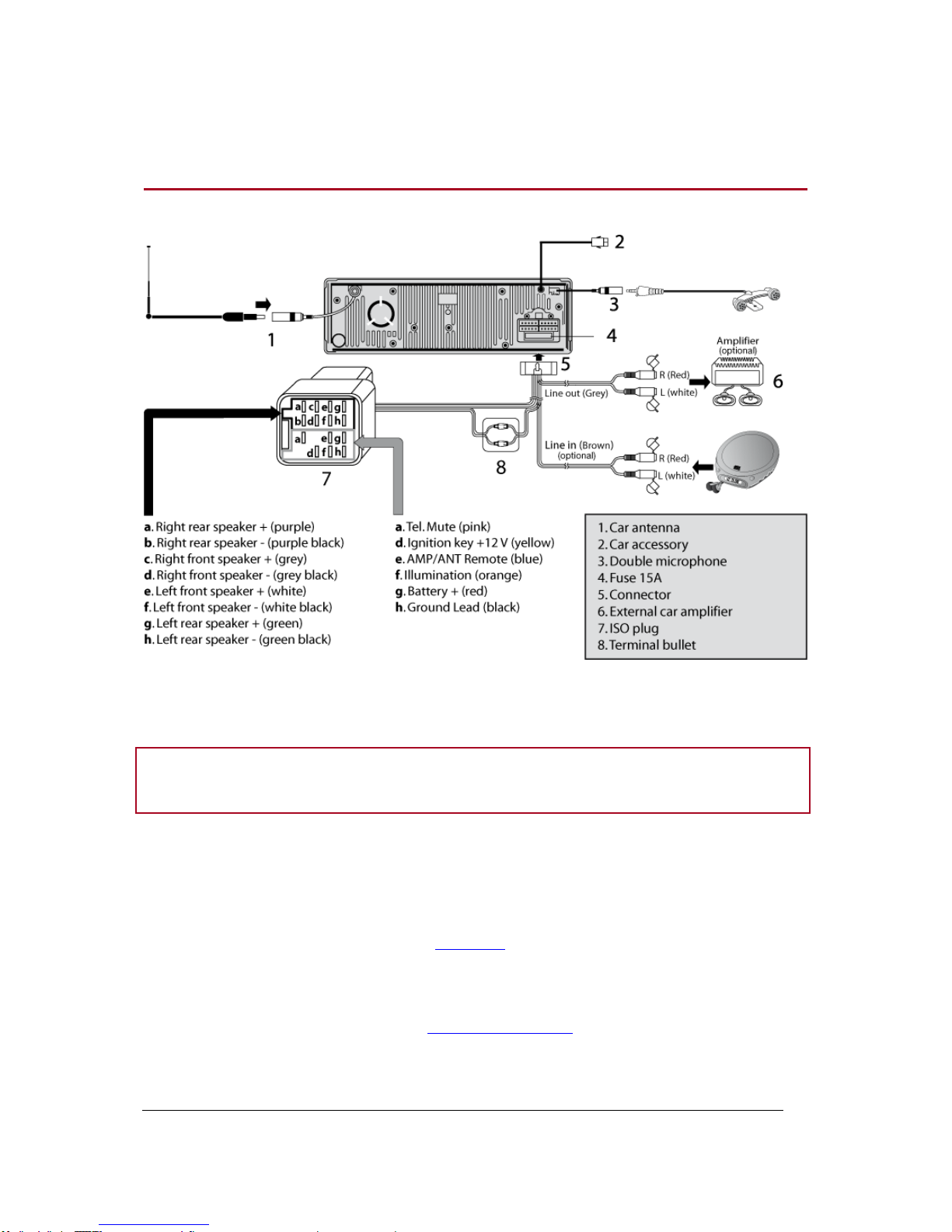
WARNING: Always test and verify all connections using suitable test equipment before
connecting the Parrot RKi8400 to the vehicle.
1. Insert the Parrot RKi8400 cage and fix it into the dash board using the bracket mounting tabs.
2. Access the vehicles car stereo wiring harness from behind the dashboard.
3. Connect the audio and power connectors of the Parrot RKi8400 to the ones of your vehicle.
4. Check the wiring as described in the final check section.
5. Connect the antenna connector of the Parrot RKi8400 to the one of your vehicle, using an
adapter if necessary.
6. Connect the microphone cable and mount the microphone.
7. Slide the car stereo into the Parrot RKi8400 cage.

6
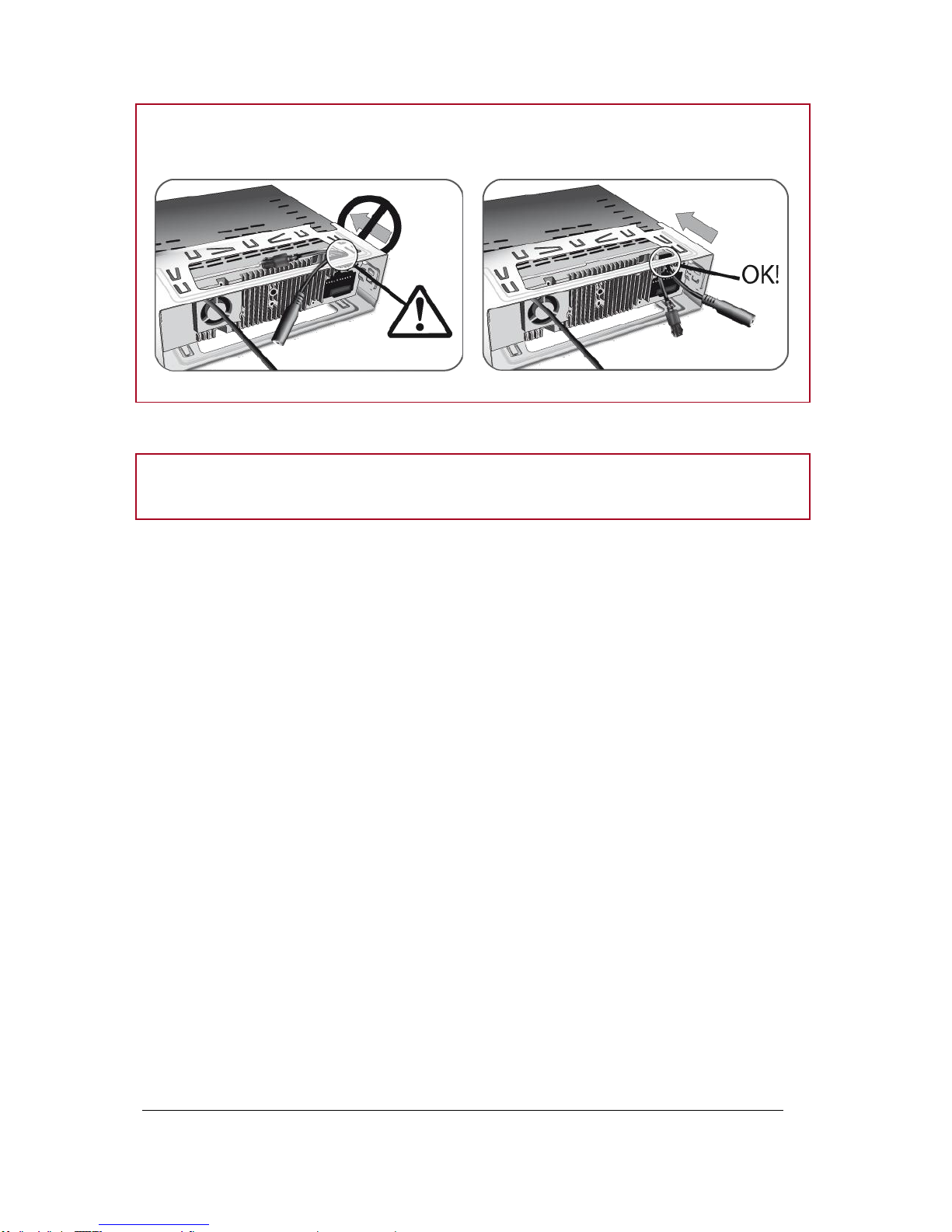
WARNING: Make sure you do not cut the cables while sliding the car stereo support and fitting the
car stereo into the dash board.
8. Attach the faceplate.
Note : To attach the faceplate, put it on the right side of the car stereo. Once the faceplate and the
car stereo magnets connect, press the left side.
Final check
Test
Once all the connections are made, turn the ignition on then off to perform the installation
test. The “Goodbye!” message must be displayed.
Action
If it is not the case, it is necessary to inverse the positions of the red and orange wires.
Indeed, the red wire of the power cable must be connected to the permanent 12V, the
orange wire to the 12V ignition and the black wire to the ground. This can be done simply
by reversing both fuse holders located on the Parrot wiring.
Installing the microphone
Selecting a
location
In order to get high-quality conversations, we advise you to respect the following
recommendations:
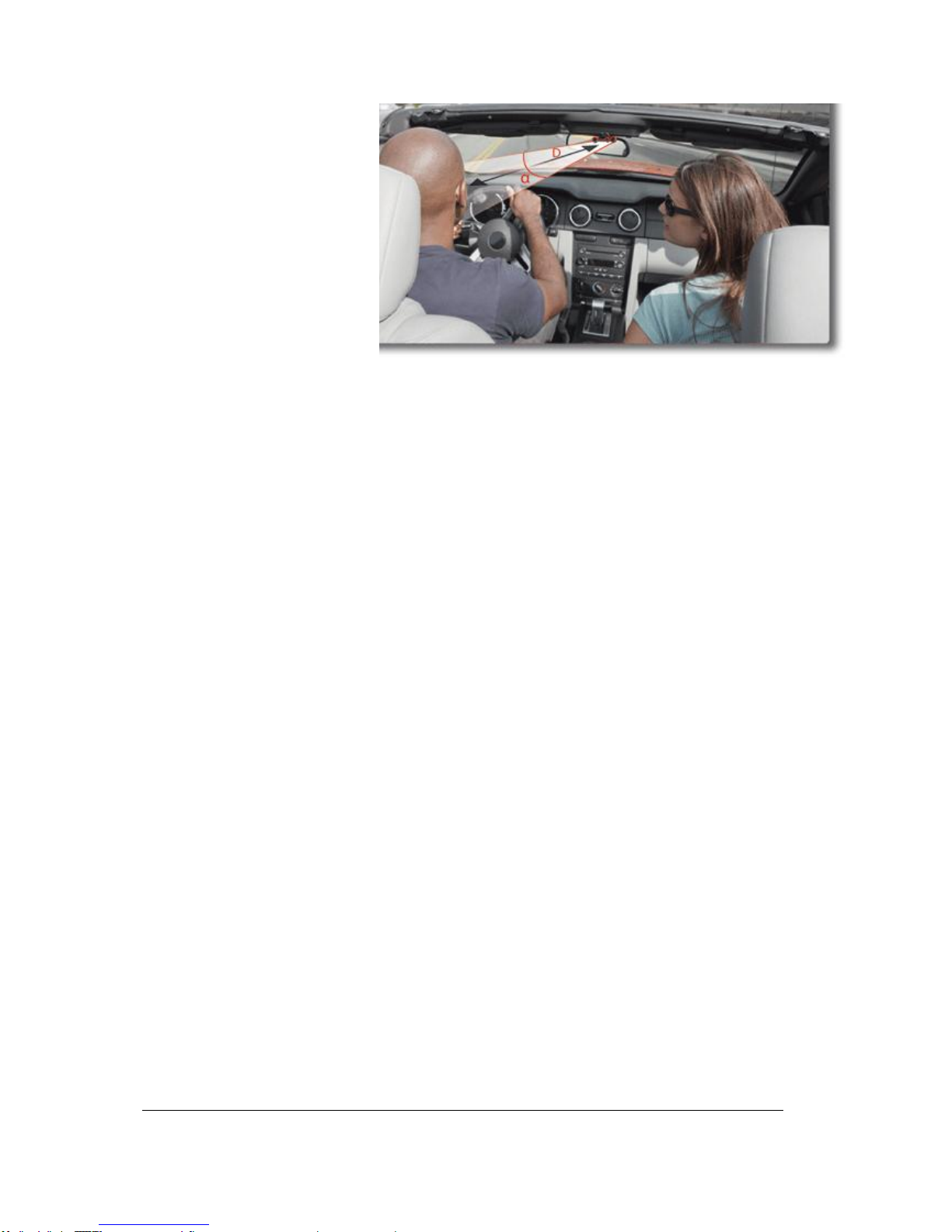
Make sure the microphone is installed as close to the mouth of the user
as possible. The ideal distance is 60 cm. The best possible location for
the microphone is near the rear-view mirror.
The microphone needs to be pointed towards the user.

7
D < 60 cm
α< 45°
Make sure the microphone is not exposed to the air stream from air vents.
Do not install the microphone cable in heating, ventilation or air
conditioning systems.
Be careful of the side airbags and SRS systems while running the
microphone cable.
Mounting the
microphone
The mounting location for the microphone must be clean and free from
grease or dust. Prior to installation, clean the area with an appropriate
cleansing product.
Once you have stuck the microphone support, wait for approximately 2
hours to make sure the adhesive tape adheres well.

8
Removing the Parrot RKi8400
Removing the
faceplate
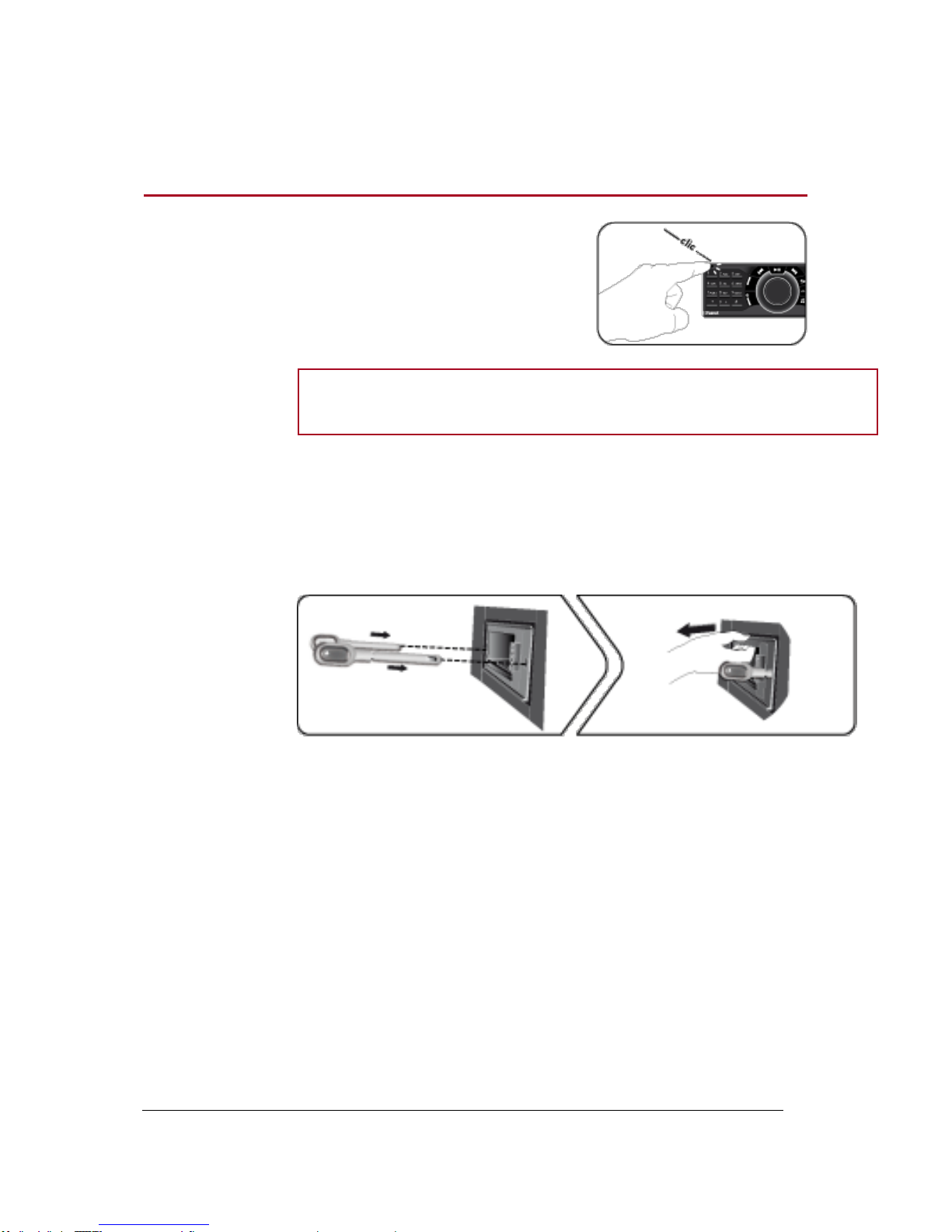
To remove the faceplate, press the eject
button in the top left.
WARNING: Always make sure the Parrot RKi8400 is switched off before
removing the faceplate.
Removing the car
stereo
To remove the entire car stereo:
1. Remove the faceplate.
2. Insert the keys into the appropriate holes until they remain stuck.
3. Pull the device towards you.

9
Getting
started
Navigating through the menus
Turning on / off the Parrot RKi8400
Press the button to turn on the Parrot RKi8400.
Hold down the button for 3 seconds to turn off the Parrot RKi8400.
Commands
Accessing the main
menu
Press the central jog wheel to access the menus.
> The Parrot RKi8400 says the name of the current menu.
Browsing through
the menus
Turn the jog wheel to browse through the menus.
Press the button to get back to the previous menu.
To get to the root menu, press the button or wait for a few
seconds.
Press the button to get to the tracks list if a song is currently
being played.
While navigating through the menus, press the button or wait
for a few seconds to get to the Now Playing screen.

10
Setting the language
If you wish to change the language of the Parrot RKi8400:
1. Press the jog wheel and select Settings > Language.
2. Use the jog wheel to select your language and press the jog wheel to confirm.
> The Parrot RKi8400 reboots automatically.
Using the vocal menus
Activating /
deactivating the
vocal menus
You can activate or deactivate the vocal menus of the Parrot
RKi8400. To do so:
1. Press the jog wheel and select Settings > Audio > Spoken
menus.
2. Press the jog wheel to activate or deactivate this option.
Adjusting the vocal
menus volume
1. Press the jog wheel and select Settings > Audio > Menu
Volume.
2. Use the jog wheel to adjust the volume and confirm.
Andere Handbücher für RKi8400
3
Inhaltsverzeichnis
Andere Parrot Autoempfänger Handbücher

Parrot
Parrot CK5100 Bedienungsanleitung

Parrot
Parrot ASTEROID Tablet Bedienungsanleitung

Parrot
Parrot RHYTHM N'BLUE Bedienungsanleitung

Parrot
Parrot RHYTHM N'BLUE Bedienungsanleitung

Parrot
Parrot RKi8400 Bedienungsanleitung

Parrot
Parrot MKi9200 RU Bedienungsanleitung

Parrot
Parrot Asteroid Classic Bedienungsanleitung

Parrot
Parrot ASTEROID Tablet Bedienungsanleitung

Parrot
Parrot Asteroid Classic Bedienungsanleitung

Parrot
Parrot ASTEROID Smart Bedienungsanleitung