Premium EDT-150-5191 Bedienungsanleitung

OPERATION MANUAL / QUICK GUIDE
MANUAL DE OPERACIÓN / GUÍA RÁPIDA
Specifications are subject to change without notice. These products are not intended for use as critical components in life support or nuclear
systems.
EDT-150-5191

EDT Series
Quick Guide
MA-5191C-1
21-10-2021
2/ 25
www.premiumpsu.com
Powering Your Challenge
1.- INSTALLATION
This is a wall-mounted unit that is cooled by natural convection, so it is necessary to install it in the position
shown in Figure 1. It is important not to cover the ventilation slots so that air can circulate freely.
Spillage and/or leakage of liquids into the equipment through the ventilation grids must be avoided. Care must
also be taken not to introduce objects through these grids that could cause the system to malfunction.
Figure 1. Charger mounting position
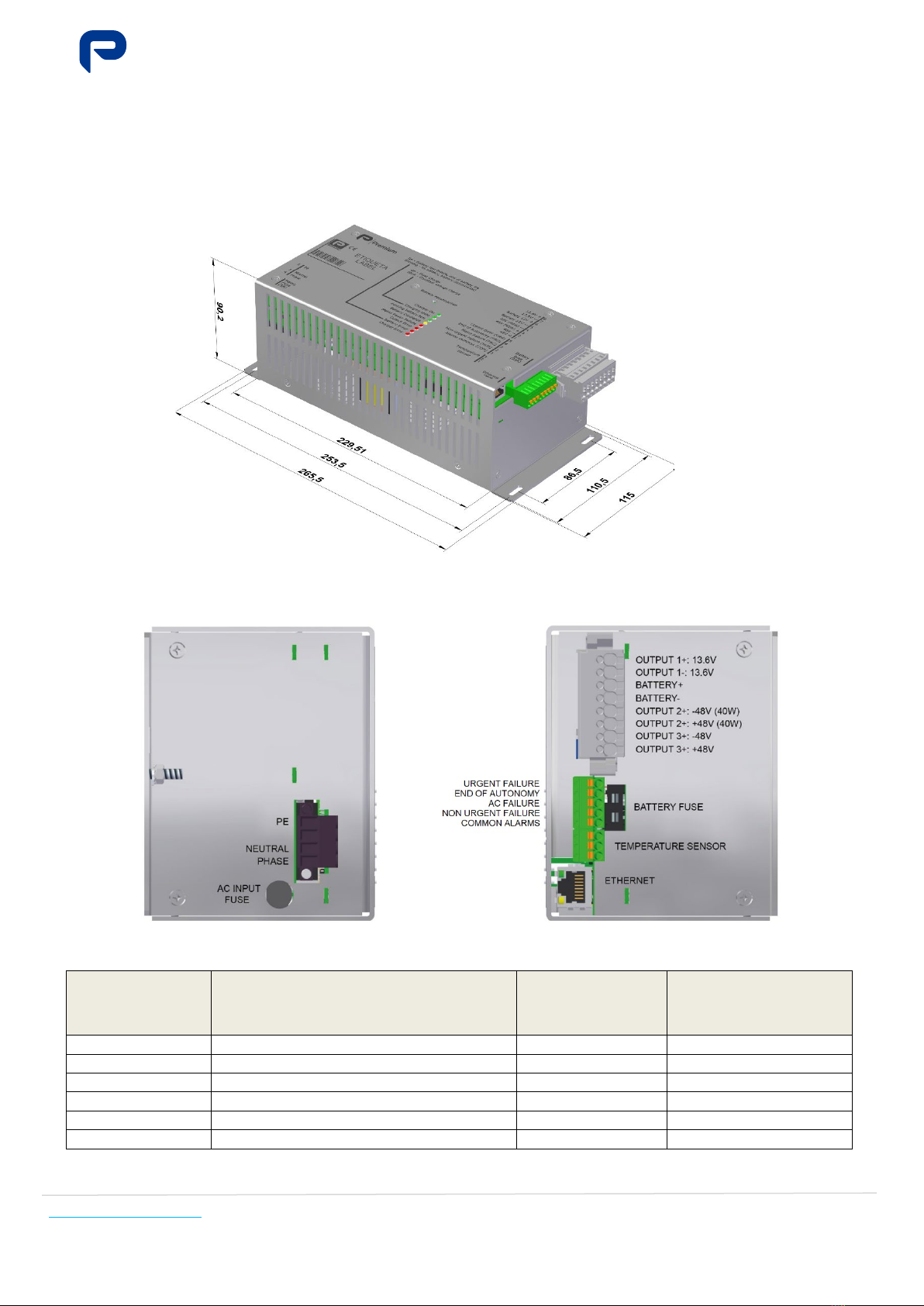
Figures 2a and 2b show the wiring of the input voltage, output voltage, temperature sensor and alarms and
Table 1 shows the cable required for the connections.
Figure 2a. Left lateral view Figure 2b. Right lateral view
Function Connection
Minimum
recommended
copper cross-
section
Maximum permissible
copper cross-section
Network input
Phase, Neutral, Earth
1 mm2
2.5 mm2
Battery
Battery +, 4-Battery -
4 mm
2
4 mm
2
Output 12V
Output 1+, Output 1-
4 mm
2
4 mm
2
Output 48V motor
Output 3+, Output 3-
1 mm
2
4 mm
2
Output 48V control
Output 2+, Output 2-
1 mm
2
4 mm
2
Alarms
1-URG, 2-FAU, 3-FAC, 4-NUR, 5-COM
0.25 mm
2
0.5 mm
2
Table. 1. Cable cross-sections for installation

EDT Series
Quick Guide
MA-5191C-1
21-10-2021
3/ 25
www.premiumpsu.com
Powering Your Challenge
2.- LOCAL CONNECTION
To connect locally to the equipment, you must be physically close to the equipment and be able to access it.
Beforehand, you must be able to determine if your device (PC, laptop, etc.) has the appropriate network
configuration to make the connection you want to make and, if so, be able to modify it conveniently. If not,
please ask authorised personnel for assistance. In order to access the charger, you need to know the IP
address of the specific unit. Each device connected to the same network (including the PC or device through
which you want to connect to the charger) must have its own IP address, different to the other devices. Two
circumstances may arise:
The procedure to connect locally without knowing the IP address of the charger would be as follows:
Step
no. 1
Press and hold the “Battery reconnection” button
for more than 10 seconds until all the LEDs start
flashing.
Button and LEDs
Step
no. 2
Connect the PC to the charger’s Ethernet socket.
If the Ethernet socket is connected to another
element (router, switch, etc.), it must be
disconnected and the device must be connected
directly to the charger.
Configure the device with:
IP address: 100.0.0.2
mask: 255.255.255.0
Ethernet socket
Step
no. 3
Optional.
Verify the connection to the charger by pinging
your device to the local IP address (100.0.0.1 by
default). If there is no connection to the charger,
double check all the above steps and ask
authorised personnel for assistance.
PING command successful
IMPORTANT!
BEFORE ANY MANIPULATION OF THE EQUIPMENT, YOU MUST HAVE READ THE USER'S MANUAL
COMPLETELY AND FULLY UNDERSTOOD THE FUNCTIONALITY OF THE EQUIPMENT.
DO NOT TAMPER WITH OR PERFORM ANY ACTION ON THE EQUIPMENT AND/OR ITS
CONFIGURATION WITHOUT BEING ABSOLUTELY CERTAIN THAT
YOU UNDERSTAND THE
IMPLICATIONS OF SAID ACTION.
PLEASE NOTE THAT INCORRECT HANDLING/CONFIGURATION MAY RENDER THE CHARGER
INOPERATIVE AND/OR DAMAGE THE BATTERIES AND EQUIPMENT CONNECTED TO THE
CHARGER.

EDT Series
Quick Guide
MA-5191C-1
21-10-2021
4/ 25
www.premiumpsu.com
Powering Your Challenge
Step
no. 4
Launch the Internet browser and enter the
default local address 100.0.0.1
For further details, see:
Operation manual - Communications
Compatible browsers (PC):
•
Mozilla Firefox (26.0 or higher)
•
Chrome (29.0 or higher)
•
Internet Explorer (11.0 or
higher)
IP address in browser
Step
no. 5
Select the corresponding user and enter the
username and password
To authenticate and access the website
Note: remember that the charger does not
have access to the LDAP server in local
mode, so the username and password are:
User: consulta
Password: consulta
Access screen
Step
no. 6
Perform the outlined operations
For more details, consult:
•Operation manual
•Operation manual - Communications
Web page
During the time that the local IP configuration is active, the unit will indicate this via flashing LEDs.
Before leaving the charger, return the charger to the normal (remote) IP configuration. To do this, press the
"Battery reconnection" button for more than 10 seconds until the LEDs stop flashing and light up as in normal
operation.
In any case, the maximum time in the local IP configuration is 20 minutes; once this time has elapsed since the
change from remote to local, the equipment will automatically reset to the remote IP configuration.

EDT Series
Quick Guide
MA-5191C-1
21-10-2021
5/ 25
www.premiumpsu.com
Powering Your Challenge
3.- REMOTE CONNECTION
Check if your device (PC, laptop, etc.) has the appropriate network configuration to make the connection and, if
necessary, modify it accordingly. If not, please ask authorised personnel for assistance.
In order to access the charger, you need to know the IP address of the specific unit. Each device connected to
the same network (including the PC or device through which you want to connect to the charger) must have its
own IP address, different to the other devices. You must know the IP address of the charger to which you want
to connect. (The following example figures show examples with IP 100.0.0.100 and 100.0.0.0.123, but in your
case you must enter the specific IP address of the charger to which you are connecting. By default, the charger
is configured with a remote IP address 200.0.0.1).
You should also know whether the charger is available from your location, i.e. whether the communications
infrastructure allows you to access the charger. The procedure would be as follows:
Step
no. 1 Connect the device with which it is going to communicate (PC etc.) to the same network as the charger is
connected. You may need to set up specific links on your computer (PPP, VPN, etc.)
Step
no. 2
Optional but recommended.
Verify the connection to the charger by pinging the IP address
of the charger on your device. If there is no connection to the
charger, double check all the above steps and ask authorised
personnel for assistance.
PING command successful
Step
no. 3
Launch the Internet browser and enter the remote address of
the charger.
•
Mozilla Firefox (26.0 or higher)
•
Chrome (29.0 or higher)
•
Internet Explorer (11.0 or higher)
For more details, please refer to the Communications Operation
Manual
IP address in browser
Step
no. 4
Select the user and enter your username and password to
authenticate and access the web page.
Note: if the charger does not have access to the LDAP server,
remember that the username and password would be:
User: consulta
Password: consulta
If you are denied access, verify that you have the required
permissions on the LDAP server and contact authorised
personnel.
Access screen
IMPORTANT!
PRIOR TO ANY MANIPULATION OF THE EQUIPMENT, YOU MUST HAVE READ THE USER'S MANUAL
COMPLETELY AND FULLY UNDERSTOOD THE FUNCTIONALITY OF THE EQUIPMENT.
DO NOT TAMPER WITH OR PERFORM ANY ACTION ON THE EQUIPMENT AND/OR ITS
CONFIGURATION WITHOUT BEING ABSOLUTELY CERTAIN THAT YOU UNDERSTAND THE
IMPLICATIONS OF SAID ACTION.
PLEASE NOTE THAT INCORRECT HANDLIN
G/CONFIGURATION MAY RENDER THE CHARGER
INOPERATIVE AND/OR DAMAGE THE BATTERIES AND EQUIPMENT CONNECTED TO THE CHARGER.

EDT Series
Quick Guide
MA-5191C-1
21-10-2021
7/ 25
www.premiumpsu.com
Powering Your Challenge
4.2.- Most common actions in the viewer profile
The following sections present the most common actions you may wish to perform in the user profile.
4.2.1 View active alarms:
Menu: MAINTENANCE -> Submenu: ALARMS
Andere Handbücher für EDT-150-5191
1
Inhaltsverzeichnis
Sprachen:
Andere Premium Lüfter Handbücher