
Prestigio Emporio PWHD01 Bedienungsanleitung
Prestigio Emporio
Wireless HDMI Bridge
PWHD01
Prestigio WHDMI manual_layout.indd 1 11/4/10 9:58 AM

2Wireless HDMI
Table of Contents
Introduction ����������������������������������������������������������������������������������������������������������3
Module View ���������������������������������������������������������������������������������������������������������4
Transmitter �������������������������������������������������������������������������������������������������������� 4
Components Summary������������������������������������������������������������������������������������� 5
Receiver ������������������������������������������������������������������������������������������������������������ 6
Components Summary������������������������������������������������������������������������������������� 7
Status Indicators ����������������������������������������������������������������������������������������������� 8
Power Indicator (Left LED) ������������������������������������������������������������������������������� 8
Status Indicator (Right LED) ����������������������������������������������������������������������������� 8
System Setup �������������������������������������������������������������������������������������������������������9
Connection Examples��������������������������������������������������������������������������������������� 9
Optimizing System Performance �������������������������������������������������������������������� 10
System Connections �����������������������������������������������������������������������������������������11
HDMI Connection (Transmitter)���������������������������������������������������������������������� 11
Power Connection (Transmitter)��������������������������������������������������������������������� 11
HDMI Connection (Receiver)�������������������������������������������������������������������������� 12
Power Connection (Receiver)������������������������������������������������������������������������� 12
IR Blaster Connection������������������������������������������������������������������������������������� 13
IR Sensor Connection������������������������������������������������������������������������������������� 13
Consumer Electronics Control Connection ���������������������������������������������������� 14
Specications���������������������������������������������������������������������������������������������������� 16
System Features��������������������������������������������������������������������������������������������� 16
Transmitter Specications������������������������������������������������������������������������������� 17
Receiver Specications ���������������������������������������������������������������������������������� 18
Safety Information �������������������������������������������������������������������������������������������� 19
Electrical Warning ������������������������������������������������������������������������������������������� 19
Disposal Information ��������������������������������������������������������������������������������������� 19
Safety Instructions ������������������������������������������������������������������������������������������ 20
Usage Instructions ������������������������������������������������������������������������������������������ 21
HDMI & HDCP ������������������������������������������������������������������������������������������������ 24
Macrovision����������������������������������������������������������������������������������������������������� 24
FCC Statement ����������������������������������������������������������������������������������������������� 24
CE Mark Warning�������������������������������������������������������������������������������������������� 25
Prestigio WHDMI manual_layout.indd 2 11/4/10 9:58 AM
3
User Guide
www�prestigio�com
Introduction
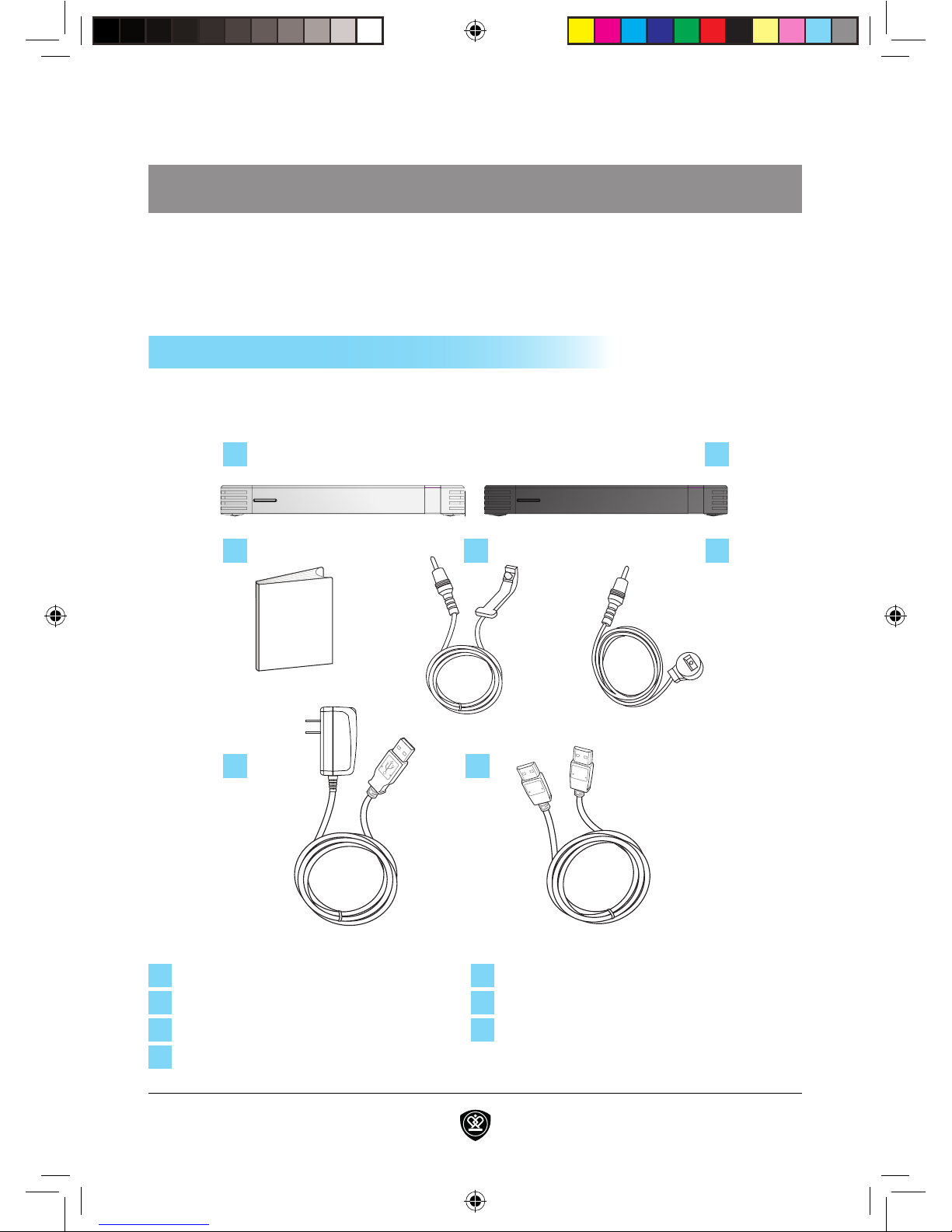
When rst unpacking your Wireless HDMI system please check to see if the
following items are included:
Documents
1 2
3 4 5
6 7
1WHDMI Transmitter 5IR Sensor
2WHDMI Receiver 6Power Adapter x 2
3Product Documentation 7HDMI Cable
4IR Blaster
Package Contents
Your Wireless HDMI system is a cable-free plug-and-play solution for extending
any A/V sources utilizing HDMI, such as satellite boxes, digital video players,
and gaming consoles, to remote displays such as High-De nition digital TVs.
Prestigio WHDMI manual_layout.indd 3 11/4/10 9:58 AM
4Wireless HDMI
1 2
4 5 63
Transmitter
Module View
Prestigio WHDMI manual_layout.indd 4 11/4/10 9:58 AM

5
User Guide
www�prestigio�com
Module View
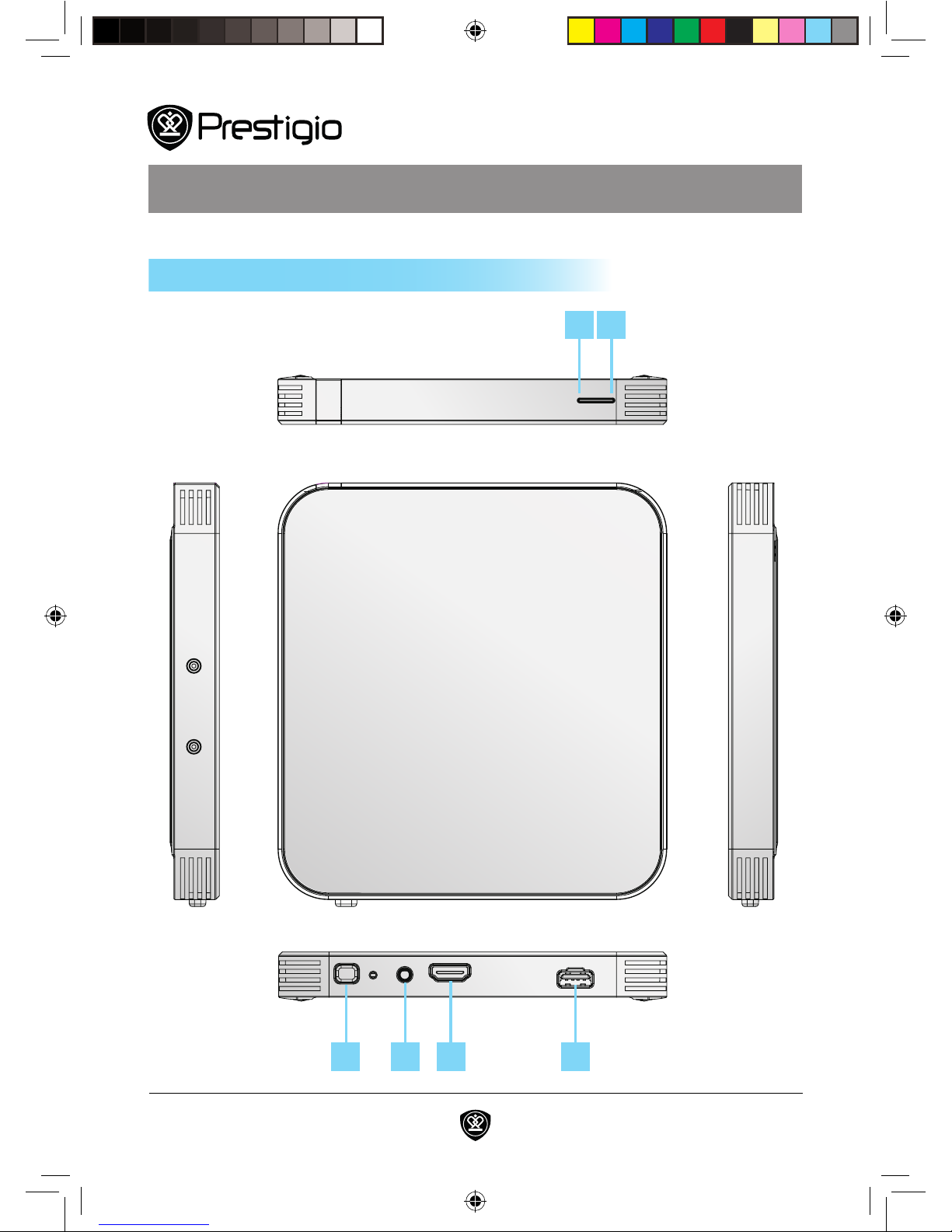
Status Indicator LED
The status indicator allows you to monitor various system conditions� See
the LED Indicators section for more information on the status indicator�
Power Indicator LED
The power indicator allows you to monitor the power status of the system�
See the LED Indicators section for more information on the power indicator�
Power Button
The power switch turns ON and OFF the Wireless HDMI module� Actual
behavior of the power switch can be customized in Windows Control Panel�
IR Blaster Port
Connect the IR Blaster included with the wireless HDMI system to this port�
The IR Blaster/Sensor enables the wireless HDMI system to control your
HDMI devices by sending signals that mimic those of a remote control�
HDMI Port
The HDMI port allows you to connect the output device to the transmitter
using an HDMI cable� HDMI provides uncompressed all-digital audio/video
signal that supports standard, enhanced, or high-de nition video and multi-
channel audio�
Power Connection Port
The power connection port allows you to power the module using the
power adapter included with the system�*
* This port does not support traditional USB functions.
1
2
3
4
5
6
Components Summary
Prestigio WHDMI manual_layout.indd 5 11/4/10 9:58 AM
6Wireless HDMI
Module View
1 2 3
4 5 6 7
Receiver
Prestigio WHDMI manual_layout.indd 6 11/4/10 9:58 AM

7
User Guide
www�prestigio�com
Module View
1
2
3
4
5
6
7
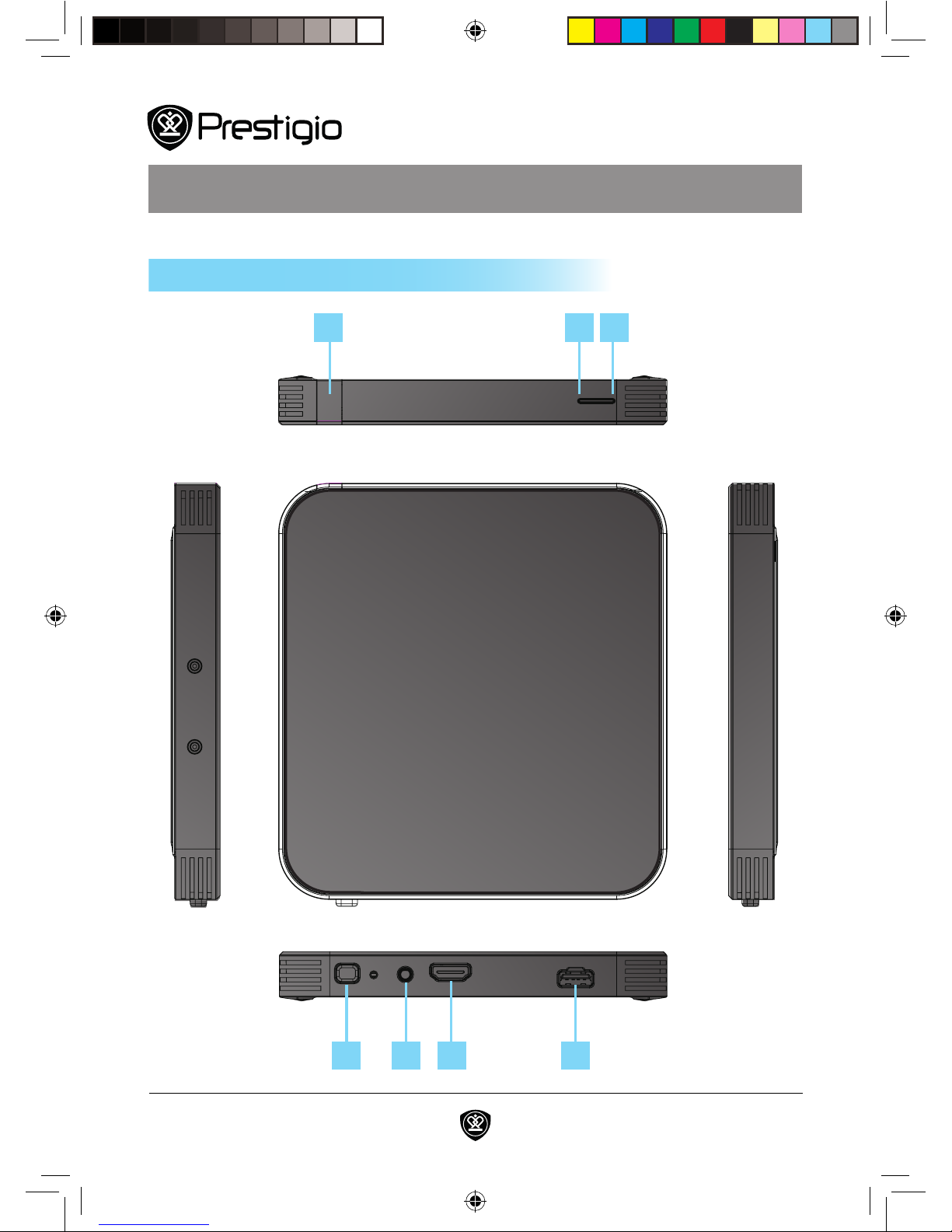
Infrared Sensor
The infrared communication sensor allows convenient wireless control of
the provided receiver using a wireless remote control�
Status Indicator LED
The status indicator allows you to monitor various system conditions� See
the LED Indicators section for more information on the status indicator�
Power Indicator LED
The power indicator allows you to monitor the power status of the system�
See the LED Indicators section for more information on the power indicator�
Power Button
The power switch turns ON and OFF the Wireless HDMI module� Actual
behavior of the power switch can be customized in Windows Control Panel�
IR Sensor Port
Connect the IR Sensor included with the wireless HDMI system to this port�
The IR Blaster/Sensor enables the wireless HDMI system to control your
HDMI devices by sending signals that mimic those of a remote control�
HDMI Port
The HDMI port allows you to connect the display device to the receiver
using an HDMI cable� HDMI provides uncompressed all-digital audio/video
signal that supports standard, enhanced, or high-de nition video and multi-
channel audio�
Power Connection Port
The power connection port allows you to power the module using the
power adapter included with the system�*
*This port does not support traditional USB functions.
Components Summary
Prestigio WHDMI manual_layout.indd 7 11/4/10 9:58 AM
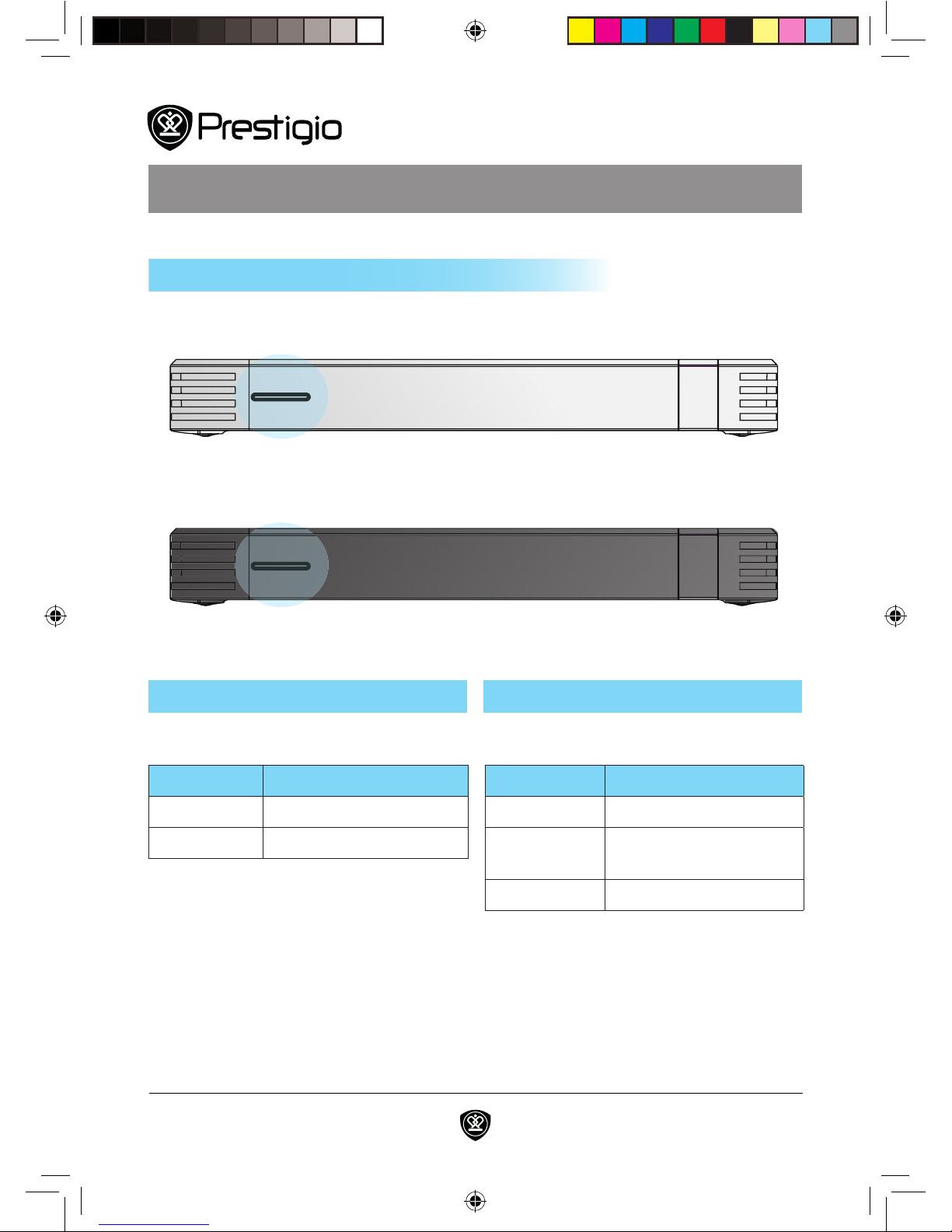
8Wireless HDMI
LED Status
Solid Red Module Powered ON
No Color Module Powered OFF
Module View
Power Indicator (Left LED)
LED Status
Blinking Blue Establishing connection
Solid Blue Transmitter and receiver
link established
No Color No link established
Transmitter
Receiver
Status Indicator (Right LED)
Status Indicators
Prestigio WHDMI manual_layout.indd 8 11/4/10 9:58 AM
9
User Guide
www�prestigio�com
System Setup
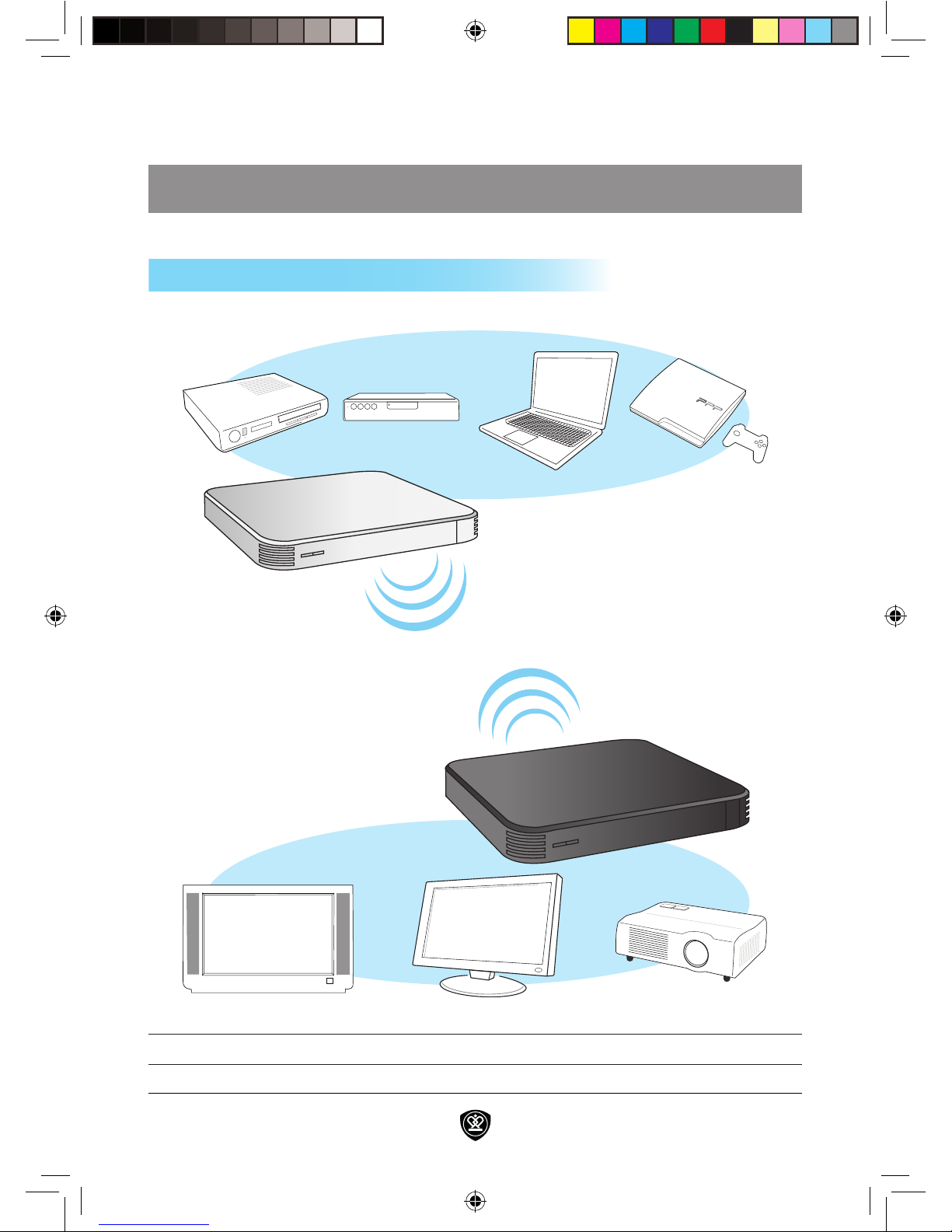
NOTE: These are example connections only
11;11
111
DVD Player Set-Top Box PC Gaming Console
HD TV Monitor Projector
Connection Examples
Prestigio WHDMI manual_layout.indd 9 11/4/10 9:58 AM

10 Wireless HDMI
System Setup
Optimizing System Performance
As with all wireless type products, the system’s performance can be affected
by its environment and any obstruction between the transmitter and receiver�
Follow the suggestions below to create an optimal environment for your new
Wireless HDMI system� Proper placement of the receiver and transmitter
units will ensure a strong connection for superior performance:
• Use one system per room, placing the transmitter and receiver units for each
system in the same room�
• If you use a 5GHz WLAN or cordless phone, place those in a different
room�
• Do not place either unit on a metallic rack�
• Place the transmitter unit as high up as possible�
• Maximum operating distance is approximately 20m or 65 feet with a
line of sight path, actual performance may vary depending on the user’s
environment�
• Be sure to keep at least 30cm or 1 foot minimum distance between the
transmitter and receiver units�
• Keep in mind the Wireless HDMI system may be affected by interference
from other wireless products and/or signal attenuation (weakening) due to
the proximity of certain objects/materials such as walls, fl oors, doors, and
other construction materials that contain metal� Large home appliances may
also affect performance such as refrigerators, washers and dryers�
Prestigio WHDMI manual_layout.indd 10 11/4/10 9:58 AM
Inhaltsverzeichnis
Beliebte Netzwerk-Hardware Handbücher anderer Marken

Matrix Switch Corporation
Matrix Switch Corporation MSC-HD161DEL Bedienungsanleitung

B&B Electronics
B&B Electronics ZXT9-IO-222R2 Bedienungsanleitung

Yudor
Yudor YDS-16 Bedienungsanleitung

D-Link
D-Link ShareCenter DNS-320L Bedienungsanleitung

Samsung
Samsung ES1642dc Gebrauchsanweisung

Honeywell Home
Honeywell Home LTEM-PV Montageanleitung


