
ProJet MJP 2500 Bedienungsanleitung

8/10/22, 12:09 PM
Quick Start Guide
infocenter.3dsystems.com/projetmjp2500/print/book/export/html/861
1/44
Quick Start Guide
ProJet MJP2500/MJP
2500 Plus
Quick Start Guide
p/n 33-D129 Rev D
Original Instructions
Please refer back to http://infocenter.3dsystems.com/projetmjp2500/quick-start-
guide for the most up-to-date quick start guide
Important Safety Information
Safety Symbols and Denitions
UV RADIATION HAZARD: Invisible UV radiation is accessible in the vicinity of this
sign or behind the panel. Radiation can cause eye injury or blindness, burn injury
and/or re. Access panels are for service only and should be openedonly by
certied service personnel.
ELECTRICAL SHOCK HAZARD: High voltage electricity is accessible in the vicinity
of this sign or behind the access panel. High voltage can cause severe burns or
death, as well as res. Access panels are for service only and should be opened
only by certied service personnel or trained maintenance personnel.
HOT SURFACE HAZARD: A hot surface is accessible in the vicinity of this sign or
behind the access panel. Avoid contact. Hot surfaces can cause burn injury or re.
Allow surface to cool before touching. Access panels are for service only and
should be opened only by certied service personnel or trained maintenance
personnel.
®

8/10/22, 12:09 PM
Quick Start Guide
infocenter.3dsystems.com/projetmjp2500/print/book/export/html/861
2/44
KEEP FINGERS AWAY FROM FAN: Putting ngers in way of moving fan can cause
serious injury.
KEEP FINGERS AWAY FROM SHARP OBJECTS: Putting ngers in way of sharp
objectscan cause serious injury.
CAUTION: Indicates the possibility of loss of data or damage to equipment.
WARNING: INDICATES THE POSSIBILITY OF INJURY OR DEATH TO PERSONNEL.
THIS GLOBAL HARMONIZED SYSTEM LABEL FOR LOW LEVEL TOXICITY. THIS
INCLUDES RESPIRATORY, SKIN, AND EYE IRRITATION, SKIN SENSITISERS AND
CHEMICALS HARMFUL IF SWALLOWED, INHALED OR IN CONTACT WITH SKIN.
THIS GLOBAL HARMONIZED SYSTEM LABEL FOR CORROSIVE CHEMICALS, MAY
CAUSE SEVERE SKIN AND EYE DAMAGE AND MAY BE CORROSIVE TO METALS.
THIS GLOBAL HARMONIZED SYSTEM LABEL IS FOR LOWER SYSTEMIC HEALTH
HAZARDS
THIS GLOBAL HARMONIZED SYSTEM LABEL WARNS HAZARDOUS TO AQUATIC
LIFE AND THE ENVIRONMENT.
WEAR GLOVES: Wear the appropriate gloves when required. For example, when
touching surfaces that may contain or have been exposed to materials, wear nitrile
gloves. Heat gloves are necessary when touching surfaces that may be hot to ensure
burns don’t occur.
ULTRAVIOLET RADIATION INSIDE: Exposure may cause eye damage. Do not operate
without covers. Wear UV eye protection.
NOTE: A note signies important information but not information of a critical
content.
Safety Guidelines
General
The 3D printer system is designed with built in safety features, improper use can cause
injury to personnel.
Follow these safety guidelines when operating the printer:
Read and follow all 3D printer system instructions. Printer should only be operated by
trained personnel.
Follow all safety rules and heed all cautions and warnings in this guide.
Do not attempt to open top door while printing.

8/10/22, 12:09 PM
Quick Start Guide
infocenter.3dsystems.com/projetmjp2500/print/book/export/html/861
3/44
Do not use any material without reviewing the Global Harmonized Standards/Safety Data
Sheet (GHS/SDS).
Dress power and communication cables behind printer to prevent tripping.
Do not attempt to access, service, or adjust printer components or perform procedures
without reviewing the documentation for user accessible maintenance routines unless
specically trained to do so.
Only certied service personnel that have completed the 3D Systems service
trainingmay perform tasks they are authorized and certied to complete.
Do not ignore warning signs posted during 3D printer system service operations.If an
error message appears on the 3D printer system’s User Interfacerefer to
“Troubleshooting Section” within this guidedepending on the error, before resuming
operation.
To prevent potential skin irritation and sensitization due to contact with waste material
or uncured Part Material, follow all guidelines in the following sections.
Protective Equipment/First Aid
Follow recommendations for protective equipment and general rst aid procedures to
minimize the risks from part material exposure. If professional medical attention is
necessary, take the Global Harmonized Standards/Safety Data Sheet (GHS/SDS) for the
exact material involved to the attending physician.
Always wear 100% nitrilegloves and lab coats when handling any part or waste
material. Latex gloves are not chemical-resistant and are not recommended.
In the event of a leak or spill of uncured part material, wear safety glasses with side
shields to provide eye protection.
Because of the 3D printer system’s built-in engineering controls, respiratory protection
is not necessary during normal operation. A NIOSH-approved (or equivalent) dust
mask is recommended when dry sanding cured material parts.
Always wear protective sleeves or a lab coat when doing anything around the
materials. When skin comes in contact with materials they can cause an allergic
reaction that can be harmful to skin.
Health Hazards / Irritant
Irritant
Any chemical may exert harmful effects if it contacts or enters the body. Uncured material is a
sensitizer,and can cause allergic reactions if it comes in contact with skin. Always wear nitrile

8/10/22, 12:09 PM
Quick Start Guide
infocenter.3dsystems.com/projetmjp2500/print/book/export/html/861
4/44
gloves when handling material. Refer to personal protection equipment for more information.
To avoid sensitization, do not allow uncured material to contact skin. Consult the GHS/SDS for
specic information about the sensitization potential.
If skin comes in contact with uncured material immediately wash with cold water and soap.
Inhalation/Ingestion
Under normal operation, inhalation is not an expected route of entry.
Ingestion - Uncured part material is toxic if ingested.
Because uncured material is toxic if ingested, it must not be present where food and drink are
stored, prepared, or consumed. After handling materials, wash hands with soap and cold water
before consuming or preparing food.
Handling Finished Parts
Finished (cured) parts can be handled or disposed of the same as standard household plastic
products. VisiJet® parts are not recyclable. VisiJet® materials are not intended for and cannot
be used for medical implant, food or drink handling applications.
Exposure control - The 3D printer system has a variety of built-in engineering controls which
are designed to prevent operator exposure. Do not try to change or disable these controls.
Skin Contact
Uncured part material is a sensitizer, and can cause allergic reactions if skin comes into
contact. When handling any part or waste material, always wear 100% nitrile gloves and lab
coats.
Should skin come into contact with uncured part material, wash thoroughly with soap and cold
water and immediately remove contaminated clothing and shoes. Do not use hot water or
solvents to wash hands, as it will result in absorption through the skin. If skin is irritated, seek
medical attention. Dry-clean contaminated clothing and discard contaminated shoes and
leather products in accordance with applicable regulations.
Eye Contact
Safety goggles with side shields should be worn to prevent accidental splashes into the eyes. If
material comes in contact with the eye, ush immediately with large amounts of cold water for
15 minutes, avoid sunlight, uorescent light, and other ultraviolet light, and obtain immediate
medical attention. Eye wash facilities and a rst aid kit should be readily available and close to
the 3D printer system.
Contact Lenses
Wearing contact lenses is not recommended if handling liquid materials. If material splashes
into eyes when contact lenses are worn, ush eyes immediately with water. Verify that ushing
has removed the contact lens from the eye(s). Protect eyes from light and obtain immediate
medical attention. Discard contact lenses that come into contact with liquid material.

8/10/22, 12:09 PM
Quick Start Guide
infocenter.3dsystems.com/projetmjp2500/print/book/export/html/861
5/44
Fume Inhalation
Under normal operation, inhalation is not an expected route of entry. Always work in a well
ventilated area when using materials and avoid breathing vapors. If inhaled, remove the
personalto fresh air. Give articial respiration or cardiopulmonary resuscitation (CPR) if
required. If breathing is dicult, give oxygen. Obtain immediate medical attention.
Ingestion
Uncured part material is toxic if ingested. Obtain immediate medical attention.
Hygienic Practices
Because uncured material is toxic if ingested, it must not be present where food and drink are
stored, prepared, or consumed. After handling materials, wash hands with soap and cold water
before consuming meals, breaks, smoking, applying cosmetics, using toilet facilities, and after
work.
Employees should be alerted of the need to clean and rinse off any contacted surface promptly
in order to prevent further contamination. Ensure a convenient washroom location is provided
with access to soap, water, and disposable paper towels.
Tools contaminated with part material should be cleaned prior to reuse. Solvents such as
denatured alcohol or Isopropyl Alcohol (IPA), are normally required to clean equipment and
tools. Wash with soap and water to remove any traces of excess part material or solvent.
Material Handling and Safety
Prior to using the ProJet® MJP 2500 & 2500 Plus users should be aware of potential
hazards which may result in exposure to uncured part material, such as removal of the
material waste bag and handling part material cartridges.
Emergency (GHS/SDS)
Chemtrec USA (800) 424-9300; Europe +1-703-527-3887
Consult the materials Global Harmonized Standards/Safety Data Sheets (GHS/SDS) for
information on specic materials. For further information on this and related topics, consult
the 3D Systems - Materials website at
http://www.3dsystems.com/support/materials/msds.
Packaging Inspection
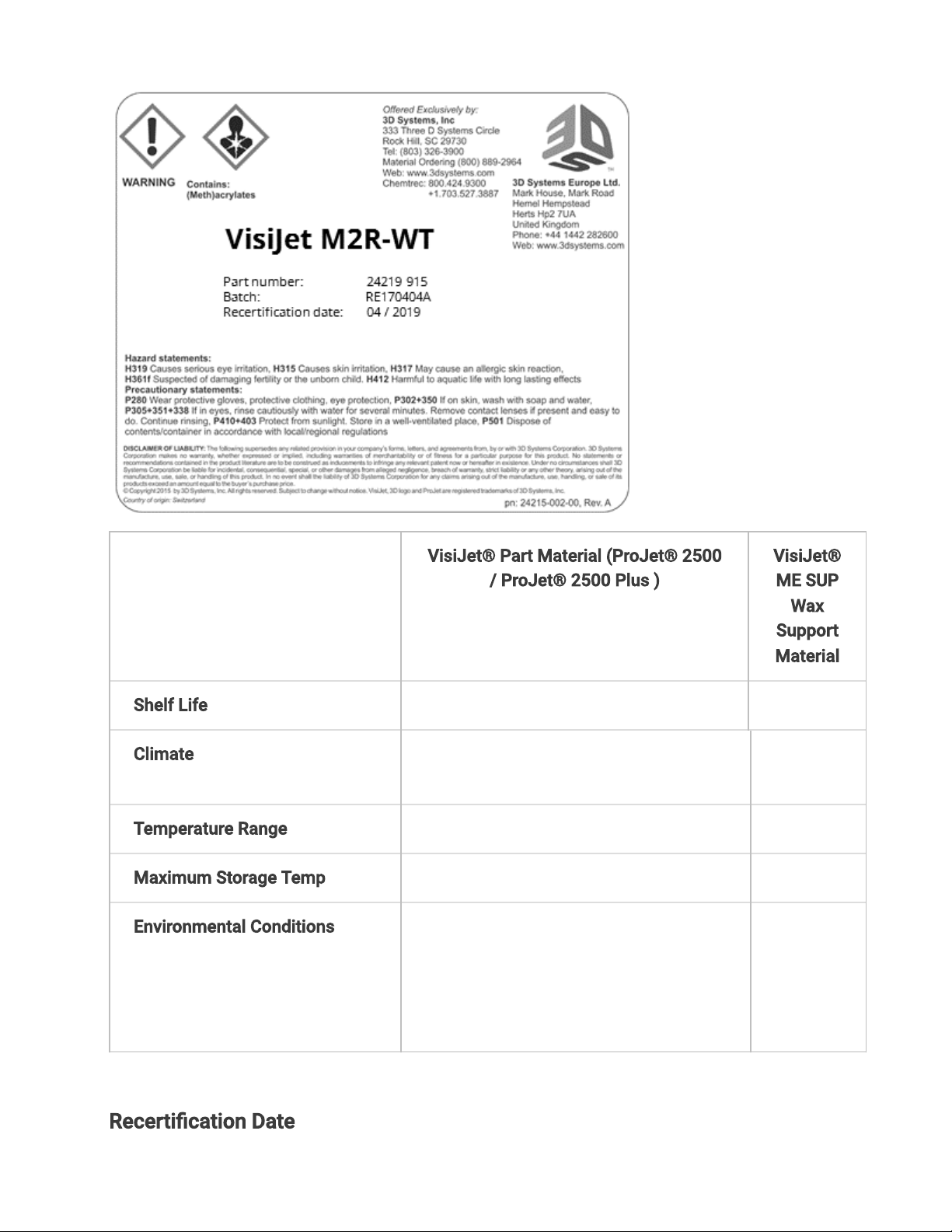
The material cartridges are packaged in shipping cartons. Upon receipt of
materialshipments, inspect cardboard carton exterior for signs of damage and leakage.
Ifleakage is observed, DO NOT open carton, and contact 3D Systems’s TechnicalSupport
8/10/22, 12:09 PM
Quick Start Guide
infocenter.3dsystems.com/projetmjp2500/print/book/export/html/861
6/44
Hotline.
VisiJet® Part Material (ProJet® 2500
/ ProJet® 2500 Plus )
VisiJet®
ME SUP
Wax
Support
Material
Shelf Life 2 Years 5 Years
Climate Cool, dry area with adequate
ventilation
Temperature Range 60°F (16°C) to 80°F (27°C)
Maximum Storage Temp 95°F (35°C)
Environmental Conditions No direct sunlight, heat, ames, or UV
energy. Do not expose materials to
heat at or above 230°F (110°C) ,
ames, sparks, or any source of
ignition.
Recertication Date

8/10/22, 12:09 PM
Quick Start Guide
infocenter.3dsystems.com/projetmjp2500/print/book/export/html/861
7/44
Always check material "Recertication Date" before use. If the cartridge has reached its
Recertication Date, your 3D Systems certied Partners or 3D Systems Technical Support
can assist with questions on materialrequiringrecertication.
Support (white) material must be loaded in the left side of material drawer. Part (black)
material cartridges must be loaded in the right side of material drawer. Before loading
cartridges into 3D printer system, inspect the cartridges for signs of damage or leakage. Do
not load a damaged or leaking cartridge. Dispose of material cartridge according to local
regulations.

8/10/22, 12:09 PM
Quick Start Guide
infocenter.3dsystems.com/projetmjp2500/print/book/export/html/861
8/44
Storing a Partially Used Material Cartridge
It is important not to lay material cartridges that are partially used on their side. Doing so
will cause material to seep through the vent cap and clog cap. This will cause damage to
the material cartridge if used for a later print.To store a partially used Material Cartridge,
place it upright in a ProJet® MJP 2500 Cartridge Holder and tighten the vent cap.
Material Storage
Material should be stored in their original containers, according to the guidelines given in
the GHS/SDS included with the material. Protect material from sunlight and ambient room
light.
Never mix different materials.
Disposal
Disposal of fully cured parts are not subject to regulations of any known agency worldwide.
VisiJet® support material cartridges may be disposed of in ordinary oce trash.
Support Material

8/10/22, 12:09 PM
Quick Start Guide
infocenter.3dsystems.com/projetmjp2500/print/book/export/html/861
9/44
Support material has no known regulatory requirements and may be disposed of in ordinary
oce waste.
Cured Part Material
Finished (cured) parts can be handled or disposed of the same as standard household
plastic products. VisiJet parts are not recyclable. VisiJet materials are not intended for and
cannot be used for medical implant, food, or drink handling applications.
Uncured Part Material and Waste
Uncured part material is classied as regulated, and in some areas hazardous; requiring
special packaging, transportation, and disposal. The disposal of partially cured or uncured
part material must comply with all local, state, and federal environmental safety regulations.
Applicable part “waste” includes cartridges (empty or full) and waste pans. Any materials
used to clean up uncured part material should be disposed of in the same manner as
uncured part material.
Dispose of your uncured parts and waste materials according to yourlocal environmental
regulatory agency. If assistance is needed, contact 3D Systems certied Partners or 3D
Systems Technical Support.
To nd out facility disposal requirements, contact a local waste disposal provider. (Local
environmental regulatory agency should have a list of qualied providers.) You will need to
give disposal service provider a copy of the part material GHS/SDS(Global Harmonized
Standards / Safety Data Sheets), and possibly other forms included in the Appendix of your
VisiJet® Material Handling Guide, such as Waste Prole Worksheet and SNUR (Signicant
New Use Regulation - U.S. only). A report will be provided, indicating disposal requirements,
as well as a quotation for regularly scheduled pickups. If assistance is needed locating a
waste disposal provider, or completing a waste disposal form, contact your local 3D
Systems certied reseller or 3D Systems Technical Support.
3D Systems assumes no liability or responsibility for proper disposal of uncured part
material. Proper disposal of uncured part material is the sole responsibility of the user.
Spilled Material
Spills of material are HIGHLY UNLIKELY, and should NOT occur in normal operation of the
3D printer system. If a leak occurs, it is an indication of a serious 3D printer system
malfunction.
The rst priority is to protect users from inadvertently touching material. Spills of support
material can be cleaned without use of protective gear, and disposed of as oce trash.
Handling uncured part material requires use of nitrile gloves and other personal protective

8/10/22, 12:09 PM
Quick Start Guide
infocenter.3dsystems.com/projetmjp2500/print/book/export/html/861
10/44
equipment to ensure no direct contact with uncured part material. If you don’t know which
material it is, assume it to be uncured part material, and handle accordingly - with the
recommended personal protective equipment.
Promptly remove spilled material, dispose of waste material, and clean up materials per
local regulatory requirements. Suspend use of the 3D printer system until you contact 3D
Systems Technical Support for a service visit to determine and repair the source of the leak.
Small spills of uncured liquid part material can be cleaned up using disposable towels, non-
reusable rags, or absorbent materials such as sawdust, clay, diatomaceous earth, or
activated charcoal. If spilled material is hot (liquid), wait until it cools before wiping up.
After wiping up the spill, wipe surface with denatured or isopropyl alcohol and clean
thoroughly with soap and water.
Caution: Never put sawdust, clay, diatomaceous earth, or activated charcoal inside
the printer, doing so will damage the printer.
Consider avoiding placement of the 3D printer system over carpeting, or consider use of
barriers to avoid the possibility of carpet damage if spills were to occur.
Advise service provider involved of the spilled material, and provide GHS/SDS and other
material information prior to contact with the material. Advise them of disposal
requirements for part material and clean-up products if part material (uncured) is the spilled
material.
Tools contaminated with part material should be cleaned prior to reuse. Solvents such as
denatured alcohol or Isopropyl Alcohol (IPA), are normally required to clean equipment and
tools. Wash with soap and water to remove any traces of excess part material or solvent.
Contact solvent suppliers for information on proper handling of solvents if used for clean-
up.
Some cleaning solvents are highly ammable such as denatured alcohol and isopropyl
alcohol. Before using solvents to clean and remove uncured part material, be sure read and
follow thesolvent suppliersafety precautions and recommended usage.
Flammability Hazards
Though the U.S. Department of Transportation does not consider VisiJet® materials a
"ammability hazard," they do classify them "combustible" based on ash points. Material
containers may rupture when exposed to extreme heat. Use National Fire Protection
Association Class B extinguishers such as carbon dioxide, dry chemical, or foam.
Andere Handbücher für MJP 2500
1
Dieses Handbuch passt für folgende Modelle
1
Inhaltsverzeichnis
Andere ProJet 3D-Drucker Handbücher

ProJet
ProJet 160 Leitfaden

ProJet
ProJet MJP 5600 Bedienungsanleitung

ProJet
ProJet MJP 2500W Bedienungsanleitung

ProJet
ProJet MJP 5600 Installationshandbuch

ProJet
ProJet HD3000 Bedienungsanleitung

ProJet
ProJet 3-D Modelers Bedienungsanleitung

ProJet
ProJet PJ 5000 Bedienungsanleitung

ProJet
ProJet 1000 Bedienungsanleitung

ProJet
ProJet 60 Series Bedienungsanleitung

ProJet
ProJet MJP 5600 Bedienungsanleitung


