
Racelogic Performance Box Touch V1 Bedienungsanleitung

Quick Start Guide: Lap Timing Mode - Performance Box Touch V1
Performance Box Touch features a 10 Hz GPS receiver and a responsive 4.3” colour touch screen. The Lap Timing
Mode allows you to view live Lap Timing information in relation to a set Start/Finish line.
There are 2 Lap Timing screens; the Main Screen, which contains live reference lap speed comparison (Delta-V), live
reference lap time comparison (Delta-T), current reference lap time, last lap time, last lap time difference to best,
session time and completed lap count. The Basic Screen contains either just a rolling lap time or a static previous lap
time.
Registration
Please register your Performance Box Touch so that Racelogic can continue to inform you about the latest software
releases and firmware upgrades and offer technical support.
Register your unit here.
The box content
https://en.racelogic.support//Product_Info/Performance_Meters/Performance_Box_Touch/Performance_Box_Touch_V1/
Quick_Start_Guide_%E2%80%93_Performance_Box_Touch_V1/Quick_Start_Guide%3A_Lap_Timing_Mode_-
_Performance_Box_Touch_V1
1

Performance Box Touch V1 (RLPBT-V1)
Product Code Quantity Description
PBT-V1 1 Performance Box Touch Unit
RLACS184 1 Cigar Plug USB Adapter
USB2-007241 1USB 2.0 A to Right Angle Micro B
data and Charging Cable, 1.5 m
RLACS313 18 GB SD Ultima Pro UHS-1 Memory
Card
RLACS277 1 Swivel Neck Richter Suction Mount
https://en.racelogic.support//Product_Info/Performance_Meters/Performance_Box_Touch/Performance_Box_Touch_V1/
Quick_Start_Guide_%E2%80%93_Performance_Box_Touch_V1/Quick_Start_Guide%3A_Lap_Timing_Mode_-
_Performance_Box_Touch_V1
2

Performance Box Touch V1 Bundle (RLPBT/B)
Product Code Quantity Description
PBT-V1 1 Performance Box Touch Unit
RLACS184 1 Cigar Plug USB Adapter
USB2-007241 2USB 2.0 A to Right Angle Micro B
data and Charging Cable, 1.5 m
RLACS313 18 GB SD Ultima Pro UHS-1 Memory
Card
RLACS277 1 Swivel Neck Richter Suction Mount
https://en.racelogic.support//Product_Info/Performance_Meters/Performance_Box_Touch/Performance_Box_Touch_V1/
Quick_Start_Guide_%E2%80%93_Performance_Box_Touch_V1/Quick_Start_Guide%3A_Lap_Timing_Mode_-
_Performance_Box_Touch_V1
3

Product Code Quantity Description
RLACS290 1 Performance Box Touch Battery
RLACS284 1GPS/GLONASS Low Profile
Antenna, 2 m
RLACS281 1 Plastic Carry Case
https://en.racelogic.support//Product_Info/Performance_Meters/Performance_Box_Touch/Performance_Box_Touch_V1/
Quick_Start_Guide_%E2%80%93_Performance_Box_Touch_V1/Quick_Start_Guide%3A_Lap_Timing_Mode_-
_Performance_Box_Touch_V1
4
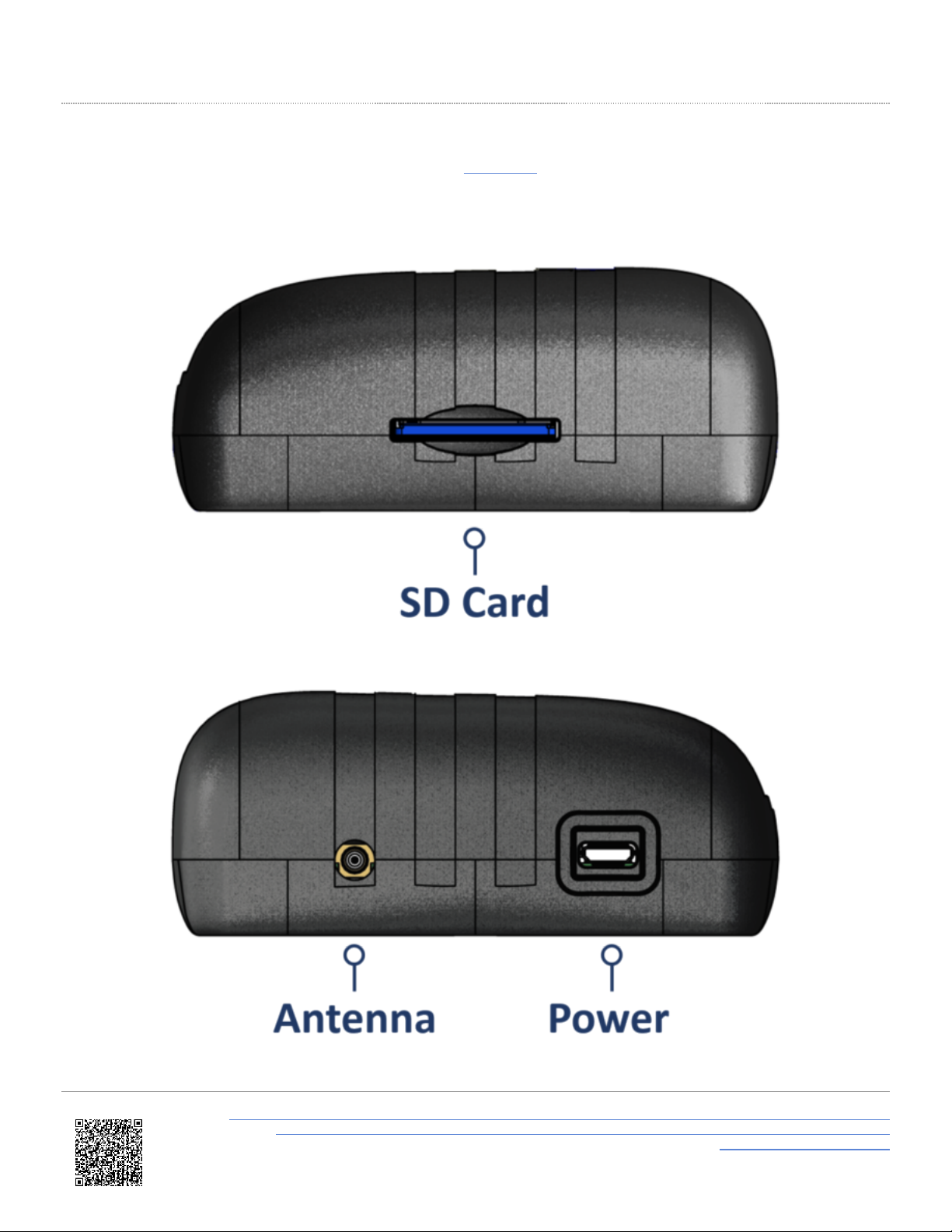
Hardware Overview
You can find more detailed connector information on the PIN OUTS page.
Left Side
Right Side
https://en.racelogic.support//Product_Info/Performance_Meters/Performance_Box_Touch/Performance_Box_Touch_V1/
Quick_Start_Guide_%E2%80%93_Performance_Box_Touch_V1/Quick_Start_Guide%3A_Lap_Timing_Mode_-
_Performance_Box_Touch_V1
5

Logging
Performance Box Touch V1 logs data via an SD card inserted into the SD cad Slot on the left-hand side of the unit.
Depending on the Logging Strategy you have selected in the General Settings area, the unit will either
log continuously or when it detects movement.
You can manually override the configured logging
strategy by tapping on the SD Card Icon when it is
green to start or stop the logging.
The Record Icon will show when the unit is logging data
to the SD card.
If you have come to a stop, but the Record Icon is still
on, you must press the SD Card Icon to stop
the logging before you remove the SD card.
Sometimes, due to poor satellite visibility, for example in
a garage or close to a building, the box may start
recording even if the car is stationary. Always check the
Record Icon to make sure the box is not recording
before you eject the card.
IMPORTANT
The SD card should not be removed when
the Record Icon flashes red as it may cause you to
lose data.
Note: If the SD card is removed while the box is still
recording, you may need to repair it on a PC before you
can use it again.
SD Card Format
Performance Box Touch is supplied with an 8 GB SDHC card in a FAT32 file format, which is the only file format it
supports.
https://en.racelogic.support//Product_Info/Performance_Meters/Performance_Box_Touch/Performance_Box_Touch_V1/
Quick_Start_Guide_%E2%80%93_Performance_Box_Touch_V1/Quick_Start_Guide%3A_Lap_Timing_Mode_-
_Performance_Box_Touch_V1
6

If you are looking to purchase a new SD card, we recommend that any card you use has a write speed of above 7
MB/s (4 MB/s is the absolute minimum) and a speed class of 10 (4 is the absolute minimum). We recommend that
you use SD cards from quality brands such as Transcend, SanDisk, Kingston or Lexar to ensure the best results.
IMPORTANT
If you have an SD card that is formatted in the exFAT or NTFS file formats, you will have to reformat it to a
FAT32 file system before it will work with a Performance Box Touch unit.
SDHC cards (2 GB to 32 GB)
Supplied or purchased SDHC cards are formatted in the FAT32 file format. This format is
supported by Performance Box Touch.
SDXC cards (64 GB and above)
Purchased SDXC cards will be formatted in exFAT or NTFS file formats; these formats are not supported by
Performance Box Touch. Please reformat as per the instructions below.
SD Card Reformatting
• FAT32 reformatting for media with sizes up to 32 GB can be done directly in Windows by right-clicking on the
media and selecting 'Format'.
• If you would like to format media with sizes above 32 GB into a FAT32 file system, you cannot do it directly in
Windows as it is not the standard formatting for the file. However, there are many third-party software programs
you can use to reformat media so that they will work correctly with our products - we recommend This Tool as
a free option from the SD card organisation.
Logged Channels
Performance Box Touch logs channels to a .vbo file on an inserted SD card. The channel information is as follows:
•Satellites: This is the number of satellites in use.
•Time: This is UTC time since midnight in the form HHMMSS.SS.
•Latitude: Latitude in minutes MMMM.MMMMMMMM +ve = North e.g. 3169.30644410M = 52D, 49M, 18.4S.
https://en.racelogic.support//Product_Info/Performance_Meters/Performance_Box_Touch/Performance_Box_Touch_V1/
Quick_Start_Guide_%E2%80%93_Performance_Box_Touch_V1/Quick_Start_Guide%3A_Lap_Timing_Mode_-
_Performance_Box_Touch_V1
7

•Longitude: Longitude in minutes MMMMM.MMMMMMMM +ve = West e.g. 00040.18164742M = 00D, 40M,
10.9S.
•Velocity: Velocity in km/h.
•Heading: Heading in degrees with respect to North.
•Height: Height above sea level in meters based on the model of the earth used by thye VBOX GNSS engines.
•Vertical velocity: Vertical velocity in km/h. +ve velocity uphill, -ve velocity downhill.
•Long accel: Longitudinal acceleration in g, +ve for forward acceleration.
•Lat accel: Lateral acceleration in g, +ve for acceleration to the left.
•Solution type: Indicator for what the unit is currently using to derive position: 0 = No sats; 1 = Standalone
using GNSS only; 2 = SBAS.
You can find more information on the VBO file format here.
Screen Overview
https://en.racelogic.support//Product_Info/Performance_Meters/Performance_Box_Touch/Performance_Box_Touch_V1/
Quick_Start_Guide_%E2%80%93_Performance_Box_Touch_V1/Quick_Start_Guide%3A_Lap_Timing_Mode_-
_Performance_Box_Touch_V1
8

Main screen example
https://en.racelogic.support//Product_Info/Performance_Meters/Performance_Box_Touch/Performance_Box_Touch_V1/
Quick_Start_Guide_%E2%80%93_Performance_Box_Touch_V1/Quick_Start_Guide%3A_Lap_Timing_Mode_-
_Performance_Box_Touch_V1
9

Setup
1. Performance Box Touch V1 has an internal patch antenna. This means that where the unit has a clear view of the
sky without any interference, an additional antenna is not required in most circumstances.
However, if it is required, you should mount the external GPS antenna (RLACS284) in the centre of the roof of the
vehicle, away from roof bars and other antennas. You can find more information about how to mount your external
antenna here.
2. If you are using an external antenna, connect it to the Performance Box Touch.
3. Connect the Battery (RLACS290) if required. You can find more information about the battery here.
4. Connect the Swivel Neck Richter Suction Mount (RLACS277) to the rear of the unit (or the battery if applicable)
and attach the suction mount to the vehicle's windscreen. You can find more information about the mounting of the
unit here.
5. Connect the power via the Power socket, or if you are using the battery independent of a power source, press
and hold the Power button on the battery for a few seconds.
6. Insert the SD card into the SD card slot. The SD Card Icon should display in green as long as the card has
available space.
7. When the unit has booted, select the Mode Button and press LAP TIMING if it is not already selected.
https://en.racelogic.support//Product_Info/Performance_Meters/Performance_Box_Touch/Performance_Box_Touch_V1/
Quick_Start_Guide_%E2%80%93_Performance_Box_Touch_V1/Quick_Start_Guide%3A_Lap_Timing_Mode_-
_Performance_Box_Touch_V1
10
Andere Handbücher für Performance Box Touch V1
5
Dieses Handbuch passt für folgende Modelle
1
Inhaltsverzeichnis
Andere Racelogic GPS Handbücher


