
Renogy Pro Series Bedienungsanleitung

VERSION A0
Smart Lithium Iron Phosphate Battery
RENOGY Pro Series
12.8V 100Ah
RBT12100LFP-BT
USER MANUAL

Before Getting Started
The user manual provides important operation and maintenance instructions for Renogy Pro
Series 12.8V 100Ah Smart Lithium Iron Phosphate Battery (hereinafter referred to as battery).
Read the user manual carefully before operation and save it for future reference. Failure to
observe the instructions or precautions in the user manual can result in electrical shock, serious
injury, or death, or can damage the battery, potentially rendering it inoperable.
zRenogy ensures the accuracy, sufficiency, and the applicability of information in the user
manual at the time of printing due to continual product improvements that may occur.
zRenogy assumes no responsibility or liability for personal and property losses, whether
directly and indirectly, caused by the user’s failure to install and use the product in
compliance with the user manual.
zRenogy is not responsible or liable for any failure, damage, or injury resulting from repair
attempts by unqualified personnel, improper installation, or inappropriate operation.
zThe illustrations in the user manual are for demonstration purposes only. Details may appear
slightly different depending on product revision and market region.
zRenogy reserves the right to change the information in the user manual without notice. For
the latest user manual, visit renogy.com.
Disclaimer
Renogy Pro Series 12.8V 100Ah Smart Lithium Iron Phosphate Battery User Manual © 2023
Renogy. All rights reserved.
RENOGY and are registered trademarks of Renogy.
zAll information in the user manual is subject to copyright and other intellectual property
rights of Renogy and its licensors. The user manual may not be modified, reproduced, or
copied, in whole or in part, without the prior written permissions of Renogy and its licensors.
zThe registered trademarks in the user manual are the property of Renogy. The unauthorized
use of the trademarks is strictly prohibited.
Online Manual
User Manual

Symbols Used .................................................................................................................................... 1
Introduction ...................................................................................................................................... 1
Key Features...................................................................................................................................... 1
SKU ..................................................................................................................................................... 1
What’s In the Box?............................................................................................................................. 2
Required Tools & Accessories ......................................................................................................... 2
Get to Know Smart Lithium Iron Phosphate Battery....................................................................3
Dimensions ........................................................................................................................................4
How to Size Battery Adapter Cables?.............................................................................................4
Secure the Battery (Optional).........................................................................................................5
Step 1. Plan a Mounting Site ............................................................................................................ 6
Step 2. Wear Insulating Gloves........................................................................................................6
Step 3. Check the Battery ...............................................................................................................6
Step 4. Install Battery Terminals .................................................................................................... 7
Step 5. Connect the Battery to Other Devices.............................................................................. 7
How to Connect Renogy Pro Batteries in Parallel?.......................................................................8
Calculate Voltage and Current in Parallel Connections ....................................................................... 8
Balance Batteries Prior to Connection .................................................................................................... 9
Parallel Connection — Installation Steps............................................................................................... 10
Battery Cell Balancing............................................................................................................................... 10
Remote, 24/7 Monitoring via DC Home App..................................................................................11
Charging/Discharging Parameter Settings.................................................................................11
Battery Charging and Discharging Logic..................................................................................... 12
Charging Logic.............................................................................................................................................12
Discharging Logic .......................................................................................................................................12
How to Estimate the Battery SOC?............................................................................................... 13
Self-Heating Function ................................................................................................................... 13
Battery Management System ....................................................................................................... 13
Troubleshooting.............................................................................................................................. 15
Specifications ................................................................................................................................. 16
Maintenance & Storage.................................................................................................................. 17
Important Safety Instructions ..................................................................................................... 18
Renogy Support .............................................................................................................................. 19
Battery Recycling ........................................................................................................................... 19
Table of Contents

— 1 —
Symbols Used
The following symbols are used throughout the user manual to highlight important information.
WARNING: Indicates a potentially hazardous condition that could result in personal injury or
death.
CAUTION: Indicates a critical procedure for safe and proper installation and operation.
NOTE: Indicates an important step or tip for optimal performance.
Introduction
The Renogy Pro Series 12.8V 100Ah Smart Lithium Iron Phosphate Battery adopts a proprietary
battery housing material in a smaller size for your RV application.
Weighing only half of the lead-acid counterparts, the battery can be safely discharged to 100%
Depth of Discharge (DOD), delivering twice the energy. Manufactured with automotive grade
battery cells, the battery features the highest safety standards and an extended 5000+ cycle life.
In addition, the smart Battery Management System (BMS) provides comprehensive protection to
the battery.
Key Features
zUnparalleled Performance
Features a greater energy density, a deeper discharge capability, a higher round-trip
efficiency, and a faster charging speed in a smaller size over counterparts in the market.
zUncompromising Quality
Ensures an exceptional lifespan with more than 5000 cycles (80% DOD), a continuous charge
or discharge current of 100A, and a wide range of operating temperatures with the automotive
grade battery cells.
zReliable Protection Mechanisms
Designed with a sturdy internal structure for RV use, and includes more than 60 protections
and alarms through the smart battery management system.
zReal-time Monitoring Through DC Home App
You can easily get the battery information through the DC Home App at any time.
zIntelligent Self-Heating Function & More Stable Performance
The built-in heater operates automatically at low temperatures to keep the battery charging,
assuring charging performance at low temperature and increasing battery lifespan.
zActive Safety Protection with Self-Control Fuse
Different from ordinary passive fuses, the self-control fuse can effectively prevent battery
overcurrent and overvoltage failures.
zBest-in-Class Capacity and Easy Expansion
The battery provides a maximum capacity of more than 105Ah for a longer-lasting application.
It supports up to 8 batteries in parallel, delivering a maximum of 12.8V 800Ah at 10.24kWh.
SKU
Renogy Pro Series 12.8V 100Ah Smart Lithium Iron Phosphate Battery RBT12100LFP-BT

— 2 —
What’s In the Box?
VERSION A0
Smart Lithium Iron Phosphate Battery
RENOGY Pro Series
12.8V 100Ah
RBT12100LFP-BT
USER MANUAL
Renogy Pro Series 12.8V 100Ah
Smart Lithium Iron Phosphate Battery × 1
User Manual × 1
Long Terminal Bolts × 2Terminal Bolts × 2
M8*1.25*16 mmM8*1.25*12 mm
Make sure that all accessories are complete and free of any signs of damage.
Required Tools & Accessories
MultimeterInsulating Gloves
Wrench (17/32 in) Battery Adapter Cables × 2
5/16 in (M8)
13mm
13mm
13mm
Prior to installing and configuring the battery, prepare the recommended tools,
components, and accessories.
For how to size battery adapter cables, refer to “How to Size Battery Adapter Cables?” in
this manual.

— 3 —
Get to Know Smart Lithium Iron Phosphate Battery
█Top
Negative Terminal (M8)
Lift Handle
Lift Handle
Positive Terminal (M8)
█Bottom
Mounting Holes
(for Battery
Fix Bracket)
Mounting Holes
(for Battery
Fix Bracket)
— 4 —
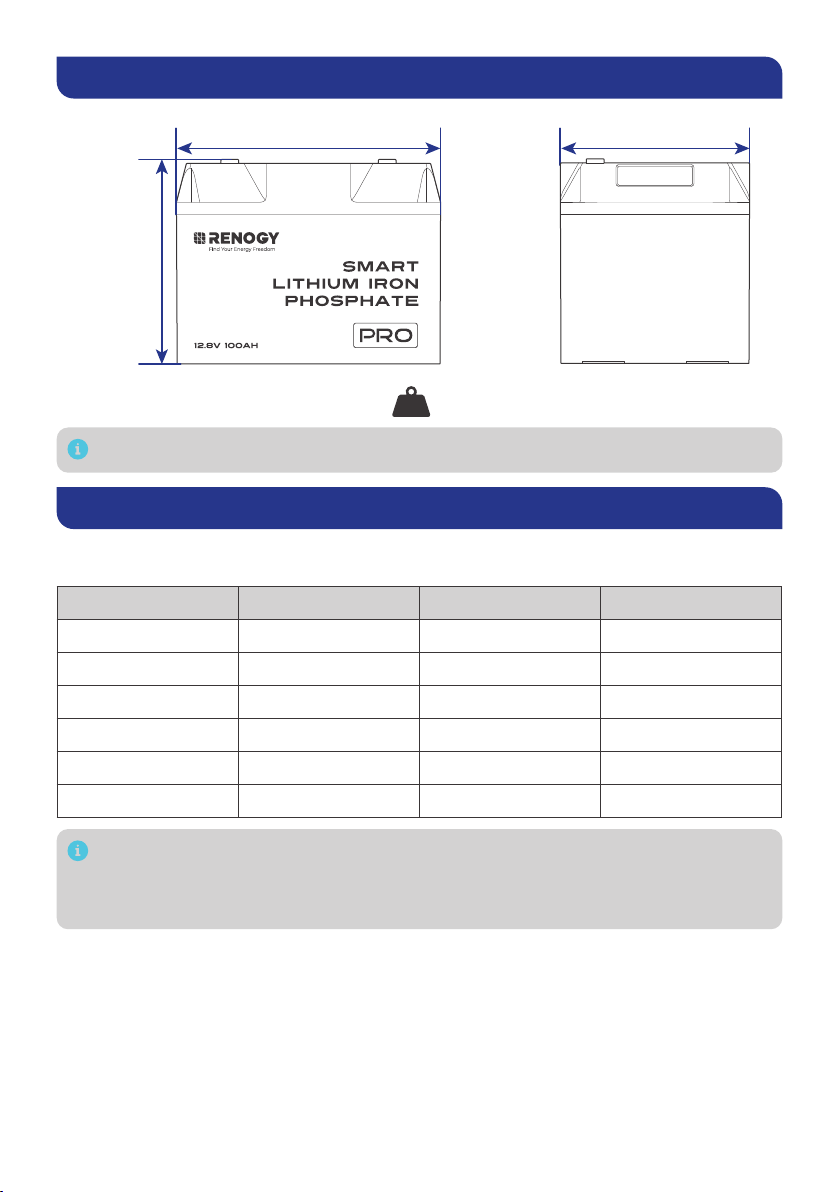
Dimensions
10.6 in (268 mm)
8.1 in
(205 mm)
7.6 in (193 mm)
26.9 lbs. (12.2 kg)
Weight
Dimension tolerance: ±0.2 in (0.5 mm)
How to Size Battery Adapter Cables?
Use appropriately sized Battery Adapter Cables (sold separately) based on expected load. Refer to
the table below for copper cable ampacities with different gauge sizes.
Cable Gauge Size Ampacity Cable Gauge Size Ampacity
14 AWG (2.08 mm²) 35A 2 AWG (33.6 mm²) 190A
12 AWG (3.31 mm²) 40A 1 AWG (42.4 mm²) 220A
10 AWG (5.25 mm²) 55A 1/0 AWG (53.5 mm²) 260A
8 AWG (8.36 mm²) 80A 2/0 AWG (67.4 mm²) 300A
6 AWG (13.3 mm²) 105A 4/0 AWG (107 mm²) 405A
4 AWG (21.1 mm²) 140A
The above values are from the NEC Table 310.17 for copper cables rated at 194°F (90°C),
operating at an ambient temperature of no more than 86°F (30°C). Cables longer than
13 feet (4000 mm) may require thicker gauge wires to prevent excessive voltage drop in
undersized wiring.

— 5 —
Secure the Battery (Optional)
Securing the battery prevents damage to the battery from loose cables and bumps.
Recommended Components & Tools
*Battery Fix Bracket
(with 8 M4*10 mm Fix Bolts)
Mounting Screws × 8
ST4
Phillips
Screwdriver (#2)
Recommended components marked with “*” are available on renogy.com.
Alternative mounting methods are allowed to meet the requirements of specific
applications.
Choose proper mounting screws specific to your installation site. This manual takes self-
tapping screws for wooden walls as an example.
Do not install batteries sideways or upside down.
Step 1: Install the battery fix bracket through the mounting holes on the battery.
Fix Bolts
14.16 in·lbs
(1.6 N·m)
Step 2: Mount the battery on a flat surface.
Left side
Right side
Mounting Screws Mounting Screws
14.16 in·lbs
(1.6 N·m)
14.16 in·lbs
(1.6 N·m)

— 6 —
Step 1. Plan a Mounting Site
For optimal battery performance, it is recommended to install the battery in a clean, cool, and dry
location, free from any accumulation of water, oil, or dirt. Accumulation of such materials on the
battery can lead to current leakage, self-discharge, and even short-circuiting.
KEEP DRY FRAGILE VENTILATION
Charge: -4°F–131°F / -20°C–55°C
Discharge: -4°F–140°F / -20°C–60°C
10%–95%
Vent
Vent Enclosed space
Air
cross-flow
Sufficient airflow must be provided to prevent excessive heat build-up and to minimize
temperature variation between the connected batteries.
This user manual takes a battery as an example to illustrate how to install the battery.
Step 2. Wear Insulating Gloves
Insulating Gloves
Step 3. Check the Battery
Inspect the battery for any visible damage including cracks, dents, deformation, and other visible
abnormalities. All connector contacts shall be clean, free of dirt and corrosion, and dry.
Do not touch the exposed electrolyte or powder if the battery is damaged.
If uncovered electrolyte or powder contacts your skin or eyes, flush it out immediately with
plenty of clean water and seek medical attention.

— 7 —
Step 4. Install Battery Terminals
70.8 in·lbs
(8 N·m)
Terminal Bolts
Battery
Adapter
Cable
Battery
Adapter
Cable
Spring Washer
Flat Washer
Ensure the cable lug and the top surface of the terminal are in contact, and place the
washers on top of the lug. Do not place the washers between the battery terminal and the
cable lug to avoid high resistance and excessive heating.
Avoid short-circuiting the battery terminals to prevent irreversible damage to the system
and battery caused by current bursts.
Verify polarity before wiring to avoid irreversible battery damage due to polarity reversal.
Do not touch the positive and negative terminals of the battery with your hands.
To ensure safe and reliable operation of the system, please follow the torque specifications
recommended by the manufacturer when securing cable connections. Over-tightening
can result in terminal breakage, while loose connections can lead to terminal meltdown or
fire. When securing multiple cable lugs on a single battery terminal, use the included Long
Terminal Bolts.
Step 5. Connect the Battery to Other Devices
Please use circuit breakers, fuses, or disconnects appropriately sized by a certified
electrician, licensed installers, or regional code authorities to protect all electrical
equipment.
█For a Single Battery
Inverter DC-DC Charger
DC Distribution
Panel
Charge
Controller
Battery Fuse
Dieses Handbuch passt für folgende Modelle
1
Inhaltsverzeichnis
Andere Renogy Batteriepack Handbücher


Beliebte Batteriepack Handbücher anderer Marken


IOGear
IOGear GBP24V Series Bedienungsanleitung

Inventus Power
Inventus Power PROTRXion S-12V100-TRX-HD Bedienungsanleitung

Clas Ohlson
Clas Ohlson PW-290A Bedienungsanleitung

EINHELL
EINHELL MULTI-Ah Power X-Change Plus Bedienungsanleitung

Samsung
Samsung EB-U3300 Bedienungsanleitung

ECTIVE
ECTIVE LC Series Bedienungsanleitung