
SACKit Touch 350 Bedienungsanleitung
1
SACKit Touch 350
2021 User manual
UK
DK
DE

2
CONTENT
Thank you! ................... 3
Quick Start Guide ............. 4
Product overview ............. 4
Product functionality........... 5
The Device ................... 6
Product setup. . . . . . . . . . . . . . . . . 8
Troubleshooting .............. 9
Cleaning of the product ........ 10
Technical specifications ........ 10
Important safety information ... 11
Disposal of the product ........ 12
Complaints ................... 12
Tak! ......................... 13
Quick Start Guide ............. 14
Produkt overblik .............. 14
Produkt funktioner ............ 15
Beskrivelse af produktet ........ 16
Produkt opsætning ............ 18
Troubleshooting .............. 19
Rengøring af produktet......... 20
Tekniske specifikationer ........ 20
Vigtig sikkerhedsinformation .... 21
Bortskaffelse af produktet ...... 22
Reklamationer ................ 22
Vielen dank! .................. 23
Kurzanleitung ................. 24
Produktübersicht .............. 24
Funktionen ................... 25
Produktbeschreibung .......... 26
Produkteinstellung............. 28
Fehlersuche .................. 29
Reinigung .................... 30
Produktangaben............... 30
Entsorgung ................... 32
Reklamation .................. 32

3
THANK YOU!
Thank you for purchasing the SACKit Touch 350 Bluetooth & Acve Noise Cancellaon headphone
from SACKit. Please read the entire instruction manual before using the product and save it for
future reference. We reserve the right to change or update information and to correct errors,
inaccuracies, or missions in text, images, and technical data. If you have any questions regarding
technical problems please contact our customer services. We hope you will enjoy your new SACKit
Touch 350 headphones.
Let SACKit rock your life!
CONGRATULATIONS on your new SACKit product!
Register your new SACKit product and get cool benefits.
1. Go to https://sackit.eu/reg
2. Enter name, e-mail, and product*
Box contents
1. SACKit Touch 350 headphone
2. Fabric travel pouch
3. 3.5mm audio cable
4. USB charging cable
5. Quick start guide
*When you register your product, you agree to receive email newsleers from SACKit.

4
QUICK START GUIDE
When you first get your SACKit Touch 350 headphones you need to charge them before they are
ready for use. SACKit Touch 350 is charged by using the included USB cable.
Charge SACKit Touch 350 for 5 hours minimum before using the product the first time.
Please turn off your headphones after use to prolong battery life.
PRODUCT OVERVIEW
9. 3.5 mm AUX
2. Acve Noise Cancela-
on (ANC)
6. Volume up/down
7. X Buon
4. Charging Port
3. Charging LED
5. Headband
1. Over-Ear Design
8. Power LED

5
PRODUCT FUNCTIONALITY
Here follows a description of all the products features. Please use the Overview in the beginning of
this user manual to locate them on the SACKit Touch 350 (page 4).
1. Over-ear design
• SACKit Touch 350’s design ensure both comfort and sound quality by direcng sound at you and
encapsulates the whole sound without being uncomfortable to wear for a longer me
2. Active Noise Cancelation (ANC)
• Press the Acve noise cancellaon buon to acvate ANC
• With ANC acvated you can minimize background noise to further enjoy your music
3. Charging LED
• Turns red when SACKit Touch 350 is charging
• Turns green when ANC is acvated.
• Turn yellow when ANC is acvated and it is charging.
4. Charging port
• Charging port for the included USB charging cable
5. Headband
• Adjustable headband to ensure a comfortable t for everyone
6. Volume up/down
• Volume buons used to adjust the volume of SACKit Touch 350
• Also used to skip to next or previous song
7. X Button
• Master funcon buon
• Used to power SACKit Touch 350 on and o
• Plays and pause music when the headset is in Bluetooth mode
• Accepts and rejects incoming calls
8. Power indicator
• Indicates when SACKit Touch 350 is turned on and o
• Flashes blue and red when SACKit Touch 350 is in Bluetooth pairing mode
9. 3.5 MM AUX
• 3.5 mm AUX jack connecon to connect the headset to a device without Bluetooth
• In-line use is possible when the baery is empty

6
How to pair SACKit Touch 350 and your device
1. For rst use: Long press the X Buon for 10 seconds. Aer the rst 5 seconds, you will hear the
ON sound. Keep pressing the buon for another 5 seconds to turn on pairing mode, indicated by
ashing the power indicator red and blue
2. Switch on Bluetooth on your device
3. Choose “SACKit Touch 350” under Bluetooth sengs on your device. Your headphones are now
connected with your device
4. Start playing music on your device
5. Long press the X buon to turn o your SACKit Touch 350 headphones
6. SACKit Touch 350 will automacally pair with the last connected device
To connect to a new device make sure that the previous connected device is disconnected otherwise
connecng opportunity won’t appear on the new device.
THE DEVICE
Operation instructions for use after first pairing
1. Aer rst me pairing your SACKit Touch 350 headphones and
2. Bluetooth device will automacally reconnect, the LED light will blink blue once SACKit Touch
350 is successfully paired.
3. Turn the headphones on by holding down the X buon unl you hear the ON sound
4. Long press X buon to turn o SACKit Touch 350.
Note: If the pairing is not successful, please turn the headphone off and back on and retry pairing.
Operation instructions for in-line use
Use the 3.5mm audio cable when you do not wish to use Bluetooth connection or when the battery
needs recharging. In-line use is possible when the battery is empty.
For in-line use:
• Connect the 3.5mm plug into your SACKit Touch 350 Headphone 3.5mm jack, then connect the
other 3.5mm plug to your device 3.5mm jack
• Adjust the volume using the controls on your mobile phone
• Enjoy the music
Bluetooth Multipoint
SACKit Touch 350 comes with the Bluetooth Multipoint feature. This means that up to two devices
can be connected to the headphones at the same time. This enables you to for example connect the
headphones to a computer and a smartphone at the same time. To switch between the two devices,
just pause the music/sound on one device and press play on the other. If your phone rings, the
SACKit Touch 350 will automatically jump on the phone.
To connect a second Bluetooth device after a first one is already connected:
1. Turn o the SACKit Touch 350,
2. Then long press the X Buon for 10 seconds. Aer the rst 5 seconds, you will hear the ON
sound. Keep pressing the buon for another 5 seconds to turn on pairing mode, indicated by as-
hing the power indicator red and blue
3. Switch on Bluetooth on your new device
4. Choose “SACKit Touch 350” under Bluetooth sengs on your device. Your headphones are now
connected with your new device

7
Battery information
• Baery: rechargeable Polymer Lithium-Ion Baery, DC: 3.7V/600mAh
• Power: USB DC5V, Please use the USB cable sealed with our headphone for charging
• Charging Time: For rst me use please be sure the baery has been charged fully before use. It
needs more than 5 hours of charging the rst me, then 4 hours for recharging
• When the red light is on, the headphone is in charge mode. The red light will turn o when the
baery is fully charged.
How to use the Active Noise Cancellation function
1. Push the ANC buon on the le ear cup turning on the green LED light and you can enjoy the
headphones in Acve Noise Cancellaon mode
2. When you don’t need the Acve Noise Cancellaon funcon, turn the ANC funcon of by pus-
hing the ANC buon
3. Acve Noice Cancellaon can be acvated and deacvated even when the SACKit Touch 350
Headphone is turned o. The Acve Noise Cancellaon will also remain on even when you turn
the SACKit Touch 350 Headphone o.
8
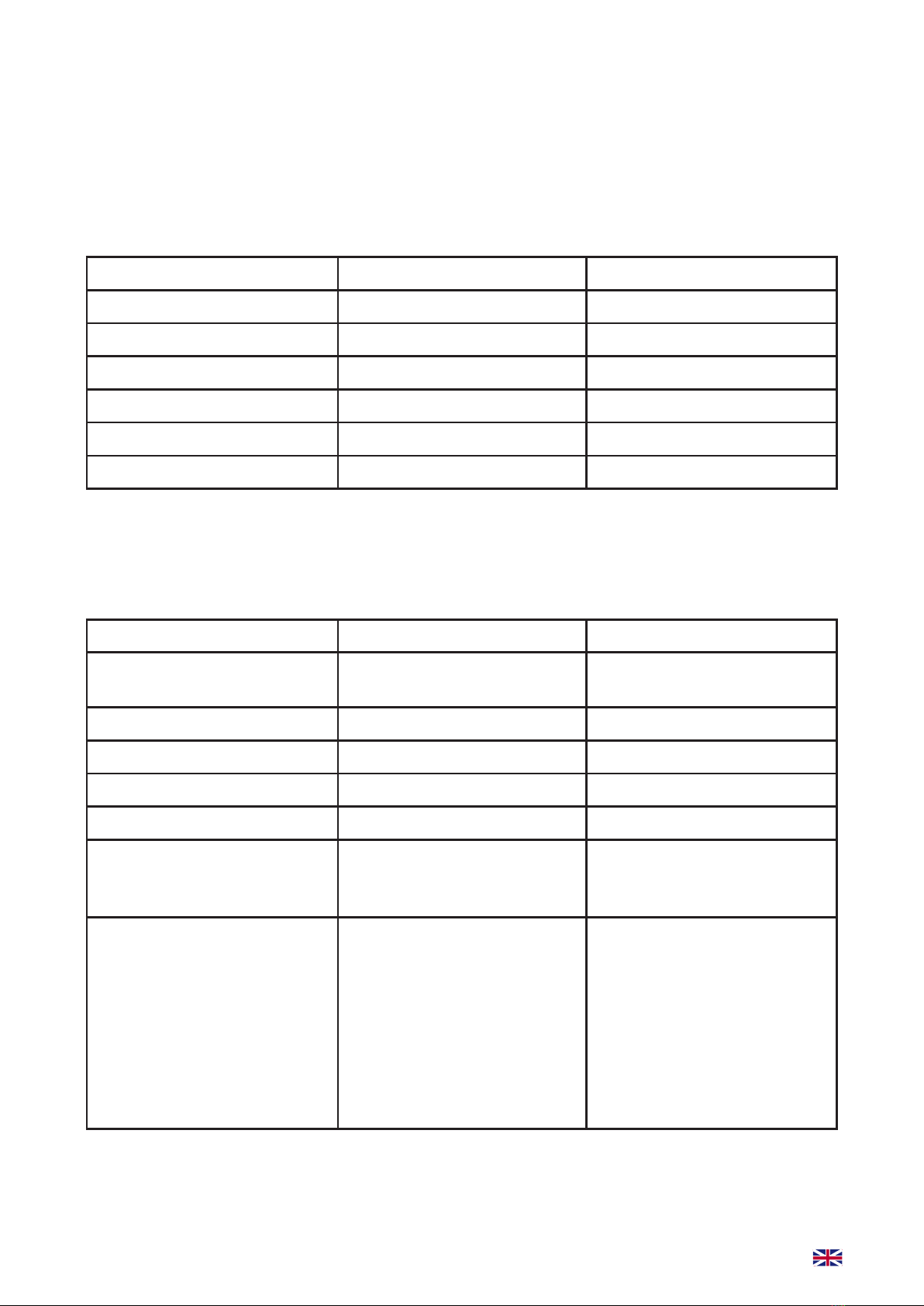
Making calls with SACKit Touch 350
When SACKit Touch 350 connected to your device, you can answer and take calls through the
headphones wirelessly.
Funcons Status of headphone Operaon
Redial Last number Standby mode Short press X button twice
quickly
Volume up Conversation mode Short press Volume + button
Volume down Conversation mode Short press Volume - button
Answering calling Ringing Short press X button
End call Conversation mode Short press X button
Reject calling Ringing Press and hold X button for
one second until you hear
indication sound
Transfer the calling between
headset and Bluetooth
devices
Conversation mode Press and hold the X button
for 3 seconds can transfer
the conversation from
headset to mobile phone.
Then press and hold the
X button for 3 seconds to
transfer the conversation
back from mobile phone to
headphone.
Note: Not all the mobile phones support all the functions listed above. Please refer to the instruction
of your device. Some functions and indication tones may vary with depending on the device.
PRODUCT SETUP
Here follows a descripon of the setup of the product. A detailed descripon of the buon’s and
funconality can be found at pages 4 to 5.
Playing Music with SACKit Touch 350
When SACKit Touch 350 connects with the mobile phone or Bluetooth transmitter, you can enjoy
music through the headphone wirelessly.
Funcons Status of headphone Operaon
Pause Playing music Short Press X button
Play Pausing Short Press X button
Next track Playing music Short press volume+ button
Previous track Playing music Short press volume–button
Volume up Playing music Long press Volume + button
Volume down Playing music Long press Volume - button

9
TROUBLESHOOTING
If you have trouble using your SACKit Touch 350 we ask you to try the following soluons. If these
soluons does not x your problem please contact our customer service at inf[email protected].
I experience issues with stability and connecon
• Try to delete the pairing between SACKit Touch 350 and your device on the device. You do this
by accessing the Bluetooth sengs on your device and choose “forget SACKit Touch 350”. Now
pair SACKit Touch 350 and your device by following the descripon found on 6
TOUCHit Over-Ear is not playing music while connected to my device
• Please check volume on your audio device to make sure it is outpung sound
• If you use in-line please make sure that the 3.5mm plug is fully inserted into your audio device
and headset. And please make sure the headphone plug and audio device’s jack scks are clean
• If SACKit Touch 350 is used wirelessly and sll is not playing music, you manually have to choose
to play from SACKit Touch 350 in your device sengs. Please refer to the instrucon of your
device or specic app for further informaon
I’m hearing a beep-sound in my headset
• When SACKit Touch 350 makes a beep-sound, they need recharging. Please charge your
headphones fully
I don’t feel like SACKit Touch 350 is comfortable to wear
• Please adjust the length headband by pull/pushing the earcups to adjust to headset for a
comfortable t
I can’t turn on my headset
• Please recharge your headset by leaving the headset in the charger for minimum 4 hours

10
CLEANING OF THE PRODUCT
1. Kindly switch o SACKit Touch 350 before you clean your headset and remove it from the power
supply
2. Do not use any chemicals to clean the product. If you need to clean the headset, please use a so
cloth with a mild cleaner
3. During cleaning please be aware to avoid water in the USB port, speakers, microphone, and but-
tons. Large amounts of water and uids may damage the headset
4. Use a so, dry, and lint-free cloth to gently clean the speaker fabric.
NOTE: Avoid using sharp objects to clean SACKit Touch 350 earbuds and charging case
TECHNICAL SPECIFICATIONS
• Model: SACKit Touch 350 Bluetooth and ANC headphones
• Bluetooth version: V5.0
• Operang distance: 10M
• Baery: 600mAh
• Charging me: 4 hours
• Charging current: 220mA
• Music playing me:
30 hours (bluetooth on, ANC o)
21 hours (Bluetooth on, ANC on)
• Call me: 30 hours
• ANC soluon: MAX
• Noise reducon performance: up to 22dB
• Driver Unit: Ø40mm
• Frequency Range: 20Hz-20KHz
• Impedence:ANC_OFF:80Ω ANC_ON :110Ω
• Size: 78*24*208mm
• Weight: 243g
Inhaltsverzeichnis
Sprachen:
Andere SACKit Kopfhörer Handbücher

SACKit
SACKit Rock 350 Bedienungsanleitung

SACKit
SACKit WOOFit Bedienungsanleitung

SACKit
SACKit TOUCHit S Bedienungsanleitung

SACKit
SACKit Touch 100 Bedienungsanleitung

SACKit
SACKit Touch 200 Bedienungsanleitung

SACKit
SACKit ROCKit S Bedienungsanleitung

SACKit
SACKit Rock 100 Bedienungsanleitung

SACKit
SACKit WOOFit Bedienungsanleitung

SACKit
SACKit Speak 200 Bedienungsanleitung

SACKit
SACKit Active 200 Bedienungsanleitung


