
ShopBot DT3624 Bedienungsanleitung

© Copyright 2017 ShopBot Tools, Inc. page 1
ShopBotTools.com888-680-4466 •
Desktop CNC Quick-Start Guide

Desktop Quick Start Guide • October 6, 2017
© Copyright 2017 ShopBot Tools, Inc. page 2
Table of Contents
Desktop Safety and Precautions.............................................................................................................5
What’s in the Crate? ................................................................................................................................7
ShopBot Desktop Overview ....................................................................................................................9
Uncrating...............................................................................................................................................10
Assemble Parts .....................................................................................................................................10
Tool Orientation and Direction of Axes..................................................................................................11
Software and Computer Conguration .................................................................................................12
Connect Power......................................................................................................................................12
Launch Software ...................................................................................................................................13
Tool Movement......................................................................................................................................14
The “Easy” Control Panel .............................................................................................................14
The Keypad ..................................................................................................................................15
Zero the X- and Y-Axes .........................................................................................................................19
Zero the Z-Axis......................................................................................................................................20
Move to Home Position.........................................................................................................................23
Warm Up (Spindle Models Only) ...........................................................................................................24
Desktop Spindle RPM Settings.............................................................................................................25
Trim the Deck ........................................................................................................................................26
Switch to ShopBot FULL.......................................................................................................................28
Surfacing the Deck................................................................................................................................29
Beyond the Basics ................................................................................................................................31
Vcarve Pro ....................................................................................................................................31
Maintenance..........................................................................................................................................32
Transportation .......................................................................................................................................32
Resources .............................................................................................................................................33

Desktop Quick Start Guide • October 6, 2017
© Copyright 2017 ShopBot Tools, Inc. page 3
Desktop Safety and Precautions
WARNING! Read all safety warnings, instructions, illustrations and specications provided with this
power tool. Failure to follow all instructions listed below may result in electric shock, re and/or serious
injury.
Save all warnings and instructions for future reference. Refer to General Power Tool Safety Warnings
sent with the User’s Guide.
Learn and understand safe use of the machine. Do not allow untrained individuals
to operate the machine without supervision. Be aware of the location of the Emer-
gency Stop switches at all times.
Eye and ear protection MUST be worn by the machine operator as well as any
bystanders or observers. Flying sawdust, material chips, and other debris can
cause serious eye injury.
Wear closed-toe shoes at all times.
Make sure that your material is properly secured before cutting, and be aware of
any small parts that may come loose after being cut. If a small part catches the
edge of a spinning bit, it can be thrown forcefully in any direction, causing injury
or damage.
Never place your hands on the rails of the ShopBot. Be aware that the machine
may move unexpectedly in any direction, which can cause serious injury if your
hands are in the path of movement.
Never wear gloves while operating the machine. As with any power tool, a glove
can get caught in moving or spinning parts and pull your hand into the machinery.
Never leave a machine running and unattended. Understand that a spinning tool
generates friction and heat, creating a risk of re. This risk is minimized by using
correct chip load, using sharp bits, and by always double-checking your les
before cutting. Be prepared to pause or stop the cut if something seems incorrect
or unsafe.
Keep a working re extinguisher within reach of the machine, for the reasons
listed above.

Desktop Quick Start Guide • October 6, 2017
© Copyright 2017 ShopBot Tools, Inc. page 4
Desktop Safety and Precautions (cont’d)
Limitations on ambient conditions - This tool is intended for indoor use; Do not run the tool outside
or in wet weather.
This tool is intended to be used with wood, plastic, or other non-ferrous materials. It is not intended for
use with ferrous materials.
Transportation - This tool can be transported by two people by grabbing from the bottom front and
rear locations.

Desktop Quick Start Guide • October 6, 2017
© Copyright 2017 ShopBot Tools, Inc. page 5
What’s in the Crate?
Desktop Tool
Shown with optional spindle and speed controller.
Manila Envelope, which includes:
• Desktop Quickstart Guide
• Desktop Enclosure Document (if applicable)
• User’s Guide Binder
• Thumb Drive with Software

Desktop Quick Start Guide • October 6, 2017
© Copyright 2017 ShopBot Tools, Inc. page 6
1/4” and 1/2” Spindle or Router Collet Sets Collet Wrenches Bit Kit (Optional)
Z-Zero Assembly Power Cord Hold Down Bolts
USB Cord Pendant

Desktop Quick Start Guide • October 6, 2017
© Copyright 2017 ShopBot Tools, Inc. page 7
ShopBot Desktop Overview - Model DT3624 Shown
Machine ON/OFF Switch
Optional Accessory Connection USB Cable
Power Cord
Pendant Connection

Desktop Quick Start Guide • October 6, 2017
© Copyright 2017 ShopBot Tools, Inc. page 8
Uncrating
The ShopBot Desktop comes securely crated for ship-
ping. Use a claw hammer to remove each of the four metal
clips. Use caution, clips are under tension and may spring
during removal.
Remove all accessories packed with the Desktop.
Remove packing materials and sides of crate.
Lift Desktop onto a sturdy table or bench.
CAUTION!!
The ShopBot Desktop is a substantial tool and depending on accessories, it can weigh from 150 to
190 lbs. Have AT LEAST one additional person help lift the tool.
Assemble Parts
Adjust leveling feet with 5/8” wrench so the tool doesn’t rock,
then use 9/16” wrench and nuts to lock the leveling feet into
position.
If the Desktop is equipped with dust collector, slide the sup-
plied hose over the vertical hose tube and attach hose to the
upper bracket with hose clamp. Note: The bottom of hose
should not be clamped so it can freely slide up and down on
the tube during operation.
Refer to Desktop Dust Collection Setup Manual in Desktop
section of Shopbot Docs at Shopbottools.com if you are
planning on using dust collection.
Refer to the Desktop Mini Enclosure instructions to install the enclosure if applicable.

Desktop Quick Start Guide • October 6, 2017
© Copyright 2017 ShopBot Tools, Inc. page 9
Tool Orientation and Direction of Axes
The pictures below show the axis orientation for the two ShopBot Desktop tools.
Normally, the 0, 0, 0 point is located at the intersection of the three axes as shown, and “front” is con-
sidered the side noted below.
Desktop Quick Start Guide • October 6, 2017
© Copyright 2017 ShopBot Tools, Inc. page 10
Software and Computer Configuration
Refer to the Uninstalling and Reinstalling ShopBot and VCarve Software document for software instal-
lation and software and computer conguration.
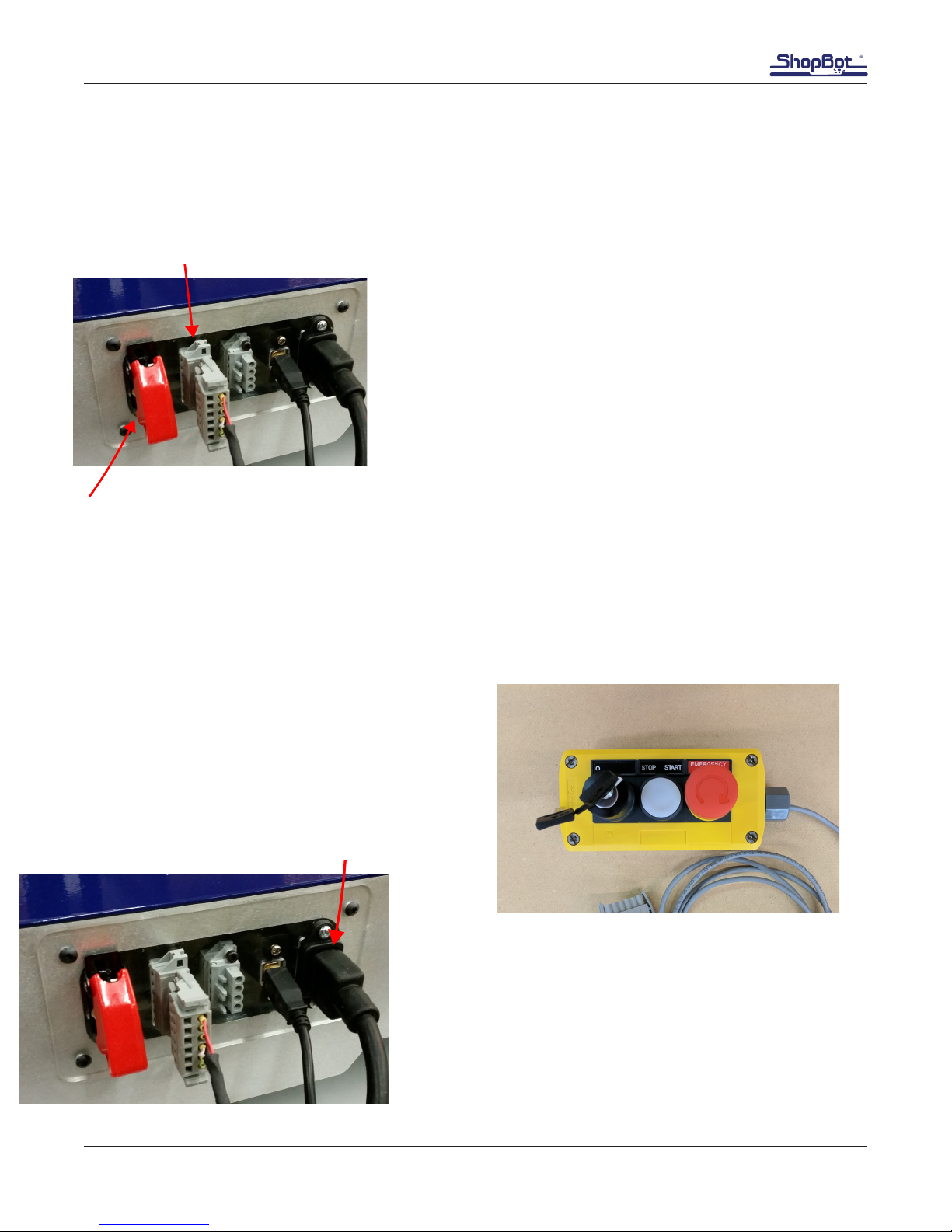
Plug in Pendant and Connect Power
Plug the pendant into the connector on the tool located in the
rear (on Desktop tools) or right side (Desktop MAX tools).
The pendant has three functions:
1) A keyed interlock switch to cut power to the router or spindle.
The machine can still be moved with the interlock turned off, but
the cutting head will not be able to spin.
2) A start/stop button. For non-emergencies, simply hit the
space bar on the computer keyboard or the start/stop button
on the pendant. This will pause the tool while maintaining XYZ
coordinates, allowing the cut le to resume without starting over.
3) An emergency stop switch. Pressing the emergency stop is
the same as turning off the main power switch. The tool will immediately stop moving and the cutter
will turn off. Machine position WILL be lost during an emergency stop. To release the emergency stop
on the pendant, turn the red button clockwise until it releases and pops up.
The presence of an emergency stop switch does not alter the need for good safety procedures
while operating the ShopBot tool.
Also note that if the pendant is not plugged into
the machine, the machine will not power on. If the
pendant comes unplugged, the emergency stop
will automatically trigger and the machine will
shut down.
Install power cord into back of the Desktop.
Machine ON/OFF Switch
Pendant Connection
Power Cord
SPINDLE
INTERLOCK
OFF ON
STOP
BUTTON
EMERGENCY STOP
BUTTON
Inhaltsverzeichnis
Andere ShopBot Werkzeuge Handbücher


