
Shot Navi W1-GL Bedienungsanleitung

User’s Manual
v.1609

2
P9
Specication
Keys
Introduction
Contents
Introduction
Getting Started
Charge the Device
Contents
Important Safety and Product Information
P2
P6
P8
Precaution Information
P2
P7
List of Items
P4
P5
Thank you for choosing Shot Navi W1-GL. With design concept of
simplicity and lightness, this product is a wearable golf GPS. It timely
detects the distance from current location to the greens, along with
preloaded global golf courses data. It can measure the remaining distance
to the greens and hazard, shot distance, score, and can also use as an
everyday watch. With GPS rangefinder, it adds styles to golfing, and
provides tactical guidance for user to enjoy the pleasure of improvement
in accuracy and the score.

3
Score
FAQ
Warranty Terms
Log In the Location/Measure the Shot
Distance
Navigation Menu / About Receiving GPS
After Services
Contact Us
Warranty
Settings
Others
Manual
P12
P14
P23
P20
P24
P22
P26
P16
P17
P18,19
P25
P27
P28
Upgrade・SCO Record
Navigation Mode
Simplied Mode P13
Hazard Mode
About the Product
Time Mode
Turn On
Search for Golf Course
P10
P10
P11

4
Important Safety and Product Information
For first time user, it is recommended to read the manual thoroughly
prior operating W1-GL for accuracy and safety purposes. Please preserve
the manual with care for easy access afterward. Please follow below
precautions for safe operation. In addition, reproduction of this user
manual is strongly prohibited.
■ The operating temperature is 32 ℉ ~122 ℉ (0 ℃ ~50 ℃ ). Please operate the
device within this range. As product is of high precision, please keep it away from
sudden temperature shock even in operating temperature range.
■ Do not drop or smash the product with force.
If dropped or smashed with force, it can cause serious damages to the
product.
■ When using or storing the product, please keep the product away from
machine with strong electronic waves/ radiation or magnetic elds.
■ If not using the product for a period of time, please preserve it in a cool
and dry location. For long storage, it is recommended to store it in a dried
container and avoid the following environments:
1. Humid and poorly ventilated location.
2. Inside a car where exposed excessively to sunlight.
3. Location with humidity over 90%.
4. When stored away, please keep the battery around 50% charged.
Being fully charged or no power will deteriorate the battery sooner.
■ Please do not expose the product to direct sunlight,high or low
temperature over long period of time (for example: place the product
inside the cart bag, in which stored in the car).

5
Precaution Information
Do not attempt to disassemble, modify and/or repair the product.
Device can be damaged from above actions, in which may invalidate the
terms of warranty.
■ Do not use the product in extreme cold, hot or humid conditions to
prevent malfunction.
■ The product is water-resistant level specied for its operation. Please do not
fully submerge it under the water.
■ The charging part of the product is made of stainless steel, but it can still
rust due to residue of sweats and other substances to surface. Please wipe it
clean with dry cloth after use.
■ Do not place the product near re to prevent shape-deformation and
malfunction.
■ Do not use the product in highly dusty sites to prevent malfunction.
Please prevent from direct exposure of sunlight when storage.
The functionality will deteriorate is change to stored above 104℉(40℃ ).
If storing for more than a month, please ensure the battery level is kept
around 50%.
※ If stored with no power, it can cause damage to the Lithium-polymer
battery. Although the protective circuit inside the battery can prevent it
from overly charged or zero power, it can still reach to zero power due
to natural discharging of electricity over the period of long storage. To
prevent mentioned situation from occurring, please ensure the battery
level is kept around 50%. In addition, please do not keep battery as fully
charged to avoid malfunction as well. Please do not connect the charger
with the device during long storage. When battery is overly charged, it
may cause chemical reactions for battery to expanding, heating up, and
re.

6
List of Items
ShotNavi W1-GL Device
Charger
※ USB AC adapter is not included with the
package. Please purchase it separately. (P23)
User's Manual

7
Charge the Device
As shown in left picture, plug the USB cable
into charger and connect the cable to PC
port or USB-AC adapter to charge the device.
Charger’s red indicator will light up while
charging.
【Checking Charging Status】
The device can be charged even when it
is power off. Please turn on the device to
examine the balance of battery and the
status of the charging.
【Display of Charging】
When charging, the
screen displays the
“Charging” sign to
indicate the device is
under charging.
【Completion of Charging】
Once the charging is
completed, the screen
will display “Battery Full”
sign.

8
Keys
Backlight Button
Press the button to turn on the LCD
backlight. Long press the button to turn
on/o the power.
Up Button
It moves the cursor up. In navigation
screen, long press it to record the number
of strokes.
Down Button
It moves the cursor down. In navigation
screen, long press it to enter the screen to
edit the number of strokes.
Menu/Return Button
It can display the menu or to return to
previous screen. In navigation screen, long
press it to turn on the navigation mode.
Conrmation Button
It confirms the selection. Long press the
button to record the location.
LCD
Display the time, navigation screen and
etc.
①
①
⑤
⑤
②②
③
③
④
④
⑥
⑥

9
Specication
Size Φ 1.87" × 0.68” (47.5 mm × 17.5mm)
(excluding straps)
Weight 2.65oz (75g)
Display 96 × 80 pixels (black and white LCD)
Battery Rechargeable Lithium-polimer battery
Water Resistant 5 ATM
Complete Charging Time 6 hours (by PC); 4 hours (by AC adapter)
Continuous Operation Time Up to 8 hours (with GPS mode)
(The continuous operation time can be shortening depending on the
frequency and duration of usage.)
10
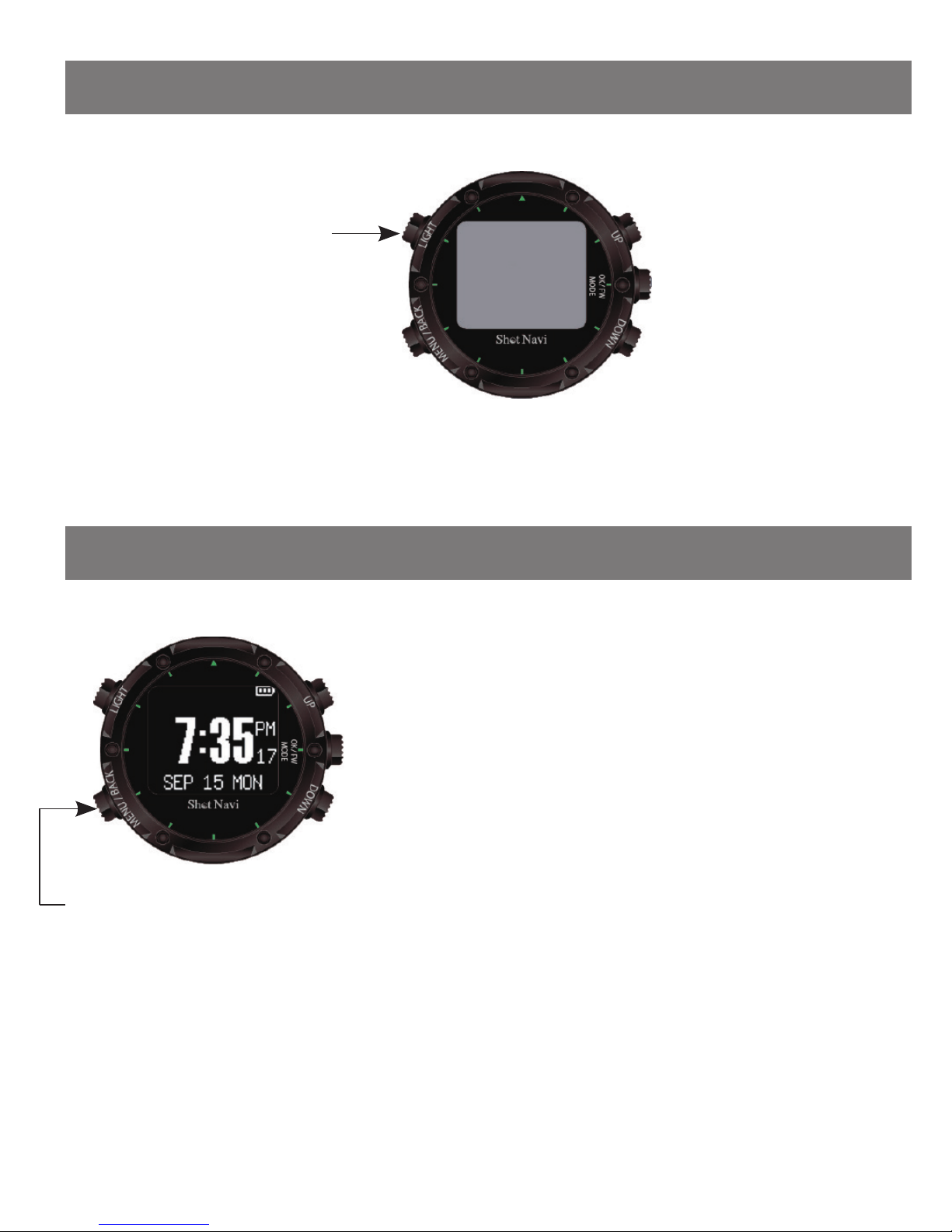
Turn On the Power
Time Mode
Using the GPS to calibrate the time is
optional.
Setting time from menu option for device is
optional (P20 ).
A long press to turn
on/o the power
Long press the on/
off button for 7
seconds, in which
2 beeping sounds
will ring during the
process.
(during time mode)
A short press to display
the menu
※ When using GPS to calibrate the time,
please operate the device at outdoor area of
open space. If environment is poor for GPS
to receive signal, it could take longer time or
possibly unable to calibrate the time.
Inhaltsverzeichnis
Andere Shot Navi GPS Handbücher


