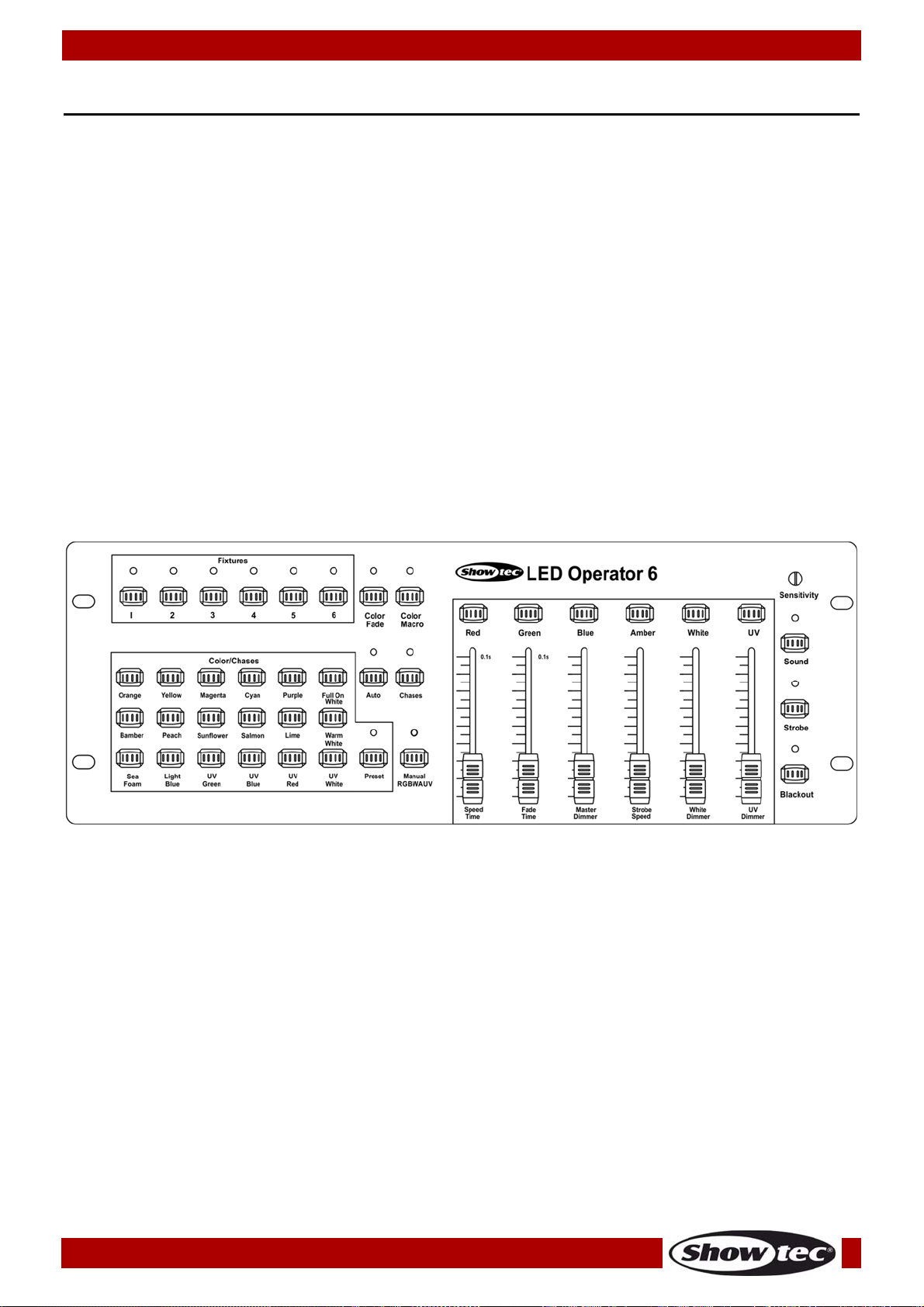
9
Ordercode: 50728
LED Operator 6
1. Color Presets
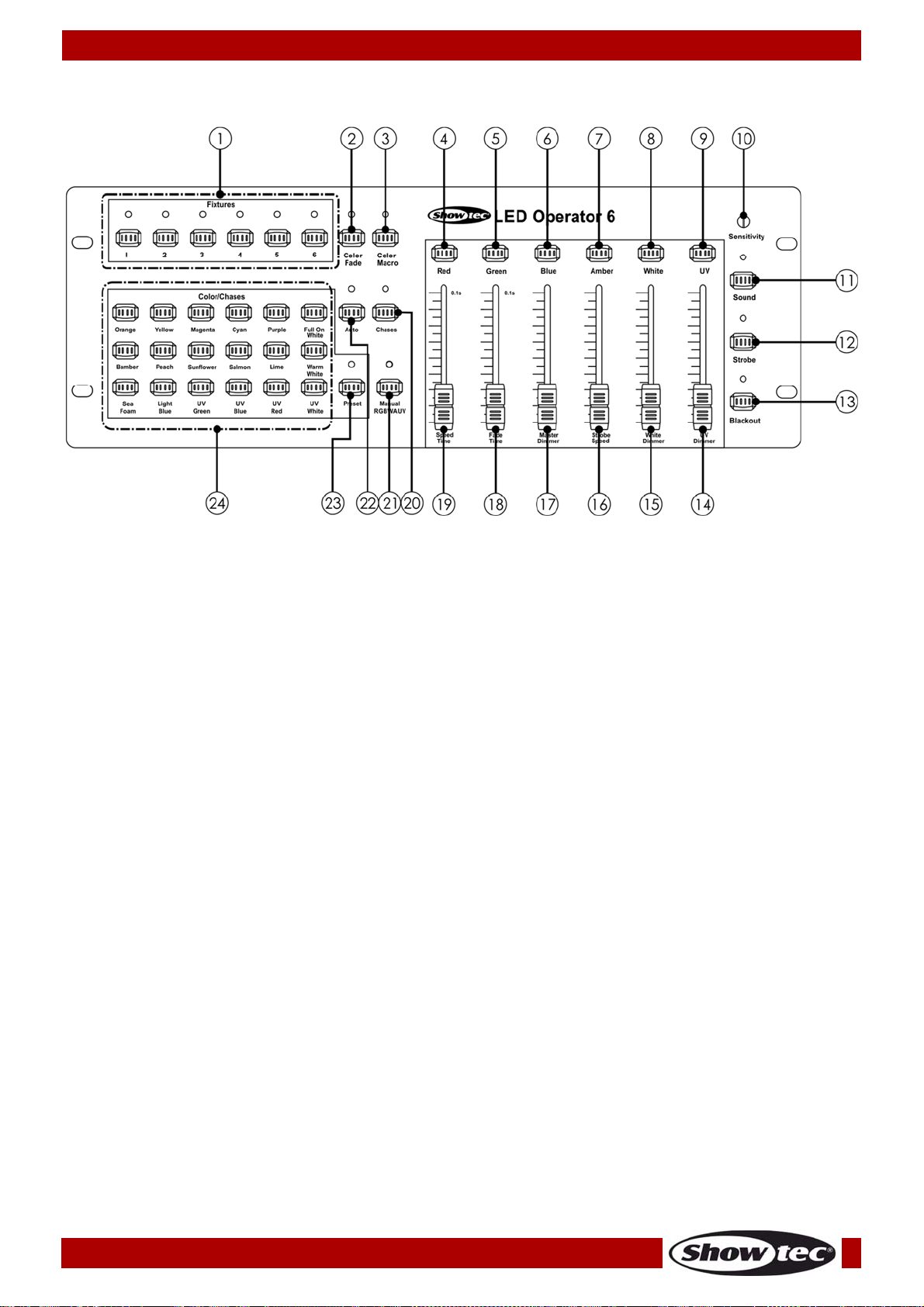
The 18 preset color buttons (24) (Orange, Yellow, Magenta, Cyan, Purple, Full on White, Amber, Peach,
Sunflower, Salmon, Lime, Warm White, Sea Foam, Light blue, UV Green, UV Blue, UV Red, UV White) can
be used to assign a color to each addressed fixture.
01) Select one or more fixtures by pressing the 6 Fixture buttons (01).
02) Press the Preset button (23), until the LED indicator lights up.
03) Slide the Fade Time fader (18) to set the fade time.
04) Slide the Master Dimmer fader (17) to set the desired light intensity.
05) Select one of the 18 Preset Color buttons (24).
06) Slide the Strobe Speed fader (16) to adjust the strobe intensity.
Sound-Active mode will not function in Preset mode.
Color Fixture 1 Fixture 2 Fixture 3 Fixture 4 Fixture 5 Fixture 6
Red CH 1,4 CH 7,10 CH 13,16 CH 19,22 CH 25,28 CH 31,34
Yellow CH 1,2 CH 7,8 CH 13,14 CH 19,20 CH 25,26 CH 31,32
Magenta CH1,3,4 CH 7,9,10,12 CH
13,15,16,18 CH
19,21,22,24 CH
25,27,28,30 CH
31,33,34,36
Cyan CH 2,3 CH 8,9 CH 14,15 CH 20,21 CH 26,27 CH 32,33
Purple CH 1,3,6 CH 7,9,12 CH 13,15,18 CH 19,21,24 CH 25,27,30 CH 31,33,36
Full on CH 1-6 CH 7-12 CH 13-18 CH 1, 9-24 CH 25-30 CH 31-36
Bamber CH 4,5 CH 10,11 CH 16,17 CH 22,23 CH 28,29 CH 34,35
Peach CH 1,4,5 CH 7,10,11 CH 13,16,17 CH 19,22,23 CH 25,28,29 CH 31,34,35
Sun
Flower CH 1,2,4 CH 7,8,10 CH 13,14,16 CH 19,20,22 CH 25,26,28 CH 31,32,34
Salmon CH 1,4,5 CH 7,10,11 CH 13,16,17 CH 19,22,23 CH 25,28,29 CH 31,34,35
Lime CH 2,4 CH 8,10 CH 14,16 CH 19,22 CH 26,28 CH 32,34
Warm
White CH 1,2,4,5 CH 7,8,10,11 CH
13,14,16,17 CH
19,20,22,23 CH
25,26,28,29 CH
31,32,34,35
Sea
Foam CH 2,5 CH 8,11 CH 14,17 CH 20,23 CH 26,29 CH 32,35
Light
Blue CH 2,3,6 CH 8,9,12 CH 14,15,18 CH 20,21,24 CH 26,27,30 CH 32,33,36
UV
Green CH 2,6 CH 8,12 CH 14,18 CH 20,24 CH 26,30 CH 32,36
UV Blue CH 3,6 CH 9,12 CH 15,18 CH 21,24 CH 27,30 CH 33,36
UV Red CH 1,6 CH 7,12 CH 13,18 CH 19,24 CH 25,30 CH 31,36
UV White CH 5,6 CH 11,12 CH 17,18 CH 23,24 CH 29,30 CH 35,36
2. Color Fade
This mode will fade all connected devices in unison, as the colors change.
01) Select one or more fixtures by pressing the 6 Fixture buttons (01).
02) Press the Color Fade button (02) until the LED indicator lights up.
03) Slide the Speed Time fader (19) to set the color change speed.
04) Slide the Fade Time fader (18) to set the transition time (fade time) between colors.
05) Slide the Master Dimmer fader (17) to set the desired light intensity.
06) Slide the Strobe Speed fader (16) to adjust the strobe intensity.
Sound-Active mode will function in Auto Fade mode.