
Siera IP Camera VSP 3001 Bedienungsanleitung

SIERA ELECTRONICS
SOUND & SECURITY
IP CAMERA
INSTRUCTION MANUAL
www.sieraelectronics.com
SIERA ELECTRONICS
SOUND & SECURITY
VSP 3001 IP CAMERA

Warning: Please read this manual carefully before
using.
Complete package should include the following items:
AC adaptor 1 pc
category 5 cross cable 1 pc
I/O terminal cable 1 pc
instruction 1 pcmanual
PREFACE

1Introduction 2
1.1 technology support
1.2 system requirements
2 Panel description 3
2.1 front view
2.2 rear view
3 Installation 4
3.1 cautions
3.2 step
4 Illustration for net connection 5
4.1 onnect with PC directly by category 5 cable
4.2 connect to INTRANET through HUB/Switch
4.3 connect to INTERNET through HUB/Switch/Router
5IP camera pages 7
5.1 home page 5.2 video page
5.3 setup page 5.4 network
5.5 time 5.6 administrator
5.7 general user 5.8 image settings
5.9 multi-camera screen 5.10 alarm trigger
5.11 transfer image in the timer mode
5.12 background recording function
6 Recording function 18
6.1 ActiveX control recording
6.2 FTP recording
6.3 playback function
7 I/O description 19
7.1 about I/O
7.2 example about I/O
8 Appendix 20
8.1 reset to factory default
8.2 troubleshooting
8.3 UFO specifications
1
CONTENTS

1.1 Features
Built-in web server, high quality JPEG image can be displayed through Internet
browser upon connection with Ethernet.
Motion JPEG can be up to 15 frames per second with high resolution 640x480.
Through Internet, pan/tilt heads and lens can be conveniently controlled to meet
with long-range monitoring.
Based on ASP/JAVA script, web server can provide max. platform compatibility.
Based on script CGI/ASP control, the server can offer convenience for the user to
integrate applications.
Output of E-mail,TFTP,I/O triggered with date, time and I/O input.
2 users security control, prevent unregistered users accessing the system.
Recording through IE.
Recording through FTP.
1 INTRODUCTION
1.2 System requirements
The requirements for PC through which the network camera pages can be browsed
are as below:
Remarks: the CPU is recommended to be Pentium II (300MHz) or greater,
which can prevent the hardware restriction.
Item
Operation
system
Network
protocol
Interface
Web browser
Windows 98
Windows 2000
Windows ME
Windows NT 4.0
Windows Xp
TCP/IP Intenet Agreement(HTTP, FTP, SMTP, TCP, UDP, ICMP IP)
10/100Mbps
Internet Explorer 5.0 or later
Netscape Navigator 4.7 or later
Description
2

3
2.1 Front view
Lens
Power indicator
2.2 Rear view
Ethernet indicator
I/O connector
DC in jack
2PANEL DESCRIPTION
Ethernet port

3 INSTALLATION
4
3.1 Cautions
Please read all safety instructions carefully before installation.
VSP-3001 IP camera should installed indoors generally. The prolonged exposure
under the sunlight or other strong lights shall accelerate the aging of the shell and
shorten the using term.
Please install the IP camera at safe site. The fall may cause the damage.
Do not place the network camera near water and assure the IP camera in a
dry circumstance with aeration.
Please use the proper input power source(input AC 220v and output DC12v/1A).
Don't leave the cables easy-touched to prevent the stumble.
Don't forcedly turn the pan/tilt head or lens to avoid the damage.
Don't touch the lens of the sensor. The fingerprint smudge shall cause the blur or no
image displayed and it also shall hurt the paint on the lens.
Please unplug the AC adaptor before cleaning the network camera. Please wipe wet
cloth only and don't use chemical and aerosol products.
Screen protection is recommended. The long-time display for same image of the
PC shall damage the monitor.
Please take the network camera to the qualified serviceman under the below cases:
A
If the IP camera does not work normally after the setup and debug by
operating instruction.
E If the network camera exhibits an irregular condition in performance.
3.2 Installation step
A Bracket installation: aim the screw of the bracket at the hole on the bottom and turn
clockwise.
B Ethernet connectiona: use category 5 cross cable and RJ-45 linker to connect the
network camera to the net. Use category 5 straight cable to connect with HUB/
Switch or use category 5 cross cable when connecting directly to the PC.
C Confirm the specification of the AC adaptor(input AC220v,output DC12v,1A) and
connect with the network camera.
D Check if the power source indicator is enlightened. If the net has been connected
correctly, the net indicator will be enlightened within 1 second.
when the power supply cord or plug is damaged.
B when liquid has been spilled into the IP camera.
C when the network camera has been dropped and damaged.
D

4 ILLUSTRATION FOR NET CONNECTION
5
He common connection programs for VSP-3001 network camera:
4.1 Connecting directly to PC(through category 5 cross cable)
For this program, the page browsing requires the basic configuration as below for
PC and IP camera:
AConnect correctly with the IP camera as above illustration.
B Set up the Ethernet card of the PC as auto or 10M half duplex mode.
C Set up the static IP address and the subnet masks. For example, IP address
is 192.168.1.6 and subnet masks is 255.255.255.0, and ignore other setup
of the net.
D enter the default IP address http://192.168.1.252 into the address field of the
net browser.
For this program, the page browsing requires the basic configuration as below for PC
and network camera:
A Connect correctly with the network camera as above illustration.
B Set up the static IP address and the subnet masks. For example, IP address is
192.168.1.6 and subnet masks is 255.255.255.0, and ignore other setup of the net.
C enter the default IP address http://192.168.1.252 into the address field of the net
browser.
Users
Link Builder / Switcher
Users
Record server
Reticle
Cross reticle
4.2 Connecting to Intranet through HUB/Switch

6
4.3 Connecting to Internet through HUB/Switch/Router
For this program, not only the basic setup of PC and IP camera but also the setup of
Port Forwarding function of Router is required, so the visit for network camera besides
Intranet is accessible. The Router should have the function of Network Address
Transition(NAT) to transit the global address to local address and assign the different
external port No. to each IP camera.
4.4 Access home page of IP camera
If the IP browser is Internet Explorer, the download for ActiveX is required. So,
reset the security level of the IE as low level(Tools menu > Internet Options > Security tab
> Custom level), and then enter HTTP://192.168.1.252 to the address field to open the
home page of VSP-3001 network camera. Click the Single Camera Screen Mode, and wait
a minute till the image appearing, then set the security level to its original level.(The PC
will save the program of ActiveX after reading it, so the security level can be set to its
original level.)
If the IP browser is Netscape Navigator, please enter directly HTTP://192.168.1.252
to address field to open the home page of VSP-3001 IP camera. Click the Single Camera
Screen Mode, wait a minute and then the image will appear.
INTERNET
Users
Users
Record server
Router
Reticle
Link Builder / Switcher

7
5 IP CAMERA PAGES
5.1 Home page
There are 3 options on home page:
1) image browsing (single camera screen/multi camera screen)
2) configuration
3) help
5.2 Video page
Click single camera screen mode, following dialogue box appears:
factory parameters
user name admin
password admin
In put network password
Please input users and password
Webserver: 192. 168. 0. 220
Domain: Camera
User(u)
Password(p)
Please store password into the list
Confirmation Cannel
8
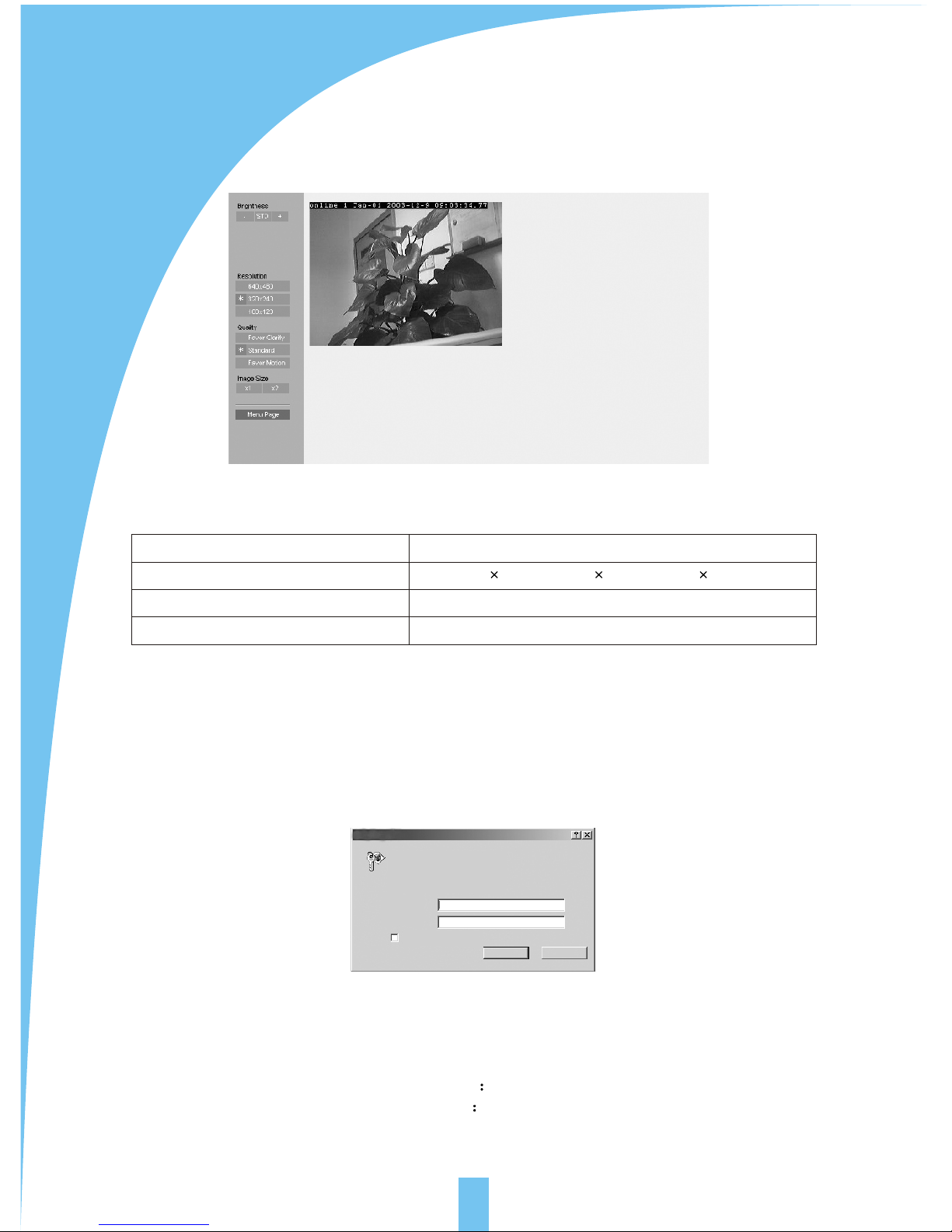
Enter user name and password of administrator and general user, then following
dialogue box appears:
click left operation bars to adjust the image directly:
Brightness 17 levels
Resolution 640 480 320 240 160 120
Quality favor clarity standard favor motion
Image size x1 x2
5.3Setup page
Click system configuration, following dialogue box will appear if the setup of
administrator or general user has been made:
In put network password
Please input users and password
Webserver: 192. 168. 0. 220
Domain: Camera
User(u)
Password(p)
Please store password into the list
Confirmation Cannel
factory parameters
user name admin
password admin
Dieses Handbuch passt für folgende Modelle
1
Inhaltsverzeichnis


