
SMARTMESH Smart Fankit Bedienungsanleitung

Smart Fankit User Guide
Important: Please read before using this product

About Smart Fan
It is a retrofit Wi-Fi enabled device that you operate within a given setting and
schedule even while you are away from home from your iOS or Android device.

1. Installing, Signup and Login SmartMesh Connect app
Install SmartMesh Connect app from Google Play or App Store (as shown Screen 1). Click on the
“SmartMesh Connect” by SmartMesh Technologies Pvt. Ltd, and proceed to install the app (as
shown in Screen 2 and Screen 3).
Screen 1 Screen 2 Screen 3
After Signing up or login you will be taken to the Main Dashboard as shown in Screen 4.
For new account, Devices, Rooms or Scenes page will be blank (as shown in Screen 5 and Screen
6 respectively)

Screen 4 Screen 5 Screen 6
2. Adding a New Device
There are two modes to onboard a device –Quick connect and Wi-Fi mode. The default is Quick
connect. Wi-Fi mode appears only when quick connect fails
(A) Quick Connect Mode
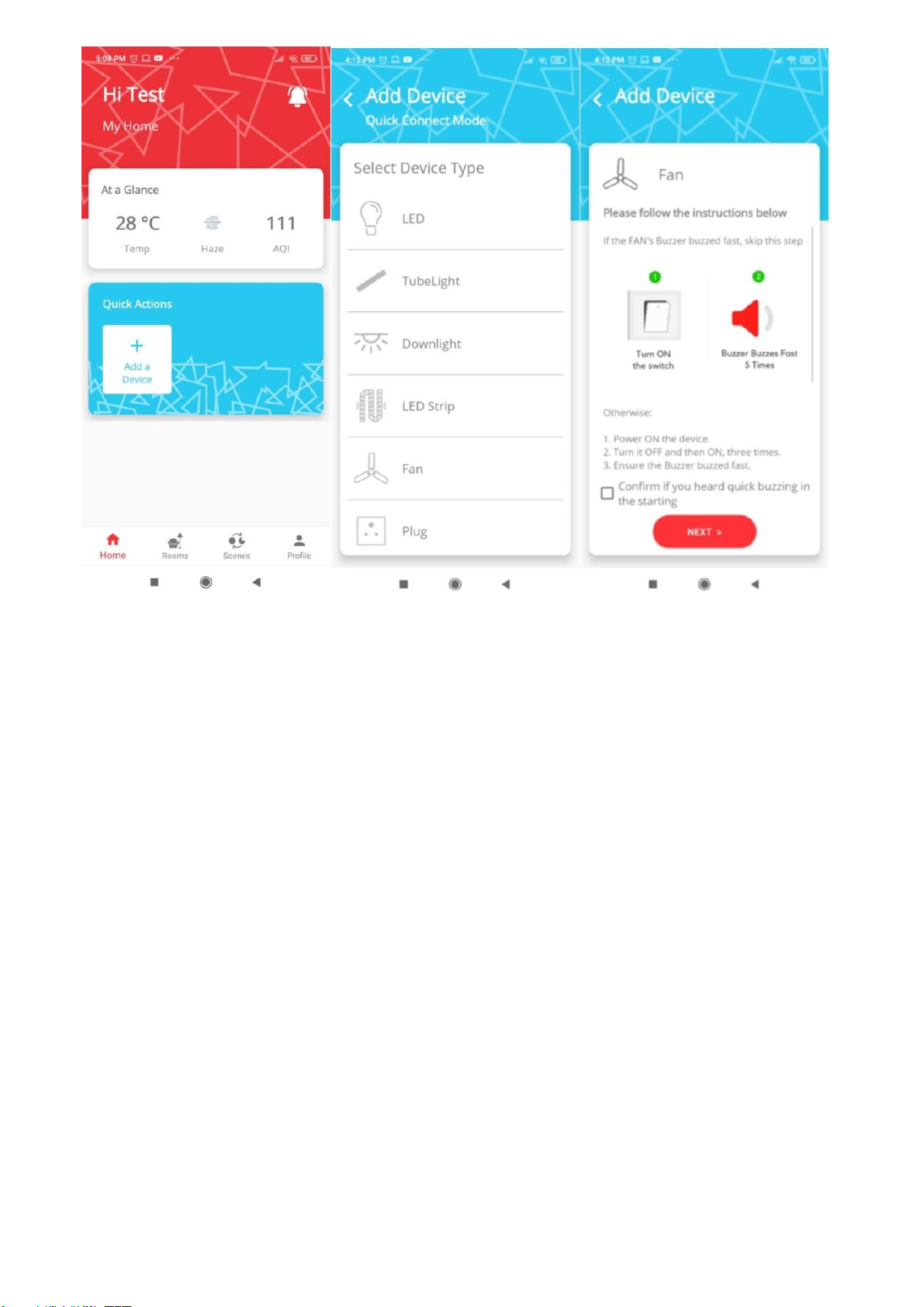
Power on the device, it will buzz rapidly for 5 times (in case of Fan) which means it is ready to
connect.
Click on Add a Device button on the Home screen (Screen 7) and you will be taken to Screen 8. On
Screen 8, click on the device that you want to connect.
On clicking the device, you will be directed to Screen 9. The default is Quick Connect.
Screen 7 Screen 8 Screen 9
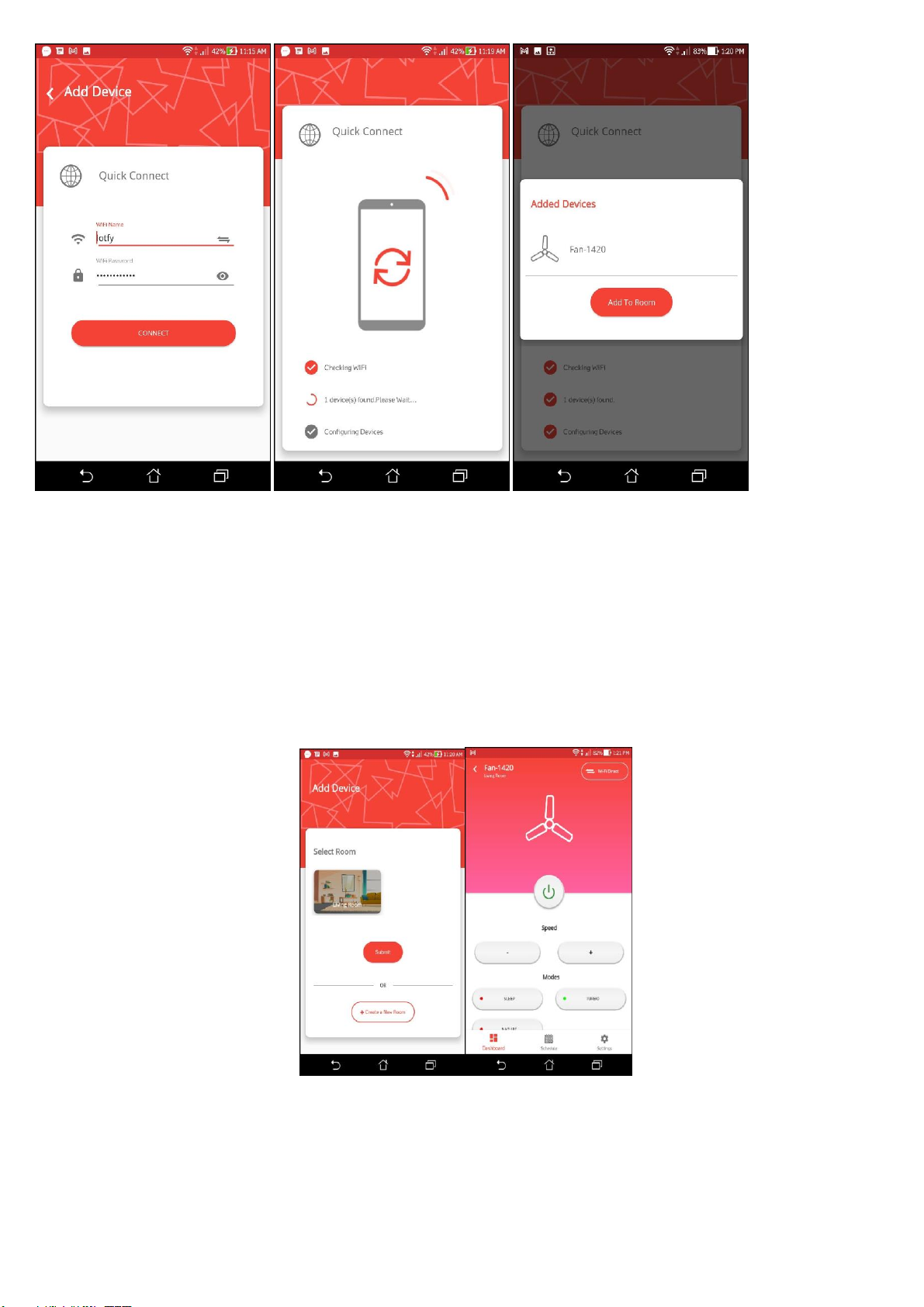
On clicking on next you will be directed to Screen 10 where you will be required to input Wi-Fi
information.
IMPORTANT NOTES:
a. Please make sure that your smart device is ON and nearby before clicking on the
Connect button.
b. Your Wi-Fi Router should be 2.4GHz.
c. Please enter correct SSID and Password for your Wi-Fi Router
d. You may be asked to accept permission to use Wi-Fi on Android. Please ACCEPT the
permission request.
Once you connect, it will scan for nearby devices (Screen 11). This could take upto 45 seconds,
please wait on that screen and do not allow the phone to go to sleep mode. You will be able to see
a list of all smart device(s) that have been added refer Screen 12.
Screen 10 Screen 11 Screen 12
Click on Add to Room which and you will be redirected to Screen 13. Select the room in which
you want to add these devices to and click on the submit button.
Once you are on Screen 14, you can control your smart device.
Screen 13 Screen 14

(B) Connect Via Wi-Fi mode
In Case Onboarding failed because of reason like Power failure, Internet disconnection or no device
found. You will get Pop-Up error showing Retry or Onboard via Wi-Fi.
Wi-Fi mode is applicable for adding single device at a time & appears only after Quick Connect
mode fails.
It is advisable to click on ‘Retry’ and try again with ‘Quick Connect’ mode.
When encountered multiple failure through ‘Quick Connect’, go for ‘Onboard via Wi-Fi’
mode.
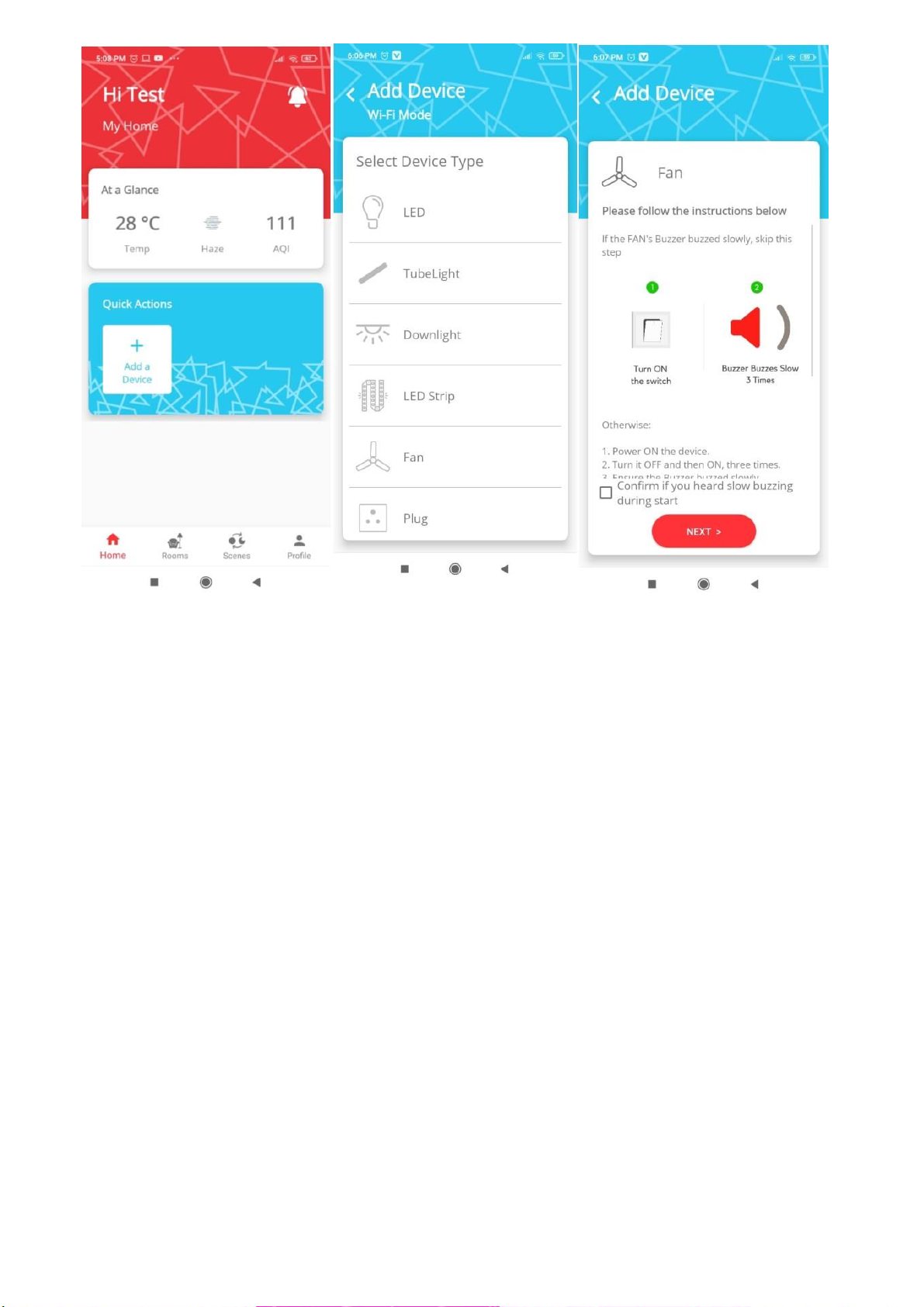
Click on ‘Onboard via Wi-Fi’ button and navigate to Screen 15. Toggle (ON/OFF) the main switch
supply of the device 3 times to change the setting of the device to Wi-Fi mode.
Power on the device, it will buzz slowly (in case of fan) which means it is ready to connect in
Wi-Fi mode.
On clicking add devices on Screen 15, you will be directed to Screen 16, now click on device
category. After that click on Wi-Fi mode as shown on Screen 17.
Screen 15 Screen 16 Screen 17
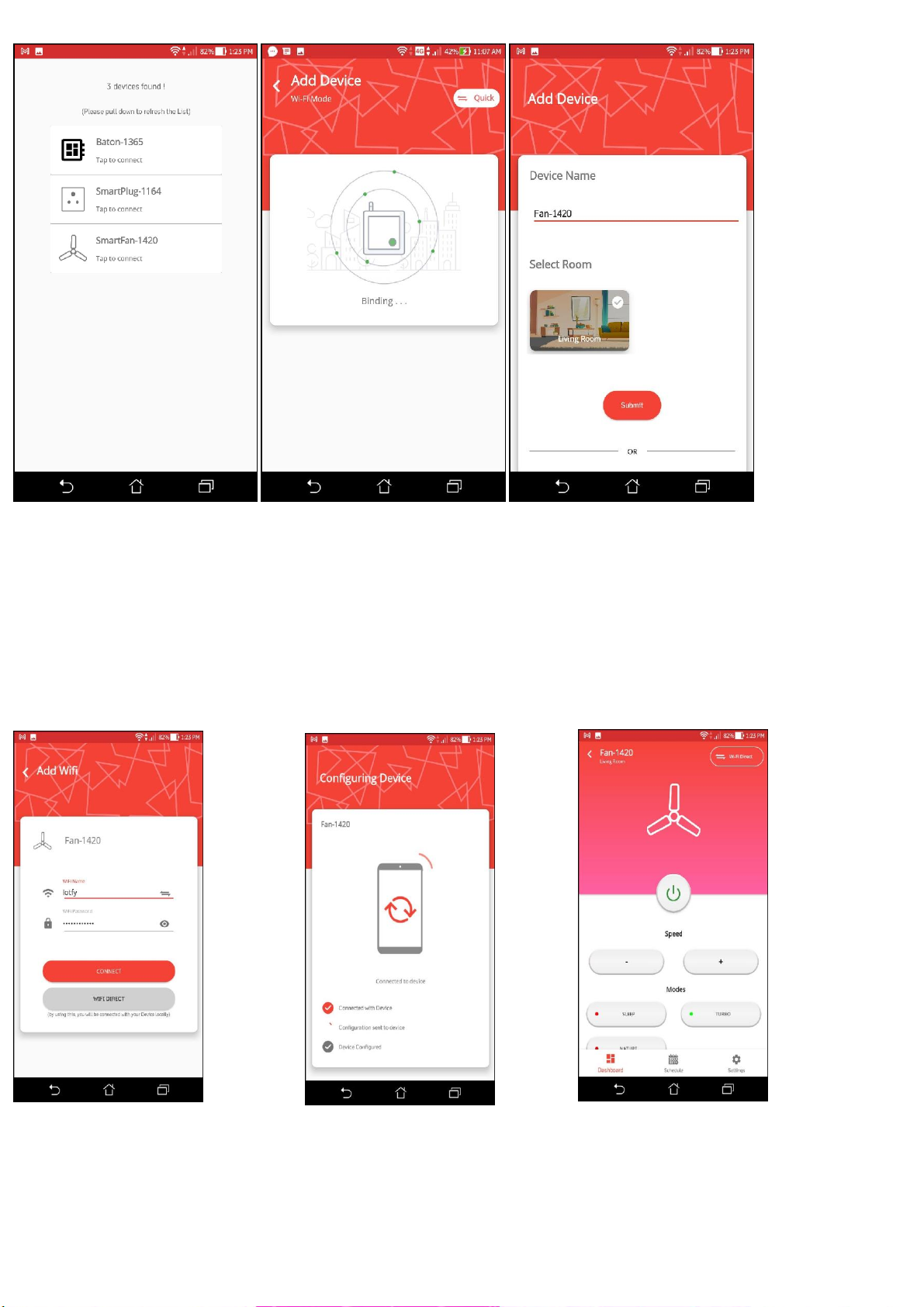
The app will scan for nearby Smart Devices on Screen 18. Once the scanning is complete, you will
be presented with a list of nearby Smart Devices (Screen 18). Tap on the smart device that you want
to connect with and you will be taken to Screen 19.
IMPORTANT NOTE: Once you are on Screen 19, please don’t close the App in between and
complete the process in one go.
Once the process is complete on Screen 19, you will be taken to Screen 20, here you can select the
room where you want to put the smart device, and also edit the default name of the device.
Screen 18 Screen 19 Screen 20
Click submit and you will be taken to Screen 21. Input the SSID and password of your Wi-Fi and
click on connect button. On clicking connect button, you will be moved to Screen 22 where the app
will try to complete the configuration and connect of Smart FAN.
On successful completion, you will be moved to Device dashboard (Screen 23). Once you are on
Screen 23, you can control your Smart FAN.
Screen 21 Screen 22 Screen 23
How to connect Smart Devices to Amazon Alexa
After Login and onboarding the device with SmartMesh connect app, you can connect all smart

devices with Amazon Alexa. Modify device name in “SmartMesh Connect” app so that Alexa can
easily recognize such as: Bedroom Light, Dining Room Light, Kids Lights, etc.
1. Launch Alexa app and sign in your Alexa account and make sure you have at least one
Alexa voice-controlled devices installed like Echo, Echo-dot, etc.
2. In the lower down corner of home page, click “More” button to show app menu. Then click
on “Skills & Games”.
3. Click on Magnifier/Search icon on the top and type “SmartMesh Connect” in the search and
click on search button. Select SmartMesh Skills by SmartMesh Technologies Pvt. Ltd.
4. Enable SmartMesh skill by sign in your SmartMesh Connect account to complete account
linking.
5. After linked account successfully, you can ask Alexa to discover devices. Alexa will show
all the discovered devices after 20 seconds.
Inhaltsverzeichnis


