
SmarTrunk Systems ST-3118D Bedienungsanleitung

UHF FM DIGITAL TRANSCEIVER
ST-3118D(450Mhz ~ 520Mhz)
ST-3118C(400Mhz ~ 470Mhz)
VHF FM DIGITAL TRANSCEIVER
ST-3118V(136Mhz ~ 174Mhz)
SmarTrunk Systems, INC.
ST-3118UM R1.1 Printed in Malaysia

Page 2
FEDERAL COMMUNICATIONS COMMISSION
INTERFERENCE STATEMENT
This equipment has been tested and found to comply
with the limits for a Class B digital device, pursuant to
Part 15 of the FCC Rules. These limits are designed to
provide reasonable protection against harmful
interference in a residential installation.
This equipment generates, uses and can radiate radio
frequency energy and, if not installed and used in
accordance with the instructions, may cause harmful
interference to radio communications. However, there is
no guarantee that interference will not occur in a
particular installation. If this equipment does cause
harmful interference to radio or television reception,
which can be determined by turning the equipment off
and on, the user is encouraged to try to correct the
interference by one or more of the following measures:
--Reorient or relocate the receiving antenna.
--Increase the separation between the equipment and
receiver.
--Connect the equipment into an outlet on a circuit
different from that to which the receiver is connected.
--Consult the dealer or an experienced radio/TV
technician for help.
FCC NOTICE
This device complies with Part 15 of the FCC Rules.
Operation is subject to the following two conditions:
(1) This device may not cause harmful interference,
(2) This device must accept any interference received,
including interference that may cause undesired
operation.

Page 3
THANK YOU!
We are grateful you chose SmarTrunk for your land mobile radio
applications. We believe this powerful, flexible and easy-to-use
transceiver will provide dependable and reliable communications to
keep personnel operating at peak efficiency.
SmarTrunk transceivers incorporate the latest in advanced SDR
technology. As a result, we feel strongly that you will be pleased with
the quality and features of this product.
NOTICES TO THE USER
GOVERNMENT LAW PROHIBITS THE OPERATION OF
UNLICENSED RADIO TRANSMITTERS WITHIN THE
TERRITORIES UNDER GOVERNMENT CONTROL.
ILLEGAL OPERATION IS PUNISHABLE BY FINE OR
IMPRISONMENT OR BOTH.
REFER SERVICE TO QUALIFIED TECHNICIANS ONLY.
SAFETY: It is important that the operator is aware of and understands
hazards common to the operation of any transceiver.
WARNING:
EXPLOSIVE ATMOSPHERES (GASES, DUST, FUMES, etc.)
Turn off your transceiver while taking on fuel, or while parked in
gasoline service stations.

Page 4
PRECAUTIONS
Observe the following precautions to prevent fire, personal
injury, and transceiver damage.
- Do not modify this transceiver for any reason.
- Do not expose the transceiver to long periods of direct
sunlight, nor place it close to heating appliances.
- Do not place the transceiver in excessively dusty, humid,
and/or wet areas, or on unstable surfaces.
- If an abnormal odor or smoke is detected coming from the
transceiver, switch OFF the power immediately and remove
the optional battery pack from the transceiver. Contact
your SmarTrunk dealer.

Page 5
Table of Contents
1. UNPACKING AND CHECKING EQUIPMENT.................................... 6
2. GETTING ACQUAINTED ...................................................................... 7
3. MAKING A CALL................................................................................... 10
4. DISPLAY................................................................................................ 11
4.1. ICONS.............................................................................................. 12
5. LED INDICATOR .................................................................................. 14
6. VOLUME SELECTOR.......................................................................... 14
7. PROGRAMMABLE BUTTONS FUNCTIONS.................................... 15
8. MENU..................................................................................................... 18
8.1. MENU RADIO.............................................................................. 20
8.2. MENU DISPLAY ......................................................................... 22
8.3. MENU MESSAGES.................................................................... 23
8.4. MENU ANNOUNCEMENTS...................................................... 25
8.5. MENU GPS.................................................................................. 26
8.6. MENU E-MAIL............................................................................. 28
8.7. MENU CONTACTS .................................................................... 30
8.8. MENU INFO................................................................................. 31
9. APPENDIX I: TYPING.......................................................................... 32
10. APPENDIX II : SELECTIVE CALLS ............................................. 34
11. APPENDIX III: CONTACTS........................................................... 36
12. APPENDIX IV: DEALER PROGRAMMED FUNCTIONS .......... 37

Page 6
1. UNPACKING AND CHECKING EQUIPMENT
Note: The following unpacking instructions are for use by your
SmarTrunk dealer, an authorized SmarTrunk service facility, or the
factory.
Carefully unpack the transceiver. We recommend that you identify the
items listed in the following table before discarding the packing
material. If any items are missing or have been damaged during
shipment, file a claim with the carrier immediately.
Supplied Accessories
Item
Part number
Quantity
Smartrunk ST-3118 Transceiver
ST-3118X
1
DC cord for ST-3118
ST-3118DC
1
Microphone
ST-3118NM
1
Screw set
ST-3118SS
1
Mounting bracket
ST-3118BR
1
Instruction manual
ST-3118UM
1
Page 7
2. GETTING ACQUAINTED
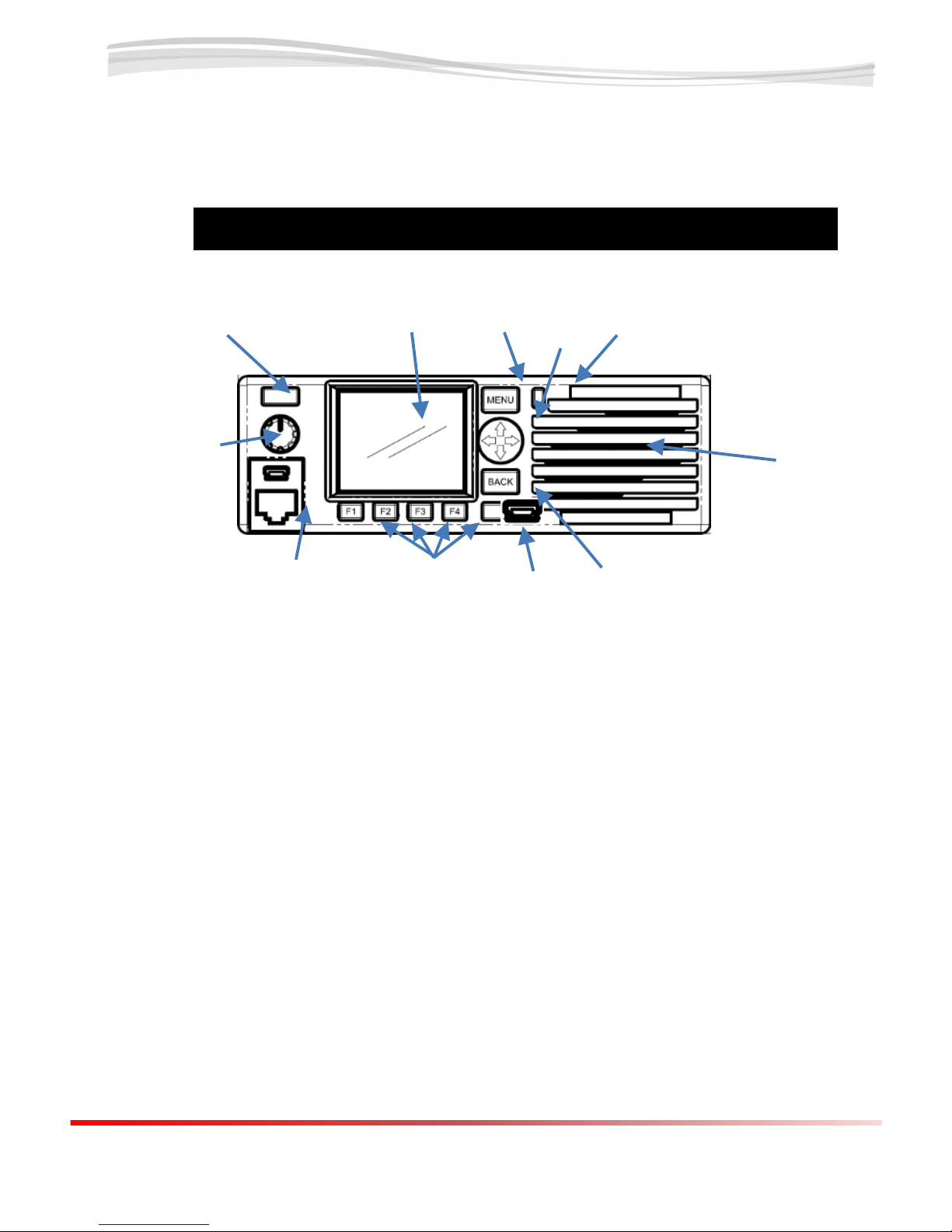
1 –Power switch:
Push to turn the radio on and push&hold to switch it off.
2 –TFT display
It shows relevant radio status, messages and general information.
3 –Menu/programmable function key
Press to activate its programmable function. The function assigned to
this key is designed by your dealer
4 –Selector switch
Use this switch to navigate through the radio menu or text edition.
7
8
9
10
1
2
3
4
5
6
11

Page 8
5 –Status indicator
Lights red during transmission
Green while receiving a call
Blink on orange when any unread incoming message
6 –Speaker
7 –Back control/programmable function key
Default step back on menu navigation.
Press to activate its programmable function. The function assigned to
this key is designed by your dealer
8 –USB connector
9 –Programmable function keys
Press to activate its programmable function. The function assigned to
this key is designed by your dealer
10 - Microphone connector
11 –Volume control
12
13
14
15

Page 9
12 - External Speaker
External speaker, 8 Ohms 5W.
13 - DC cord
Connect to 12.8Vdc. Red to positive (+), black to negative (-). Please
consider the max current is 15A.
14 –AUX connector
Expansion port for telemetry and other special functions.
15 –Antenna connector
No one of the speaker pins is ground. If you makes a
shortcut of any of these pins to Ground (chassis), then you
will create a permanent damage to the radio.
Reverse polarity will damage the radio. Please double
check the connection before apply DC.
Never use the radio without the appropriate antenna
connected to this terminal.

Page 10
3. MAKING A CALL
To place a call to other party or group, please follow the steps:
Press the PTT switch in the microphone and speak in your
normal speaking voice.
For best sound quality at the receiving station, hold the
microphone approximately 1.5 inches (3-4 cm) from your
mouth.
Release the PTT switch to receive.
Adjust the volume level as per your desire when receiving.
If enabled by your radio programmer or dealer, your radio
may have a time out timer which can set a limit to the max
length of your transmission without releasing the PTT. If it
happens, you will receive a warning beep and message on
the display.
Andere Handbücher für ST-3118D
1
Dieses Handbuch passt für folgende Modelle
2
Inhaltsverzeichnis
Andere SmarTrunk Systems Transceiver Handbücher


