
SMS Audio SMS-WS-BLK Bedienungsanleitung
SMS-WS-BLK
SMS-WS-WHT
OWNER’S MANUAL

You have just purchased the ultimate in personal
audio performance, comfort, style and luxury.
Please take a few moments to familiarize yourself
with the controls and operation of your new headphones.
Also, please take note of any warning notices throughout
this manual. Listening to any audio source at loud volumes
can cause permanent hearing damage.
Safety Tips
Inside the Box
A Message From 50
About Lossless Audio
At a Glance
Quick Start Guide
Detailed User Guide
Charging the Battery
Volume Control
THUMPP Enhanced Bass™
Track Control
Using SYNC
Airplane Mode
Using the Supplied Audio Cable
FAQ
FCC Compliance Statements
Warranty Information
2
3
4
6
8
10
12
13
13
14
15
16
16
18
20
22
...........................................
........................................
...................................
.................................
...........................................
.....................................
....................................
.........................................
...............................
..........................................
...........................................
.........................................
..........................
..................................................
.........................
................................
2 3
WARNING: Listening to music at very high levels for extended periods of
time can damage one’s hearing. Adjust volume before inserting the ear pieces
into your ears to protect them against sudden bursts of sound. This device
complies with part 15 of the FCC Rules. Operation is subject to the following
two conditions: (1) This device may not cause harmful interference, and (2) this
device must accept any interference received, including interference that may
cause undesired operation.
ATTENTION: This equipment had been tested and found to comply with the
limits for a Class B digital device, pursuant to Part 15 of the FCC Rules.
These limits are designed to provide reasonable protection against harmful
interference in a residential installation. This equipment generates, uses, and
can radiate radio frequency energy and, if not installed and used in accordance
with the instructions, may cause harmful interference to radio communications.
ATTENTION: Changes or modifications not expressly approved by SMS
Audio™ could void the user’s authority to operate the equipment.
1] SYNC by 50™wireless headphones
2] 3.5mm wireless transmitter
3] Hard-shell carry case
4] 3.5mm audio cable w/ built-in microphone
5] Micro USB charging cable
6] USB to AC adapter
7] Airplane plug adapter
8] Soft touch cleaning cloth
9] Owner’s manual
10] Product brochure
Safety Tips Package Contents

If you’re reading this, you must have excellent taste in electronics – so
I don’t need to say too much... but here’s a quick note about why I
decided to create my own line of luxury headphones by SMS Audio™:
First: Sound quality. I like my music to sound the same at home, around the
city or on the road as it does in the studio.
Second: Style. Comfort and luxury are important to me from head to toe, and
my accessories should accent my style, not detract from it.
Third: Toughness. I like the things I buy to last a long time, and my
headphones get heavy usage. That’s why SMS headphones are made tough,
rugged and flexible.
I hope you enjoy them as much as I do - I have a pair with me at all times
so I never have to be far away from the music I enjoy.
54
P.S. Tweet up and let me know what you think: @SMSby50 and @50cent.
A Message from 50
www.SMSby50.com

76
KLEER®Wireless Technology delivers high-quality
wireless audio through a robust, low-power-consuming
2.4GHz radio signal - ideal for listening to portable devices.
KLEER’s patented wireless architecture provides lossless
CD-quality digital stereo audio, while also allowing for
extended battery life over comparable wireless technologies.
Always look for the LosslessSound badge on any wireless audio
products to ensure that you are purchasing the highest quality wireless
products available for your listening experience.
Limitations of 2.4GHz Wireless Devices
2.4GHz radio waves are primarily utilized for short-distance applications.
As such, devices using this technology need a “line of sight” for proper
and predictable operation.
Obstacles, such as brick/concrete walls or trees may block the signal and
can cause loss of wireless connectivity, even if briefly.
In order to achieve maximum results, please make sure that the
transmitting device and the headphones (receiver) have the best
possible line of sight with each other.
If you use your wireless headphones while moving, the wireless
connection may change rapidly and may create interference, static or
loss of signal.
If possible, place the transmitter (i.e. MP3 player) in a pocket, bag or
armband with a direct line of sight and remain within 50’ of the unit.
Wireless Technology Facts & Limitations

98
RIGHT EARCUP,
SIDE Volume Up
Next Track (FF)*
Volume Down
Previous Track (REV)*
Refer to this guide for button descriptions
and locations of other features mentioned
throughout the manual.
Button Locations & Descriptions
LEFT EARCUP,
SIDE
On / Off / Mute
Headband
Adjustment
Slider
Power On Indicator
(Blue LED)
SYNC / Bass Boost
Press once for bass boost,
press and hold to enter
SYNC mode.
Press once to mute
or unmute, press and
hold to turn on or off.
*Track REV and FF only work with USB or 30-pin transmitters.
LEFT EARCUP,
BOTTOM
3.5mm
Audio Jack
Micro USB Port
AUDIO CABLE
Microphone
Call Answer /
Audio Control button
DONGLE
SYNC button
On / Off Micro USB
Port
OFF
ON
10 11
For Wireless Use
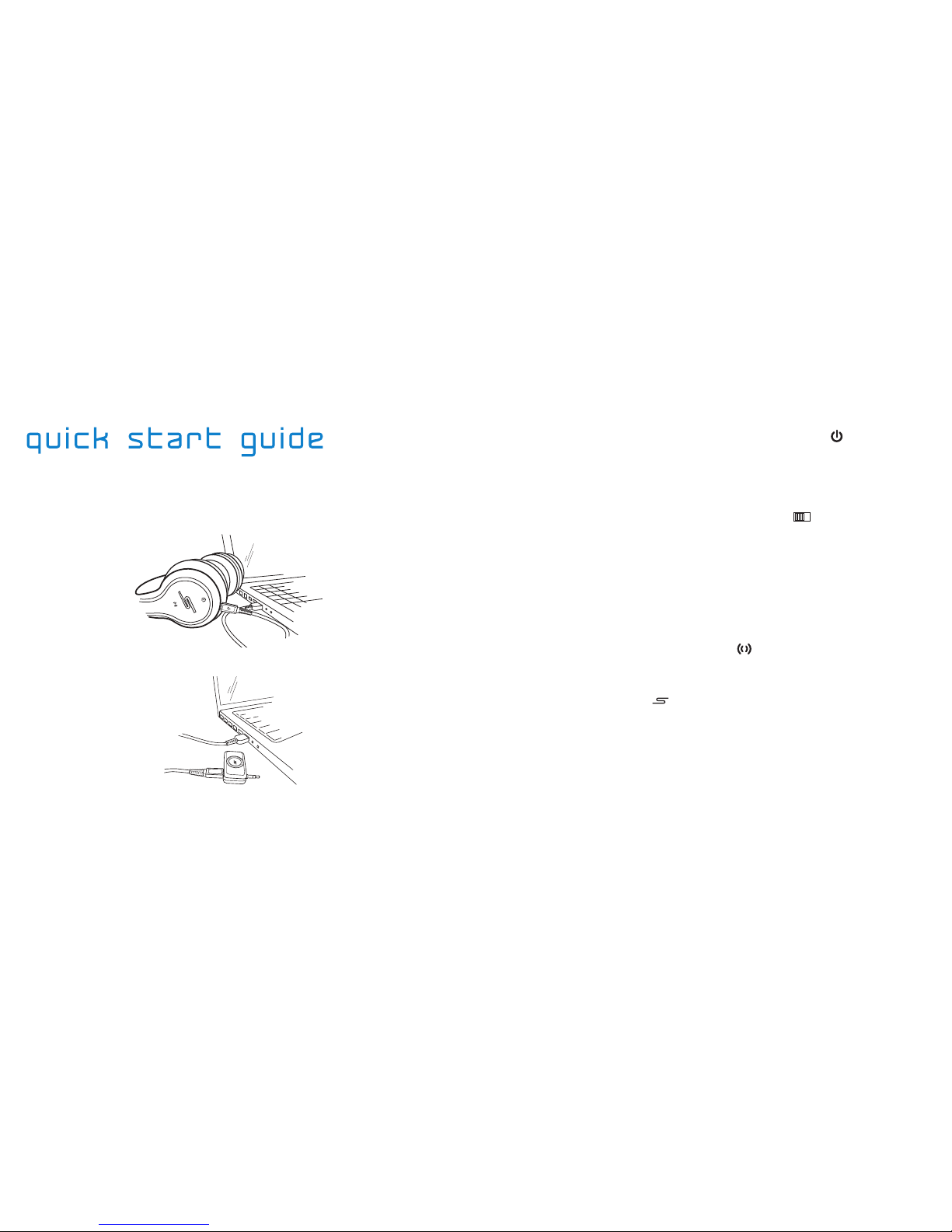
Connect the USB cable to charge* the headphone’s internal battery:
1]
Connect the USB cable to charge* the 3.5mm wireless dongle:
2]
*Both the headphones and the wireless dongle have a blue LED that will illuminate while charging;
charging time for the headphones is about 2 hours, while the dongle takes about 1.5 hours to charge.
On both the headphones and the dongle, the LED will turn off when the unit is fully charged.
Turn on the headphones using the On / Off / Mute ( ) button
located on the left ear of the device.
3]
• If the headphones are not yet associated with a transmitter, or if
they are searching for a transmitter, the LED will blink every second.
Turn on the 3.5mm dongle using the On / Off ( ) switch.
4]
• If the dongle is already associated with the headphones, the LED
will blink every 5-6 seconds on both devices.
• To perform the association (only required once), continue to step 5.
Plug the dongle into any audio source with a 3.5mm audio jack and
begin playing music. (NOTE: make sure the volume is not too high!)
5]
Hold down the SYNC / Bass Boost ( ) button on the left ear for 3
seconds; the blue LED will begin to blink rapidly.
6]
Hold down the SYNC ( ) button on the dongle for 3 seconds; again,
the blue LED will begin blinking rapidly.
7]
• After a few seconds, you may hear a short burst of music - the
association process is not finished yet as the transmitter is searching
for other KLEER-based wireless devices.
• After about 20 seconds, the two devices are now associated with
one another and the blue LEDs will flash in unison at a slower speed.
Getting Started Getting Started

1312
Use the supplied USB cable to charge the internal battery of the
wireless headphones and the 3.5mm dongle, as shown on p. 10.
Your headphones come with a Micro USB cable that can be connected
to a computer or other device made for USB charging. Simply plug the
Micro USB cable into the port on the underside of the left earcup.
The indicator light will illuminate a solid blue while charging; once the
headphones are fully charged, the light will turn off automatically.
• On an empty battery, charging time for the headphones is about 2 hours, while for the dongle
charging time is about 1.5 hours.
• You can expect to receive about 17 hours of wireless music playability on a full charge.
• If you deplete the batteries while you’re out, simply plug in the SMS Audio cable (included) and
continue enjoying your music on the go.
NOTES:
Volume control can be performed by using either the volume buttons
located on the right earcup of the headphones or directly at the source
to which the 3.5mm dongle is connected.
• To mute the audio, simply press the On / Off / Mute ( ) button once.
• To unmute, press the On / Off / Mute ( ) again to resume the original
volume level of the audio source.
Your headphones are equipped with THUMPP Enhanced Bass™, a
computer-controlled, power-allocating technology that enhances the
bass frequencies in any song for body-shaking, deep, rumbling bass.
• To activate THUMPP Enhanced Bass™, simply press the SYNC / Bass
Boost ( ) button once at any time while listening to music.
• To turn it off, press the SYNC / Bass Boost ( ) button again and the
bass will return to normal equalized levels.
Detailed User Guide Detailed User Guide
There are two inputs on your wireless
headphones. The flat input on the left earcup
is a Micro USB for charging the device.
The circle-shaped input is a 3.5mm jack for
connecting the included audio/mic cable.
LEFT EARCUP
3.5mm Audio Micro USB

14 15
You can connect up to 4 different pairs of SYNC by 50™wireless
headphones to the same audio source - perfect for gaming, movies or
music-sharing sessions when you don’t want to disturb the neighbors.
Place the 1st additional headphone unit into Association Mode by
holding down the SYNC / Bass Boost ( ) button for 3 seconds; the
blue LED will begin to blink rapidly.
1]
• Repeat this step for up to 3 additional headphone units before
continuing the process.
To associate additional units:
Put the 3.5mm wireless transmitter dongle into Association Mode by
holding down the SYNC ( ) button for at least 3 seconds; the blue
LED will being to blink rapidly.
2]
• After a few seconds, you may hear a short burst of music - the
association process is not finished yet as the transmitter is syncing
with each additional pair of headphones.
• After about 20 seconds, all of the additional headphones are now
associated with the same transmitter dongle and the blue LEDs will
flash in unison at a slower speed.
Track control can be performed by using either the onboard control
panel or directly at the audio source.
• All track and volume control buttons are located on the right earcup.
Detailed User Guide Detailed User Guide
RIGHT EARCUP
Volume Up
Previous Track (REV)*
Volume Down
Next Track (FF)*
*Track REV and FF only work with USB or 30-pin transmitters.
16 17Detailed User Guide Detailed User Guide
Listening to Music
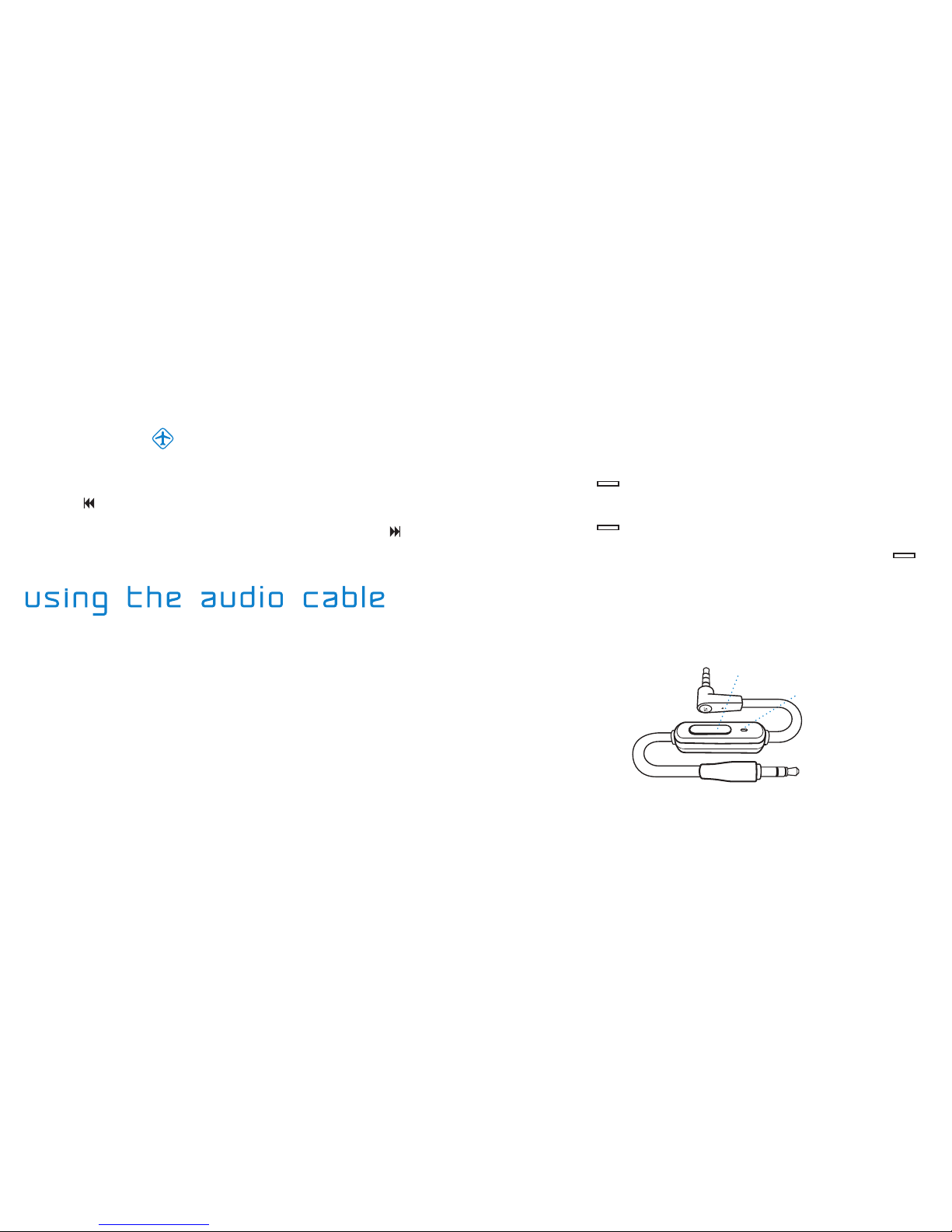
Plug the straight end of the provided audio/mic cable into the 3.5mm
jack on the left earcup of your headphones, and the 90º angled end
into your desired audio output device.
1]
Adjust the volume on the audio device until you reach the
desired volume level, keeping in mind that listening to music too
loudly for extended periods can damage your hearing.
2]
Adjust the headband extensions for proper fit until the earcups sit
comfortably around your ears.
3]
*The audio/mic cable is compatible with with iPod®, iPhone™ and iPad™.
Audio Controls*
To skip tracks, simply press the CALL ANSWER / AUDIO
CONTROL ( ) button on the audio/mic cable twice quickly.
•
To answer an incoming phone call, press the CALL ANSWER ( )
button on the audio/mic cable once; press it again to hang up.
•
Music playback will automatically pause in the event of an incoming call; if
you receive the call, music will remain on pause until you hang up, and then
automatically resume playback when the call ends.
Airplane Mode
Airplane Mode disables the lit “S” display on your headphones.
To enable Airplane Mode, simply press the PREVIOUS TRACK /
REV ( ) button and hold for 3 seconds.
1]
To disable Airplane Mode, press the NEXT TRACK / FF ( ) button
and hold for 3 seconds.
2]
To go back one track, quickly press the CALL ANSWER / AUDIO
CONTROL ( ) button on the audio/mic cable three times.
•
AUDIO CABLE
Microphone
Call Answer /
Audio Control button
Dieses Handbuch passt für folgende Modelle
1
Inhaltsverzeichnis
Andere SMS Audio Kopfhörer Handbücher

SMS Audio
SMS Audio SMS-EBBT-SPRT Series Bedienungsanleitung

SMS Audio
SMS Audio KidzSafe my Design KS-2013-GDIY-ROH Bedienungsanleitung

SMS Audio
SMS Audio SMS-BTWS-SPRT SERIES Bedienungsanleitung

SMS Audio
SMS Audio SMS-INWD-SPRT SERIES Bedienungsanleitung

SMS Audio
SMS Audio SMS-BTWS-SPRT SERIES Bedienungsanleitung

SMS Audio
SMS Audio SMS-EBBT-SPRT Series Bedienungsanleitung

SMS Audio
SMS Audio EB-BIOSPORT SERIES Bedienungsanleitung

SMS Audio
SMS Audio Rebel Alliance Bedienungsanleitung

SMS Audio
SMS Audio SMS-WD-BLK Bedienungsanleitung

SMS Audio
SMS Audio SMS-ONWD-SPRT SERIES Bedienungsanleitung


