Solwise IR-C1212HW (POE) Bedienungsanleitung

C1212HW(POE) User’s Manual
1
OutdoorH.264IR-C1212HW(POE)
StandAlone
IPCamera
MANUAL
Firmware 2.2.0.5 Version
Revision Date : 2009.06.01

C1212HW(POE) User’s Manual
2
WARNING: If the actions indicated in a “WARNING” are not complied with, injury
or major equipment damage could result. A warning statement typically
describes the hazard, its possible effect, and the measures that must be taken
to reduce the hazard.
CAUTION: If the action specified in the “CAUTION” is not complied with, damage
to your equipment could result.
NOTE: A “NOTE” provides supplementary information, emphasizes a point or procedure, or
gives a tip for easier operation.
CAUTION:
Any changes or modifications not expressly approved by the party responsible for
compliance could void the user’s authority to operate the equipment.
NOTE: This equipment has been tested and found to comply with the limits for a class digital device, pursuant
to part 15 of the FCC Rules. These limits are designed to provide reasonable protection against harmful
interference when the equipment is operated in a commercial environment. This equipment generates, uses,
and can radiate radio frequency energy and, if not installed and used in accordance with the instruction manual,
may cause harmful interference to radio communications. Operation of this equipment in a residential area is
likely to cause harmful interference in which case the user will be required to correct the interference at his own
expense.
Disposal of Old Electrical & Electronic Equipment
(Applicable in the European Union and other European countries with separate
collection systems)
This symbol on the product or on its packaging indicates that this product shall not be treated as
household waste. Instead it shall be handed over to the applicable collection point for the recycling of
electrical and electronic equipment. By ensuring this product is disposed of correctly, you will help prevent
potential negative consequences for the environment and human health, which could otherwise be caused
by inappropriate waste handling of this product. The recycling of materials will help to conserve natural
resources. For more detailed information about recycling of this product, please contact your local city
office, your household waste disposal service or the shop where you purchased the product.

C1212HW(POE) User’s Manual
3
• Make sure not to connect the power before you install the camera.
• There is great chance of damaging your camera if the camera is opened by an unqualified
service engineer or installer.
• Avoid using the camera under direct sunlight (tropical area, Middle East), or near to any
source of heat.
• Don’t merge the camera under water; always put silicon gel on antenna connector after
installation to avoid corrosion and reducing the wireless link capability.
• Avoid exposing the camera to violent movement or vibration.
• Always use the camera in a well ventilated location to prevent overheating.
• Connect proper “Relay” between load and camera, to protect camera, don’t connect load
greater than 0.5A.
• Please use power adapter equipped with the camera, foreign power adapter with wrong
voltage may permanent damage your camera.
• Wireless link distance is depend on both camera (C1212HW) and Access Point,
unbalanced transmit power won’t help extend the wireless link range.
• Clean the glass window frequently to ensure good clear view, remove the snow and ice
accumulated outside and inside of class window shield, keep camera inside dry by blow
dryer.
• Must use PSE come with C1212HW-POE
All the safety and operating instructions must be read before the unit is operated.

C1212HW(POE) User’s Manual
4
Table of Contents
Chapter 1 Features.................................................................................................................................................................................5
Chapter 2 Packing Detail ...................................................................................................................................................................8
Chapter 3 Cable and Connectors................................................................................................................................................9
3.1 FRONT VIEW .................................................................................................................................... 9
3.2 REAR VIEW .................................................................................................................................... 10
Chapter 4 System Requirement .................................................................................................................................................13
4.1 The lowest hardware configuration.................................................................................................. 13
4.2 The recommended hardware configuration ..................................................................................... 13
Chapter 5 INSTALLATION..............................................................................................................................................................14
5.1 CONNECT to PC or LAN .............................................................................................................. 14
5.2 CONNECT to WAN ....................................................................................................................... 18
5.3 Install ActiveX and Login ............................................................................................................... 19
Chapter 6 Software Configurations .........................................................................................................................................24
6.1 Menu Tree..................................................................................................................................... 24
6.2 Live View Page................................................................................................................................ 25
6.3 Video Playback ............................................................................................................................. 29
6.4 System Settings ............................................................................................................................ 31
6.5 Video Settings............................................................................................................................... 33
6.6 Motion Alarm Setting..................................................................................................................... 35
6.7 Sensor Alarm Settings .................................................................................................................. 36
6.8 Network Setting............................................................................................................................. 38
6.9 Advanced Settings ........................................................................................................................ 41
6.10 User Management ...................................................................................................................... 43
6.11 RS-485 Settings .......................................................................................................................... 44
6.12 Storage Settings.......................................................................................................................... 45
6.13 Local Settings ............................................................................................................................. 47
Appendix 1 Network Port for IP Camera.............................................................................................................................48
Appendix 2 Network Factory Defaults...................................................................................................................................48
Appendix 3 Cross Ethernet Cable Making Tip................................................................................................................49

C1212HW(POE) User’s Manual
5
Chapter 1 Features
H.264, Duplex audio (Wi-Fi), Hi power IR Leds
Clairvoyant 1212HW(POE) IP Camera offers a cost-effective, outdoor Wi-Fi IP camera
solution for remote monitoring and security surveillance over a local area network or the
Internet. Optional POE makes the wiring easier, only standard UTP Cat. 6 Ethernet
cable required to carry both data and DC 48V power, no extra electric cable required,
The camera is ideal for use in small or mid-sized businesses and homes, it is also easy to set
up and use.
Clairvoyant 1212HW is an embedded IP camera device designed for (2.4GHz wireless)
network video surveillance applications. Optimized H.264 video compression algorithm
assures clearer and more fluent image transmission. It uses 420 TVL 1/3” Sony CCD
(optional 480TVL/ 520TVL), the latest techniques and high integration single chip SOC with
powerful Linux RTOS (Real-time Operating System) to realize high performance and low cost
digital multimedia process. Built-in Web Server allows users to conveniently carry out
remote control via Internet Explorer. Furthermore, central management software can be
used for integrated surveillance and management of multiple network cameras, so it is very
easy to build large video surveillance system.
Performance:
- SOC single chip solution, equipped with two processors, ARM9 and DSP
- Support high sensitivity CCD sensor
- H.264 main profile @ Level 3, realize transmission of High Definition video over low
network bandwidth easily.
- Support dual compression and dual video output streams, more adaptive to different
network environment, display different resolution video on different client devices
(PC & phone)
- Up to 30 frames per second in all resolutions ranging up to 704 x 576
- Up to 10 viewers can directly access the camera simultaneously
- Stand alone alarming & motion detection; able to set 396 detective zones (22 x 18) each
with 100 levels sensitivity, send snapshots by scheduling or at alarm/ motion detected
through emails or upload pictures to FTP server.
- Built-in Web server enables the use of a standard Web browser for viewing and
management
- Support remote software upgrade safely function
- Support dynamic IP address (DDNS), LAN, Internet (ADSL PPPoE & DHCP)
- Network protocols: HTTP, TCP/IP, UDP, RTP, RTCP, RTSP, SMTP, PPPoE, DDNS, DNS,
SMTP, BOOTP, DHCP, FTP, NTP
- Support Bi-directional real time transmission of audio talk-back & broadcast.
- Network self-adapting technology to adjust video frame rate automatically according to the
network bandwidth.
- Auto-recovery function if exception occurs and auto-connection if the network fails
- Provide SDK and client demo source code.

C1212HW(POE) User’s Manual
6
- Management software that can manage up to 1728 cameras in 48 groups, display
maximum 36 cameras video on single screen, support video lost、motion detection and
sensors alarm functions
- Support masks function to mask sensitive area to protect privacy.
- Support active & passive mode access, support GSM/ CDMA network or private network
without public IP.
- Support Multicast, unlimited clients connection. (must with Clairvoyant decoder or
NVSCenter software)
- Supports SD card up to 32GB, can store recording and snapshots locally.
- Optional POE-PD & PSE
- IP64 Weather proof
- 35 high efficiency IR LEDs
Technical parameters:
Imagine Sensor: 420 TVL, 1/3 Sony CCD, Day/ Night, optional 480TVL/ 540TVL
Lens: 6mm fixed focal, optional 4/ 8/ 12 mm
Day/ Night: Hi-Power IR LEDs, effective range 40 meters (35 x Ø8mm IR LEDs, 45°)
Video compression:H.264 main profile @Level 3; M-JPEG dual compression
Video Resolution: PAL: 352x288(CIF),704x288(2CIF),704x576(D1)
NTSC: 352x240(CIF),704x240(2CIF, 704x480(D1)
Adjustment of Video Parameters:Brightness, hue, contrast, saturation and image quality
Streaming Format:Optional streaming format (video streaming or audio & video streaming)
Video Frame Rate: PAL: 1 - 25 frames/second; NTSC: 1 - 30 frames/second
Video Compression Bit Rate:16Kbit/S~16Mbit/S, constant bit rate or variable bit rate
Audio Input: 1 channel linear input, Impedance:1kΩ
Audio Compression: MP3
Audio Output: 1 channel linear output
Audio talk-back input:1 channel, MIC interface
Supported Protocols: HTTP, TCP/IP, UDP, RTP, RTCP, RTSP, SMTP, PPPoE, DDNS,
DNS, SMTP, BOOTP, DHCP, FTP, NTP
System Interface: 10 Base-T/100Base-TX Ethernet port; 1 RS485 port, 1 RS232 port;
Wi-Fi:2.4GHz, IEEE 802.11g/b with WEP, WPA, WPA2 (C1212HW)
Antenna (C1212HW)
- 5dBi @2.4GHz, omni
- IPEX1.13
Alarm Input: 1 channel on/off input, supporting NO (normally open) or NC (normally close)
Alarm Output: 1 channel on/off output, Contact rating 220VAC 1A/ 24VDC 1A
Dimensions (mm, L x H x W): 260 x 115 x 100
Weight (g): 950
Input Power Supply: Optional POE-PSE
Maximum Power: Less than 8W, optional DC 48V POE-PD
Operating Temperature: -10 ~ +55 ℃
Storage Temperature: -20 ~ +70 ℃
Weather Proof: IP64
System Requirements:

C1212HW(POE) User’s Manual
7
Operation System:
Microsoft Windows XP, VISTA, Windows 7
Browser:
Microsoft Internet Explorer 6.x or above

C1212HW(POE) User’s Manual
8
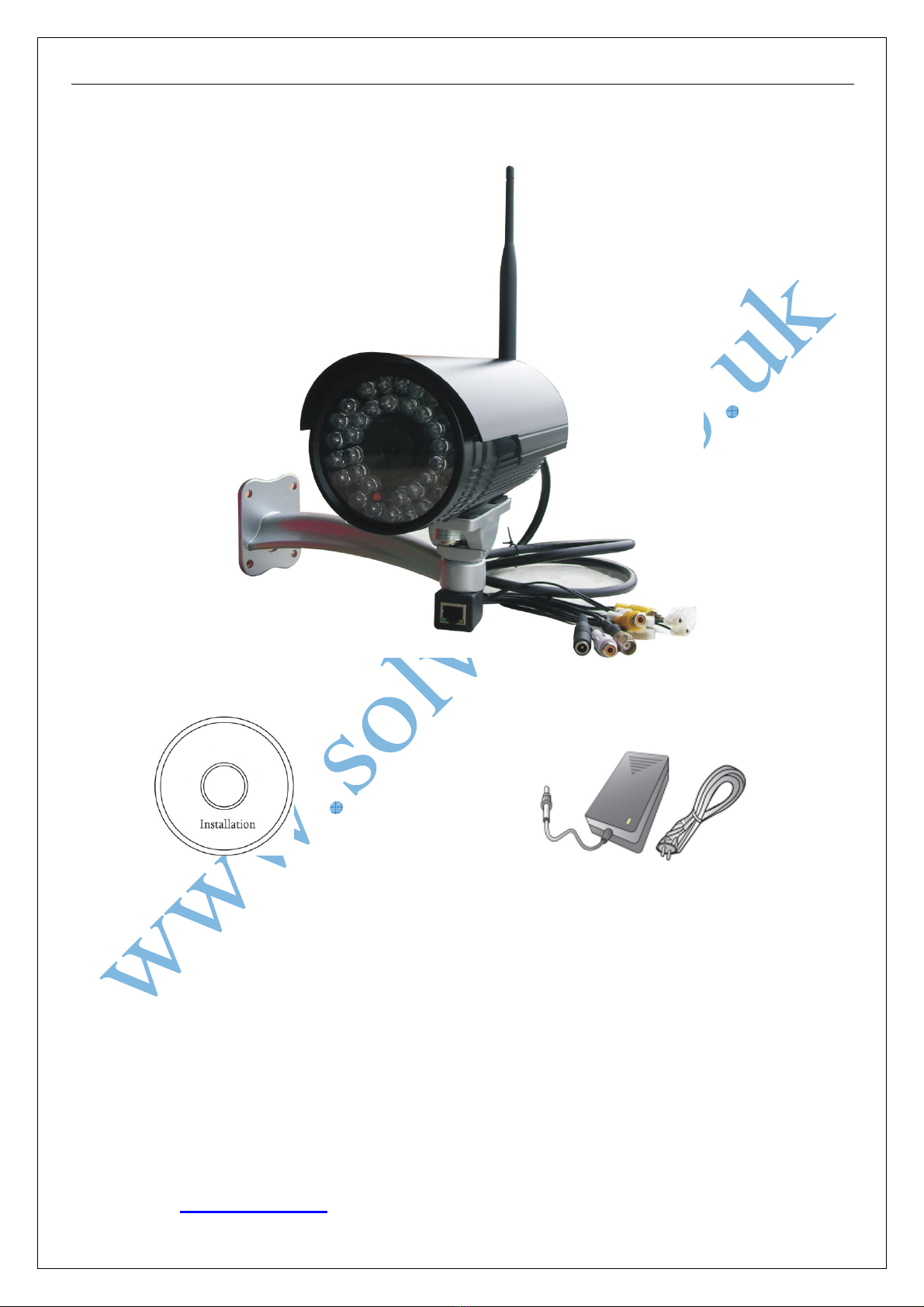
Chapter 2 Packing Detail
1. C1212H(W) H.264 outdoor IR IP Camera (optional Wi-Fi or POE)
2. Installation Software utilities & Central Management Software CD
3. AC Adaptor (DC12V/ 2A) & Power Cord
3. AC Adaptor & Power Cord
1. C1212H(W) IP Camera
2. Installation Software utilities CD

C1212HW(POE) User’s Manual
9
Chapter 3 Cable and Connectors
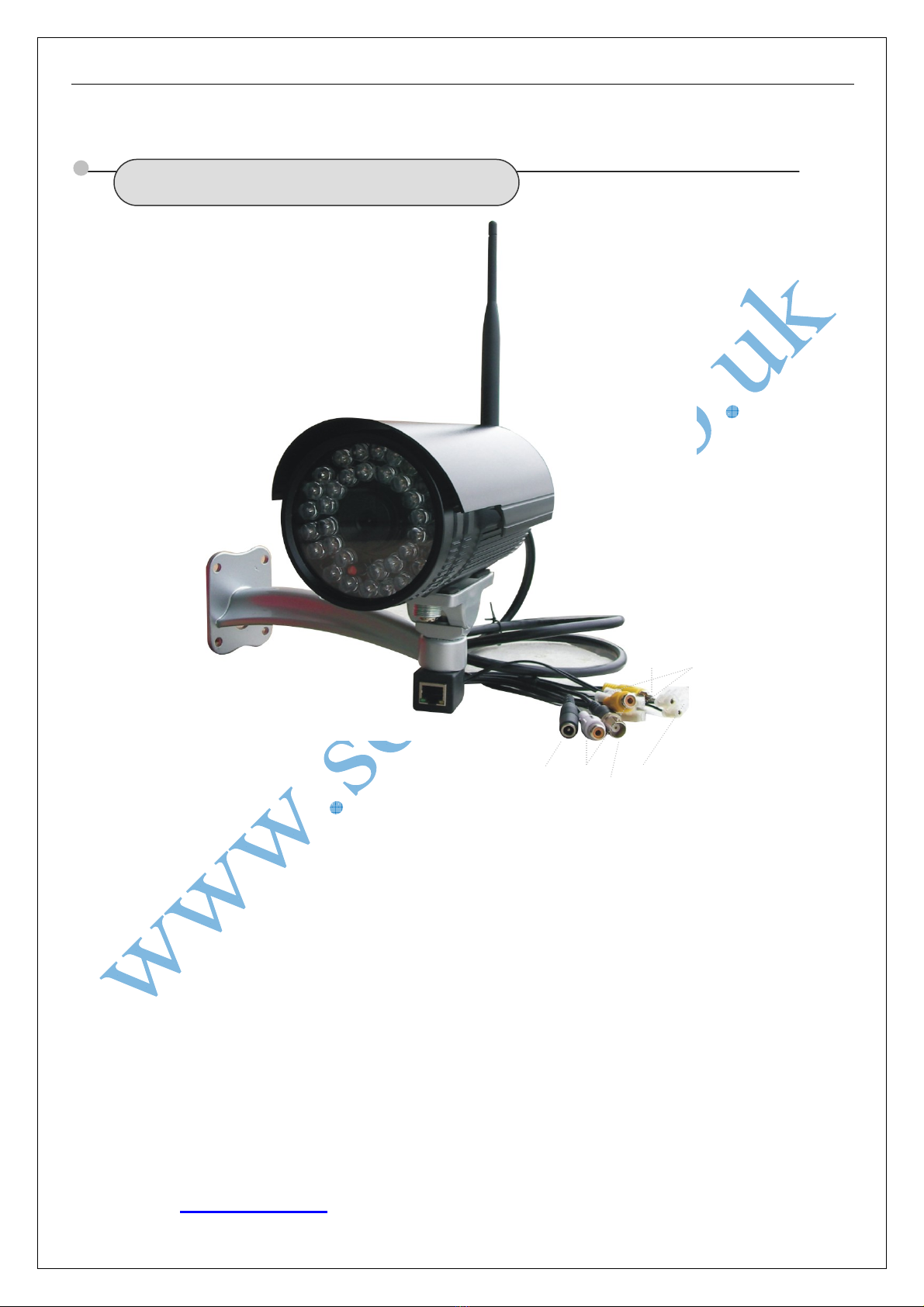
3.1 FRONT VIEW
1. Terminal (A+/ B-) : RS-485 A+/ B-; D+/ D- to control PTZ
2. Reset Terminal : Restore to factory default settings
3. RCA connectors : Female audio outputs to Speakers
4. Power connector : DC12V/ 2A
5. RCA plug : Male audio input port to sound monitor.
6.
Terminals (Alarm) : Alarm input (NC or NO) /
Alarm output ( on/off output, 220VAC 1A/ 24VDC 1A)
7. RJ-45 : Network Ethernet connector, LEDs flashing when accessing
○
1
○
3
○
5○
6
○
4
○
2
○
7

C1212HW(POE) User’s Manual
10
3.2 REAR VIEW
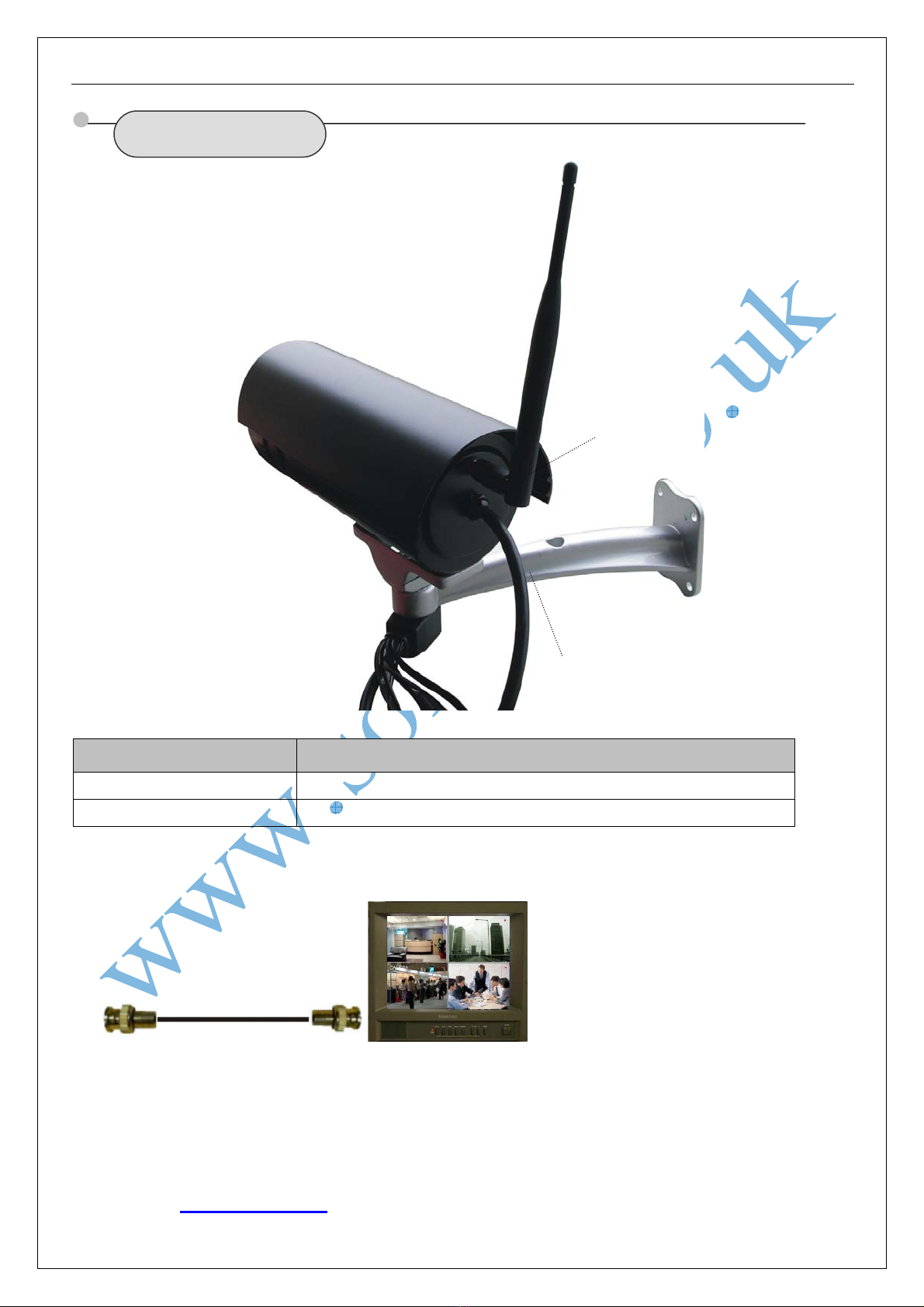
Port Name Description
○
1RSMA Connector 5 dBi omni antenna
○
2Tail Cable 3 feet wire
Connect BNC output to monitors
○
1
○
2
Dieses Handbuch passt für folgende Modelle
1
Inhaltsverzeichnis
Andere Solwise Sicherheitskamera Handbücher