Triplex 4Ch H.264 hardware codec Network DVR Bedienungsanleitung


4Ch H.264 hardware codec -NetworkDVR
1
INSTALLATION & SAFEGUARDS
All the safety and operating instructions should be read before the unit is operated.
Environment Condition for Installation
1. To prevent electric shock or other hazard, do not expose units to rain, moisture, or dust.
2. Place this unit in a well-ventilated place and do not place heat-generating objects on this unit.
3. This unit should not be located in an area where it is likely to be subjected to mechanical shocks.
Before You Start
1. Ensure the power switch is in the OFF position prior to starting.
2. Do not attempt to open or remove the covers. That may expose you to dangerous voltage or
other hazards.
3. Installation should be performed by qualified service personnel only.
4. This unit should be operated only from the type of power source indicated on the manufacturer’s
label and with the power supply included with the unit.
Notice
1. Before initial configuration or operation you must first set the TIME/DATE, followed by HDD clear.
If you don’t follow this steps first, that may cause non recording on the HDD or non saving
setting value. Even though it is recorded, you cannot search recorded data.
2. When it comes to HDD capacity, you can use a big size of HDD.
3. When you set the record setup, you have to set the Record Configuration and also Schedule
Setup. This unit records as per the Record type & Schedule setup. The default setting value for
Schedule setup is Continuous mode.
Installation & Safeguards
Notice
This equipment has been tested and found to comply with the limits for a Class A digital device,
pursuant to part 15 of the FCC Rules. These limits are designed to provide reasonable
protection against harmful interference when the equipment is operated in a commercial
environment. This equipment generates, uses, and can radiate radio frequency energy and, if
not installed and used in accordance with the instruction manual, may cause harmful
interference to radio communications. Operation of this equipment in a residential area may
cause harmful interference in which case the manufacturer of the device is not responsible and
the user would be responsible to correct the interference.

4Ch H.264 hardware codec -NetworkDVR
2
Contents
Contents
21----------------------------------------------------------------SetupCHAP. 5
21----------------------------------------------------------------General Operation5-1.
22----------------------------------------------------------------Display Setup5-2.
22----------------------------------------------------------------VGA Setup1)
23----------------------------------------------------------------Screen Display Setup2)
23----------------------------------------------------------------OSD Setup3)
19----------------------------------------------------------------Data Backup4-9.
19----------------------------------------------------------------PTZ Camera Operation4-8.
18----------------------------------------------------------------Search4-7.
CHAP. 1 Features & Package Contents ---------------------------------------------------------------- 4
1-1. Features ---------------------------------------------------------------- 4
1-2. Package Contents ---------------------------------------------------------------- 5
CHAP. 2 Function of Each Button ---------------------------------------------------------------- 6
2-1. Front ---------------------------------------------------------------- 6
2-2. Rear ---------------------------------------------------------------- 7
CHAP. 3 Installation ---------------------------------------------------------------- 8
3-1. Installation ---------------------------------------------------------------- 8
1) HDD (Hard Disk Drive) ---------------------------------------------------------------- 9
2) Camera ---------------------------------------------------------------- 9
3) Monitor ---------------------------------------------------------------- 10
4) Power ---------------------------------------------------------------- 10
5) Other External Device ---------------------------------------------------------------- 11
CHAP. 4 Operation ---------------------------------------------------------------- 12
4-1. System Log In ---------------------------------------------------------------- 12
4-2. HDD Clear & Factory Default ---------------------------------------------------------------- 12
4-3. Display Configuration ---------------------------------------------------------------- 15
4-4. Live View Setup ---------------------------------------------------------------- 16
1) Full / Multiple View ---------------------------------------------------------------- 16
2) SEQ ---------------------------------------------------------------- 16
3) PIP View ---------------------------------------------------------------- 16
4) ZOOM View ---------------------------------------------------------------- 16
5) Freeze ---------------------------------------------------------------- 16
4-5. Record ---------------------------------------------------------------- 17
4-6. Playback ---------------------------------------------------------------- 17

4Ch H.264 hardware codec -NetworkDVR
3
46----------------------------------------------------------------Backup6-5.
58----------------------------------------------------------------SpecificationCHAP. 8
30----------------------------------------------------------------Buzzer Setup8)
57----------------------------------------------------------------Web Program7-3.
53----------------------------------------------------------------DDNS set up in DVR7-2.
51----------------------------------------------------------------Registering DVR for DDNS7-1.
48----------------------------------------------------------------Player6-6.
51----------------------------------------------------------------DDNS Web-serverCHAP. 7
39----------------------------------------------------------------Spot Setup4)
5-3. Record ---------------------------------------------------------------- 24
1) Record Setup ---------------------------------------------------------------- 24
2) Schedule Setup ---------------------------------------------------------------- 25
5-4. Configuration ---------------------------------------------------------------- 26
1) HDD Management ---------------------------------------------------------------- 26
2) Time/Date Setup ---------------------------------------------------------------- 27
3) Camera Setup ---------------------------------------------------------------- 27
4) Motion Setup ---------------------------------------------------------------- 28
5) Interval Setup ---------------------------------------------------------------- 29
6) Alarm Setup ---------------------------------------------------------------- 29
7) Password Setup ---------------------------------------------------------------- 29
5-5. External Device Setup ---------------------------------------------------------------- 30
1) TCP/IP Setup ---------------------------------------------------------------- 30
2) Pan / Tilt Setup ---------------------------------------------------------------- 39
3) Audio Setup ---------------------------------------------------------------- 39
5-6. Firmware Upgrade ---------------------------------------------------------------- 40
5-7. Factory Default ---------------------------------------------------------------- 40
CHAP. 6 IRS ---------------------------------------------------------------- 41
6-1. IRS Setup ---------------------------------------------------------------- 42
6-2. DVR Setup ---------------------------------------------------------------- 43
6-3. Viewer ---------------------------------------------------------------- 44
6-4. Search ---------------------------------------------------------------- 45
CHAP. 9 Remote Controller ---------------------------------------------------------------- 59
Contents
Contents

4Ch H.264 hardware codec -NetworkDVR
4
CHAP 1. Features & Package Contents
1-1. Features
CHAP 1. Features & Package Contents
Live Display
Real time display per camera
Auto Sequence
PIP (Picture in picture)
Digital Zoom of display (2X ZOOM)
Freeze
Simple playback mode
Simple PTZ camera control
Record
Efficient image quality selection in 5 steps
Audio recording
Schedule recording
Event record by alarm and motion detection
Emergency recording
Network
IRS (Integrated Remote Station)
DDNS supported
Playback
Search and playback by recorded data size, date/time, and event
Various playback speed (forward and backward)
Event Search
Data backup
Backup via USB memory stick / via network
Others
Supports UNI-CODE
Supports SPOT Monitor
PAL/NTSC Auto detection
Video loss detection

4Ch H.264 hardware codec -NetworkDVR
5
1-2. Package Contents
1. DVR Main Unit
3. Power Cable
4. Power Adapter
5. User’s Manual
7. Rubber Pad 8. HDD absorber 9. HDD Bolts
Prevents DVR from slipping. Attach it to the bottom of main unit.7. Rubber Pad
Remote controller 2. Remote Controller
Package Contents Description
1. DVR Main Unit Stand-Alone Digital Video Recorder
3. Power Cable AC power supply to adapters for 12V DC power
4. Power Adapter DC power supply
5. User’s Manual User’s Manual
6. Software CD IRS (Integrated Remote Station) program
8. HDD absorber Absorbs the mechanical shock of HDD against the case bottom.
9. Bolts Bolts for fixing HDD.
10. Mouse Enables to control all functions of DVR.
10. Mouse
CHAP 1. Features & Package Contents
USB
NETWORK DVR
POWER HDD ACTIVE
2. Remote Controller
6. Software CD

4Ch H.264 hardware codec -NetworkDVR
6
Name Function
① USB HOST Used for Data Backup and Firmware Update
(Only USB memory stick should be used.)
② LED Lamps Shows status of operation
POWER : Power status
HDD Active : HDD status
CHAP 2. Function of Each Button
2-1. Front
CHAP 2. Function of Each Button
1
2

4Ch H.264 hardware codec -NetworkDVR
Connection to VGA monitor (CRT or TFT LCD monitor)VGA3
1ch audio inputAudio input
Connection with PTZ camera or other external device using RS 485
RS 4852
Relay out terminal
Relay output
Sensor input terminalSensor input
DC 12VDC power9
Connection to Ethernet deviceEthernet4
Connection to PS/2 MousePS/28
7
6
5
1
Monitor output
Camera input
Audio output
Spot monitor output 1ch spot monitor output (NTSC/ PAL)
1ch composite monitor output (NTSC/ PAL)
4ch camera input (NTSC/ PAL)
1ch audio output
FunctionName
2-2. Rear
CHAP 2. Parts name & functions
2 3 5 6
7 8 9
4
RISK O F EL ECTRIC
SHOCK. DO NOT OPEN !
CAUT I O N
NO USE R SE RV I CE ABL E PART S I NS ID E.REFE R SERVICINGT O QUALIFIED
1
RS 485 D-
2
RS 485 D+
3
RELAY COM
4
RELAY NC
5
RELAY NO
6
RLARM GND
7
ALARM D4
8
ALARM D3
9
RLARM D2
10
RLARM D1
PS/2 DC12V
ETHERNET
FUNCTION
CAUTION : TO REDUCE THE RISK OF EL ECT RICAL SHOCK. DO NOT OPEN COVERS .
SERVICE P ERSONNEL .
WA RNNIG : TO P RE VENT F IR E OR SHOCK HAZ ARD. D O NOT E XP OSE UNI TS NOT
SPECIFICALLY DESIGNED FOR OUTDOOR USE TO RAIN OR MOISTURE.
AUDIO
IN OUT
CH 1 CH2
SPOT
MONITOR
CH 3 CH4
1
7

4Ch H.264 hardware codec -NetworkDVR
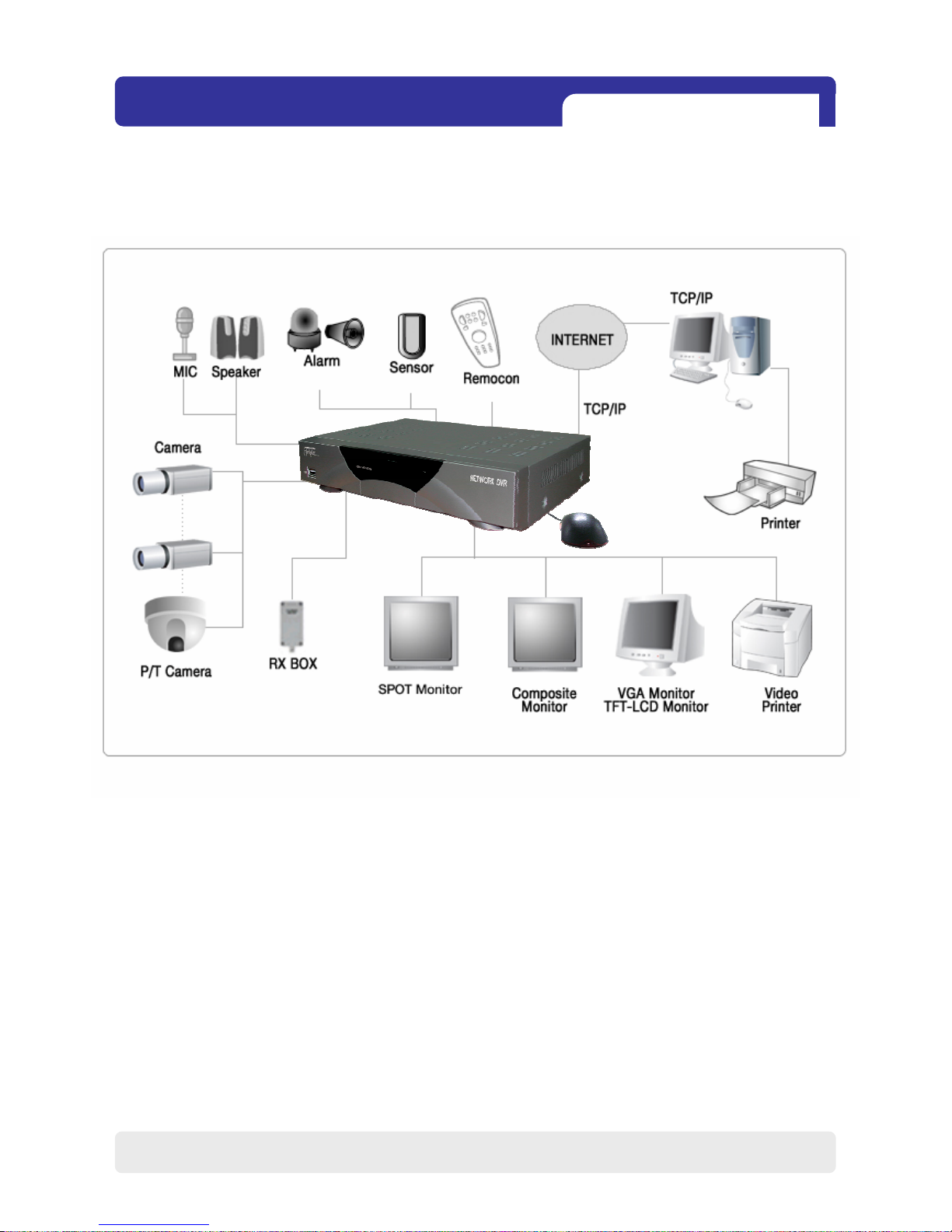
3-1. Installation configuration
CHAP. 3 Installation
CHAP.3 Installation
8

4Ch H.264 hardware codec -NetworkDVR
9
1) HDD
3-1. Installation
1. Connect Main Board and HDD using SATA data cable and HDD power cable.
2. Stick the HDD absorber (included in package) on the bottom of case and then install the
HDD on top of them by using the bolts (included in package).
3. Screws must be inserted from outside of the case bottom.
CHAP. 3 Installation
MAIN BOARD
HDD
2) Camera
Connect camera to the camera input on rear panel of DVR marked CAMERA IN.
Dieses Handbuch passt für folgende Modelle
1
Inhaltsverzeichnis
Beliebte Netzwerk-Hardware Handbücher anderer Marken

Matrix Switch Corporation
Matrix Switch Corporation MSC-HD161DEL Bedienungsanleitung

B&B Electronics
B&B Electronics ZXT9-IO-222R2 Bedienungsanleitung

Yudor
Yudor YDS-16 Bedienungsanleitung

D-Link
D-Link ShareCenter DNS-320L Bedienungsanleitung

Samsung
Samsung ES1642dc Gebrauchsanweisung

Honeywell Home
Honeywell Home LTEM-PV Montageanleitung