
TVS electronics BS-L100 Plus Bedienungsanleitung

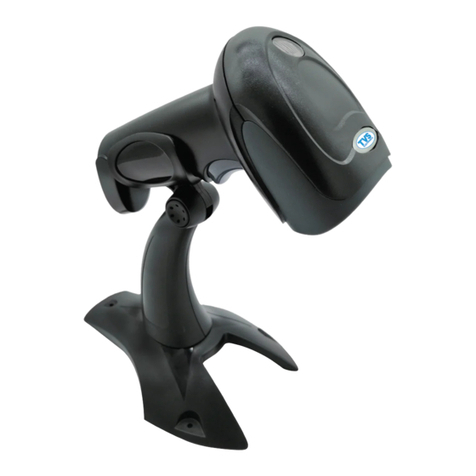
Handheld Laser Barcode Scanner - BS-L100 Plus
1
BS-L100 Plus User Manual

Handheld Laser Barcode Scanner - BS-L100 Plus
2
Table of Contents
Chapter 1 Getting
Started……………………………………………………………………………………………...4
Barcode Programming……………………………………………………………………4
Factory
Defaults …………………………………………………………………………………….4
Chapter 2 Scan Mode...................................................................................................5
Manual Mode........................................................................................................... 5
Continuous Mode........................................................................................................... 5
Auto-Flashing Mode......................................................................................................... 5
Chapter 3 Notification......................................................................................................6
Buzzer ......................................................................................................................6
Chapter 4 Communication
Settings …………………………………………………………………………………6
RS-232 Interface ................................................................................................. 6
Baud Rate...............................................................................................6
Parity Check ....................................................................................... 7
Stop Bit ........................................................................................ 7
Data Bit ........................................................................................ 7
USB Interface……………………………………………………………..8
USB HID-KBW………………………………………….8
USB Country Keyboard Types………………………………………….8
USB COM Port Emulation………………………………………….9
Chapter 6 Keyboard Mode..........................................................................10
Chapter 7 Data Formatting...........................................................................11
Prefix Setting ..............12
Suffix Setting..............13
Character for Prefix and Suffix..............14-19
Chapter 8 Symbologies ...................................................................................20-32

Handheld Laser Barcode Scanner - BS-L100 Plus
3
Factory Defaults Scanning
The following barcode can restore the engine to the factory defaults.
You may need to reset your engine when:
1. engine is not properly configured so that it fails to decode barcodes
2. you forget previous configuration and want to avoid its impact
3. functions that are rarely used have been enabled for the time being.
000B0
Factory Default
Chapter 2 Scan Mode
Manual Mode
Manual Mode (default): A trigger pull activates a decode session. The decode
session continues until the barcode is decoded or the trigger is released or the decode
session timeout expires.
013300
Manual
Continuous Mode: A trigger press activates the engine to scan and decode
at user-specified intervals, i.e. the timeout between decodes. Each decode session lasts until
barcode is decoded or the decode session timeout expires. To suspend/resume the operation,
simply press the trigger. By default, the engine rereads same barcode with no delay.
013304 Continuous

Handheld Laser Barcode Scanner - BS-L100 Plus
4
013302
Button Delay
013301
Single Untriggered
013303
Button Delay Untriggered
Automatic Flashing Mode:
013305
Chapter 3 Notification
Buzzer
014201
Buzzer ON ( Default)
014200
Buzzer off
0145800
Buzzer Frequency 2048
014300
Buzzer High
014301
Buzzer Low
0145AAA
Buzzer Frequency 2731
Chapter 4 Communication Settings
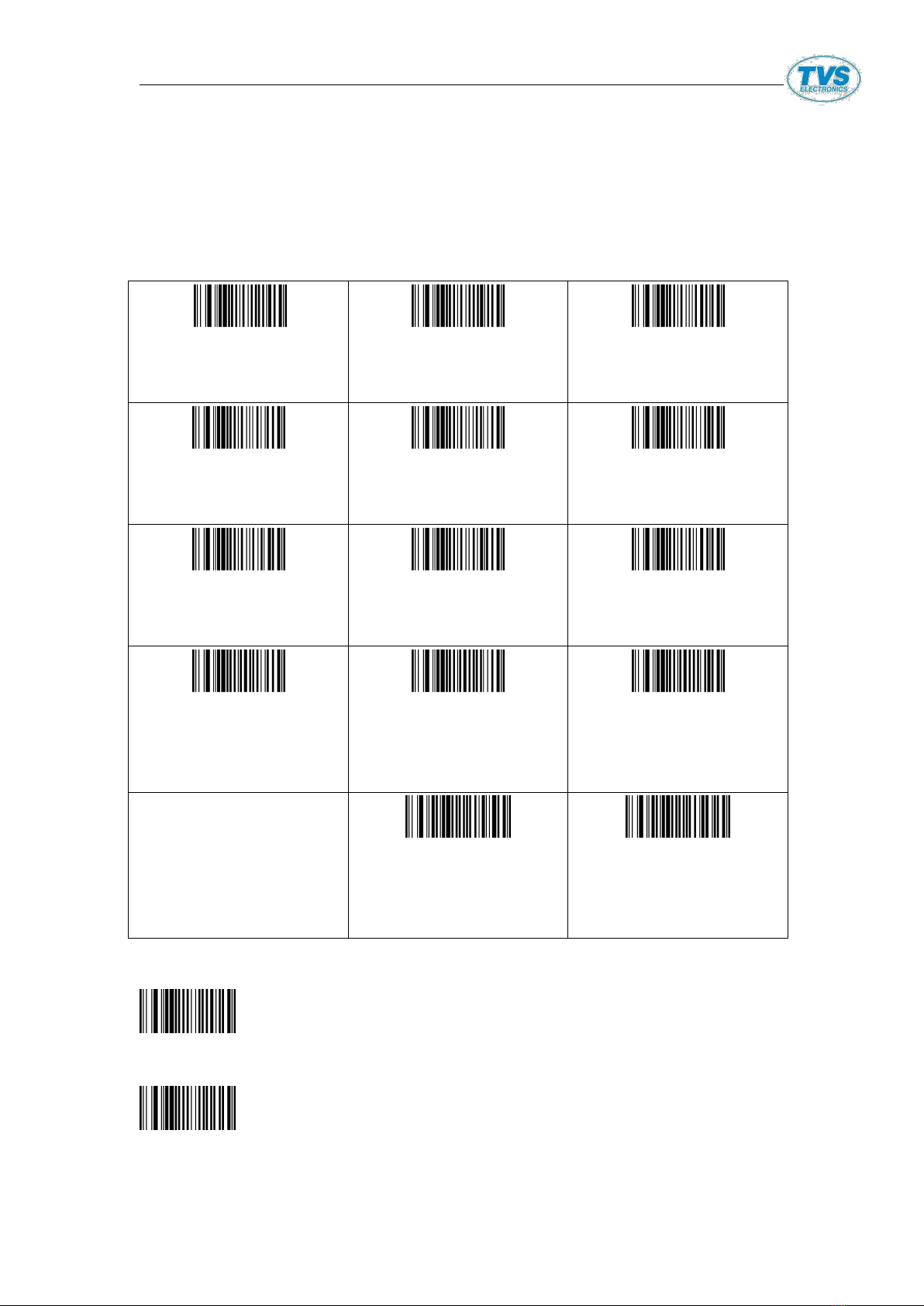
The scanner provides an RS-232 interface and a USB interface to communicate with
the host device. The host device can receive scanned data and send commands to
control the engine or to access/alter the configuration information of the engine via
the RS-232 or USB interface.
Handheld Laser Barcode Scanner - BS-L100 Plus
5
RS-232 Interface
Baud Rate
When the scanner is connected to a host device through its RS-232 interface, you need to set
communication parameters (including baud rate) to match the host device. Baud rate is the number
of bits of data transmitted per second. Set the scanner’s baud rate to match the Host requirements.
000701
RS232 600bps
000702
Rs232 1200bps
000703
Rs232 2400bps
000704
Rs232 4800bps
000705
Rs232 9600bps
Factory Fault
000706
RS232 19200bps
000707
Rs232 38400bps
000708
Rs232 57600bps
000709
Rs232 115200bps
001200
RS232 No Parity
001201
RS232 XON/OFF
Protocol
001202
RS232 RTS/CTS
Protocol
0013020
RS232 Handshake
Timeout 2s
0013050
RS232 Handshake
Timeout 5s
Parity Check
001000
RS232 No Parity
001001
RS232 Odd Parity

Handheld Laser Barcode Scanner - BS-L100 Plus
6
001002
RS232 Even Parity
Stop Bit
00090
RS232 1 stop Bit
00091
RS232 2 stop Bit
Data Bit
00080
RS232 8 Bit Data
00081
RS232 7 Bit Data
USB Interface
USB HID-KBW
When enabled, the scanner’s transmission is simulated as USB keyboard input. It works on a Plug
and Play basis and no driver is required.
000603
USB-HID
USB Country Keyboard Types
Keyboard layouts vary from country to country. All supported keyboard types are listed below

Handheld Laser Barcode Scanner - BS-L100 Plus
7
Keyboard Mode
0005000
USA,Chinese(English)
Default
0005001
Canada (French )
0005002
Netherlands (Dutch)
0005003
Spain-Spanish
0005004
Argentina-Latin
American
0005005
Brazil-Portuguese
0005006
Denmark-Danish
0005007
UK-English
0005008
Italy-Italian
0005009
France-French
0005010
Germany-German
0005011
Norway-Northern Sami
0005012
Sweden,Finland-Swedis
h,Finnish
0005013
Slovakia-Slovak
0005014
Portuguesa-Portugues
e
0005015
Czech Republic-Czech
0005016
Belgium -Dutch
0005017
Turkey-F
0005018
Turkey-Q
0005019
Poland-Polish
0005020
Switzerland
–German,French
0005021
0005022
0005023

Handheld Laser Barcode Scanner - BS-L100 Plus
8
Croatia-Srb-Crt
Hungary -Hungarian
Japan-Japanese
0005024
Russia-Russian
0005025
Arab (Arab)
USB-COM
Chapter 7 Data Formatting
Introduction
After a successful barcode read, a string containing numbers, letters or symbols will be returned.
In real applications, barcode data may be found insufficient for your needs. You may wish to
include additional information such as barcode type, data acquisition time or delimiter in data
being scanned. Adding extra information to printed barcodes does not seem like a sensible
solution since that will increase the barcode size and make them inflexible. Instead, we come up
with the idea of appending prefix and suffix to the data without making any change to barcodes.
We will show you how to conduct the configuration in the following sections.
Note: Customized data:< Prefix><Data><Suffix>< Terminating Character>
Prefix &Suffix Setting:
Prefix/Suffix Setting
0212@\r
CR
0213@\r\n
CR+LF
0211@[ETX]
All barcodes(rear)
add ETX

Handheld Laser Barcode Scanner - BS-L100 Plus
9
02160081
All barcodes(front)
addF2
02110081
All barcodes(rear)
addF2
0210@
Cancel all
barcodes(rear)
format character
0217@[STX]
Add STX before
barcodes
0215@
Cancel all boots
before barcodes
02240
Add prefix
02241
Add suffix
02242
Exit add pre/suffix
Mode
02220
Clear all prefix
02200
Clear all suffix
02340
Exit Hide Prefix Mode
02341
Exit Hid Suffix Mode
02342
Exit Hide Middle Mode
02343
Exhit Hide Nth Mode
Note:1,SUC/SWK/SUG all setting code are code128,when it is barcode
Prefix ^3 will be set,such as ^3+******(required code):
2,The Ascll code of this table is decimal, and the hexadecimal system is referenced in schedule 2
Prefix & Suffix Setup Instruction
1.The prefix and suffix is divided into shared prefix-suffix and
private prefix-suffix;SUCR SUC0 SUC2 SUGR could add max 32 characters;
SWK could add max 16 characters.
2.Shared Prefix-suffix :
Two Methods to prefix-suffix:
[1]. To scan one code to add,setup code 0223X(Prefix)、
0221X(Suffix)
0223, 0221stand for one-time adding shared prefix-suffix X
stand for added characters,X is binary,for example, to add
shared prefix-suffix A, setup code is 0221A ,which show all
code add suffix A, to input the following content in the
software:

Handheld Laser Barcode Scanner - BS-L100 Plus
10
Setup code is 0223A ,which show all codes will be added prefix
A;to input the following content in the software:
For example,to add shared suffix CR, setup code is 0221\r,to input
the following content in the software:
[2]: to scan one code to add,setup by Ascll, setup code is
021100nn (suffix ) 、 021600nn (prefix ) ; Ascll setup by Hexadecimal
detailed spec pls refer to ASCll Table 1
For Example:to add shared prefix-suffix A, By Hexadecimal, setup
code is:02160041
Moreover:to add character &Enter behind code,to add“+”and Enter behind
code ;setup code :0213@+\r ;Suffix :0212@ No cumulative 、0213@ 2
times、0211@ three times
3,To add private suffix
To add private suffix,to add A behind all Code 128;Two Methods:
1,0211 0141
Table 1, Ascll Table 2
2,0212 A A
If accumulative, to use 0213A、0211A
Any other code,pls refer to Table 1
To add private prefix,to add A in the front of all Code 128 ;Two Methods:
1,0216 0141
Table 1 pls refer to Ascll Table 2
2,0217 A A
Inhaltsverzeichnis
Andere TVS electronics Barcode-Lesegerät Handbücher



Beliebte Barcode-Lesegerät Handbücher anderer Marken

POSMicro
POSMicro Datalogic PowerScan D7100 Bedienungsanleitung

Marson
Marson MT780 Kurzanleitung zur Einrichtung

NCR
NCR RealPOS Bedienungsanleitung

Motorola
Motorola SE3300 Kurzanleitung zur Einrichtung

Element
Element P130BT Bedienungsanleitung

Motorola
Motorola Symbol LS3008 Installations- und Betriebshandbuch


