TypeS S402 Pro Bedienungsanleitung

4K DUAL VIEW DASHCAM
WITH 2K CABIN FACING CAM
TYPE S Drive App Compatible
Important, retain for future reference:
Read carefully
WP ITM. BT532871
Care & Use Instructions

2
TABLE OF CONTENTS
1. Introduction ...............................................................................................................................................................................3
2. Package Contents ...................................................................................................................................................................4
3. Product Specications ..........................................................................................................................................................5
4. Product Dimension ................................................................................................................................................................5
5. Product Overview ....................................................................................................................................................................6
6. Button Conguration .............................................................................................................................................................7
7. Installation ..................................................................................................................................................................................8
8. Initial Setup .............................................................................................................................................................................. 10
9. Conguration & Menu Settings ........................................................................................................................................11
10. Camera Status & LED Indicators ....................................................................................................................................17
11. Recording Time......................................................................................................................................................................17
12. Time-lapse Recording Logic ..........................................................................................................................................18
13. Technical Specications ...................................................................................................................................................18
14. Viewing and Managing Media Files Using A Computer .....................................................................................19
15. Safety Information ............................................................................................................................................................. 20
16. Maintenance & Warranty ................................................................................................................................................ 22
17. General Information .......................................................................................................................................................... 25

3
Please read all of the installation instructions carefully before installing the product. Improper
installation will void the manufacturer’s warranty. The installation instructions do not apply to all
types of vehicles, and are written as guidelines to assist in installing the system.
Consult an experienced technician if you are not comfortable installing the product. You can
also contact TYPE S at 866.294.9244 to speak to one of our installation specialists if you have any
specic questions regarding this product.
BEFORE using the dashcam, please read the safety information provided in this user manual.
ALWAYS use the product as outlined in this user manual.
Please make sure to read and understand all local laws and regulations regarding cameras and their
use in a vehicle. Laws vary by state.
1. INTRODUCTION

www.typesauto.com/register
Register this product within 30 days of purchase to receive 1 FREE YEAR of additional warranty coverage
(beyond the standard one year warranty), along with special product offers and announcements.
Registre este producto dentro de los 30 días siguientes a la compra para recibir 1 AÑO GRATUITO de
cobertura de garantía adicional (más allá de la garantía estándar de un año), junto con ofertas de productos
y anuncios especiales.
Enregistrez ce produit dans les 30 jours suivant l'achat pour recevoir une couverture supplémentaire
GRATUITE DE 1 AN (au-delà de la garantie standard d'un an), ainsi que des offres et des annonces spéciales.
STOP
ARRÊT
DETÉNGASE
Mon-Fri, 8am-5pm PST / Lundi au vendredi, 8h à 17h HNP /
Lun-vie, 8 a. m. a 5 p. m. Hora del Pacífico
Please contact our customer service before returning this product to
the store. Our friendly representatives are happy to help with any
questions or concerns you have.
Póngase en contacto con nuestro servicio a clientes antes de regresar
este producto a la tienda. A nuestros amables representantes les dará
mucho gusto ayudarle con cualquier pregunta o inquietud que tenga.
Veuillez communiquer avec notre service à la clientèle avant de
retourner le produit au magasin. Nos représentants se feront un plaisir
de vous assister pour toute question ou préoccupation.
Product code / Code de produit / Código del producto : BT533004
@TypeSAuto
ML-533004DNR_V1
4
2. PACKAGE CONTENTS
1. 1 x 4K Dual View Dashcam with
2K Cabin Facing Cam
2. 1 x 12V/24V Power Adapter
3. 1 x Windshield Mount
4. 1 x Mounting Bracket with 3M
VHB™ Double Sided Tape
1. 2. 3.
4. 5. 6.
7. 8. 9.
5. 1 x Extra 3M VHB™Double Sided Tape (Spare)
6. 1 x 32GB MicroSD Card (Pre-installed)
7. 1 x 3.28' / 1m USB-A to USB-C Data Transfer Cable
8. 1 x Instruction Manual
9. 1 x Warranty Card

5
3. PRODUCT SPECIFICATIONS
4. PRODUCT DIMENSION
Screen:
Resolution:
Frequency:
Operating Voltage:
Operating Temperature:
Viewing Angle:
Image Sensor:
Maximum Signal Range:
2.4"
4K UHD - Ultra High Denition (3840 x 2160p)
2.4 GHz
DC 12V / 24V - Cigarette Lighter Adapter (CLA)
14F~140F (-10C~60C)
132° Diagonal
5MP
9.84 Feet/3 Meters
(without interference or obstruction)
4.17 in / 106 mm
1.77 in /
45 mm
1.57 in / 40 mm

6
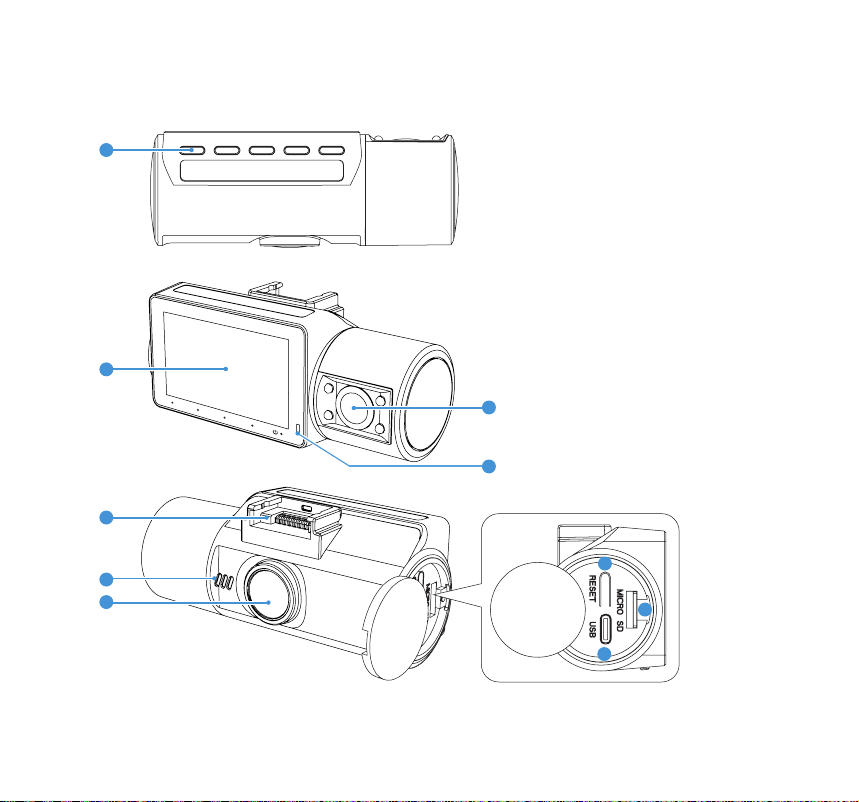
5. PRODUCT OVERVIEW
1. Function Buttons
2. Display Screen
3. Mounting Socket
4. Microphone
5. Front View Camera
6. Cabin View Camera
7. Status Indicator
8. Reset Button
9. USB-C Data Port
10. MicroSD Card Slot
15
1
3
8
9
10
5
4
6
2
7

1
1
7
Settings Menu (press once)
Toggle Front/Cabin view/PIP (press once)
Snapshot (press once)
Back to Video Mode (press once)
Toggle screen On/O (press once)
Master On/O (press and hold for 3 sec)
Toggle Microphone On/O (press once)
Toggle Front/Cabin view/PIP (press once)
Lock/Unlock Video (press once)
Record (press once)
Toggle screen On/O (press once)
Master On/O (press and hold for 3 sec)
6. BUTTON CONFIGURATION
Apply conguration and settings to the dashcam
using the 5 function buttons. Refer to the
screen display below for the buttons and their
corresponding functions in dierent modes.
Function Buttons
Video Mode
Camera Mode
Camera ModeCamera Mode
Video ModeVideo Mode

8
Plug the USB-C power cable into the
input port on the Windshield Mount.
Plug the 1080P Rear Camera power
cable into the AV-IN port.
* 1080P Rear Camera (BT532838) sold separately.
Attach the dashcam
to the Windshield
Mount using the
socket on the top.
2
3
4
1
7. INSTALLATION
Peel o the protective lm
from the display screen.
Insert the MicroSD card into the slot
if it's not already in there.

9
Slide the Mounting Bracket into the
Windshield Mount and peel o the 3M
VHB™ Double Sided Tape. Mount the
dashcam on the windshield.
Determine the best mounting position:
i. Adjust the Cabin View Camera’s position to get the best view of the interior of your vehicle.
ii. The Windshield Mount has a built-in GPS receiver. Position the Windshield Mount on a surface
that allows it to get a clear view of the sky through the windshield in order to get the best GPS
signal strength.
5
Adjust the Cabin View Camera’s position
to get the best view of the interior of your
vehicle.
7
Determine the best mounting position.
6
- The GPS receiver is located
inside the Windshield
Mount.
- To ensure the best
performance, please avoid
placing it under a physical
obstacle.

10
Route the power cable to your cigarette lighter outlet (12/24V DC outlet) and hide the cable in
the headliner and pillers. We recommend going through the passenger side so the cable doesn't
get into the driver's way.
8
8. INITIAL SETUP
Set date & time. The time
stamps that appear on all future
recordings will follow this setting.
Andere Handbücher für S402 Pro
1
Dieses Handbuch passt für folgende Modelle
2
Inhaltsverzeichnis
Andere TypeS Dashcam Handbücher