
Vicon I-Onyx MP-955 Bedienungsanleitung

XX194-00-00
MP-955 AND MP-955DN IP
COLOR AND DAY/NIGHT MEGAPIXEL
CAMERAS
Vicon Industries Inc. does not warrant that the functions contained in this equipment will meet your
requirements or that the operation will be entirely error free or perform precisely as described in the
documentation. This system has not been designed to be used in life-critical situations and must not
be used for this purpose.
Warning: To prevent fire or shock hazard, do not expose the unit to rain
or moisture.
Copyright © 2008 Vicon Industries Inc. All rights reserved.
Product specifications subject to change without notice.
Vicon and its logo are registered trademarks of Vicon Industries Inc.
ViconNet, Kollector, I-Onyx and their logos are registered trademarks of Vicon Industries Inc.
VICON INDUSTRIES INC., 89 ARKAY DRIVE, HAUPPAUGE, NY 11788
TEL: 631-952-CCTV (2288) FAX: 631-951-CCTV (2288)
TOLL FREE: 800-645-9116
24-Hour Technical Support: 800-34-VICON (800-348-4266)
UK: 44 (0) 1489-566300 WEB: www.vicon-cctv.com
Vicon part number 8009-8194-00-00 Rev 908 Section 1/3

FCC Notice
Note: Complies with Federal Communications Commission Rules & Regulations Part 15, Subpart B for a
Class A digital device.
WARNING
This equipment generates and uses radio frequency energy and if not installed and used properly, that is, in
strict accordance with the manufacturer’s instruction, may cause interference to radio and television
reception. It has been type tested and found to comply with the limits for a Class A computing device in
accordance with the specification in subpart B of part 15 of the FCC rules, which are designed to provide
reasonable protection against such interference in a commercial installation. However, there is no guarantee
that interference will not occur in a particular installation. If this equipment does cause interference to radio
and television reception, which can be determined by turning equipment off and on, the user is encouraged
to try and correct the interference by one or more of the following measures:
•Reorient the receiving antenna.
•Relocate the equipment with respect to the receiver.
•Relocate the equipment away from the receiver.
•Plug the equipment into a different electrical outlet so that the equipment and receiver
are on different branch circuits.
If necessary, the user should consult the dealer or an experienced radio/television technician for additional
suggestions.
The user may find the following booklet prepared by the Federal Communications Commission helpful:
“Interference Handbook, Bulletin CIB-2”
This booklet is available from the U.S. Government Printing Office, Superintendent of Documents, Mailstop
SSOP, Washington, D.C. 20402-9328, ISBN 0-16-045542-1.
Warning: Power must be removed from this unit before removing circuit modules or ribbon cables.
Caution: This unit contains circuit cards with integrated circuit devices that can be damaged by static
discharge. Take all necessary precautions to prevent static discharge


XX194-00-00 Rev 908 MP-955DN Megapixel Camera
i
Contents
Introduction...................................................................................................................................................... 1
Installation.........................................................................................................................................................2
Connectors and Controls ............................................................................................................................... 2
Connections..................................................................................................................................................... 4
Camera Configuration..................................................................................................................................... 5
ViconNet Configuration. ............................................................................................................................... 16
Appendix ........................................................................................................................................................ 23
Shipping Instructions.................................................................................................................................... 26
Network Cable................................................................................................................................................ 27
Technical Information ................................................................................................................................... 28
Vicon Standard Equipment Warranty.......................................................................................................... 30

ii
Important Safeguards –
Indoor Use
GRAPHIC SYMBOL EXPLANATION
The lightening bolt symbol alerts the user to the presence of
dangerous voltage that may present the risk of electric shock.
The exclamation point symbol alerts the user to the presence
of important operating and maintenance instructions.
WARNING
To reduce a risk of fire or electric shock, do
not expose this product to rain or moisture.
1. Read Instructions - Read all safety and operating
instructions before the product is operated.
2. Retain Instructions - Retain all safety and operating
instructions for future reference.
3. Heed Warnings - Pay attention to all product warnings.
4. Follow Instructions - Follow all operating instructions.
5. Cleaning -(Do not use caustic, abrasive or aerosol
cleaners)
a) For units that CAN BE DISCONNECTED from the power
source, use a damp cloth for cleaning.
b) For units that CANNOT BE DISCONNECTED from the
power source, use a damp cloth for cleaning and do not
allow moisture or liquids to enter vents.
6. Attachments - Use only UL Listed Vicon recommended
attachments to prevent unit damage and personal injury.
7. Water and Moisture - Use only products designed for
outdoor environments where they will be exposed to water or
moisture.
8. Accessories - Do not place the unit on an unstable surface
to avoid falling. Use only UL Listed Vicon recommended mounting
accessories.
9. Ventilation - Do not block ventilating slots and openings as
they ensure reliable operation. Do not place the unit near a
heat source or into an enclosure unless recommended by
Vicon.
10. Grounding - Only products equipped with a 3-prong
grounded plug should be inserted into a grounded power outlet.
Contact an electrician to replace an obsolete outlet. Do not
force a plug into a non-grounded outlet.
11. Power Cord Protection - Power supply cords should not
be routed in trafficked areas or in tight spaces where they will
be pinched or used to bear weight. Allow some slack in the
cord where it enters the unit.
12. Lightning - Disconnect the product from its power source
and cable system when possible to prevent damage due to
lightning and power-line surges.
13. Power Lines - Do not locate outside cables over power or
utility lines where they can fall and make direct contact.
Contact with power lines can be fatal.
14. Overloading - Do not overload wall outlets and extension
cords to prevent risk of fire and electric shock.
15. Object and Liquid Entry - Never probe through, or spill
liquid into, enclosure openings to prevent risk of fire or electric
shock.
16. Servicing - Refer all servicing to qualified service
personnel.
17. Damage Requiring Service - Obtain service when:
a) The power-supply cord or plug is damaged.
b) Objects have fallen or liquid has been spilled into the
product.
c) The product is not designed for outdoor use and has
been exposed to water or moisture.
d) The product does not operate per the operating
instructions. Perform Vicon recommended adjustments,
modifications and troubleshooting only to avoid unit
damage and personal injury.
e) The product has been dropped.
f) The product shows a significant change in performance.
18. Replacement Parts - Use only Vicon specified
replacement parts or an approved equivalent to prevent unit
damage and injury.
19. Safety Check - Request safety checks to be performed
following repair or maintenance to verify proper operation.
20. ESD Precaution - Take all normal electrostatic discharge
precautions to avoid component damage during installation
and operation.
21. For 230 VAC Devices Only - When the disconnect device
is not incorporated in the equipment or when the plug on the
power supply is intended to serve as the disconnect device,
follow the guidelines below:
a) For permanently connected 230 VAC units, a readily
accessible disconnect device must be incorporated into
the site wiring.
b) For 230 VAC units with a plug, the outlet must be
installed near the unit and be easily accessible.
XX194-00-00 Rev 908 MP-955DN Megapixel Camera

1
Introduction
The information in this manual covers the installation and operation of the MP-955 and
MP-955DN I-Onyx® Megapixel IP Dome Camera. These cameras dome should only be
installed by a qualified technician using approved materials and wiring practices in
accordance with the National Electrical Code ANSI/NFPA 70, state, and local electrical codes.
Read these instructions thoroughly before beginning an installation.
The MP-955 and MP-955DN I-Onyx® Megapixel Cameras are powerful IP cameras
compatible for operation within a ViconNet® (version 5 software) digital video management
system. Offering the ability to deliver 1.3 megapixel resolution video across the network, the
cameras can be remotely managed and controlled from ViconNet NVRs, DVRs and
Workstations. The MP-955 is a 1.3 megapixel resolution color camera while the MP-955DN
provides day/night functionality.
Equipped with a 100 Mbps LAN interface board, the cameras allow direct plug-in to a network
switch. Images received from the IP cameras can be displayed, recorded or archived using
the ViconNet management software.
Megapixel cameras provide a higher resolution, which results in images with more detail and
clarity. They also offer the ability to cover a larger area while maintaining the detail in the
image. This provides the capability to digitally zoom further into the live or the recorded video
without losing focus and pixelating.
The camera comes with an accessory kit containing:
1. Two terminal blocks, 3-pin for power and 4-pin for alarm connections (alarms not
supported by ViconNet)
2. 12 VDC power adaptor
3. Camera mounting bracket and hardware
4. 4.2 mm/f1.8 megapixel fixed lens and lens mount (C/CS) adaptor
5. Allen key
6. Product CD
XX194-00-00 Rev 908 MP-955DN Megapixel Camera

2
Installation
Connectors and Controls
Reset Button
Rear Panel
1. Ethernet Port
The camera connects to the Ethernet via a standard RJ-45 connector. Supporting NWay
(auto negotiation), this IP camera can auto detect the speed of local network segment
(10Base-T/100Base-TX Ethernet). The camera supports PoE, so it can be powered through
the Ethernet port as well.
2. Reset Button
To reset the camera back to factory defaults, follow the steps below:
Step 1: Switch off the camera by disconnecting the power cable.
Step 2: Press and continue to hold the reset button. Reconnect the power cable while
continuing to hold the reset button.
Step 3: Keep holding the reset button depressed about 6 seconds and then release it. The
unit will start up with factory default settings.
3. Audio Input/Output
Not supported by ViconNet (for future use).
4. Action LED Indicator
The LED will light up after IP camera has successfully completed the boot process.
XX194-00-00 Rev 908 MP-955DN Megapixel Camera

XX194-00-00 Rev 908 MP-955DN Megapixel Camera
3
5. I/O Terminal Connector
Not supported by ViconNet (for future use).
6. Power Input
If power input is 12 VDC, make connections as labeled below. LED lights when there is power
to the camera.
4
Connections
Follow the procedures below to connect the IP device to other equipment in the system.
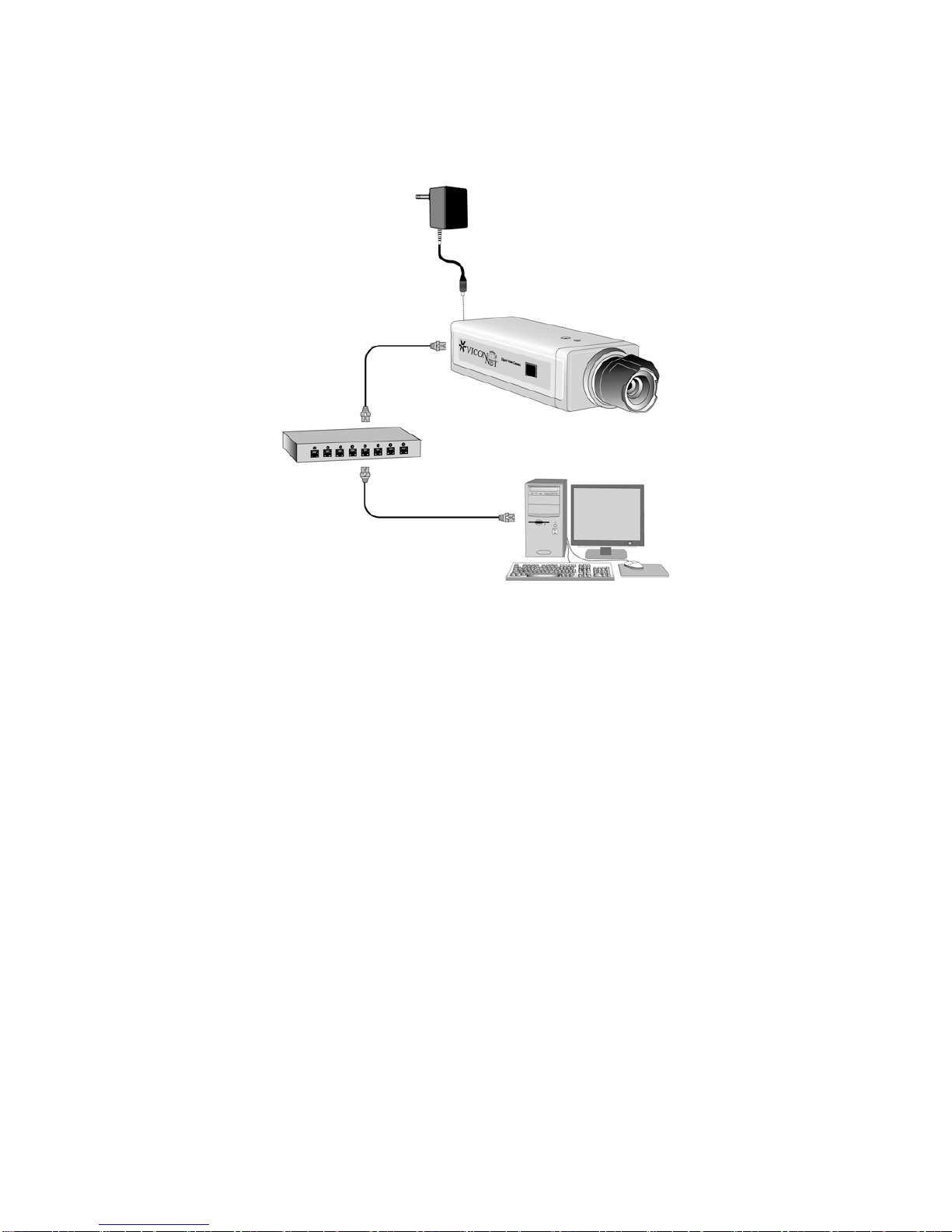
1. If using 12 VDC, connect the power adaptor to the camera and then to an
appropriate power source.
2. When powering with PoE, connect camera’s Ethernet port to an Ethernet (RJ-45) connector.
If your camera has built-in PoE, you can regard it as a Powered Device(PD) and connect
it directly to a Power Sourcing Equipment (PSE) device, such as a PoE switch.
3. Connect a PC to the Ethernet hub (RJ-45 connector).
XX194-00-00 Rev 908 MP-955DN Megapixel Camera
Andere Handbücher für I-Onyx MP-955
1
Dieses Handbuch passt für folgende Modelle
1
Inhaltsverzeichnis
Andere Vicon IP-Kamera Handbücher

Vicon
Vicon IQeye Alliance-mx Bedienungsanleitung

Vicon
Vicon V661D-312D Betriebsanleitung

Vicon
Vicon I-ONYX VND-970IP Betriebsanleitung

Vicon
Vicon XX258-10-00 Bedienungsanleitung

Vicon
Vicon V9360 Bedienungsanleitung

Vicon
Vicon XX247-20-04 Bedienungsanleitung

Vicon
Vicon ROUGHNECK V910 Bedienungsanleitung

Vicon
Vicon IQeye R5 Series Bedienungsanleitung
Vicon
Vicon SurveyorVFT SVFT-M Bedienungsanleitung

Vicon
Vicon XX235-10-00 Betriebsanleitung


