Viessmann VITOTRONIC 200 Bedienungsanleitung

Operating instructions
for the system user
VIESMANN
Heating system and domestic ventilation system with heat pump control unit
Vitotronic 200, type WO1C
VITOTRONIC 200
5623 540 GB 8/2012 Please keep safe.

2
Please follow these safety instructions closely to
prevent accidents and material losses.
Safety instructions explained
Danger
This symbol warns against the risk of injury.
!Please note
This symbol warns against the risk of material
losses and environmental pollution.
Note
Details identified by the word "Note" contain additional
information.
Target group
These operating instructions are designed for system
users.
This appliance has not been designed to be operated
by individuals (including children) with limited physical,
sensory or mental capacities or who are lacking in the
appropriate experience and/or knowledge, unless they
are supervised by a person with responsibility for their
safety or were instructed by that person in the opera-
tion of this appliance.
!Please note
Children should be supervised.
Ensure that children never play with the appli-
ance.
Danger
Incorrect work on the system can lead to life-
threatening accidents.
Work on electrical equipment must only be car-
ried out by a qualified electrician.
In case of fire
Danger
With fire there is a risk of burning.
■Shut down the system.
■Use a tested fire extinguisher, class ABC.
Installation conditions
!Please note
Incorrect ambient conditions can lead to system
damage and can put safe operation at risk.
Appliances installed inside:
■Ambient temperatures:
–Vitocal 200-A:
Ensure ambient temperatures higher than
5 °C and lower than 30 °C.
–All other Vitocals:
Ensure ambient temperatures higher than
0 °C and lower than 35 °C.
■Avoid air contamination through halogenated
hydrocarbons (e.g. as in paints, solvents and
cleaning agents).
■Avoid continuously high humidity levels (e.g.
through frequent drying of washing).
Appliance installed outside:
■Operate the appliance only at ambient temper-
atures above –20 ºC and below 35 ºC.
Auxiliary components, spare and wearing parts
!Please note
Components that are not tested with the system
may cause system damage, or may affect its
functions.
Installation or replacement work must only be
carried out by qualified personnel.
Safety instructions
For your safety
5623 540 GB

3
1. Introductory information Commissioning ...................................................................................... 6
Terminology ........................................................................................... 6
Your system is preset at the factory ....................................................... 6
Energy saving tips ................................................................................. 7
Tips for greater comfort ......................................................................... 7
2. About the controls Opening the control unit ......................................................................... 9
Programming unit .................................................................................. 9
■"Operating info" ................................................................................... 10
■Symbols .............................................................................................. 10
Standard menu ...................................................................................... 11
Extended menu ...................................................................................... 12
How to use the controls ......................................................................... 12
Operating program ................................................................................. 13
■Operating programs for heating, cooling, DHW, frost protection ........ 13
■Operating programs for ventilation ..................................................... 15
■Special operating programs ................................................................ 15
Time program ........................................................................................ 15
■Setting a time program using central heating/central cooling as an
example .............................................................................................. 16
■Setting the time program efficiently .................................................... 17
■Deleting time phases .......................................................................... 17
3. Start-up/shutdown Starting the heat pump .......................................................................... 18
Stopping the heat pump ......................................................................... 19
■With frost protection ............................................................................ 19
■Without frost protection (shutting down the system) ........................... 19
4. Central heating/central
cooling
Room temperature ................................................................................. 20
■Setting the standard room temperature for heating/cooling ............... 20
■Setting the reduced room temperature for heating/cooling ................ 20
Operating program ................................................................................. 20
■Setting the operating program for heating/cooling .............................. 20
Time program ........................................................................................ 21
■Setting the time program for heating/cooling ...................................... 21
Heating system with heating water buffer cylinder ................................ 21
■Setting the time program for the heating water buffer cylinder ........... 21
Heating curve/cooling curve .................................................................. 22
■Setting the curves for heating/cooling ................................................ 22
Switching off central heating/central cooling .......................................... 23
Comfort function "Party mode" .............................................................. 23
■Setting "Party mode" for heating/cooling ............................................ 23
■Ending "Party mode" ........................................................................... 23
Energy saving function "Economy mode" .............................................. 24
■Setting "Economy mode" for heating .................................................. 24
■Ending "Economy mode" .................................................................... 24
Energy saving function "Holiday program" ............................................ 24
■Setting the "Holiday program" for heating/cooling, ventilation ............ 24
■Cancelling or deleting the "Holiday program" ..................................... 25
5. DHW heating DHW temperatures ................................................................................ 26
■Setting the standard DHW temperature ............................................. 26
■Setting the higher DHW temperature ................................................. 26
Operating program ................................................................................. 26
■Setting the operating program for DHW heating ................................ 26
Time program ........................................................................................ 26
■Setting the time program for DHW heating ......................................... 26
■Setting the start optimisation .............................................................. 27
■Setting the stop optimisation .............................................................. 27
■Setting a time program for the DHW circulation pump ....................... 27
Index
Index
5623 540 GB

4
DHW heating outside the time program ................................................. 28
■Activating "1x DHW heating" .............................................................. 28
Stopping DHW heating .......................................................................... 28
6. Heating system with elec-
tric booster heater
.................................................................................................................. 29
7. Active cooling mode Enabling and blocking active cooling mode ........................................... 30
8. Air/water heat pumps .................................................................................................................. 31
9. Ventilation Starting ventilation ................................................................................. 32
Stopping ventilation ............................................................................... 32
■Activating "Standby mode" ................................................................. 32
■Stopping ventilation to change filters .................................................. 32
Operating program ................................................................................. 32
■Setting the operating program for ventilation ...................................... 33
Ventilation without heat recovery ........................................................... 33
■Setting the room temperature for ventilation ...................................... 33
■Setting a minimum temperature for ventilation ................................... 33
Time program ........................................................................................ 33
■Setting a time program for ventilation ................................................. 33
Comfort function "Intensive operation" .................................................. 34
■Setting "Intensive operation" for ventilation ........................................ 34
■Ending "Intensive operation" .............................................................. 34
Energy saving function "Economy mode" .............................................. 34
■Setting "Economy mode" for ventilation ............................................. 34
■Ending "Economy mode" .................................................................... 35
Energy saving function "Holiday program" ............................................ 35
■Setting "Holiday program" for ventilation, heating/cooling .................. 35
■Cancelling or deleting the "Holiday program" ..................................... 35
10. Power from a photovoltaic
system
Own consumption of power ................................................................... 36
11. Further adjustments Setting the display contrast .................................................................... 37
Setting the display brightness ................................................................ 37
Setting names for heating/cooling circuits ............................................. 37
Setting the preferred heating/cooling circuit for the standard menu ...... 38
Setting the time and date ....................................................................... 38
Language selection ................................................................................ 38
Setting the temperature unit (°C/°F) ...................................................... 38
Restoring factory settings ...................................................................... 38
12. Calling up Calling up information ............................................................................ 40
■Calling up the solar energy yield ........................................................ 40
■Daily log .............................................................................................. 40
■Screed drying ..................................................................................... 40
Calling up messages ............................................................................. 41
13. Manual mode .................................................................................................................. 43
14. Special system versions .................................................................................................................. 44
15. What to do if... Rooms are too cold ................................................................................ 45
Rooms are too hot ................................................................................. 46
There is no hot water ............................................................................. 46
The DHW is too hot ............................................................................... 46
" " is flashing and "Note" is displayed ................................................ 47
" " is flashing and "Warning" is displayed ............................................ 47
" " is flashing and "Fault" is displayed ................................................. 47
Index
Index
5623 540 GB

5
"Power-OFF C5" is displayed ................................................................ 47
"Controls locked out" is displayed .......................................................... 47
"Check filter" is displayed ...................................................................... 47
Doors/windows can only be opened with difficulty ................................. 47
Doors/windows bang when opened ....................................................... 48
16. Maintenance Cleaning the heating system ................................................................. 49
■In conjunction with a brine/water or water/water heat pump .............. 49
■In conjunction with an air/water heat pump ........................................ 49
■Vitotronic control unit .......................................................................... 49
Heating system inspection and maintenance ........................................ 49
■DHW cylinder (if installed) .................................................................. 49
■Safety valve (DHW cylinder) ............................................................... 49
■Potable water filter (if installed) .......................................................... 50
■Damaged connecting cables .............................................................. 50
Cleaning the domestic ventilation system .............................................. 50
■Cleaning supply air/extract air valves ................................................. 50
Replacing filters in the extract air valves ............................................... 51
Replacing the ventilation unit filters ....................................................... 51
■Resetting the service display .............................................................. 53
17. Appendix Refrigerant ............................................................................................. 54
Overview extended menu ...................................................................... 54
Calling up options under "Information" .................................................. 54
Terminology ........................................................................................... 57
■Active cooling mode (active cooling) .................................................. 57
■System version ................................................................................... 57
■Operating program ............................................................................. 57
■Operating status ................................................................................. 57
■Own consumption of power from a photovoltaic system .................... 57
■Electric booster heater ........................................................................ 58
■Power-OFF ......................................................................................... 58
■Underfloor heating .............................................................................. 58
■Quieter operation ................................................................................ 58
■Heating mode/cooling mode ............................................................... 58
■Heating curve/cooling curve ............................................................... 59
■Heating/cooling circuits ....................................................................... 61
■Heating circuit pump ........................................................................... 62
■Instantaneous heating water heater ................................................... 62
■Heating water buffer cylinder .............................................................. 62
■Controlled domestic ventilation ........................................................... 62
■Cooling mode ..................................................................................... 64
■Cooling function .................................................................................. 64
■Cooling curve ...................................................................................... 64
■Cooling circuit ..................................................................................... 64
■Ventilation ........................................................................................... 64
■Mixer ................................................................................................... 65
■Room temperature .............................................................................. 65
■Safety valve ........................................................................................ 65
■Secondary pump ................................................................................ 65
■Solar circuit pump ............................................................................... 65
■Cylinder primary pump ....................................................................... 65
■Drinking water filter ............................................................................. 65
■Compressor ........................................................................................ 66
■Weather-compensated heating/cooling mode .................................... 66
■Domestic ventilation ........................................................................... 66
■Time program ..................................................................................... 66
■DHW circulation pump ........................................................................ 66
18. Keyword index .................................................................................................................. 67
Index
Index (cont.)
5623 540 GB

6
The commissioning and matching up of the heat pump
control unit to local conditions and to the structural
characteristics of the building, plus the instruction of
the user in operating the system, must be carried out
by your heating contractor.
Note
These operating instructions also describe functions
that are only available on some heat pump models or
only with accessories. These functions are not specifi-
cally identified.
For questions relating to the extent of functions and
accessories for your heat pump and your heating sys-
tem, check with your local heating contractor.
Terminology
To provide you with a better understanding of the func-
tions of your Vitotronic control unit some terminology is
explained.
The terms are marked as follows:
Further information can be found in chapter
"Terminology" in the appendix.
Your system is preset at the factory
Your heating system is preset at the factory and is
therefore ready for operation:
Central heating/Central cooling
■Your home will be heated from 00:00 to 24:00 h to
20 °C "Set room temperature" (standard room tem-
perature).
■If a heating water buffer cylinder is installed, it will be
heated.
■Any electric booster heater installed will be enabled
(see chapter "Enabling electric booster heater").
■Active cooling mode is blocked (see chapter "Ena-
bling and blocking active cooling mode").
DHW heating
■The DHW is heated every day from 00:00 to 24:00 h
to 50 °C "Set DHW temperature".
■Any installed DHW circulation pump is switched off.
■Any electric booster heater installed will be enabled
(see chapter "Enabling electric booster heater").
Frost protection
■Frost protection for your heat pump, DHW cylinder
and any heating water buffer cylinder that may be
installed is ensured.
Note
At temperatures below −15 °C, the frost protection of
the heat pump, the DHW cylinder and the heating
water buffer cylinder is only ensured if an instantane-
ous heating water heater is installed (on site).
Domestic ventilation with Vitovent 300-F
■From 00:00 to 24:00 h: Domestic ventilation in oper-
ating status "Standard".
Wintertime/summertime changeover
■This changeover is automatic.
Date and time
■The date and time were set by your heating contrac-
tor.
Your heating contractor can make further settings for
you during commissioning.
You can change the settings to suit your requirements
at any time.
Power failure
In the case of a power failure, all settings are retained.
Introductory information
Commissioning
5623 540 GB

7
Central heating/Central cooling
■Standard room temperature ("Set room tempera-
ture", see page 20):
Never overheat your home. Every degree of room
temperature reduction saves up to 6 % on your heat-
ing bills.
Never set your standard room temperature higher
than 20 °C.
■Time program (see page 21):
Heat your home to the standard room temperature
during the day and the reduced temperature at night
(not suitable for underfloor heating). Set the time pro-
gram for this.
■Operating program:
If you do not require central heating or cooling, select
one of the following operating programs:
–"Only DHW" (see page 26):
If you require no heating for your home in summer,
but you need hot water.
–"Standby mode" (see page 19):
If you don't need to heat your home and don't need
hot water for longer periods.
■Short absence (see page 24):
Reduce the room temperature, for example when
you go shopping (not suitable for underfloor heating
systems). For this, select "Economy mode".
■Holidays (see page 24):
If you are going away, select the "Holiday pro-
gram":
The room temperature will be reduced, and DHW
heating will be turned off. In connection with a venti-
lation unit, a lower ventilation stage will be selected.
■Ventilation/airing:
To air a room, close the thermostatic valves and
briefly open the windows fully (if no domestic ventila-
tion system has been installed).
■Roller shutters:
Close roller shutters (where installed) at dusk.
■Thermostatic valves:
Ensure that thermostatic valves are set correctly.
■Radiators:
Never place things in front of radiators or thermo-
static valves.
DHW heating
■DHW circulation pump (see page 27):
Only activate the DHW circulation pump for periods
in which DHW is regularly drawn off. Set the time
program for this.
■DHW consumption:
Consider showering instead of running a bath. A
shower generally uses less energy than a full bath.
Domestic ventilation (in conjunction with ventila-
tion units)
■Short absence (see pages 32 and 34):
Select a lower ventilation stage, for example when
going shopping. For this, select "Economy mode"
or the "Standard operation" operating program.
■Holidays (see page 35):
If you are going away, select the "Holiday pro-
gram":
A lower ventilation stage will be selected. The room
temperature will be reduced, and DHW heating will
be turned off.
Own consumption of power (in conjunction with a
photovoltaic system)
■Use the power generated by your photovoltaic sys-
tem for your heating system (see page 36).
For additional energy saving functions of the heat
pump control unit, please contact your heating contrac-
tor.
Tips for greater comfort
Central heating/Central cooling
■Standard room temperature ("Set room tempera-
ture", see page 11):
You can select your individual preferred temperature
at any time in the standard menu.
■Preferred heating circuit (see page 38):
If your heating system comprises several heating cir-
cuits, you can input the important settings for a pre-
ferred heating/cooling circuit directly in the standard
menu.
■Time program (see page 21):
Make use of the time program. In the time program,
you can set time phases with different room temper-
atures, for example different temperatures for day
and night time.
■Heating water buffer cylinder (if installed, see
page 21):
Set the time program for the heating water buffer cyl-
inder so there is always sufficient heat for your heat-
ing circuits, for example to bridge power-OFF times
imposed by your local power supply utility.
■Electric booster heater (if installed, see page 29):
Enable the electric booster heater and set up a time
program for it. The electric booster heater starts
automatically if large amounts of heat are suddenly
required.
■"Active cooling mod." (see page 30):
After enabling the active cooling mode, a high cool-
ing capacity will be available for centrally cooling
your home, when required.
Introductory information
Energy saving tips
5623 540 GB

8
■Heating curve/cooling curve (see page 22):
The heating curve enables you to individually adjust
the heating system to the actual heat demand in your
home. If set correctly, your preferred temperature will
be achieved all year round. The same applies to the
cooling curve.
■"Party mode" (see page 23):
Select "Party mode" if you want to heat your home
to a temperature that is different from that dictated by
the time program.
Example: The time program determines that in the
evening, your home is heated to a reduced room
temperature, but you have visitors staying into the
evening.
DHW heating
■Time program (see page 26 and 27):
Use the time program for DHW heating. In the time
program, you can set time phases with different
DHW temperatures, for example higher in the morn-
ings than during daytime.
Use the time program for the DHW circulation pump.
During the selected time phases, DHW will be availa-
ble at the draw-off points at the required tempera-
ture.
■"Start optimisation" (see page 27):
The start optimisation ensures that your DHW cylin-
der will be heated to the selected temperature at the
beginning of any heating phase.
■"Stop optimisation" (see page 27):
The stop optimisation ensures that your DHW cylin-
der will be heated to the selected temperature at the
end of any heating phase.
■Once-only DHW heating (see page 28):
With "1x DHW heating" the heat pump will immedi-
ately heat up the DHW cylinder, independent of any
time program.
■Electric booster heater (if installed, see page 29):
Enable the electric booster heater and set up a time
program for it. The electric booster heater starts
automatically, if the heat pump on its own cannot
heat up the DHW cylinder quickly enough, for exam-
ple during the power-OFF times enforced by the
local power supply utility.
Domestic ventilation (in conjunction with ventila-
tion units)
■"Intensive operation" (see page 34):
During "Intensive operation" you increase the air
change rate in your home, for example when cook-
ing.
Operation of air/water heat pumps
■Quieter operation (see page 31):
Select the time program for quieter operation, for
example in order to reduce the noise level of your
air/water heat pump at night.
Introductory information
Tips for greater comfort (cont.)
5623 540 GB

9
The heat pump control unit may look different depend-
ing on the type of heat pump.
Control unit at the front of the heat pump
14°C 21°C
Fig. 1
Control unit on top of the heat pump
BA
Fig. 2
ATop part of control unit with programming unit
BButton for changing the angle
Control unit mounted on the wall
Fig. 3
Note
Brief operating instructions can be found on the back
of the flap. To open, pull the top edge of the flap for-
ward.
Programming unit
You can change all heat pump control unit settings
centrally at the programming unit.
If remote controls are installed in your rooms, you can
also adjust the settings at these remote controls.
Remote control operating instructions
About the controls
Opening the control unit
5623 540 GB

10
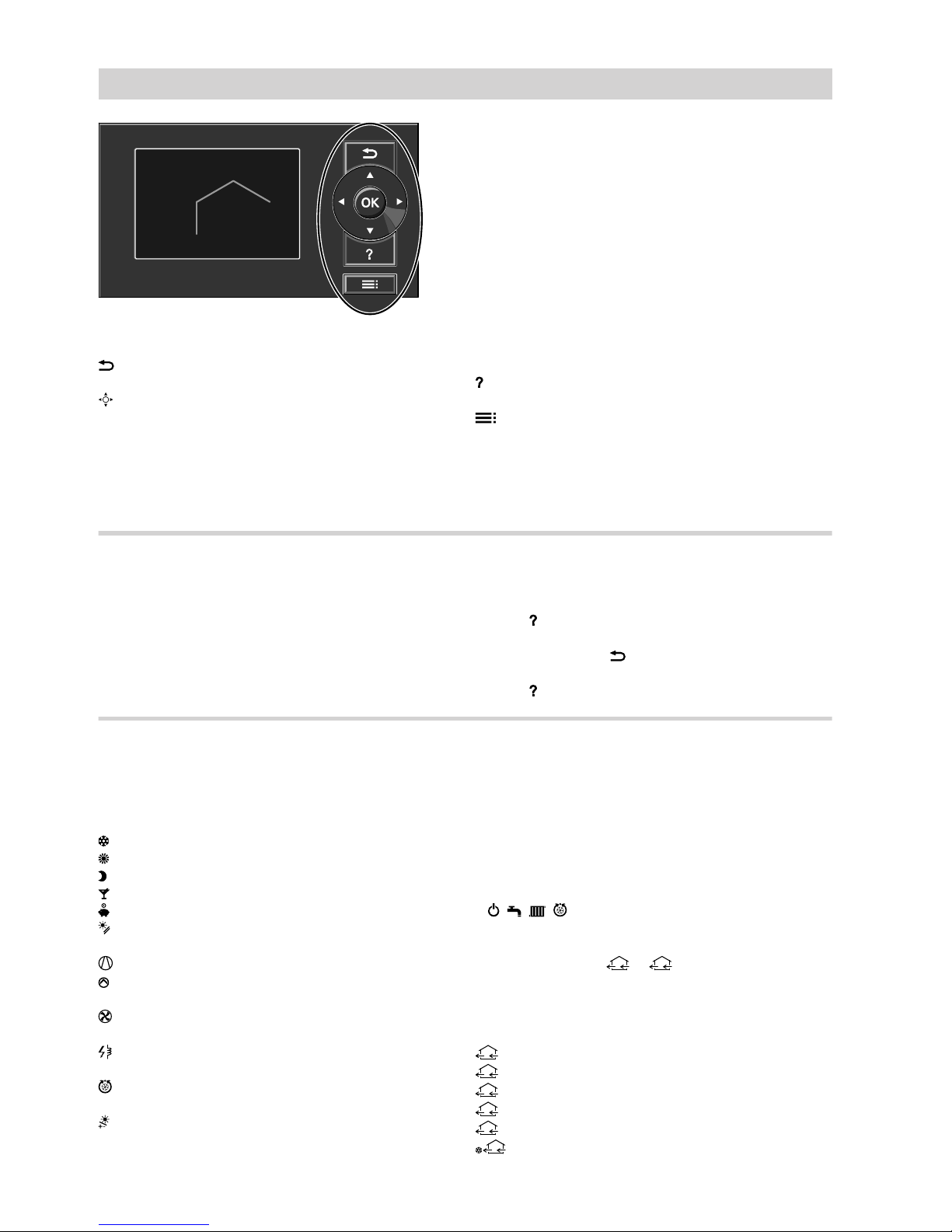
14 °C 21 °C
Fig. 4
Takes you to the previous step in the menu or
cancels a setting you have started to input.
Cursor keys
Scroll through the menu or set values.
OK Confirms your selection or saves the setting.
Calls up "Operating info" (see following chapter)
or additional information on the selected menu.
Calls up the extended menu.
Two control levels are available:
■The standard menu: See page 11.
■The extended menu: See page 12.
Note
The screen saver is activated if you have not made
any adjustments on the programming unit for a few
minutes (see page 12).
"Operating info"
Displays brief instructions on how to operate the
device.
How to call up the "Operating info":
■If the screen saver is active (see page 12):
Press .
■From anywhere in the menu:
Keep pressing the key until the standard menu is
shown (see page 11).
Press .
Symbols
These symbols are not always displayed, but appear
subject to the system version and the operating state.
Indicators:
Frost protection enabled
Central heating to standard room temperature
Central heating with reduced room temperature
Party mode is active for central heating
Economy mode is active for central heating
In conjunction with a solar thermal system:
Solar circuit pump is running
Compressor is running
For brine/water or water/water heat pumps:
Primary pump is running
For air/water heat pumps:
Fan is running
Instantaneous heating water heater is active (elec-
tric booster heater)
In conjunction with a cooling circuit:
Cooling mode is active
In conjunction with a photovoltaic system:
Own consumption of power is active
Heating/cooling circuits:
HC... Heating circuit ...
or
Heating/cooling circuit ...
SKK Separate cooling circuit
Operating programs:
■Operating programs for heating, cooling, DHW:
, , , :
For explanation of the symbols, see page 13
■Operating programs for ventilation:
Ventilation stages
0
to
4
subject to the selected
operating program, see page 15
Ventilation stages (in conjunction with a ventilation
unit):
0
No ventilation
1
Minimum air flow rate
2
Reduced air flow rate
3
Standard air flow rate
4
Maximum air flow rate
2
Frost protection for the ventilation unit is active.
Symbol using fan stage 2 as an example
About the controls
Programming unit (cont.)
5623 540 GB
Andere Handbücher für VITOTRONIC 200
15
Inhaltsverzeichnis
Andere Viessmann Netzwerk-Router Handbücher
Beliebte Netzwerk-Router Handbücher anderer Marken

NETGEAR
NETGEAR FS526T - Switch Bedienungsanleitung

Korenix
Korenix JetNet 5710G Series Bedienungsanleitung

Automated Logic
Automated Logic ZN551 Betriebsanleitung

Cisco
Cisco ASR 1000 Series Bedienerhandbuch

EnGenius
EnGenius ESR-9710 Bedienungsanleitung

Cisco
Cisco 805 Series Bedienungs- und Sicherheitshinweise