Xiamen Maxincom Technologies MUC1004 Service-Handbuch

MUC1004 Administrator guide
Http://www.maxincom.com 1 / 80
MUC1004
IP PBX
Administrator guide V1.0
Version 1.0.0.15
Xiamen Maxincom Technologies Co., Ltd.

MUC1004 Administrator guide
Http://www.maxincom.com 2 / 80
Table of Contents
1. Introduction .............................................. 5
1.1 Overview ............................................................................................... 5
1.2 Product Features .................................................................................... 5
1.3 Product Appearance................................................................................ 6
1.4 Scenario of Application............................................................................ 7
2. Installation Guide...................................... 9
2.1 Installation Notice................................................................................... 9
2.2 Installation Procedure ............................................................................. 9
2.2.1 Connect Drawing........................................................................... 9
3. WEB Interface Configuration .................... 9
3.1 Access MUC1004 unit.............................................................................. 9
3.2 Parameters Configuration...................................................................... 10
3.3 System Information .............................................................................. 11
3.3.1 System Information..................................................................... 11
3.3.2 Extensions Status........................................................................ 11
3.3.3 Trunk Status............................................................................... 12
3.4 Network Configuration .......................................................................... 14
3.4.1 LAN Configuration ....................................................................... 14
3.4.2 VLAN Configuration ..................................................................... 15
3.4.3 ARP ........................................................................................... 16
3.4.4 VPN Configuration ....................................................................... 17
3.4.5 DDNS Server............................................................................... 18
3.4.6 Static Routing ............................................................................. 19
3.4.7 DHCP Server............................................................................... 20
3.5 Trunks................................................................................................. 21
3.5.1 Analog Trunks(PSTN Trunks) ....................................................... 21
3.5.2 IP Trunk (peer to peer mode) ...................................................... 23

MUC1004 Administrator guide
Http://www.maxincom.com 3 / 80
3.5.3 VoIP Trunk ................................................................................. 24
3.6 PBX Basic............................................................................................. 26
3.6.1 Extensions.................................................................................. 26
3.6.2 Feature Codes............................................................................. 33
3.6.3 Speed dial .................................................................................. 35
3.6.4 Outbound Routes ........................................................................ 36
3.6.5 Parking Lot ................................................................................. 39
3.6.6 General Preferences .................................................................... 40
3.7 PBX Inbound Call Control ...................................................................... 41
3.7.1 Inbound Routes .......................................................................... 41
3.7.2 Blacklist...................................................................................... 45
3.7.3 IVR ............................................................................................ 46
3.7.4 Queue........................................................................................ 48
3.7.5 Ring Groups................................................................................ 52
3.7.6 Conferences ............................................................................... 54
3.7.7 Callback .................................................................................... 56
3.8 PBX Advanced Settings ......................................................................... 57
3.8.1 SIP settings ................................................................................ 57
3.8.1.1 SIP General setting ............................................................... 57
3.8.1.2 SIP Network Configuration ..................................................... 59
3.8.1.3 Qos...................................................................................... 61
3.8.1.4 codecs ................................................................................. 61
3.8.2 IAX setting ................................................................................. 61
3.8.3 PIN Sets..................................................................................... 63
3.8.4 DISA ......................................................................................... 64
3.8.5 Paging and Intercom .................................................................. 65
3.9 Voice Management ............................................................................... 66
3.9.1 Voice prompt Recordings ............................................................. 66
3.9.2 Music on Hold ............................................................................. 67
3.9.3 Voicemail Settings ....................................................................... 68

MUC1004 Administrator guide
Http://www.maxincom.com 4 / 80
3.10 System Preferences ............................................................................ 70
3.10.1 Firewall Rules............................................................................ 70
3.10.2 Firmware update ....................................................................... 71
3.10.3 Data backup ............................................................................. 72
3.10.4 Data restore.............................................................................. 72
3.10.5 Password Setting....................................................................... 73
3.10.6 Time & Date ............................................................................. 73
3.10.7 Factory reset............................................................................. 74
3.10.8 Reboot ..................................................................................... 75
3.11 Reports.............................................................................................. 75
3.11.1 CDR Report.............................................................................. 75
3.11.2 System logs ............................................................................ 76
3.11.3 Firewall logs............................................................................ 76
3.12 System tools ...................................................................................... 77
3.12.1 SMTP Setting ............................................................................ 77
3.12.2 Ping ......................................................................................... 78
3.12.3 Tracert ..................................................................................... 78
3.12.4 Packet Capture.......................................................................... 79
3.12.5 Text to wav .............................................................................. 79
3.12.6 Certificates ............................................................................... 79

MUC1004 Administrator guide
Http://www.maxincom.com 5 / 80
1. Introduction
1.1 Overview
MUC1004—IP PBX for Small Business/Home Office
MUC1004 is a standalone embedded hybrid PBX for small businesses and
remote branch offices of larger organizations. It is designed to bring
enterprise-grade Unified Communications and Security Protection in an easy-
to-manage fashion.
1.2 Product Features
● Alert
● Firewalls
● Blacklist
● HTTPS
● Call Back
● Integrated built-in packet capture
tools
● Call Detail Records(CDR)
● Interactive Voice Response (IVR)
● Call Forward,Call Parking
● Intercom/Zone Prompt
● Call Pickup
● Music On Hold
● Call Recording
● Open VPN
● Call Routing
● Paging/Intercom
● Call transfer
●Phone Provisioning
● Call Waiting
● PIN Users
● Caller ID
● QoS
● Conference
● Queue
● DDNS
● Ring Group
● Define Office Time
● Speed Dial
● Direct Inward System Access
(DISA)
● Spy functions
● Distinctive Ringtone
● Static Route
● Do Not Disturb(DND)
● VLAN
● External Storage
● Voicemail

MUC1004 Administrator guide
Http://www.maxincom.com 6 / 80
1.3 Product Appearance
The appearance of MUC1004 shows as follow
Figure 1-3-1 Front view of MUC1004
Table 1-3-1 Description of Front view
Index
Indicators
Description
1
RUN
On: Starting
Off: Abnormal
Blinking every 0.5s: Normal status
2
POWER
On: Power on
Off: Power off
3
WAN,LAN
Green LED: indicates the Internet interface is in Link .
Yellow LED: ON is indicates 100MBps Ethernet port.
4
1,2,3,4
Red LED stands for FXO port
Orange LED indicates presence of a BRI port.
Green LED stands for FXS port
Red LED blinks: FXO port isn’t connected to PSTN line.
Alternately blinks Red and Green: FXO port has an
incoming call.
Alternately blinks Red and Green fast: FXO port is in a
call.
Alternately blinks Green and Red: FXS port is ringing.
Alternately blinks Green and Red fast: FXS port is in a
call.

MUC1004 Administrator guide
Http://www.maxincom.com 7 / 80
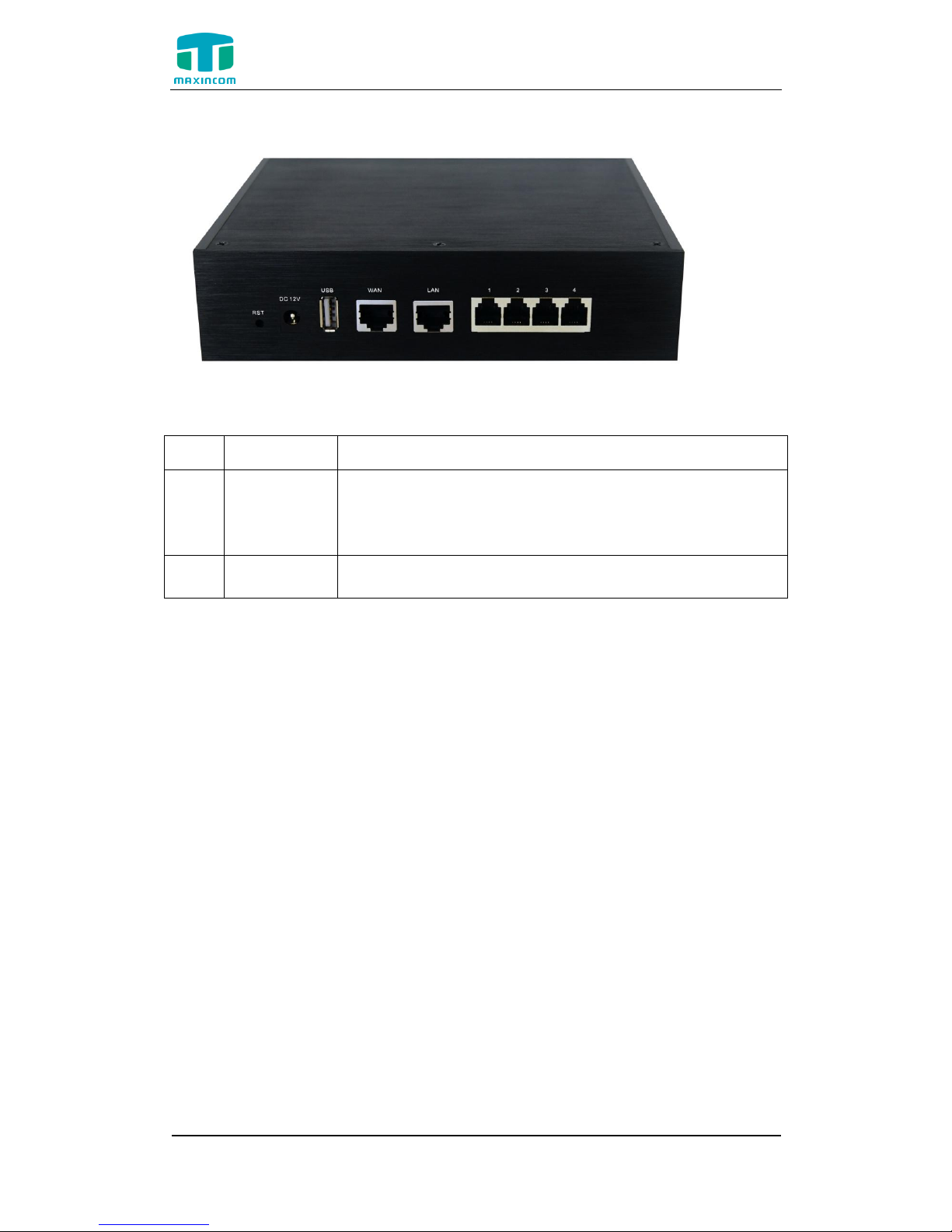
Figure 1-3-2 Rear view of MUC1004
Table 1-3-2 Description of Rear view
Index
Interface
Description
1
RST
Reset button to restore default IP and password
or restore factory setting.
Hold RST button 8 seconds, RUN LED being ON
during this time
2
Power
Connector
Power connector of DC power. Input: DC12V 1A
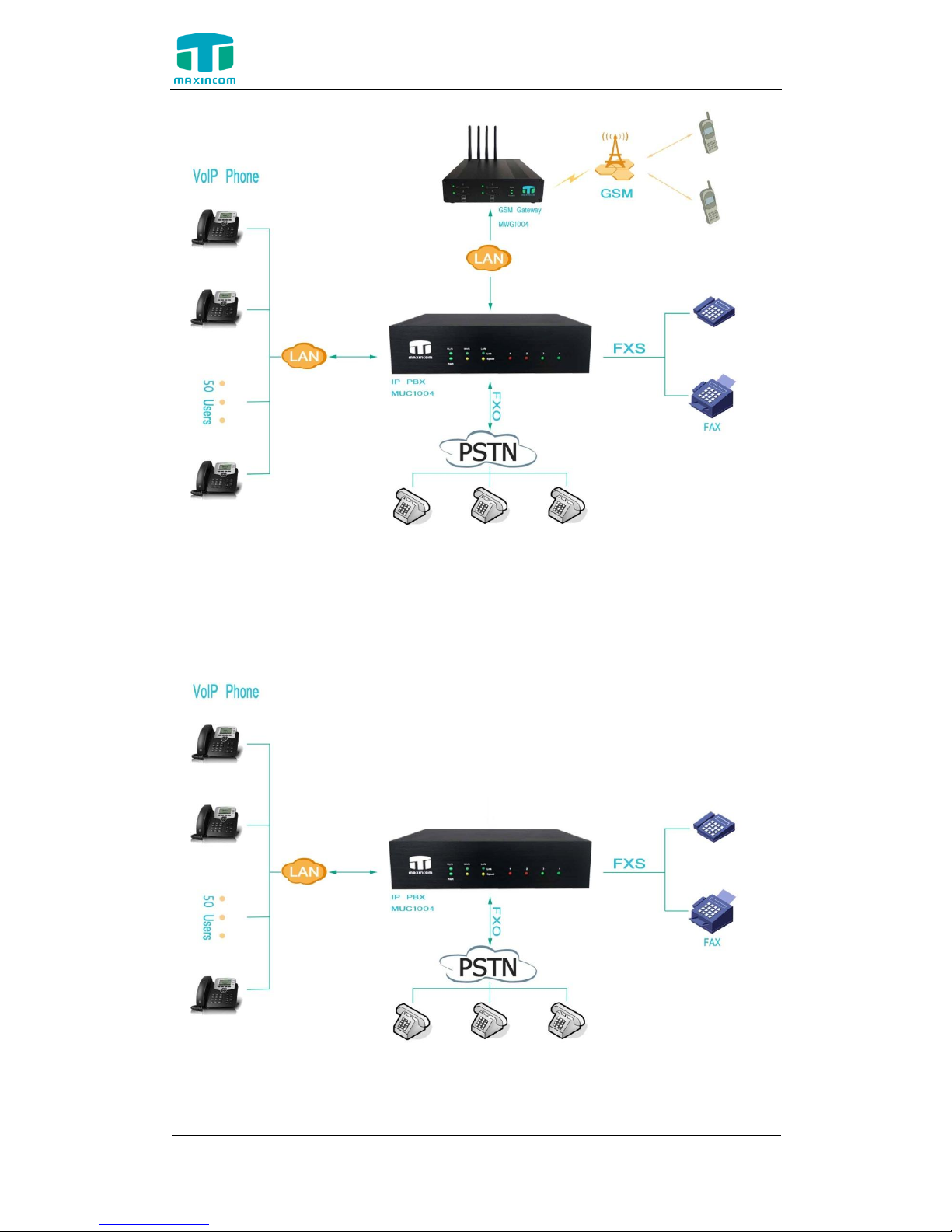
1.4 Scenario of Application
Application 1
Figure 1-4-1

MUC1004 Administrator guide
Http://www.maxincom.com 8 / 80
Application 2
Figure 1-4-2

MUC1004 Administrator guide
Http://www.maxincom.com 9 / 80
2. Installation Guide
2.1 Installation Notice
MUC1004 adapts 12VDC Power adapter , make sure AC power supply
grounded well to ensure the reliability and stability;
Notes: incorrect power connection may damage power adapter and device.
MUC1004 provides standard RJ45 with 10Mbps or 100Mbps interfaces.
2.2 Installation Procedure
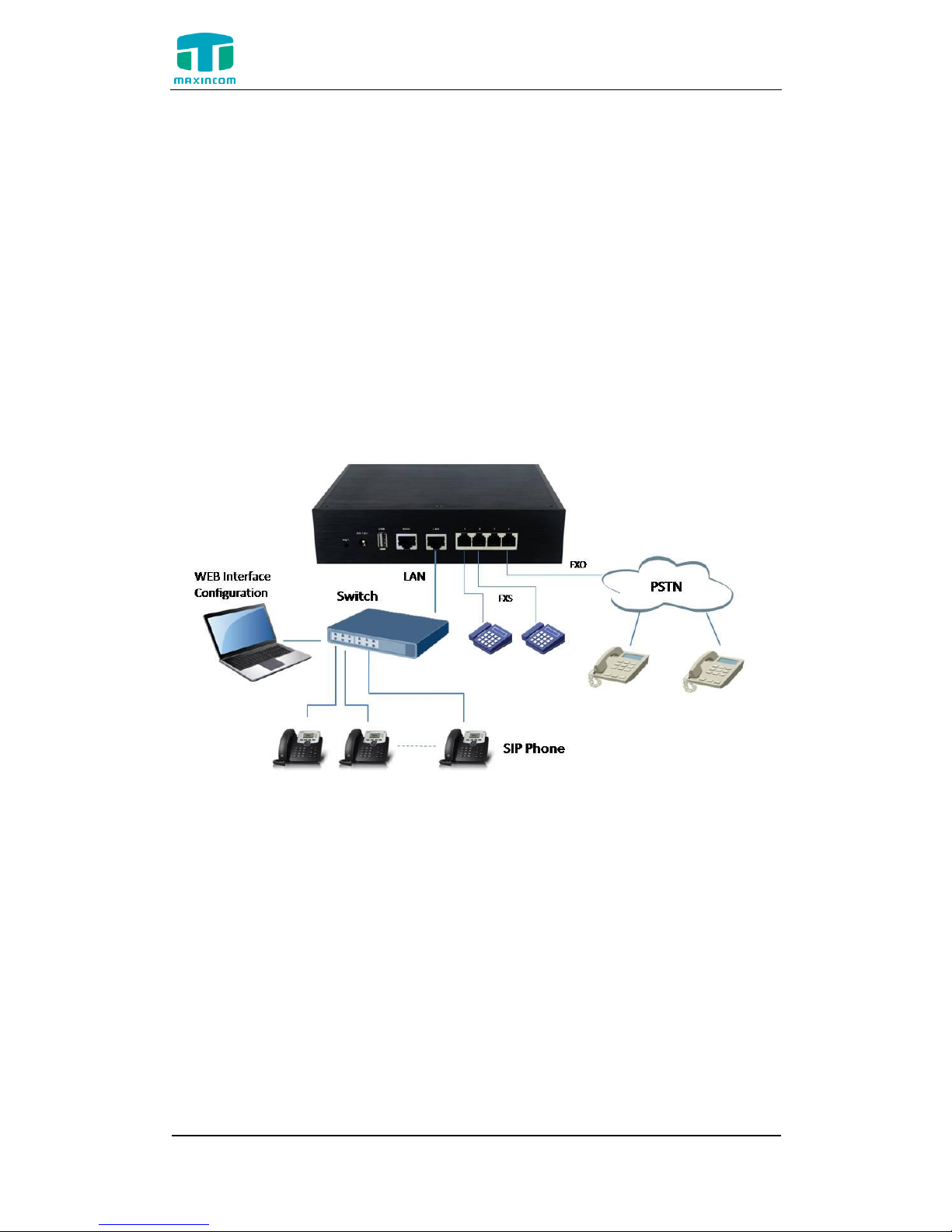
2.2.1 Connect Drawing
Figure 2-2-1 Connect Drawing
3. WEB Interface Configuration
MUC1004 IP PBX has the same web interface. This charpter describes web
configuration of MUC1004. The MUC1004 contains an embedded web server
to set parameters by using the HTTP protocol. We are strongly recommend to
a c c e s s d e v i c e w i t h G o o g l e C h r o m e o r F i r e f o x B r o w s e r .
3.1 Access MUC1004 unit
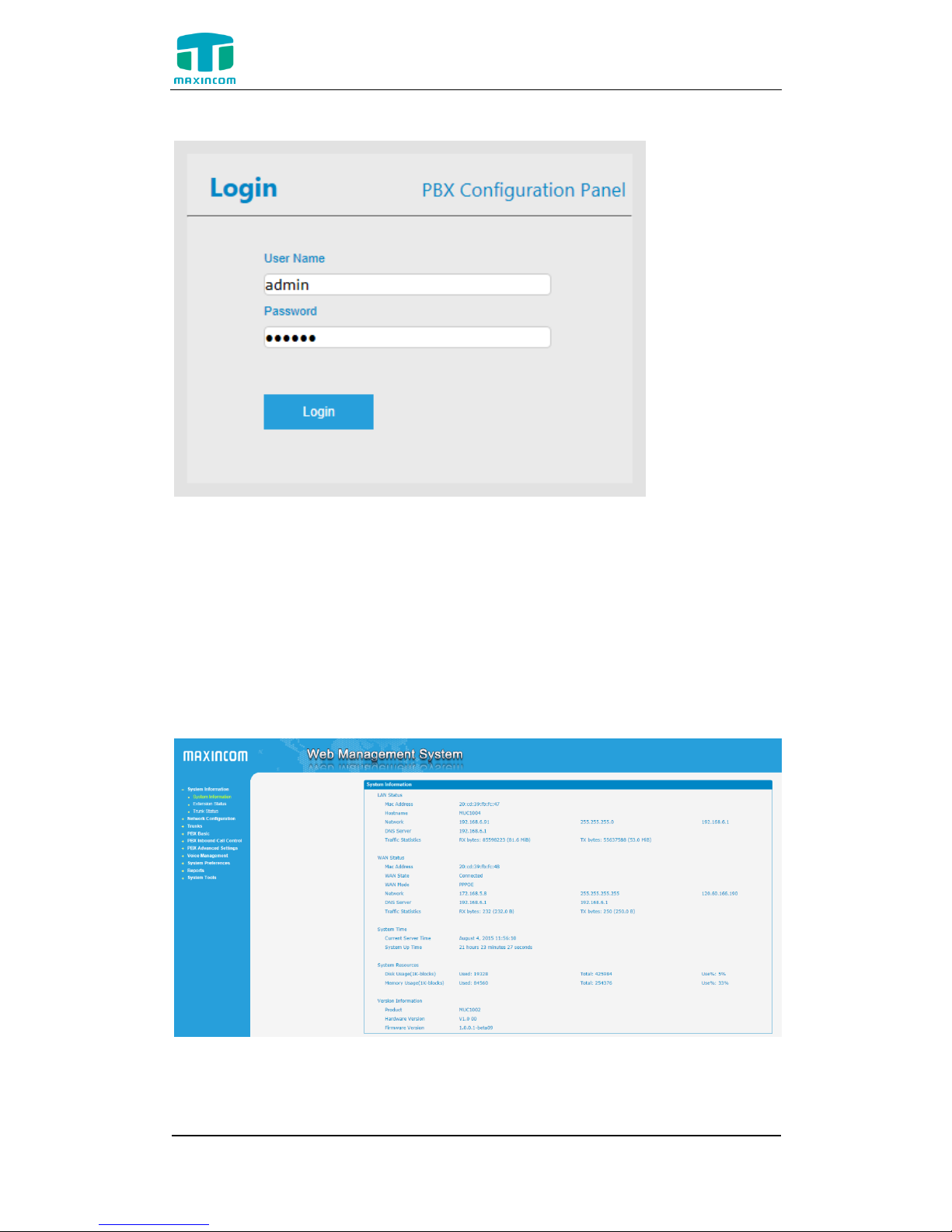
Enter IP address of MUC1004 in IE/Google Chrome/Firefox Browser. The default IP
of LAN port is 192.168.6.200. and the GUI shows as below:
In this example, the IP address is 192.168.6.91

MUC1004 Administrator guide
Http://www.maxincom.com 10 / 80
Figure 3-1-1 WEB login interface
Enter username and password and then click “Login” in configuration
interface. The default username and password are “admin/admin”. It is
strongly recommended, change the default password to a new password
for system security .
3.2 Parameters Configuration
MUC1004 WEB configuration interface consists of the navigation tree
and the detail configuration interfaces.
Figure 3-2-1 WEB introduction
Go through navigation tree, user can check, view, modify , and set
the device configuration on the right of configuration interface.
Inhaltsverzeichnis
Beliebte Telefonanlage Handbücher anderer Marken

Allo.com
Allo.com Nano 2 Bedienungsanleitung

ZYCOD
ZYCOD ZX50 Bedienungsanleitung

Panasonic
Panasonic KX-TDA100BX Bedienungsanleitung

LV switch
LV switch IPPBX800 Gebrauchsanweisung

Edge-Core
Edge-Core VST3305 Bedienungsanleitung

Panasonic
Panasonic KX-T7625 - Digital Proprietary Speakerphone 24... Bedienungsanleitung

Rauland-Borg
Rauland-Borg Telecenter IV Bedienungsanleitung

Grandstream Networks
Grandstream Networks UCM6208 Bedienungsanleitung

ATCOM
ATCOM IPPBX IP02 Bedienungsanleitung

Panasonic
Panasonic KX-TVS50 - 2 Port Voicemail System Bedienungsanleitung

bintec elmeg
bintec elmeg elmeg hybird 600 Bedienungsanleitung

Panasonic
Panasonic KX-NS300 Bedienungsanleitung