Xorcom XP0100 Bedienungsanleitung

Xorcom Ltd. www.xorcom.com
XP0100(P) IPPHONE
USER MANUAL

Xorcom Ltd. www.xorcom.com
About This Guide
Thank you for choosing this Enterprise IP Phone which is especially designed for power
users in the office environment. It features fashion and sleek design, abundant
telephony applications, broad interoperability with the popular 3rd party VoIP products,
fulfilling the VoIP deployment needs from enterprise and ITSP.
In this User Guide, you will find everything you need to quickly use your new phone. Be
sure to verify with your system administrator that your network is prepared for
configuring your IP phone. As well, be sure to read the Packing List section in this guide
before you set up and use the phone.
Declaration of Conformity
Hereby, it’s declared that this phone is in conformity with the essential
requirements and other relevant provisions of the CE, FCC.
CE Mark Warning
This is a class B device, in a domestic environment; this product may cause radio
interference, in which case the user may be required to take adequate measures.
WEEE Warning
To avoid the potential effects on the environment and human health as
a result of the presence of hazardous substances in electrical and
electronic equipment, end users of electrical and electronic equipment
should understand the meaning of the crossed-out wheeled bin symbol.
Do not dispose of WEEE as unsorted municipal waste and have to collect
such WEEE separately.

Xorcom Ltd. www.xorcom.com
This page is intentionally left blank.

XP0100 Enterprise IP Phone Table of Contents
I
Table of Contents
Getting Started..................................................... 1
Packing List................................................................................................1
Assembling the Phone .................................................................................2
Configuration and Registration .....................................................................5
Configuring via Web Page.......................................................................5
Configuring via keypad ..........................................................................6
Overview .............................................................. 7
Keypad Instruction......................................................................................7
LED Instruction ..........................................................................................8
Icon Instruction..........................................................................................9
User Interface ..........................................................................................10
Customizing Your Phone..................................... 13
General Settings.......................................................................................13
Phone Status ......................................................................................13
Language ...........................................................................................13
Time and Date ....................................................................................14
Keypad Lock .......................................................................................14
Audio Settings..........................................................................................15
Volume ..............................................................................................15
Ring Tones .........................................................................................16
Codec Selection ..................................................................................17
Contact Management ................................................................................18
Local Directory....................................................................................18
Blacklist .............................................................................................19
Other Settings..........................................................................................19
Key as Send .......................................................................................19
Hot Line .............................................................................................20
Headset Prior...................................................................................... 20
Dual Headset......................................................................................21
Anonymous Call ..................................................................................21
Auto Redial.........................................................................................22
Auto Answer .......................................................................................22
Missed Call Log ...................................................................................23
Logo Customization .............................................................................23
Programmable Keys.............................................................................23
Live Dialpad .......................................................................................23
Replace Rule.......................................................................................24

XP0100 Enterprise IP Phone Table of Contents
II
Dial Now ............................................................................................24
Area Code ..........................................................................................24
Block Out ...........................................................................................25
Feature Synchronisation.......................................................................26
Push XML ...........................................................................................26
WatchDog ..........................................................................................26
Using the Basic Call Functions ............................ 27
Making a call ............................................................................................27
Call Devices........................................................................................27
Call Methods.......................................................................................27
Password Dial .....................................................................................28
Call Completion...................................................................................29
Answering a Call.......................................................................................29
Answering an Incoming Call .................................................................29
Denying an Incoming Call.....................................................................29
DND ..................................................................................................29
Call Forward .......................................................................................30
Intercom............................................................................................30
During an Active Call.................................................................................31
Mute..................................................................................................31
Call Hold ............................................................................................31
Call Waiting ........................................................................................ 32
Call Transfer .......................................................................................32
3-way Conference ...............................................................................33
Network Conference ............................................................................33
Voice Mail...........................................................................................33
Using the Advanced Phone Functions ................. 35
Account Setting ........................................................................................35
TLS ...................................................................................................35
DNS-SRV ...........................................................................................36
Network Setting .......................................................................................36
PC Port Setting ...................................................................................36
VLAN Setting ......................................................................................37
LLDP..................................................................................................37
HTTPS ...............................................................................................38
Maintenance Tasks ....................................................................................38
Administrator Mode .............................................................................38
Administrator/User Password ................................................................39
Reboot...............................................................................................39
Reset to Factory ..................................................................................40
Export/Import Configuration File ...........................................................40
Firmware Update.................................................................................40

XP0100 Enterprise IP Phone Table of Contents
III
Decryption .........................................................................................41
Zero-sp-touch.....................................................................................42
System Log Export .............................................................................. 42
PCAP Trace Export ...............................................................................42
802.1X ..............................................................................................43
DSS Keys Configuration.............................................................................43
Line...................................................................................................44
Speed Dial .........................................................................................44
BLF ...................................................................................................45
BLF List..............................................................................................45
Voice Mail...........................................................................................46
Pick Up ..............................................................................................46
Group Pick Up.....................................................................................46
Call Park ............................................................................................47
Intercom............................................................................................47
DTMF.................................................................................................47
Prefix.................................................................................................48
Local Group ........................................................................................48
Conference.........................................................................................48
Forward .............................................................................................49
Transfer .............................................................................................49
Hold ..................................................................................................49
DND ..................................................................................................50
Redial ................................................................................................50
Call Return .........................................................................................50
Record ...............................................................................................50
URL Record ........................................................................................51
Multicast Paging..................................................................................51
Group Listening ..................................................................................52
Public Hold .........................................................................................53
Private Hold........................................................................................53
Shared Line ........................................................................................53
Automatic Call Distribution (ACD)..........................................................54
Zero-sp-touch.....................................................................................54
URL ...................................................................................................55
SNMP ......................................................................................................55
Action URL ...............................................................................................56
Action URI ...............................................................................................57
Music on Hold...........................................................................................58
SIP Diversion Display ................................................................................59
Suppress DTMF Display .............................................................................59
Tone Settings ...........................................................................................60
Voice.......................................................................................................60
Ring........................................................................................................61

XP0100 Enterprise IP Phone Table of Contents
IV
Trouble Shooting ................................................ 63

XP0100 Enterprise IP Phone Getting Started
Xorcom Ltd. 1 www.xorcom.com
Getting Started
Packing List
The following components are included in your package:
Enterprise IP Phone
Phone Stand
Power Adapter

XP0100 Enterprise IP Phone Getting Started
Xorcom Ltd. 2 www.xorcom.com
Handset & Handset Cord
Ethernet Cable
Quick Installation & Quick Reference
CD-ROM (Optional)
Check this list before installation to ensure that you have received each item. If you are
missing any items, contact your IP phone reseller.
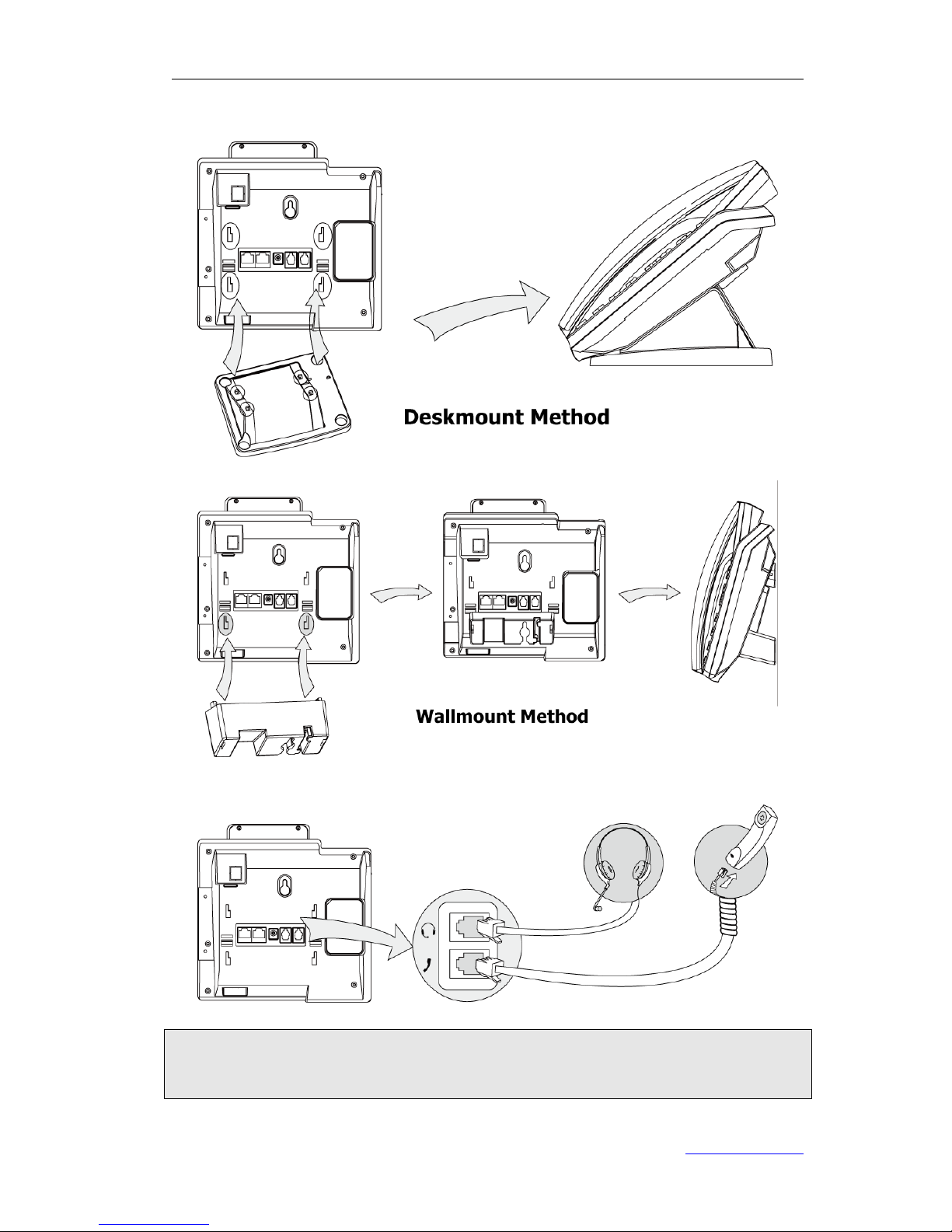
Assembling the Phone
This section introduce how to assemble the phone with the components in the packing
list:
Attach the Stand
Connect Handset and Headset
Connect Network and Power

XP0100 Enterprise IP Phone Getting Started
Xorcom Ltd. 3 www.xorcom.com
1) Attach the Stand, as shown below:
2) Connect Handset and Headset, as shown below:
Note:
Headset is not provided in the packing list. Please contact your distributor for more
information.
Andere Handbücher für XP0100
2
Dieses Handbuch passt für folgende Modelle
1
Inhaltsverzeichnis
Andere Xorcom IP-Telefon Handbücher

Xorcom
Xorcom UC924 Bedienungsanleitung

Xorcom
Xorcom UC505U Bedienungsanleitung

Xorcom
Xorcom XP0150G Bedienungsanleitung

Xorcom
Xorcom XP0120P Handbuch

Xorcom
Xorcom XP0120 Bedienungsanleitung

Xorcom
Xorcom UC926 Bedienungsanleitung

Xorcom
Xorcom XP0020 Bedienungsanleitung

Xorcom
Xorcom CXR1000 Bedienungsanleitung

Xorcom
Xorcom UC902S Bedienungsanleitung

Xorcom
Xorcom UC42 Bedienungsanleitung