
Xtech VOXDOTS XTH-700 Bedienungsanleitung
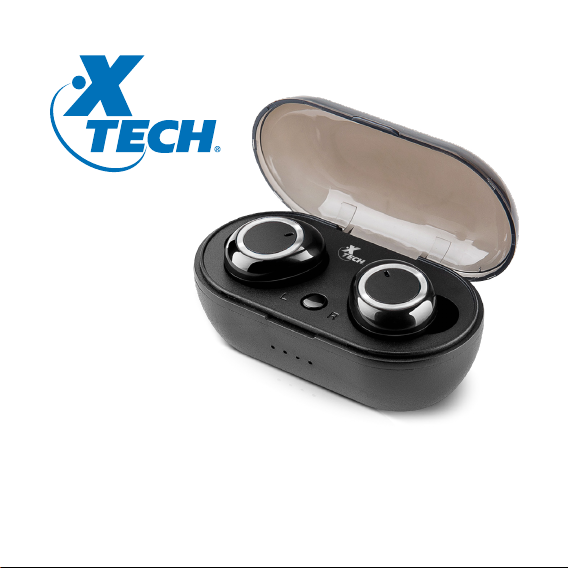
XTH-700
True Wireless Stereo (TWS) earphones
with portable charging case
VOXDOTS

English
User guide
I. Introduction
Thank you for purchasing the Xtech XTH-700 True wireless earphones with
Bluetooth®wireless technology. By pairing it with mobile audio devices also
enabled with this technology, the earphones offer great audio quality,
excellent performance and the freedom of listening to music or taking calls
easily everywhere you go.
We encourage you to thoroughly read this user guide to get the most out of
this innovative and truly portable wireless audio device.
II. Main features
• True wireless stereo (TWS) earphones
• Built-in HD microphone for taking calls
• Supports single (mono) and dual earphone use (stereo)
• Stream audio wirelessly up to 150ft away from any compatible Bluetooth®
device*
• 15 hours of total playback time and approximately 120 hours in standby
mode**
• The dual charging dock includes a 330mAh battery with the capacity to store
enough energy to last up to 3 cycles
• Each earbud is equipped with a 40mAh battery
• The charging dock can fully charge earbuds in about 1.5 hours
• Includes interchangeable ear tips for a comfortable, custom fit
Package contents:
• Wireless earphone (2)
• Magnetic charging case (1)
• USB charging cable (1)
• Silicone tips
Medium (2 pairs)
Large (1 pair)
• User guide (1)
* Range estimate is based on an area free and clear of obstacles and interference, and within
the line-of-sight between both Bluetooth®V5.0 devices
**Estimated battery run time depends on usage patterns and volume settings
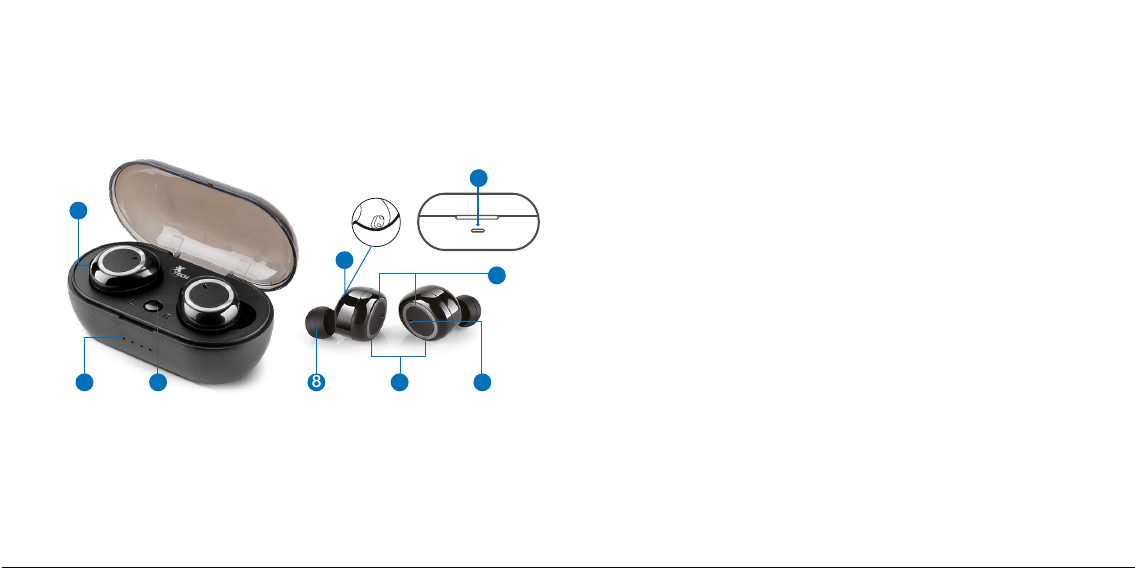
8
6
7
4
59
1. Magnetic charging socket: Place each earphone in the corresponding left
and right side to recharge.
2. On/Off button: Press this button to turn on the battery LED indicator. The
LED will display the charge remaining capacity. The LED will turn off
automatically after 30 seconds.
3. Case LED indicators: The white LEDs light up consecutively while the case
is being charged. Once all LEDs stop blinking and turn solid white, it means
that the case is fully charged.
4. Charging port: Insert the micro-USB cable in this jack.
5. Built-in microphone: Picks up your voice to enable hands-free calling and
conferencing.
6. Earphone LED indicator: The LED turns solid red while the earphones are
being charged. Once the earphones reach full capacity, the red light will turn
off.
7. Earphone magnetic charging contacts: Place the left and right earphones
properly in the charging case to begin charging.
8. Silicone ear tips: Interchangeable tips provide a comfortable fit for hours.
9. Power/Multifunction button: Press the multifunction button to power the
earphones on and off.
Press this button also to start and pause media, and to answer or end an
incoming call.
III. Product overview
3 2
1
IV. Basic operation
4.1. Charging the case and earphones
Note:
- The case and earphones have internal, non-removable, rechargeable batteries.
Do not attempt to remove the battery as you may damage the device.
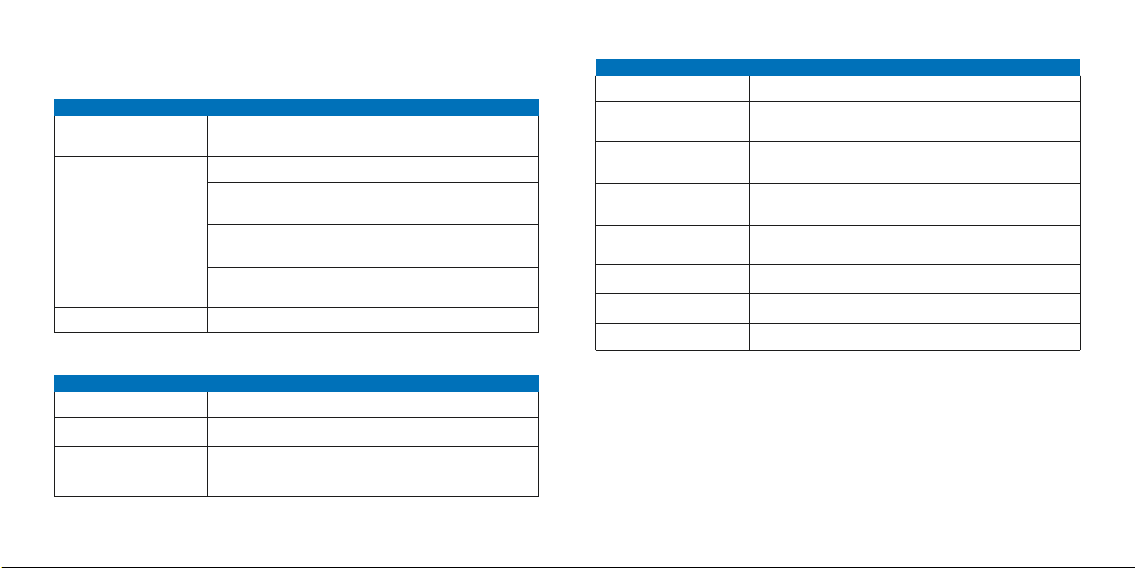
Pairing
Hands-free mode
Playback mode
Press and hold to enable the pairing mode (if the earphones
fail to automatically go into pairing mode).
Briefly press to answer and end an incoming call
Press three times to redial the last number called (on
supported devices)
Press and hold for about 1 second to reject or ignore an
incoming call
Press and hold for about 2 seconds to enable the voice
command feature on the device
Briefly press the right or left button to play and pause audio
Mode
Multifunction button
Function
Charging
Charging complete
Power on
The LED turns solid red
The LED turns off
Initially, the LEDs light up in blue on both earphones, then the
left earphone LED starts flashing red and blue. The right
earphone LED lights up in blue once every 5 seconds
Status
LED indicators on earbuds
Function
Power off
Pairing mode active
Left or right channel
enabled
Bluetooth®connection
Standby
Low battery
Incoming call/ Dialing
Phone is on active call
The LEDs glow red, before turning off completely
The LED on the right earphone tuns solid blue, and the
LED on the left one flashes red and blue alternatively
Blue LED lights up once every 5 seconds
When the device has paired, only the blue LED will blink once
every 5 seconds on both earphones
The LED on the right earphone stays solid blue and on the left
one, the LED stays solid red
Red LED blinks once every second
Blue LED lights up once every 5 seconds
Blue LED lights up once every 5 seconds
Status Function
Earphone multifunction buttons with LED status indicators:

4.2. Turning your earphones on or off
1. To turn your earphones on you can take them out of the base or press and
hold the Multifunction button on each one for about 4 seconds. The Power
on prompt will be heard, making the LED glow blue on one earphone and
alternate red and blue in the other one.
2. As both earphones synchronize, the Connected prompt will be heard,
followed by the blue LED on main earphone flashing once every 4 seconds.
3. To turn the earphones off, place the earphones back in the case. You can
also press and hold the Multifunction button for about 4 seconds. The
Power off prompt will be heard, making the red LED blink briefly on both
sides upon shutting off.
4.3. Wearing your earphones
- The earphones are intended to fit comfortably in either ear for all day
hands-free wearing.
- Select the tip that best fits the size of your ear canal. Gently push the
earphone into your ear. The earphone should rest securely and comfortably in
your ear when properly inserted.
- Although the case and earphones can be charged at the same time, it is
recommended to fully charge the case’s battery before charging the
earphones for the first time.
1. To charge the case, plug the USB cable into a power source and the
micro-USB in the case’s port. The case starts charging automatically.
2. Charging the case battery to its full capacity may take about 2 hours.
3. When the battery is fully charged, LED indicators light will become solid
white.
4. Proceed to place the earphones on the sockets of the charging case. Their
built-in batteries are automatically charged as long as they remain inside the
base.
5. While the earphones are being charged, the red indicator on each side lights
up. When fully charged, the LED will turn off. This process will normally take
about an hour.
6. The fully charged buds have power for up to 5 hours of playback time or up
to 120 hours of standby time. However, these times may vary depending on
the mobile device used, on the usage profile, and on the listening habits of
each individual user.
7. The low battery prompt will be heard to let you know that their voltage is
below the acceptable level to continue operating properly.

- Voice quality when speaking will be best when there are no obstacles
between the mobile phone and earphones, including your body.
V. Advanced operation
5.1. Pairing your earphones with a mobile device
1. Turn both earphones on by removing them from the charging case or by
pressing the Multifunction button for 4 seconds on both sides
simultaneously.
2. Set your Bluetooth®phone to “discover” the wireless earphone.
3. Place the phone and earphones within one meter of each other.
4. Left and right earbuds should pair together automatically. After both
earphones synchronize with each other, the blue LED will blink slowly in one
of them, while the red and blue LEDs will start alternating quickly in the
second earphone to indicate that it has entered into the pairing mode.
5. Select the XTH-700 earphone from the list of newly discovered devices in
your phone.
6. Accept by pressing Yes or OK on the device. If prompted, enter the passkey
0000 (4 zeros). Your device will confirm when pairing is complete.
7. The Your device is connected prompt will be heard when the mobile phone
and earphones are able to establish the wireless connection, making the LED
change to blinking blue.
8. If after 60 seconds the pairing process fails, please repeat steps 1 through 6
as described above.
9. The earphones will automatically go into standby mode after a short period
of inactivity to save battery life.
10. You only need to pair the earphones with your phone once, as it will re-pair
automatically.
11. The automatic re-pairing feature will allow the headset to be reconnected
after being switched back on or when placed again within wireless range.
5.2. Call management using your wireless earphones
• When there is an incoming call, your phone will ring, the blue LED will blink
once every 5 seconds, accompanied by a tone through the earphones.

• Briefly press the Multifunction button on either earphone to pick it up. You
may also press the answer button on your cellular phone to receive the
incoming communication in your earphones
Note: Audio will be transmitted to both earbuds.
• To end a call, simply press the Multifunction button on either earphone once
again.
• To ignore an incoming communication and send the caller to voicemail, press
and hold the Multifunction button on either earphone for about 2 seconds.
• Last number redialed will be heard when you press 3 times the
Multifunction button on either earphone to ring the last number called.
5.3. Music playback and voice command using your wireless earphones
• Briefly press the Multifunction button on the either earphone to start and
stop audio playback.
• Press and hold the Multifunction button for about 2 seconds to enable voice
command in supported devices through Google Assistant or Siri.
VI. Troubleshooting
If you cannot connect the headset to your phone, do as follows:
• Ensure that the headset is charged, switched on, paired with and connected
to your phone.
• Ensure that the Bluetooth®feature is activated on your phone.
• Check that the headset is within 30 feet of your phone and that there are no
obstructions between the headset and the phone, such as walls or other
electronic devices.
VII. Technical specifications
Device
Type
Form factor
Maximum power output (RMS)
Frequency response
Signal- to-noise ratio
DC input
Speaker
Driver unit
Maximum power output
Frequency
Impedance
Sensitivity
Microphone
Signal- to-noise ratio
Impedance
Sensitivity
True Wireless Stereo earbuds with
portable charging case
In-ear
6mW total
20Hz-20kHz
80dB
5V/300mA
Φ10mm
3mW
20Hz〜20kHz
16Ω
96±5dB
60dB
2.2kΩ
-42dB±3dB

Precautions
• Your headset is powered by a rechargeable battery. The battery can be
charged and discharged hundreds of times, but it will eventually wear out.
• Recharge your battery only with compatible chargers designated for this
device.
• Unplug the USB charger from the source when not in use.
• Parts of the headset are magnetic. Metallic materials may be attracted to the
device. Do not place credit cards or other magnetic storage media near the
headset, because information stored on them may be erased.
• Do NOT drop, hit or shake the device.
• Do NOT disassemble, repair or modify the earphones yourself.
• Do NOT use harsh chemicals, cleaning solvents, or strong detergents to clean
the device.
• Do NOT expose headset to excessive heat or to direct sunlight for long
periods of time.
• Do NOT store the device in a place with high humidity or dust.
Connectivity
Connection type
Wireless RF frequency
Wireless range
Battery
Charging method
Type
Capacity
Charging time
Run time
Standby time
Additional information
Dimensions
Weight
Cable length
Warranty
Bluetooth® JL 5.0
4GHz-2.480GHz
150ft*
Earbud: up to 3 recharge cycles
through each magnetic socket
Charging case: micro-USB
Lithium
Earbud: 40mAh each
Charging case: 330mAh
Earbuds: 1 hour
Charging case: 1.5 hours
Up to 5 hours at 50% volume on a
single charge, with an additional 10
hours of backup time**
120 hours
2.8(W)x 1.5(L)x1.2(H)in
1.4oz
Charging cable: 3.3ft
One year
* Range estimate is based on an area free and clear of obstacles and interference, and within
the line-of-sight between both Bluetooth®V5.0devices
**Estimated battery run time depends on usage and volume settings

FCC statement
This equipment has been tested and found to comply with the limits for a
Class B digital device, pursuant to part 15 of the FCC Rules. These limits
are designed to provide reasonable protection against harmful interference
in a residential installation. This equipment generates, uses, and can radiate
radio frequency energy and, if not installed and used in accordance with the
instructions, may cause harmful interference to radio communications.
However, there is no guarantee that interference will not occur in a
particular installation. If this equipment does cause harmful interference to
radio or television reception, which can be determined by turning the
equipment off and on, the user is encouraged to try to correct the
interference by one or more of the following measures:
• Reorient or relocate the receiving antenna.
• Increase the separation between the equipment and receiver.
• Connect the equipment into an outlet on a circuit different from that to
which the receiver is connected.
• Consult the dealer or an experienced radio/TV technician for help.
NOTES

Español
Guía de usuario
I. Introducción
Gracias por preferir los Audífonos con verdadera conexión inalámbrica
estéreo XTH-700 de Xtech y tecnología inalámbrica Bluetooth®. Al
emparejarlo con teléfonos móviles también equipados con esta tecnología, el
audífono ofrece un audio de alta calidad, un excelente desempeño, al igual
que la libertad de escuchar música o recibir llamadas adondequiera que vaya
con toda facilidad.
Le recomendamos leer detenidamente la guía del usuario, con el objeto de
aprovechar al máximo todas las ventajas de este innovador y verdaderamente
portátil dispositivo de audio inalámbrico.
II. Características principales
• Audífonos con verdadera conexión inalámbrica estéreo (TWS)
• Micrófono HD integrado para conversaciones con manos libres
• Admite el uso de un solo audífono (mono) o de ambos (estéreo)
• Reproducción de audio en forma inalámbrica hasta 45 metros de distancia
con cualquier dispositivo compatible con Bluetooth®*
• 15 horas de tiempo total de reproducción y aproximadamente 120 horas en
modo de pausa**
• La base dual incluye una batería de 3300mAh capaz de almacenar la energía
necesaria para completar hasta 3 ciclos de carga
• Cada audífono viene con una batería de 40mAh
• La base recarga completamente los audífonos en 1,5 horas
• Incluye almohadillas intercambiables con el fin de garantizar el calce perfecto
para cada usuario
Contenido del empaque:
• Audífono inalámbrico (2)
• Estuche de carga (1)
• Cable de alimentación USB (1)
• Puntas de silicona para los oídos
Mediana (2 pares)
Grande (1 par)
• Guía del usuario (1)
* El cálculo de la distancia se basa en un área libre de obstáculos e inferencias, y en línea
recta entre ambos dispositivos Bluetooth® V5.0
**La duración aproximada de la batería depende de los hábitos de uso y de la regulación del
volumen
Inhaltsverzeichnis
Sprachen:
Andere Xtech Kopfhörer Handbücher


