Zenty ZT-199 Bedienungsanleitung

(844) 200-1945 | [email protected] Page 2of 16 Copyright © Zenty AV
SAFETY PRECAUTIONS
To ensure the best from the product, please read all instructions carefully before using the device.
Save this manual for further reference.
⚫Unpack the equipment carefully and save the original box and packing material for possible future
shipment
⚫Follow basic safety precautions to reduce the risk of fire, electrical shock and injury to persons.
⚫Do not dismantle the housing or modify the module. It may result in electrical shock or burn.
⚫Using supplies or parts not meeting the products’ specifications may cause damage, deterioration
or malfunction.
⚫Refer all servicing to qualified service personnel.
⚫To prevent fire or shock hazard, do not expose the unit to rain, moisture or install this product
near water.
⚫Do not put any heavy items on the extension cable in case of extrusion.
⚫Do not remove the housing of the device as opening or removing housing may expose you to
dangerous voltage or other hazards.
⚫Install the device in a place with fine ventilation to avoid damage caused by overheat.
⚫Keep the module away from liquids.
⚫Spillage into the housing may result in fire, electrical shock, or equipment damage. If an object or
liquid falls or spills on to the housing, unplug the module immediately.
⚫Do not twist or pull by force ends of the optical cable. It can cause malfunction.
⚫Do not use liquid or aerosol cleaners to clean this unit. Always unplug the power to the device
before cleaning.
⚫Unplug the power cord when left unused for a long period of time.
⚫Information on disposal for scrapped devices: do not burn or mix with general household waste,
please treat them as normal electrical wastes.

(844) 200-1945 | [email protected] Page 5of 16 Copyright © Zenty AV
ZT-AP40 is a compact-size digital amplifier (Class-D) with 3 inputs (2 line in and 1 balanced MIC). It is
integrated with powerful functions, including bridge connection, dual-mono, EQ control, microphone
mixer etc.
It has a good application in different places, including classroom, small meeting room, lecture hall,
bar, pub etc.
⚫2x20Watt@4Ohm as the default amplifier output.
⚫Bridge connection function. User can switch the ZT-AP40 to be 1x40Watt@8Ohm by bridge
connection.
⚫Two stereo audio inputs, switchable by button, IR remote & RS232.
⚫Volume/Bass/Treble controllable by buttons IR remote & RS232.
⚫MIC port can support balance/unbalance signal, suppress the external noise effectively.
⚫Line audio output at 3.5mm jack, with volume controllable.
⚫Dual-mono function. User can sum up the stereo audio to two times mono audio.
⚫MIC mixer function. The microphone will be mixed to the line audio output and be controlled
separately.
⚫MIC input supports 48V phantom power, dynamic MIC and wireless MIC.
⚫Auto noise gate. It keeps detecting the audio and MIC input, will mute the output when there is no
input.
⚫Ultra-low inrush current, no need for power sequencing. This allows multiple ZT-AP40 to be
powered on simultaneously without overloading power circuits.
⚫Convection cooler, fan is not needed.
⚫Antistatic case design: providing good protection for long-term and stable performance.
•(1) x ZT-AP40 (The mounting ears and ZT-AP40 are as a whole.)


(844) 200-1945 | [email protected] Page 6of 16 Copyright © Zenty AV
•(2) x Pluggable Terminal Blocks
•(1) x RS232 Cable
•(1) x Power Adapter
•(1) x Power Cord
•(4) x Plastic Cushions
Notes:
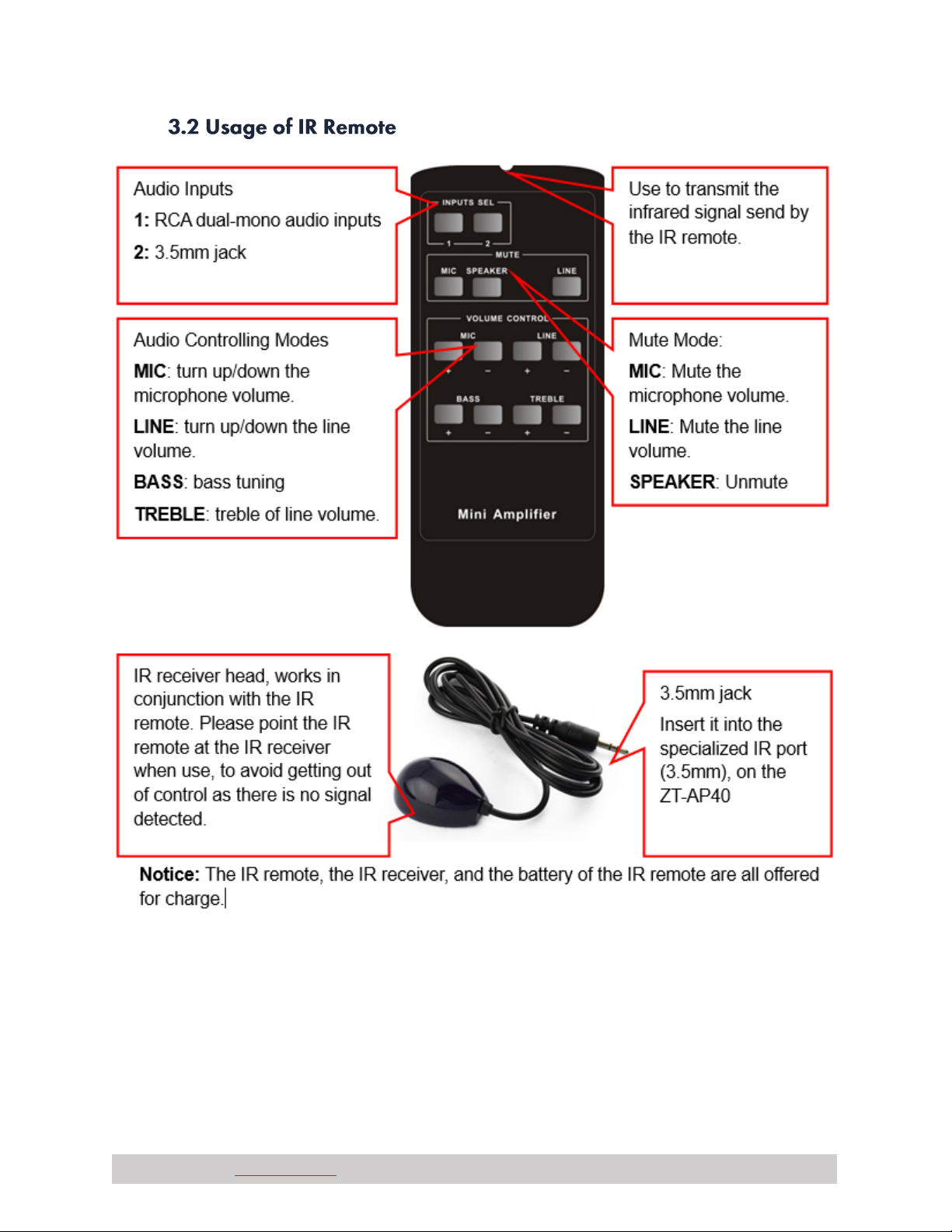
•The IR remote and its battery are offered for charge separately.
•The IR receiver is also offered for charge.
•Please confirm if the product and the accessories are all included, if not, please contact with the
dealers.
The default output of amplifier is 2x20Watt@4Ohm, so user can connect the amplifier output in the
regular way. As the picture below

(844) 200-1945 | [email protected] Page 7of 16 Copyright © Zenty AV
The ZT-AP40 has the bridge connection, to double the output power at 1x40Watt@8Ohm. It will sum up
the input left channel and input right channel to be mono output, and the power is up to 40Watt.
The bridge connection is:
The ZT-AP40 also has the function of double-mono output. It can sum up the left and right channel, to
be the mono audio output. In this way, the both of the outputs are showing the same mono audio. The
connection is:

(844) 200-1945 | [email protected] Page 8of 16 Copyright © Zenty AV
The microphone input of ZT-AP40 has three modes, and different modes use different connections, as
the picture below:
When the switch turns to “48V”, the MIC input will provide a 48V phantom power. This is usually used
for power supply for condenser microphone, Connection is:
“+” connects to positive, “-” connects to negative and “╧”to ground.
Note: In this mode, only condenser microphone can be connected with.
When the switch turns to “MIC”, the microphone input is used for connecting with dynamic
microphone. There are two different connections:
1) Unbalanced connection:
“╧”connects to ground, and “-”connects to signal.
“╧”connects to ground, and “+”connects to signal.
2) Balanced connection: “+” connects to positive, “-” connects to negative and “╧”connects to ground.
When the switch turns to “LINE”, the microphone input is used for connecting with normal audio or
wireless microphone output. There are two different connections:
1) Unbalanced connection:
“╧”connects to ground, and “-”connects to signal.
“╧”connects to ground, and “+”connects to signal.
2) Balanced connection: “+” connects to positive, “-” connects to negative and “╧” connects to ground.

(844) 200-1945 | [email protected] Page 9of 16 Copyright © Zenty AV
The buttons provide the control of volume/EQ control and switching. The following content introduces
audio switching and EQ control in detail.
There are two switchable stereo audio inputs, one 2xRCA input, and one 3.5mm jack input, switchable
through the buttons as below:
The line volume and MIC volume can be controlled by the buttons.
The MIC Volume/LINE volume/LINE bass/LINE treble will be selected by the buttons, and controlled
up/down/mute by the function buttons. Please check the picture below:
Dieses Handbuch passt für folgende Modelle
1
Inhaltsverzeichnis