
Avonic AV-REC200 Bedienungsanleitung

USER MANUAL
Recorder & Encoder with HDMI & SDI input
AV-REC200
www.avonic.com • © July 2022 • Version 1.5
DISCLAIMER, CONTACT AND CE MARKING
Disclaimer
All text, graphics, photographs, trademarks, logos, artwork and computer code (collectively, “Content”),
including but not limited to the design, structure, selection, coordination, expression, “look and feel” and
arrangement of such Content, contained in this Manual is owned, controlled or licensed by or to Avonic, and is
protected by trade dress, copyright, patent and trademark laws, and various other intellectual property rights and
unfair competition laws.
Except as expressly provided in these Terms of Use, no Content of this Manual may be copied, reproduced,
republished, uploaded, posted, publicly displayed, encoded, translated, transmitted or distributed in any way
(including “mirroring”) to any other computer, server, Web site or other medium for publication or distribution or for
any commercial enterprise, without the prior written consent of Avonic.
Copyright © 2022 AVONIC All Rights Reserved.
The information contained in this Manual is subject to change without notice.
Contact Info
For any questions or suggestions, contact your reseller or local distributor of Avonic.
Visit the Avonic website www.avonic.com to find your local Avonic distributor or to download the most recent
version of the documentation.
Join Avonic on Social Media
www.Facebook.com/avonicPTZ www.instagram.com/avonicPTZ
www.LinkedIn.com/company/avonic www.youtube.com/channels/avonic
www.twitter.com/avonic
CE Marking
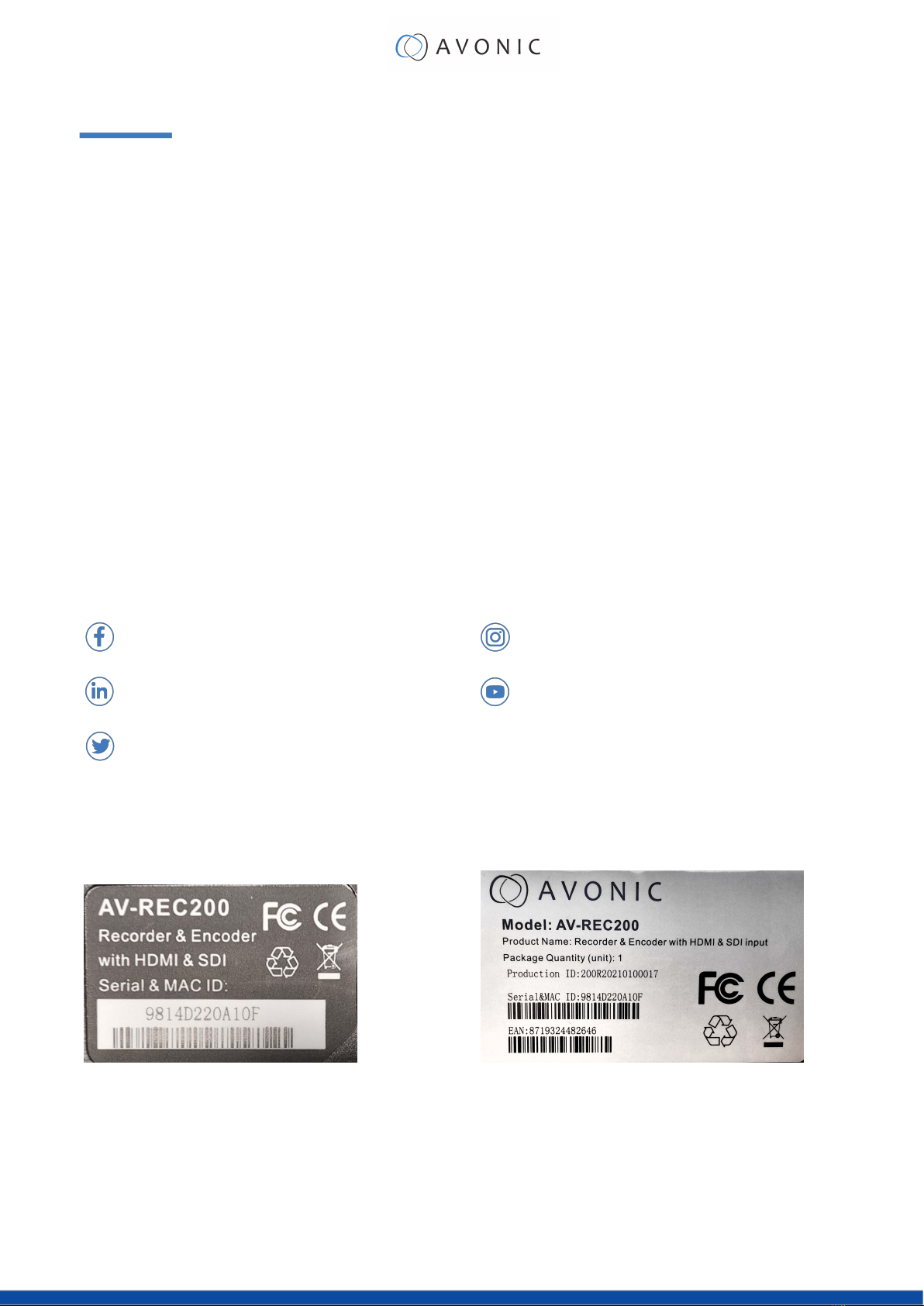
The Product has a CE Marking. The CE labels are placed at the bottom of the Product and on the packaging.
See the respective figures below:
Figure 1: CE Marking (Product) Figure 2: CE Marking (Packaging)
ii

EU DECLARATION OF CONFORMITY
Table 1: EU Declaration of Conformity
CE DECLARATION OF CONFORMITY
1. Models No: AV-REC200
2. Brand Name: Avonic
3. Product Name: Recorder & Encoder with HDMI & SDI input
(pre-order)
4. Manufacturer: Avonic
Exportweg 11a
2645ED Delfgauw
Netherlands
3. This declaration of conformity is issued under the sole responsibility of the manufacturer
4. The object of the declaration described in point 1 is in conformity with the EMC2014/30/EU
5. Standards:
EN 55032: 2015
EN 61000-3-2: 2014
EN 61000-3-3: 2013
EN 55035: 2017
6. Signed for and on behalf of Avonic:
Delfgauw, 25th of April, 2019
Martijn van Bodegom,
Product Manager
iii

IMPORTANT INFORMATION
Liability
Avonic will NOT be held responsible for any damage or injury caused by unqualified persons carrying out these
tasks, or by not following the instructions in this Manual.
Intended Use and Non-Intended Use
Installation
The following applies to the installation of the camera:
• The installation activities in this Manual should ONLY be executed by experienced technicians.
• The installation activities should NOT be executed by minors, mentally disabled persons or other persons not
qualified to perform these tasks.
Operation
The following applies to the operation of the camera:
• The operational activities described in this Manual should ONLY be executed by people with enough
technical knowledge to perform the activities in a safe manner.
• This Product is specifically developed for video conferencing / streaming via internet by companies,
institutes and universities. It is NOT meant for private use in the residential area.
• This Product should ONLY be used indoors.
• This Product is NOT a medical device and should NOT be used as a substitute for professional medical
judgment. It is NOT designed or intended for use in the diagnosis of disease or other conditions, or in the
cure, mitigation, treatment, or prevention of any condition or disease. Please consult your healthcare
provider prior to making any decisions related to your health.
Important Precautions
This Product is NOT intended for use where failure of the device could lead to death, personal injury, or
severe environmental damage.
Be sure that you have COMPLETELY READ and UNDERSTOOD ALL information in this Manual before
unpacking, installing and using this Product. Keep the Manual in a safe place for future reference or
download it from www.avonic.com.
Failure to follow the SAFETY NOTES as described in this chapter could result in fire, electric shock, injury, or
damage to this Product or other property.
Power this Product ONLY with the included cable and power adapter. Other adapters may not meet
applicable safety standards, and could pose a risk of death or injury when connected.
Symbols Used in This Manual
Symbol Meaning Description
Danger Not following the instructions associated with this symbol may
lead to personal injury and / or serious damage to the Product.
Electrical Shock Not following the instructions associated with this symbol may
lead to life-threatening situations and / or serious damage to the
Product.
iv

Symbol Meaning Description
Listed Caution should be exercised related to the information listed
in the user manual. Not following this information or instructions
may lead to injury and/or damage to the product.
Important The information associated with this symbol requires special
attention.
Information The information associated with symbol refers to a general
remark or a reference to other documentation.
Instruction This symbol refers to one or more user instructions that must be
followed as is documented in the user manual.
Recycling Specific parts of the Product can be re-used.
Acronyms
The following acronyms are used in this Manual:
DHCP Dynamic Host Configuration Protocol
FTP File Transfer Protocol
HD High Definition
HDMI High-Definition Multimedia Interface
IP Internet Protocol
MJPEG Motion-JPEG
RTMP Real-Time Messaging Protocol
RTSP Real-Time Streaming Protocol
SDI Serial Digital Interface
SKU Stock Keeping Unit
SNR Signal to Noise Ratio
SRT Secure Reliable Transport
UDP User Datagram Protocol
v

Contents
DISCLAIMER, CONTACT AND CE MARKING....................................................................................... ii
EU DECLARATION OF CONFORMITY...................................................................................................iii
IMPORTANT INFORMATION..................................................................................................................iv
Liability......................................................................................................................................... iv
Intended Use and Non-Intended Use..................................................................................... iv
Installation......................................................................................................................... iv
Operation..........................................................................................................................iv
Important Precautions..................................................................................................... iv
Symbols Used in This Manual....................................................................................................iv
Acronyms.....................................................................................................................................v
INTRODUCTION......................................................................................................................................8
Purpose of This Manual..............................................................................................................8
Target Audience.........................................................................................................................8
Document Structure................................................................................................................... 8
SAFETY.................................................................................................................................................... 9
Important Precautions................................................................................................................9
Intended Use...............................................................................................................................9
Handling.............................................................................................................................9
Installation.......................................................................................................................... 9
Ventilation........................................................................................................................10
Repair............................................................................................................................... 10
Power and Adapter....................................................................................................... 10
Atmospheric Conditions.................................................................................................10
PRODUCT OVERVIEW......................................................................................................................... 11
Description.................................................................................................................................11
Features..................................................................................................................................... 11
UNPACKING.........................................................................................................................................12
Package Contents................................................................................................................... 12
Unpacking the Recorder......................................................................................................... 13
Return Procedure..................................................................................................................... 13
MOUNTING AND INSTALLATION.........................................................................................................14
Mounting construction............................................................................................................. 14
Connecting the Components to the Recorder....................................................................14
Audio Connection.......................................................................................................... 15
OPERATION.......................................................................................................................................... 16
WebGUI......................................................................................................................................16
Login................................................................................................................................. 16
Start...................................................................................................................................17
Status Page..................................................................................................................... 18
Live Service/ Streaming Setting.....................................................................................19
Record Page / FTP Upload Settings..............................................................................25
Playback Settings............................................................................................................28
Overlay Settings.............................................................................................................. 29
System Settings................................................................................................................32
Front Panel Operation............................................................................................................. 36
Front side: Button and Display layout...........................................................................36
Front Panel Menu........................................................................................................... 36
Live....................................................................................................................................37
Playback.......................................................................................................................... 38
Record..............................................................................................................................39
System.............................................................................................................................. 41
vi

MAINTENANCE.................................................................................................................................... 42
Maintenance.............................................................................................................................42
Usage Precautions....................................................................................................................42
TRANSPORT AND STORAGE............................................................................................................... 43
DISPOSAL AND RECYCLING...............................................................................................................44
TROUBLESHOOTING.............................................................................................................................45
General...................................................................................................................................... 45
Power Issues.............................................................................................................................. 45
WebGUI......................................................................................................................................45
Cannot enter WebGUI...................................................................................................45
Cannot stream, record or playback............................................................................45
Firmware update failed................................................................................................. 45
API Commands...................................................................................................................................46
How to use the API.................................................................................................................. 46
API Data.................................................................................................................................... 47
APPENDIX B - INPUT RESOLUTIONS.................................................................................................... 48
vii

INTRODUCTION
Purpose of This Manual
This Manual describes the safety precautions and the instructions for safe unpackaging, installation, operation,
maintenance and disposal of the Avonic REC-200.
In this Manual, the Avonic REC-200 are referred to as the 'Product'.
Target Audience
This Manual is developed for installation technicians who install the Product at client sites, and for IT professionals
who are responsible for operating the Product.
Document Structure
The Manual is subdivided into the following Chapters:
1. Introduction
2. Safety
3. Product Overview
4. Unpacking
5. Mounting and Installation
6. Operation
7. Maintenance
8. Transport and Storage
9. Disposal and Recycling
10. Troubleshooting
Additionally, it contains the following
•Appendix A - API Data
•Appendix B - Input Resolutions
8

SAFETY
This chapter contains important safety information regarding the unpacking, installation and use of the camera.
Important Precautions
This Product is NOT intended for use where failure of the device could lead to death, personal injury, or
severe environmental damage.
Be sure that you have COMPLETELY READ and UNDERSTOOD ALL information in this Manual before
unpacking, installing and using this Product. Keep the Manual in a safe place for future reference or
download it from www.avonic.com.
Failure to follow the SAFETY NOTES as described in this chapter could result in fire, electric shock, injury, or
damage to this Product or other property.
Power this Product ONLY with the included cable and power adapter. Other adapters may not meet
applicable safety standards, and could pose a risk of death or injury when connected.
Intended Use
This Product is intended to record video. See also section Intended Use and Non-Intended Use on page iv for
details.
Handling
To prevent the risk of injury, take the following precautions when handling this Product:
• Handle the Product with care. It is made of metal, glass, and plastic and has sensitive electronic
components inside.
• The Product can be damaged if dropped, burned, punctured or crushed, or if it comes into contact with
liquid.
• Do not pick up and move the Product unit while a tripod is attached. The fitting may break under the
weight of the tripod, which may result in injury.
• If you suspect any damage to the Product, discontinue its use, as it may cause overheating or injury.
Installation
To prevent the Product from falling down which may cause injuries:
• Set up this Product on a hard, stable surface.
• Ensure the construction is capable of supporting four times the weight of the Product. (See 'General
Specifications > Weight product’ in the Product Datasheet for the exact weight.)
• Use a safety loop or drop protection that prevents the Product from falling if the construction fails.
• During installation, NEVER install a Product above a person.
• Check the installation at least once a year. An improper construction could cause the unit to fall off,
resulting in personal injury.
9

Ventilation
To prevent the risk of life-threatening injury or damage to the Product or other property, caused by electric
shock or fire hazard due to overheating:
• Maintain adequate ventilation by NOT installing or placing the Product unit in a bookcase, built-in cabinet or
any other confined space.
• Ensure that curtains or any other material does NOT obstruct the ventilation.
Repair
Take the following precautions if the Product should be repaired:
• Don’t open this Product and don’t attempt to repair it yourself. Disassembling the Product may damage it
or may cause injury to you.
• If this Product is damaged, malfunctioning, or if it comes into contact with liquid, contact Avonic or an
Avonic Authorized Service Provider.
• Repairs by service providers other than Avonic or an Avonic Authorized Service Provider may not involve the
use of Avonic genuine parts and may affect the safety and functionality of the device. You can find more
information about repairs and service at www.avonic.com.
Power and Adapter
To prevent the risk of life-threatening injury or damage to the Product or other property, caused by electric
shock or fire hazard:
• Power this Product ONLY with the included cable and power adapter. Other adapters may not meet the
applicable safety standards. They could pose a risk of death or injury when connected.
• Do NOT use damaged cables.
• Do NOT power the Product in a moist / wet environment.
• Before you power the Product, ensure the cable is fully inserted into the power adapter.
• Plug the power adapter directly into a power outlet.
• Do NOT use the power adapter at a moist / wet location.
• Do NOT connector disconnect the power adapter with wet hands.
• Keep the Product, cable, and power adapter in a dry and well-ventilated area when in use.
• Stop using the power adapter and any cables if any of the following conditions exist:
• The power adapter plug or prongs are damaged.
• The cable becomes frayed or otherwise damaged.
• The power adapter is exposed to excessive moisture, or liquid is spilled into it.
• The power adapter has been dropped, and its enclosure is damaged.
Atmospheric Conditions
To prevent the risk of injury or damage to the Product or other property caused by a potentially explosive
atmosphere:
• Do NOT use this Product in an area with a potentially explosive atmosphere, such as areas where the air
contains high levels of flammable chemicals, vapors, or particles (such as grain, dust, or metal powders),
may be hazardous.
• Exposing this Product to environments having high concentrations of industrial chemicals, including near
evaporating liquified gasses such as helium, may damage or impair this Product functionality.
• Obey all signs and instructions.
10
Andere Handbücher für AV-REC200
2
Dieses Handbuch passt für folgende Modelle
1
Inhaltsverzeichnis
Andere Avonic Messgerät Handbücher


