
B-I-C America WTR-SYS Bedienungsanleitung

TM
WTR-SYS
Wireless Transmitter/Receiver System
User Manual
925 . Shepard Street • Anaheim, CA 92806
www.bicamerica.com

FCC Compliance
This device complies with Part 15 of the FCC Rules. Operation is subject to the following two
conditions:
(1) this device may not cause harmful interference, and (2) this device must accept any interference
received, including interference that may cause undesired operation.
Changes or modifications not expressly approved by the party responsible for compliance could
void the user’s authority to operate the equipment.
This equipment has been tested and found to comply with the limits for a Class B digital device,
pursuant to part 15 of the FCC Rules. These limits are designed to provide reasonable protection
against harmful interference in a residential installation. This equipment generates and can radiate
radio frequency energy and, if not installed and used in accordance with the instructions, may
cause harmful interference to radio communications. However, there is no guarantee that interfer-
ence will not occur in a particular installation. If this equipment does cause harmful interference to
radio or television reception, which can be determined by turning the equipment off and on, the
user is encouraged to try to correct the interference by one or more of the following measures:
• Reorient the receiving antenna.
• Increase the separation between the equipment and receiver.
• Connect the equipment into an outlet on a circuit different from that to which the receiver
is connected.
To satisfy FCC RF exposure requirements, a separation distance of 20 cm or more should be
maintained between this device and persons during device operation.
To ensure compliance, operations at closer than this distance is not recommended. The antenna
used for this transmitter must not be co-located in conjunction with any other antenna or transmitter.
Important Safety Instructions
• Unplug this apparatus during lighting storms
or when unused for long periods of time.
• Refer all servicing to qualified services per-
sonnel. Servicing is required when the appa-
ratus has been damaged in any way, such as
power-supply cord or plug is damaged, liquid
has been spilled or objects have fallen into the
apparatus, the apparatus has been exposed
to rain or moisture, does not operate normally,
or has been dropped or damaged. When the
apparatus exhibits a distinct change in per-
formance this indicates a need for service.
• Adjust only those controls that are covered by
the operating instructions as an improper ad-
justment of other controls may result in dam-
age and will often require extensive work by a
qualified technician to restore the apparatus
to its normal operation.
• Read these instructions.
• Keep these instructions.
• Heed all warnings.
• Follow all instructions.
• Do not use this apparatus near water.
• Clean only with dry cloth.
• Do not block any ventilation openings. Install
in accordance with the manufacturer’s in-
structions.
• Do not install near any heat sources such as
radiators, heat registers, stoves, or other ap-
paratus (including amplifiers) that produce heat.
• Protect the power cord from being walked on
or pinched particularly at plugs, convenience
receptacles, and the point where they exit from
the apparatus.
• Only use attachments/accessories specified by
the manufacturer.
2
• Damage Requiring Service: Unplug the appa-
ratus from the wall outlet and refer servicing
to qualified service personnel.
• Object and Liquid Entry: ever push objects
of any kind into the apparatus through open-
ings as they may touch dangerous voltage
points or short-out parts that could result in a
fire or electric shock. The apparatus shall not
be exposed to dripping or splashing and no
objects filled with liquids, such as vases shall
be placed on the apparatus. Don’t put candles
or other burning objects on top of this unit.
• This device has no power switch. To discon-
nect this device from power supply, the power
cord must be disconnected.
• The power supply and power cord for this ap-
paratus is intended for indoor use only.
• Only use the included A/C adaptor.
Safety Information
WARNING:
TO REDUCE THE RISK OF FIRE OR
ELECTRIC SHOCK, DO NOT EXPOSE THIS
E UIPMENT TO RAIN OR MOISTURE.
The lightning flash with arrowhead symbol within an equilateral
triangle is intended to alert the user to the presence of uninsulated
dangerous voltage within the product’s enclosure that may be of
sufficient magnitude to constitute a risk of electric shock.
The exclamation point within an equilateral triangle is intended to
alert the user to the presence of important operating and maintenance
(servicing) instructions in the literature accompanying the product.
3

Thank you for purchasing the B.I.C America WTR-SYS wireless transmitter/receiver
system. This kit makes it easy to connect your powered subwoofer and powered
speakers wirelessly. With the purchase of additional W-Receivers, you can play mul-
tiple subwoofers or pairs of powered speakers on the same wireless channel simul-
taneously. ever has it been easier to extend your bass and upgrade your .1 system
to a .2, .3, or even a .4 system – no need to upgrade to an expensive audio receiver!
When you install additional WTR-SYS wireless kits, the WTR-SYS also offers 4 sep-
arate wireless channels which enable you to play up to 4 different wireless channels
or zones. Eliminate the need to run expensive, long bulky wires and cables to multiple
audio zones. Place your powered speakers where they look and sound best with no
front to back of room wires or cables.
The W-Transmitter can be connected to your A/V receiver (variable pre-amp out jacks
required), PC, Mac, mobile device, TV or any product with 1/8” (3.5mm) or RCA con-
nectors to send a signal to any powered speakers in your business or home wirelessly.
With set-up in just minutes, you can immediately enjoy CD quality sound from your
patio, second audio zone or anywhere you’d like!
SPECIFICATIONS
• External antennas enable range of 80’ unobstructed and up to 60’ obstructed.
• 4 selectable channels permit multiple wireless signals simultaneously
• Wireless 20Hz-20kHz
• CD quality sound
• o software required
• Super compact size and self-adhesive Velcro strips enable multiple
placement options.
• S R: 93dB
• RF band: 2.4GHz
• Compatible with most subwoofers, powered speakers, and A/V receivers
(must have variable pre-amp out RCA jacks).
4
5

6
Connections and Configurations
1. Channel Selector
The WTR-SYS features four different selectable channels. Be sure to set both the transmitter and receiver
to the same channel for each application.
Playing Different Channels and/or Audio Zones
Example: When you install additional WTR-SYS wireless kits, you can play up to four separate selectable
wireless channels or zones. Set your first WTR-SYS transmitter and receiver to channel #1 for wireless
subwoofer(s). Then, set your second WTR-SYS transmitter and receiver to channel #2 to add wireless
powered surround speakers. Add up to four WTR-SYS transmitter/receiver kits to play different channels
and audio zones throughout your home!
Add Additional Powered Subwoofers & Powered Speakers to the Same Wireless Channel
Example: Extend your bass and add more wireless B.I.C powered subwoofers to your system with the
purchase of additional B.I.C W-Receivers. Set your second W-Receiver to the same wireless WTR-SYS
channel that Subwoofer #1 is set to. Enjoy 5.2 sound from a 5.1 receiver, 7.3 sound from a 7.1 receiver,
or 9.4 sound from a 9.1 receiver! Or, play what’s running in your living room or basement in any other
area in your home.
2. Status LED
There are two LED on each W-Transmitter and W-Receiver – a red power indicator and a blue status
indicator. The red LED will remain lit as long as the unit is on. The blue LED will either flash or remain
constant. If the blue LED is flashing, the receiver or transmitter is looking for a signal. When the blue
LED is constant, the unit has successfully paired the receiver and transmitter.
3. Micro USB Power Port
4. Analog Input/Output Connection
5. Antenna Connection
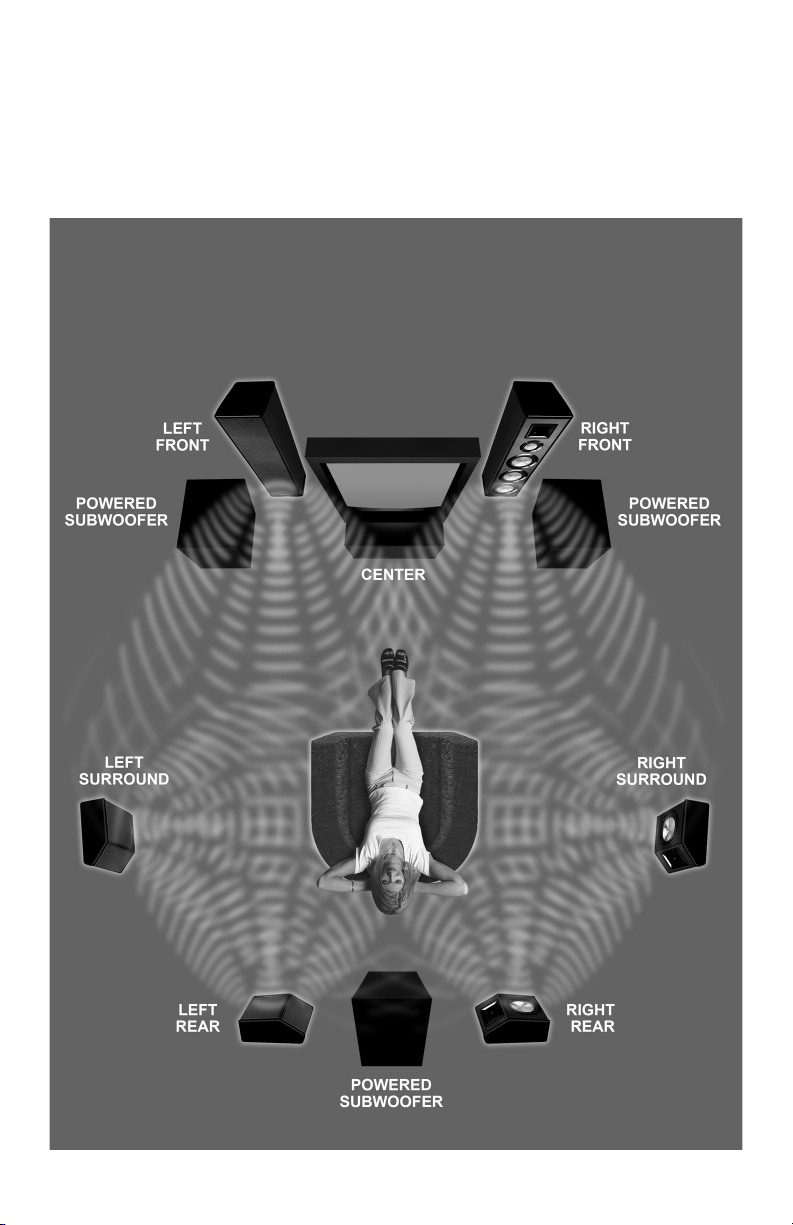
* EXTE D YOUR BASS!... Add extra wireless powered subwoofers
without having to upgrade to a more expensive audio receiver. This
can be done by purchasing additional B.I.C W-Receivers and setting
them to the same wireless channel that your first subwoofer is set to.
SURROUND YOURSELF!
7.3 Configuration (3 Subs!)
7

HOOKUP GUIDE FOR
8

WIRELESS SUBWOOFER(S)
9
1) Set W-Transmitter and W-Receiver to the same channel located on the front of the units.
OTE: If your subwoofer or audio receiver has left and right RCA inputs, do not use the
Y-adapter cable.
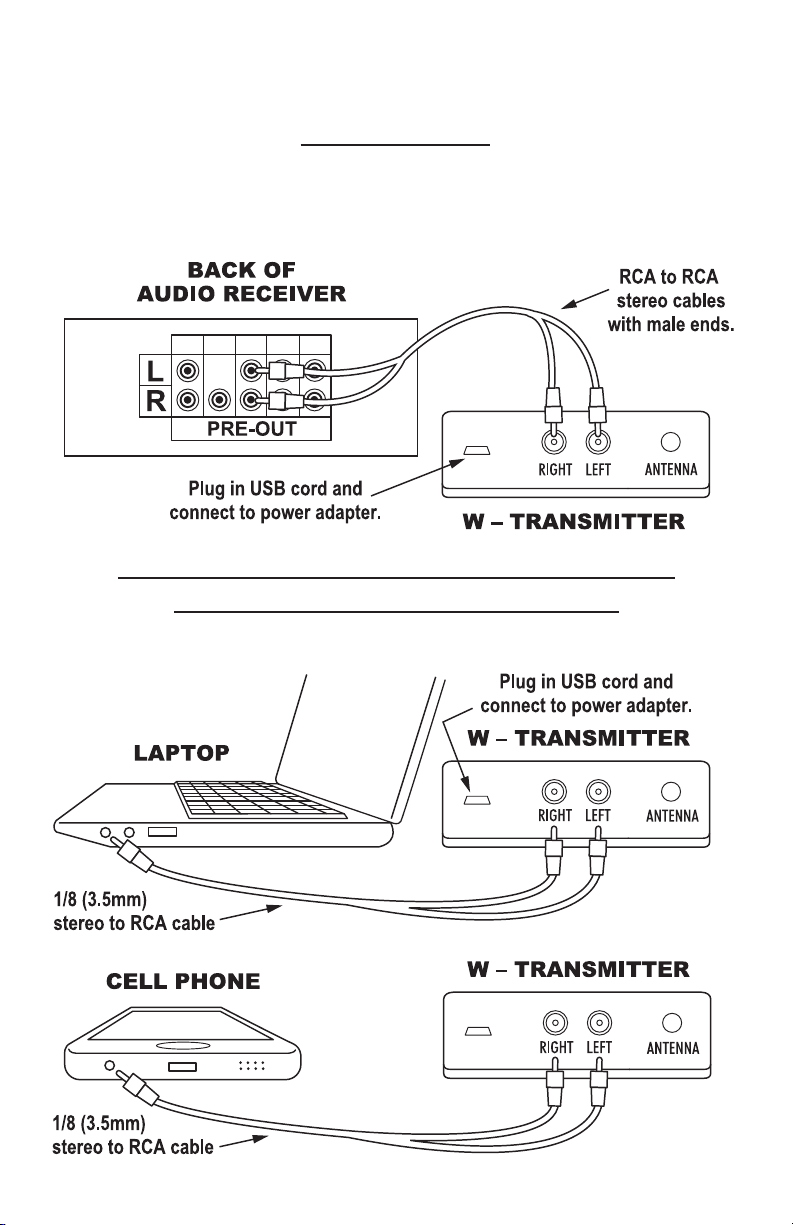
HOOKUP GUIDE FOR
Audio Receiver
OTE: In order for this hook-up to work, your audio receiver must have variable pre-amp
out RCA jacks.
1) Set W-Transmitter and W-Receiver to the same channel located on the front of the units.
Computer, Phone, Tablet or Any Other Device
with 1/8˝ (3.5mm) Stereo Jack Output
1) Set W-Transmitter and W-Receiver to the same channel located on the front of the units.
10
Inhaltsverzeichnis


