Burkert ME24 Bedienungsanleitung

Operating Instructions
Type ME24
I/O-Module

We reserve the right to make technical changes without notice.
Technische Änderungen vorbehalten.
Sous réserve de modifications techniques.
© Bürkert Werke GmbH & Co. KG, 2015 -2017
Operating Instructions 1710/02_EU-EN_00810473 / Original DE

3
Content
1 THE OPERATING INSTRUCTIONS .............................................................................................................................................6
1.1 Symbols ......................................................................................................................................................................................6
1.2 Definition of the term “product” .....................................................................................................................................6
2 AUTHORIZED USE .............................................................................................................................................................................7
3 BASIC SAFETY INSTRUCTIONS .................................................................................................................................................8
4 GENERAL INFORMATION ................................................................................................................................................................9
4.1 Contact address .....................................................................................................................................................................9
4.2 Warranty ......................................................................................................................................................................................9
4.3 Information on the Internet ...............................................................................................................................................9
5 DESCRIPTION OF THE DEVICE ...............................................................................................................................................10
5.1 Possible combinations .....................................................................................................................................................10
6 TECHNICAL DATA .............................................................................................................................................................................11
6.1 Conformity ..............................................................................................................................................................................11
6.2 Standards ................................................................................................................................................................................11
6.3 Operating conditions ........................................................................................................................................................11
6.4 Mechanical data ...................................................................................................................................................................12
6.5 Electrical data .......................................................................................................................................................................13
6.5.1 Electrical properties of the inputs and outputs ...........................................................................13
7 INSTALLATION ...................................................................................................................................................................................15
7.1 Safety instructions .............................................................................................................................................................15
7.2 Mount Type ME24 on backplane Type BEF1 ........................................................................................................15
7.3 Connect external sensors and actuators ...............................................................................................................16
7.3.1 Plug configuration and wiring ..........................................................................................................17
8 START-UP .............................................................................................................................................................................................23
8.1 Safety instructions .............................................................................................................................................................23
8.2 Configuration of Type ME24 ..........................................................................................................................................23
I/O module
Type ME24
English

4
Type ME24
9 CONFIGURATION USING THE DISPLAY .............................................................................................................................24
9.1 Brief description of the user interface ....................................................................................................................24
9.1.1 Description of buttons .......................................................................................................................25
9.2 Operating structure ...........................................................................................................................................................26
9.3 User level (access rights) ..............................................................................................................................................27
9.3.1 Changing the user level (access rights) .......................................................................................27
9.3.2 Logging off the user level .................................................................................................................28
9.3.3 Changing password (PIN) ................................................................................................................28
9.4 Switching to the Parameter, Maintenance or Diagnostics detailed view .............................................29
9.5 Setting Bürkert system bus (büS) .............................................................................................................................30
9.5.1 Detailed views in the büS function .................................................................................................31
9.6 Setting input module ........................................................................................................................................................32
9.6.1 Setting analog input ...........................................................................................................................32
9.6.2 Calibrating analog input ....................................................................................................................35
9.6.3 Reset analog input to factory settings ...........................................................................................37
9.6.4 Setting digital input ............................................................................................................................37
9.6.5 Reset totalizer, only when Flow rate operating mode active ....................................................40
9.6.6 Calibrate digital input, for Flow rate operating mode only ........................................................41
9.6.7 Resetting digital input to factory settings .....................................................................................42
9.6.8 Simulation of a process value on the input module ....................................................................43
9.7 Setting output module .....................................................................................................................................................44
9.7.1 Setting analog output ........................................................................................................................44
9.7.2 Calibrating analog output .................................................................................................................47
9.7.3 Resetting analog output to factory settings .................................................................................48
9.7.4 Setting digital output .........................................................................................................................48
9.7.5 Manually actuating output module ..................................................................................................62
10 DISPLAY ELEMENTS ......................................................................................................................................................................63
10.7.1 Display of device status ....................................................................................................................64
11 MAINTENANCE ..................................................................................................................................................................................65
11.1 Safety instructions .............................................................................................................................................................65
11.2 Replacing devices ...............................................................................................................................................................65
11.3 Replacing the memory card ..........................................................................................................................................67
11.4 Troubleshooting ...................................................................................................................................................................69
English

5
Type ME24
12 ACCESSORIES ..................................................................................................................................................................................70
13 PACKAGING AND TRANSPORT ...............................................................................................................................................71
14 STORAGE ..............................................................................................................................................................................................71
15 DISPOSAL ............................................................................................................................................................................................71
English

6
The operating instructions
Type ME24
1 THE OPERATING INSTRUCTIONS
The operating instructions describe the entire life cycle of the device. Keep these instructions in a location which is
easily accessible to every user and make these instructions available to every new owner of the device.
Important Safety Information.
Read the operating instructions carefully and thoroughly. Study in particular the chapters entitled “2 Authorized
use” and “3 Basic safety instructions”.
▶The operating instructions must be read and understood.
1.1 Symbols
DANGER!
Warns of an immediate danger.
▶Failure to observe the warning will result in a fatal or serious injury.
WARNING!
Warns of a potentially dangerous situation.
▶Failure to observe the warning may result in serious injuries or death.
CAUTION!
Warns of a possible danger.
▶Failure to observe this warning may result in a moderate or minor injury.
NOTE!
Warns of damage to property.
• Failure to observe the warning may result in damage to the device or the equipment.
Indicates important additional information, tips and recommendations.
Refers to information in these operating instructions or in other documentation.
▶Designates instructions for risk prevention.
→Designates a procedure which you must carry out.
Indicates a result.
1.2 Definition of the term “product”
In these instructions, the term „product“ always refers to the I/O module, Type ME24.
English

7
Authorized use
Type ME24
2 AUTHORIZED USE
Non-authorized use of the Type ME24 may be dangerous to people, nearby equipment, and the
environment.
The I/O module Type ME24 collects, converts and compares physical measurement data from external sensors
or receives switching commands from büS participants via the büS interface. This measurement data or these
switching commands are relayed to external actuators or to büS participants via the büS interface.
▶Use according to the authorized data, operating conditions and conditions of use specified in the contract
documents and operating instructions.
Observe the following when using the product
▶Use the device only in conjunction with third-party devices and components recommended and authorized by
Bürkert.
▶Use only when in perfect condition and always ensure proper storage, transportation, installation and
operation.
▶Use only as intended.
English

8
Basic safety instructions
Type ME24
3 BASIC SAFETY INSTRUCTIONS
These safety instructions do not make allowance for any
• contingencies and events which may arise during the assembly, operation, and maintenance.
• local safety regulations – the operator is responsible for observing these regulations, also in relation to the instal-
lation personnel.
General hazardous situations.
To prevent injuries:
▶Do not make any internal or external changes on the product and do not subject it to mechanical stress.
▶Secure the system from unintentional actuation.
▶Only trained technicians may perform installation and maintenance work.
▶After an interruption in the power supply, ensure that the process is restarted in a controlled manner.
▶Observe the general rules of technology.
NOTE!
Electrostatic sensitive components or modules.
The product contains electronic components which react sensitively to electrostatic discharge (ESD). Contact
with electrostatically charged persons or objects are hazardous to these components. In the worst case scenario,
they will be destroyed immediately or will fail after start-up.
• Observe the requirements in accordance with EN 61340-5-1 to minimize or avoid the possibility of damage
caused by sudden electrostatic discharge.
• Do not touch electronic components while the supply voltage is switched on.
English

9
General information
Type ME24
4 GENERAL INFORMATION
4.1 Contact address
Germany
Bürkert Fluid Control Systems
Sales Center
Christian-Bürkert-Str. 13-17
D-74653 Ingelfingen
Tel. + 49 (0) 7940 - 10 91 111
Fax + 49 (0) 7940 - 10 91 448
E-mail: [email protected]
International
Contact addresses can be found on the final pages of the printed operating instructions.
And also on the Internet at:
www.burkert.com
4.2 Warranty
The warranty is only valid if the Type ME24 is used as intended in accordance with the specified application conditions.
4.3 Information on the Internet
The operating instructions and data sheets for Type ME24 can be found on the Internet at:
www.burkert.com
English
10
Description of the device
Type ME24
5 DESCRIPTION OF THE DEVICE
The output module of Type ME24 receives the switching commands of büS participants via the büS interface, pro-
cesses them and relays this information to externally connected actuators.
The input module of Type ME24 receives the physical measurement data from external sensors. The input module
converts and compares this measurement data and communicates the values via the büS interface to büS participants.
The HMIU module Type ME25, in conjunction with the display Type ME21, can be used to configure the basic func-
tions. Alternatively, this can also be carried out via the “Bürkert Communicator”.
5.1 Possible combinations
The I/O module Type ME24 can only be operated within a system in combination with additional modules. For
setting up a system comprising several modules, please contact your Bürkert sales office.
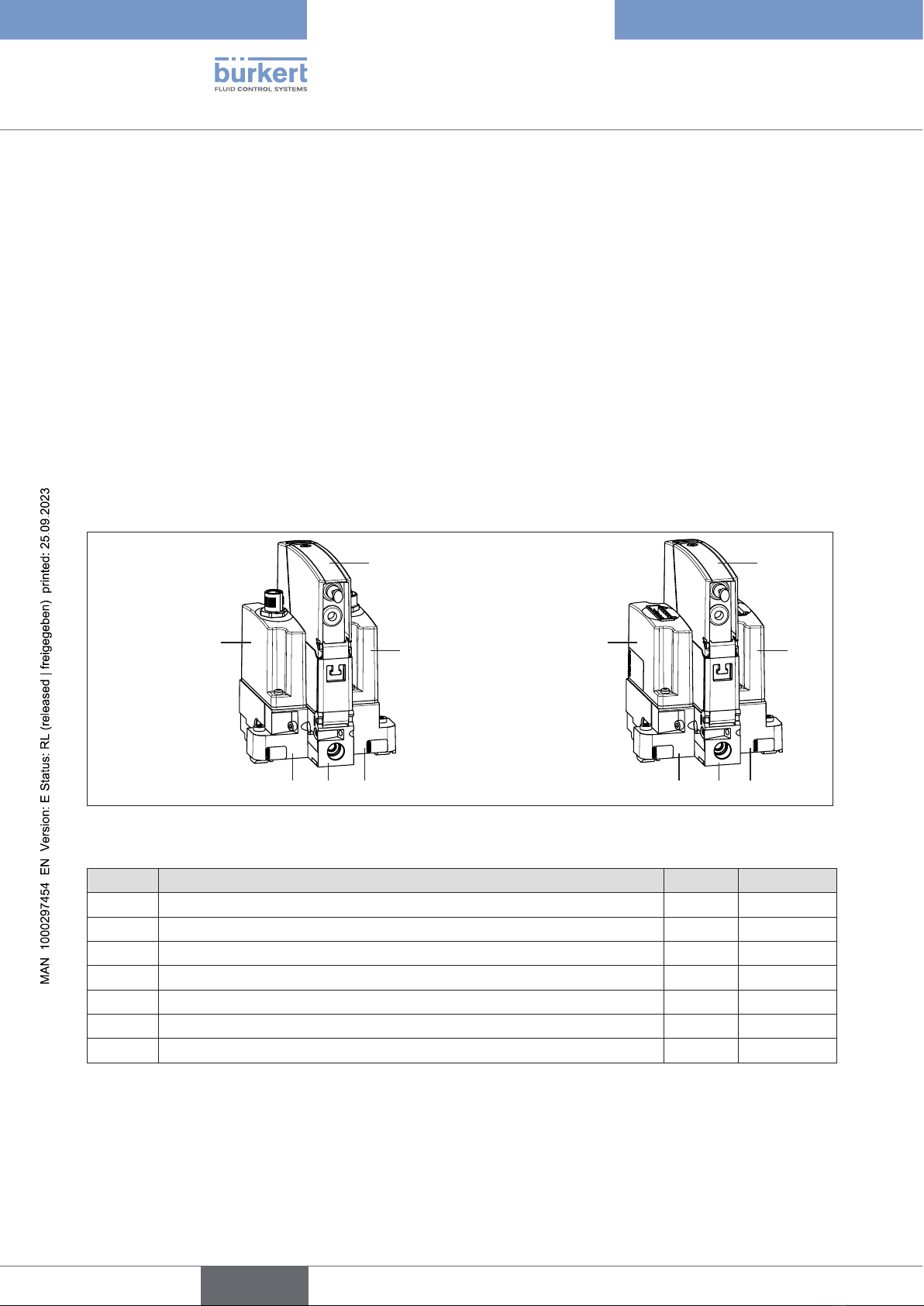
Example of a system in minimum combination:
Connection variant:
Terminals for cable
gland
Connection variant:
Circular plug-in
connector M12
13
6 5 7
ME24
24
6 5 7
ME24
Figure 1: Example of a system: Minimum combination of Type ME24 with additional modules
Module Designation Types Order no.
1 Input module (connection variant: circular plug-in connector M12) ME29 00564825
2 Input module (connection variant: terminals) ME29 00564826
3 Output module (connection variant: socket M12) ME29 00564827
4 Output module (connection variant: terminals) ME29 00564828
5 Backplane for Type ME24 BEF1 00564841
6 Backplane, left BEF1 00564844
7 Backplane, right BEF1 00564846
Table 1: Modules of a possible combination with Type ME24
English
Andere Handbücher für ME24
1
Inhaltsverzeichnis
Andere Burkert E/A-System Handbücher
Beliebte E/A-System Handbücher anderer Marken

WAGO
WAGO 750-344 Bedienungsanleitung

Teknim
Teknim TWM-1887 Bedienungsanleitung

Intelligent Appliance
Intelligent Appliance IA-2662-E Bedienungsanleitung

BERGHOF
BERGHOF ECC DIO 16/16 Bedienungsanleitung

Advantech
Advantech PCM-27J3AU Installations- und Betriebshandbuch

Festo
Festo CP-E08-M12-CL Bedienungsanleitung