
cliMATE HP32 Bedienungsanleitung

HP32
Handbook
SL 3.0
Proportional feedback
Example con t.SEt = 25.0°C
Example with percentual= 53%
Example con Po._ _ = 0%
Example con Po.-- = 100%
SETTING
Press SET:
This message will be displayed instead of the
°Set temperature value.
Press + or - to modify, press SET to confirm.
At this point: this message will be displayed instead of the
Positionminimumopening%value.
Press + or - to modify, press SET to confirm.
At this point: this message will be displayed instead of the
Positionmaximumopening%value.
Press + or - to modify, press SET to confirm.
POSITION VIEWING
Press SET for at least one second (and not for more 5
seconds, because an Init procedure is then issued):
thismessagewillbedisplayedshowingthecurrent%position.
MAIN SETTINGS (Run Mode)
Press +: willbe displayed followed by
°MaximumTemperatureRecording.
Press - : willbe displayed followed by
°MinimumTemperatureRecording.
VIEWING TEMPERATURE RECORDING
Valuesrecordedarepermanentlystoredinthememory. Toclearmemory push + key
formore than3 seconds: CLEA messagewillbe displayed beforeclearing operation.
*1) Formore detailssee Operating Diagram.
*2)Flappositionwhenzonetemperatureequals SETtemperature(SETkeyinRunMode)
(0is fully closed).
*3)Ifhuntingoccurswhensearchingforthepositionduringflapoperation(dueto
mechanical gearmotor hysteresis), increase the Pcn.1 setting value until it is
eliminated.
*4) Values can be entered in hand mode or are automatically set by Init procedure.
*5) tEnP =0 : °C Temperaturerange.
tEnP =1 : °F Temperature range.
*6) You can correct the readings on the sensor (+ or -).
COSt PROGRAMMING (Systemconstants)
These settings refer to the mode operation of the system and must be made on
initialstart-up.
Press - / + together for at least one second: the message C.O.S.t. will be
displayed.
Press SETrepeatedlyuntilthedesiredvariable'smessageisdisplayed (seetable
below):variablevalueandrelatedmessagewillbedisplayed.
Press + or - to set a new value and then SET to confirm.
The next system constant will then appear.
YoucanpressSETforaleasttwoseconds toescapeandreturntotheRunMode.
FLAPPOTENTIOMETERINITILIZATIONPROCEDURE(Init)
Connectthepotentiometer ofany value(max 10Kohm,recommended1Kohm)
must be applied to the flap motor.
Havingdonethis,proceedasfollowstorecordthepotentiometervalues.
Press SET key for at least 5 seconds: when Init message is displayed for more
thanonesecond. ReleaseSETkey.HP32closestheflap(lightCLOSEflashes)
andthepotentiometer resistancevalueisdisplayed.
Whentheflaphascompletelyclosed,pressSETtorecordthevalue:atthispoint HP32
opens theflap(lightOPENflashes)andthepotentiometer resistancevalueisdisplayed.
When the flap has completely opened, press SET to record the value.
HP32 then returns automatically to the Run mode.
.sseMeulaVgninaeMetoN
PorP °0.4 egnarlanoitroporPC° 1*
1.tcP 0TESotpalfnoitisoP% 2*
1.ncP 5egnarlartueN% 3*
LC.oP 0n
oitisopdesolcpalfniecnatsiserretemoitnetoP 4*
PO.oP 9999 noitisopnepopalfniecnatsiserretemoitnetoP 4*
PnEt 1
=noitatneserpererutarepmeT 5*
Et.dA °0.0 )-ro+(noitcerrocerutarepmetrosnesC° 6*
& hold
& hold
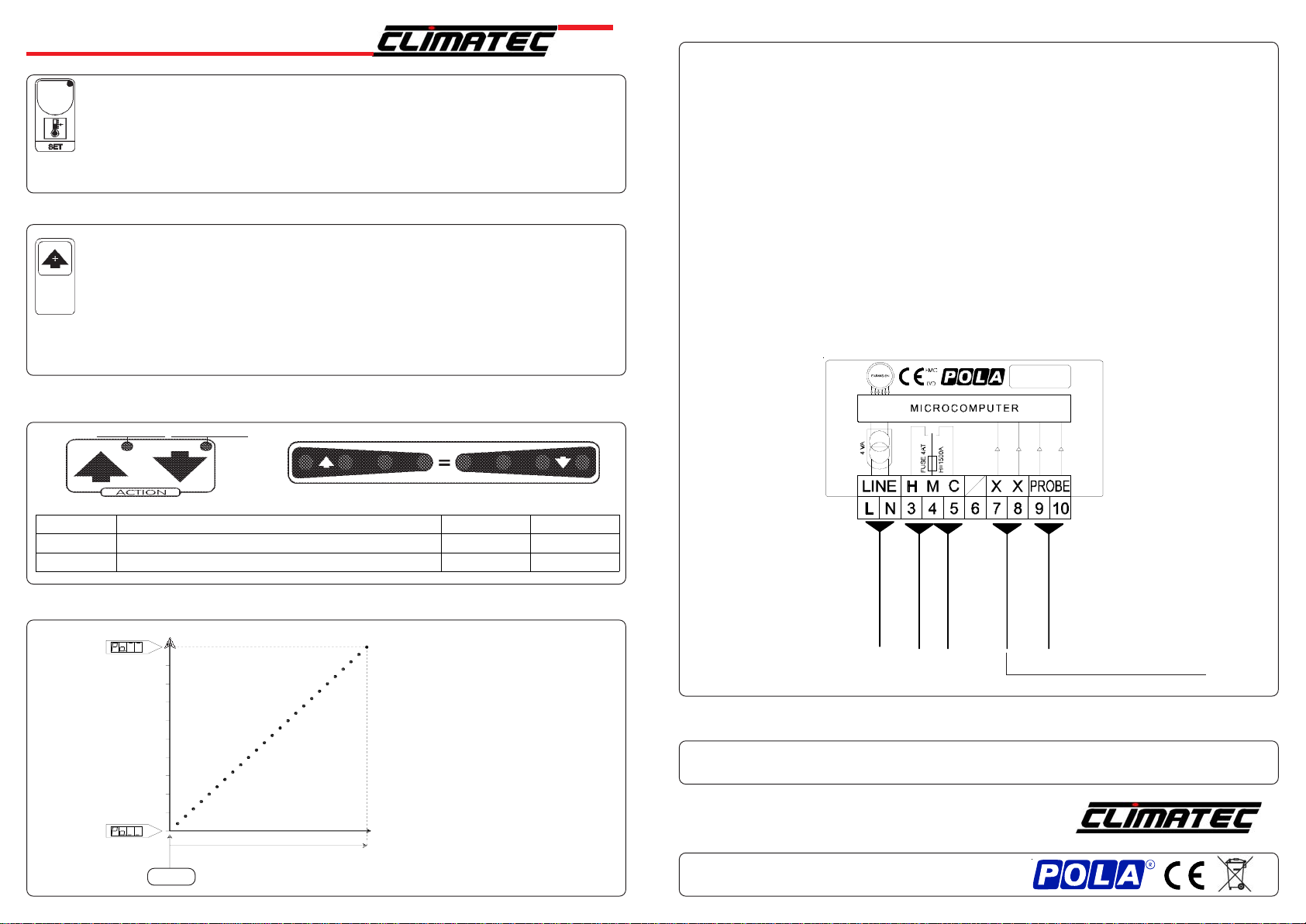
INSTALLATION
Howto connectthe sensors
Connectthe sensorprovidedas shown in the diagram. For remote connections use
astandard0.5-squaremillimetertwo-polewire,takinggreatcare over the connections,
by insulating and sealing the joins carefully.
230V LINE *
HP32
* Other power voltage if you required
N.O. CONTACT
CLOSE FLAP (Heat)
OPEN FLAP (Cool)
N.O. CONTACT
POTENTIOMETER
(Max 10Kohm)
SX Temperature
Probe
Recommended 1 Kohm type
As it company policy to continually improve the products the Manufacturers
reservethe right tomake any modificationsthereto without priornotice. They
cannot be held liable for any damage due to malfunction.
19.07.06
Unit 6, Old Wharf Ind. Estate, Dymock Rd, Ledbury HR8 2JQ
PRESET PROGRAMS (Bootstrap)
Thisprocessorispre-programmedwith the following(variable)settings.Toreturn
tothese settings at any time: poweroffthe processor, press SET key and keep
it pressed giving power on: boot message will be displayed (now release SET
key).
t.SEt=25.0° Po._ _= 0 Po.- -=100.
The COSt values are shown in COSt Programming
t.SEt. with Pct.1=0
100
90
80
70
60
50
40
30
20
10
0
OPERATIVE DIAGRAM
ProP °Ambient temperature
% Opening Flap
"HAND" MODE
In some start-up conditions it may be useful to work in "hand" mode:
Power off the processor, press +key and keep it pressed giving power on:
Hand message will be displayed (release now + key).
Push + untilisdisplayednumberrequiredtobehanded(seetableStateindication
lamps) andpush SET for activatingrelay.
Pushing + again to increasethe relay number, previous relay isdeactivated.
YoucanpressSETforaleasttwosecondstoescapeandreturntotheRunMode.
Swinging Ambient / Set temperature (t.SEt) indicator
ON OPEN
ON CLOSE
STATUS INDICATION LAMPS
Lamp. Meaning N° Relay Contatcts
CLOSE Close (Heat) On 13-4
OPEN Open (Cool) On 24-5
How to connect the response potentiometer
Connectthepotentiometerofanyvalue(max10Kohm,recommended1Kohm)and
connectthe terminals 7-8.
For remote connections use a standard 0.5-square millimeter two-pole wire, taking
great care over the connections, by insulating and sealing the joins carefully.
How to connect the line
Connect line on terminals L-N.
Protectsupplywith adequate fuse.
How to connect the contacts
Connect terminals on the terminal block (contacts up to 4AMP.AC1).
Troubleshooting
-O.C.- is displayed when the temperature sensor wiring is open circuit,
-S.C.- is displayed when the temperature sensor wiring is short circuit.


