
Coremorrow P16 Series Bedienungsanleitung

P16 Piezo Nanopositioning Scanner
User Manual
Version: V1.0
This document describes the following products:
■P16.XY50S/K
■P16.XY80S/K
■P16.XY100S/K

DECLARATION
This user manual is applicable to P16 Piezo Nanopositioning Scanner,
for your smooth and correct use of this product, please read this manual
carefully before using it. Please follow the instructions in the installation
and use process. Improper operation may cause injury to the operator and/
or damage to the product, so it is required that the entire installation and
operation process should be completed by professionals with a certain
foundation and a certain understanding of product principles, or under the
guidance of a professional.
If you disassemble or transform the product without permission, our
company will not be responsible for any consequences arising therefrom.
To change the product model and other false sales of our company's
products are illegal, users should be vigilant. Once found, you should
actively report or contact our company, jointly crack down on illegal acts,
and prevent fraud and economic losses. CoreMorrow will investigate for the
legal responsibility of the illegal subject and related party.
With the continuous development and innovation of technology,
CoreMorrow will timely add the latest information to the manual as
required. If you need, please contact us, or to our website www.coremorrow.
com for download, we apologize for any inconvenience caused to you.

1
1. Introduction ........................................................................................................................................2
1.1 Purpose and content ................................................................................................................2
1.2 Symbol and meaning................................................................................................................2
1.3 Users of This Manual ................................................................................................................2
1.4 Manual Lost and Reissued......................................................................................................2
2. Safety Guide........................................................................................................................................3
3. Product Overview ...........................................................................................................................4
3.1 Product Introduction ................................................................................................................4
3.2 Product Features........................................................................................................................5
3.3 Motion direction ........................................................................................................................5
4. Operating environment ..................................................................................................................6
5. Installation and operation..............................................................................................................6
5.1 Installation and Precautions...................................................................................................6
5.2 Load................................................................................................................................................8
5.3 Operating...................................................................................................................................10
6. Transportation and inspection ..................................................................................................11
6.1 Transportation..........................................................................................................................11
6.2 Open-Box Inspection.............................................................................................................12
7. Maintenance and Treatment......................................................................................................12
7.1 Problem Handling...................................................................................................................12
7.2 Daily maintenance..................................................................................................................13
7.3 Disposal......................................................................................................................................14
8. Connector .........................................................................................................................................14
8.1 Driving and Sensor Connector...........................................................................................14
9.Customer Service ............................................................................................................................16
10.Contact us........................................................................................................................................16
Contents

P16 Piezo Nanopositioning Scanner User Manual
2
1.
2.
1. Introduction
1.1 Purpose and content
The manual is mainly for smooth and correct use of P16 Piezo Nanopositioning Scanner.
The manual contains all the necessary information for P16 Piezo Nanopositioning Scanner.
Introduction of the precautions during installation and use.
1.2 Symbol and meaning
DANGER: Improper handling may could cause injury to the operator.
Attention: Improper handling can cause damage to the equipment.
No order between items.
1.3 Users of This Manual
The default user of this manual has knowledge of piezoelectric products and controllers,
and has a certain basis for their installation and use.
1.4 Manual Lost and Reissued
If this manual is lost, please contact CoreMorrow. We will send you the latest version of the
user manual.
Please operating in order.

3
In order to prevent damage to the product caused by improper operation, the
following points should be paid attention to when in use.
P16 Piezo Nanopositioning Scanner is used in a dust-free, oil-free and lubricant-free
environment.
As the product is designed with flexible structure, it is recommended that the load
should not exceed load capacity of product. When loading, DO NOT apply torque
force and DO NOT pry or twist the load surface, so as not to damage the structure.
Recommended voltage range is 0~120V for long-term use and lifetime.
Do not disassemble the product to avoid damage.
Avoid stretching and bending the cable interface to prevent damage to the cable.
Use the dedicated cable provided by CoreMorrow to connect P16 Piezo
Nanopositioning Scanner to controller.
Do not connect via an extension cable casually, if you need a longer cable, please
contact CoreMorrow.
A change in temperature and pressure will charge the piezoelectric actuator, and
the actuator will remain energized for a period of time when it is disconnected
from the controller,So the operator should pay attention to when in use:
Do not disassemble P16 Piezo Nanopositioning Scanner.
Discharge P16 before installation, which can be done by connecting to the
controller.
Do not unplug the wire connecting with controller during operation.
Before use, check whether the connection wire of the product is in good condition and
whether the product and the controller are effectively grounded. During operation,
strictly standardize the operation. Do not touch the product (up to 150V voltage) with
your hand when power on, in case of danger.
2. Safety Guide
P16 Piezo Nanopositioning Scanner is designed with the most advanced technology and
safety standards for your own safety and the correct use of the product, please observe
the following points when in use.

P16 Piezo Nanopositioning Scanner User Manual
4
3. Product Overview
3.1 Product Introduction
P16 Piezo Nanopositioning Scanner has the following advantages:
High performance piezo stack:
P16 Piezo Nanopositioning Scanner is driven by a highly reliable ceramic actuator with
a fully insulated structure, so its performance and service life are far better than the
traditional actuator. The insulating layer can effectively prevent the piezoelectric ceramic
from being damaged when exposed to moisture. Therefore, the stability of piezoelectric
ceramics can be guaranteed under extreme circumstances. Compared with traditional
driving mechanism, there are no transmission parts and friction. Therefore, ceramic
actuator has the characteristics of no rebound, no maintenance, and no wear, etc.
Flexible hinge structure:
P16 Piezo Nanopositioning Scanner adopting flexible hinge mechanism has advantages
of no friction, high positioning accuracy. Flexible hinge is an element not affected by static
and dynamic friction, based on the elastic deformation of metal material (e.g., steel) ,
there is no rolling and sliding parts. Flexible unit has very high load capacity and stiffness.
Hinge guide needs no maintenance and no wear and tear. Suitable for a wide range of
temperatures, no lubricating oil is required.
Strain Sensor:
Strain sensor detects the position information by its own expansion. They are fixed in the
proper position of the transmission part and measure the displacement of the moving
part. This type of position measurement is made by contact and indirect measurement. So
the displacement of the moving platform is measured by measuring lever, guide hinge, or
piezoelectric ceramic stack.
The sensor is connected by a full bridge, no drift, and can be precisely positioned in the
nanometer range.
P16 Piezo Nanopositioning Scanner has a travel range of up to 50, 100 or ±50um/axis in
5
3.2 Product Features
Large travel.
Closed-loop strain gauge sensor, high positioning accuracy.
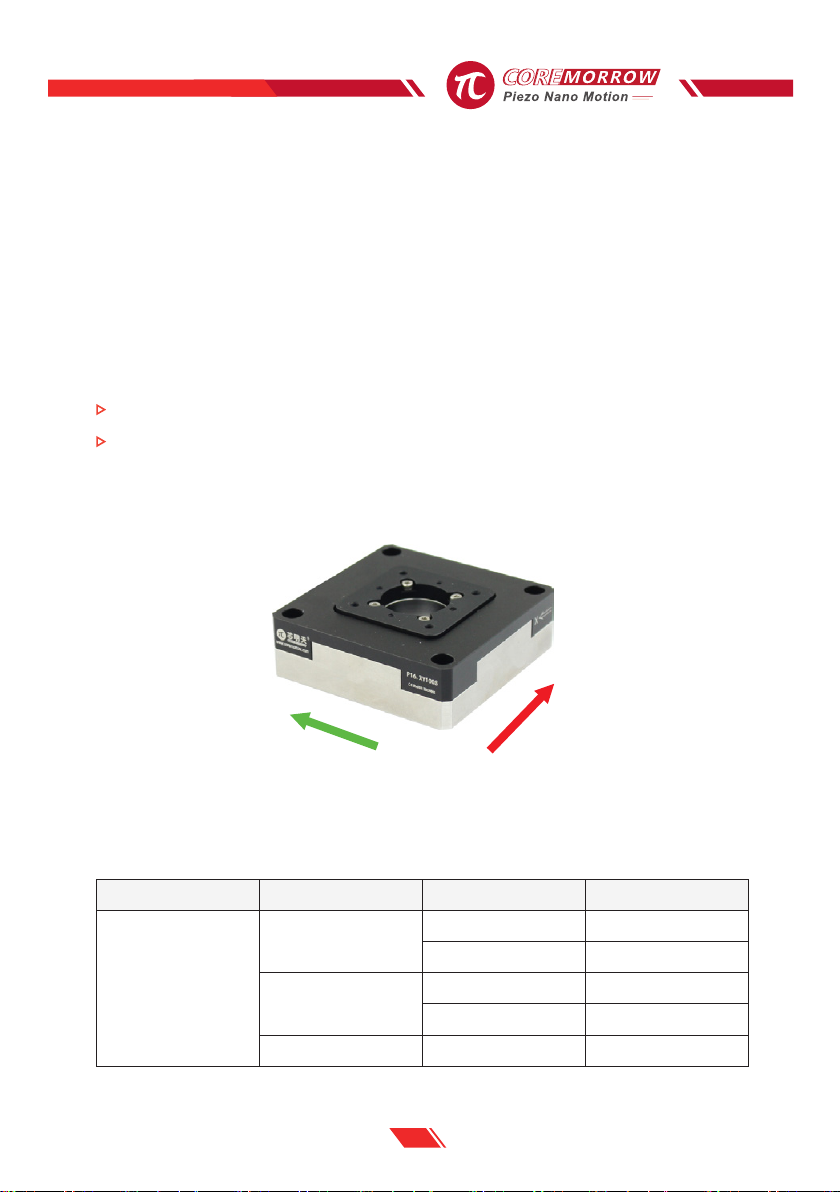
3.3 Motion direction
X/Y, and features fast response speed, no mechanical friction, high repeatable positioning
accuracy, easy to operate, so it can meet different applications. This product can also be
customized according to the needs.
P16 is mainly used in biotechnology, interferometry, quality detection, optical detection,
nanometer positioning, microscopy and imaging, image processing and other fields, with a
good development prospect.
FIG. 1 Motion Direction of P16 Piezo Nanopositioning Scanner
The identification of the labels on the wires of P16 is as follows:
X
Y
Model Motion direction Function Label
P16.XY
XPZT Drive CH1
Senser output 1
YPZT Drive CH1
Senser output 2
- Constant voltage CH3
Table1.P16 Wire Identification and Motion Direction
P16 Piezo Nanopositioning Scanner User Manual
6
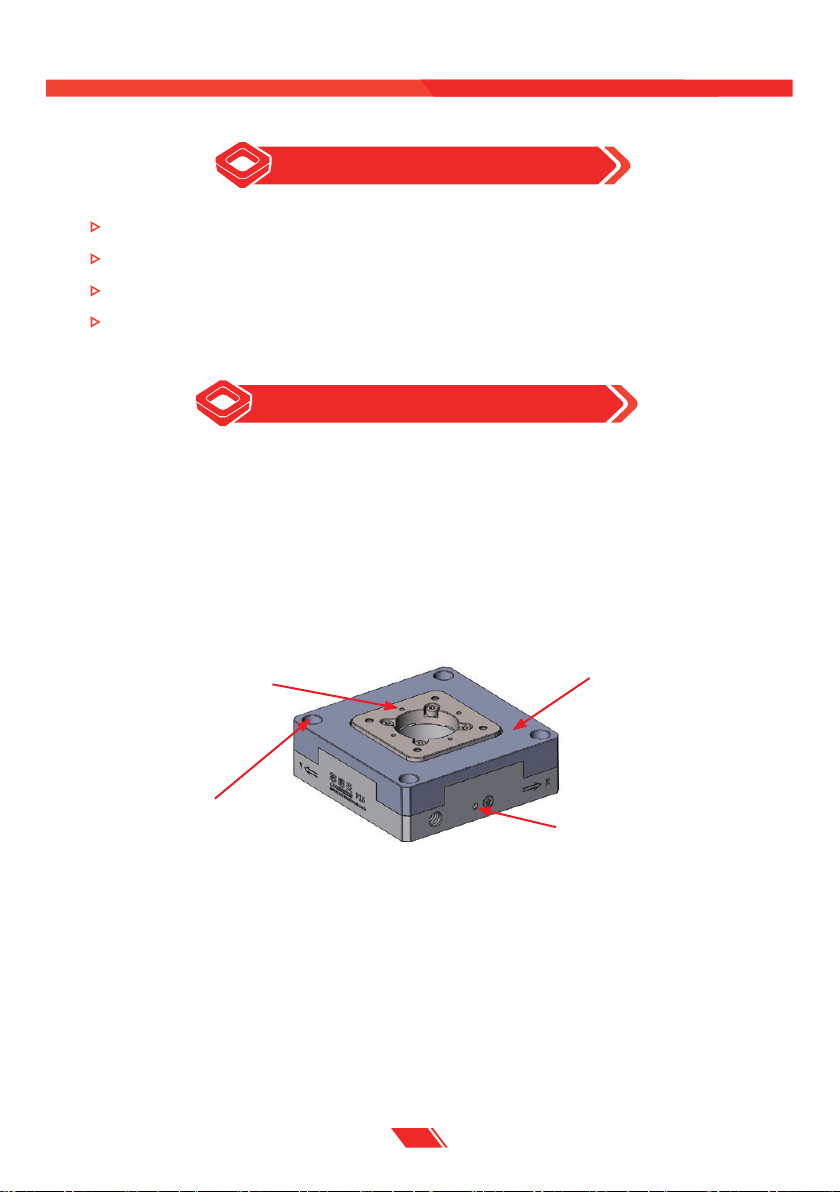
FIG.2 P16 Installation diagram
4. Operating environment
A clean, dustfree and non-corrosive environment
Operating temperature : -20~80℃
Relative humidity : <60%
Recommended voltage range is 0~120V for long-term use and lifetime
5. Installation and operation
Safety check should be carried out before installation, such as whether the connection wire
is damaged or broken, whether the drive power supply is grounded, etc.
5.1 Installation and Precautions
Installation diagram of P16 is as follows:
1. Ensure that the installation plane is relatively flat.
2. Use M3 to mount P16 on the mounting surface directly and tighten it.
3. Grounding protection for connection, as shown below.
M3 hole for mounting
M3 hole for load mounting Motion surface
M2.5 hole for grounding

7
FIG. 3 Grounding protection diagram
Safety washer
Flat washer
Platform
Cable
connector
Ground protection
Screw
FIG.4 Connector diagram
Sensor output Label for sensor output
Label for PZT drive
PZT drive output
4. Mounting the load and tighten it properly to ensure the positioning accuracy.
5. Connect the P16 connector with the corresponding controller according to the
identification.
The wiring mode of Lemo connector is shown as below:
P16 Piezo Nanopositioning Scanner User Manual
8
5.2 Load
When mounting the load, ensure that the load quality is less than the maximum load
capacity of P16, and try to mount the load in the center of the moving surface.
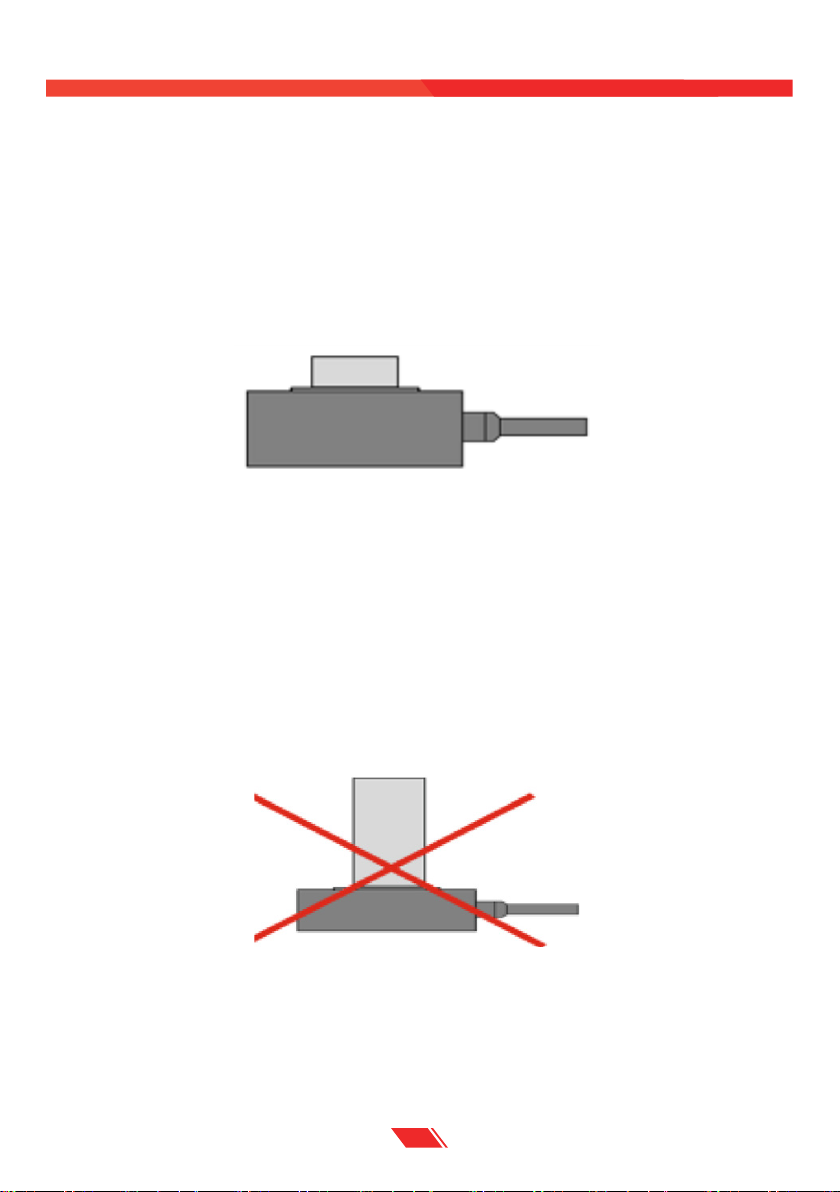
The correct position to mount the load is shown below.
FIG.5 The load is applied to the center of the moving surface
FIG.6 Try not to let the position of the center of gravity far exceed the active platform
For the protection of the product, we do not recommend that the load is too high. If a
high load must be used, please appropriately low the position of the center of gravity of
the load. The wrong mounting way is shown in the figure below.
Dieses Handbuch passt für folgende Modelle
3
Inhaltsverzeichnis
Andere Coremorrow Scanner Handbücher

Coremorrow
Coremorrow P18 Series Bedienungsanleitung

Coremorrow
Coremorrow Piezo Nanopositioning P16.XY20 Bedienungsanleitung

Coremorrow
Coremorrow Piezo Z P78.Z100K Bedienungsanleitung

Coremorrow
Coremorrow P17.XY200 Bedienungsanleitung

Coremorrow
Coremorrow XD601-D2 Bedienungsanleitung

Coremorrow
Coremorrow P15 Series Bedienungsanleitung

Coremorrow
Coremorrow P12 Series Bedienungsanleitung

Coremorrow
Coremorrow P79 Piezo Z Bedienungsanleitung

Coremorrow
Coremorrow S54 Series Bedienungsanleitung

Coremorrow
Coremorrow N62 Bedienungsanleitung


