
Dr.HD D15 Bedienungsanleitung

USER'S Manual
[2012.10.12]D15+F15_russian+english.indd 1 2012-10-12 11:22:38

73
English
Contents
1. Introduction ------------------------------------------------------- 74
1.1 Overview -------------------------------------------------------- 74
1.2 Main Features --------------------------------------------------- 74
2. Safety Precautions ----------------------------------------------- 75
2.1 safety ------------------------------------------------------------ 75
2.2 Precautions ------------------- ---------------------------------- 76
3. Points to Check before Use -------------------------------------- 77
3.1 Accessories ------------------------------------------------------ 77
3.2 The Satellite dish ------------------------------------------------ 77
4. Controls/Functions ----------------------------------------------- 78
4.1 D15 - Front Panel ------------------------------------------------ 78
4.2 D15 - Rear Panel ------------------------------------------------ 79
4.3 F15 - Front Panel ------------------------------------------------ 80
4.4 F15 - Rear Panel ------------------------------------------------ 81
4.5 Remote Controller ---------------------------------------------- 82
5. How to Connect -------------------------------------------------- 84
6. Operation --------------------------------------------------------- 86
6.1 Getting Started ------------------------------------------------- 86
6.2 System Setting ------------------------------------------------- 101
6.3 Channel Manager ---------------------------------------------- 108
6.4 Installation ----------------------------------------------------- 114
6.5 Entertainment --------------------------------------------------- 116
6.6 Utils ------------------------------------------------------------- 118
6.7 Common Interface ---------------------------------------------- 124
6.8 Conditional Access System ------------------------------------- 126
6.9 DVR ------------------------------------------------------------- 128
7. Troubleshooting --------------------------------------------------- 135
8. Specifications ----------------------------------------------------- 136
[2012.10.12]D15+F15_russian+english.indd 73 2012-10-12 11:23:02

74
1. Introduction
1.1 Overview
This satellite receiver is designed for the reception of free-to-air and encrypted channels.
Depending on your location, enjoy the rich choice of up to 10,000 different channels
broadcasting a large range of programs: culture, sports, cinema, news, events, etc.
This receiver is assembled with highly qualified electronic parts.
1.2 Main Features
▪Video Resolution : 1080p / 1080i / 720p / 576p / 576i
▪Common Interface
▪DVR Ready via USB External Mass Data Storage Device
▪Time Shift, Record & Playback
▪USB 2.0 Host for MP3 Playback, JPEG Viewing & Firmware Update
▪10,000 Programmable Channels
▪DVB-S, DVB-S2 Compliant
▪HDMI Output
▪On-screen display with true color full resolution
▪Advanced Blind Scan
▪Auto & Manual Channel Search
▪Dolby Digital Output
▪Channel Sorting by Alphabet, Transponder or CAS
▪16 Favorite Channel Groups
▪OSD in 12 Languages
▪Multi Picture Display and Zoom
▪16:9 Full Screen, 4:3 Letterbox & Full Screen
▪DiSEqC 1.2 and USALS Compatible
▪Data Transfer Between Units
▪Extended Electronic Program Guide (EPG) and program reservation through EPG
▪Teletext by OSD/VBI (Vertical Blanking Interval)
▪Auto Voltage (AC 100 - 250V) SMPS
▪High speed software upgrade via USB 2.0
▪Parental Lock/ Installation Lock / Receiver Lock / Channel Lock / Lock Channel Confirm
▪ Manufactured under license from Dolby Laboratories.
“Dolby” and the double-D Symbol are trademarks of Dolby Laboratories.
✽ DiSEqC is a trademark of EUTELSAT
[2012.10.12]D15+F15_russian+english.indd 74 2012-10-12 11:23:03

75
English
2. Safety Precautions
2.1 Safety
lBe sure to read this user’s manual before
starting the operation of the unit.
lDo not touch the power cord with wet hands
as it may cause electric shock.
lNever open the cover. It is very dangerous
to touch the inside of the unit due to possible
electric shock.
lPlace the unit in a well ventilated and
no-heat environment.
lWhen you do not use this unit for a long
time, make sure that power cord is pulled out
from the outlet. Also do not use a damaged
power cord as it may cause fire or electric shock.
lA professional installation is required.
If reception is interrupted, contact
your local service centre.
[2012.10.12]D15+F15_russian+english.indd 75 2012-10-12 11:23:03

76
2. Safety Precautions
2.2 Precautions
lInstall the unit horizontally. An uneven
installation may cause the unit to be damaged.
lDo not put heavy items such as a TV set on
the unit. That may damage the unit.
lDo not leave the unit where the water drops
or splashes.
lDo not put water holding items such as vases
on the unit.
lDo not install the unit:
▪ Where it is subject to vibrations
▪ Where it is exposed to direct sunlight
▪ Where there is humidity
▪ Where the temperature is too high or too low
▪ Where there is no ventilation
lMoving the unit to a hot area from a cold
one will cause condensation. Do not operate
the unit for one or two hours or until it has
dried completely.
When installing the unit
[2012.10.12]D15+F15_russian+english.indd 76 2012-10-12 11:23:03

77
English
✽ This unit supports DiSEqC 1.2 and can work with a compatible antenna positioner.
Ask your dealer for information.
3. Points to Check before Use
The accessories below are included with this receiver:
Your dish should be properly installed and azimuth and elevation must be precisely set up
3.1 Accessories
3.2 The Satellite dish
Remote control
User’s manual
Batteries(AAA type) 2EA
BATTERY
BATTERY
BATTERY
BATTERY
HDMI Cable
HDMI
HDMI
[2012.10.12]D15+F15_russian+english.indd 77 2012-10-12 11:23:03
78
4. Controls/Functions
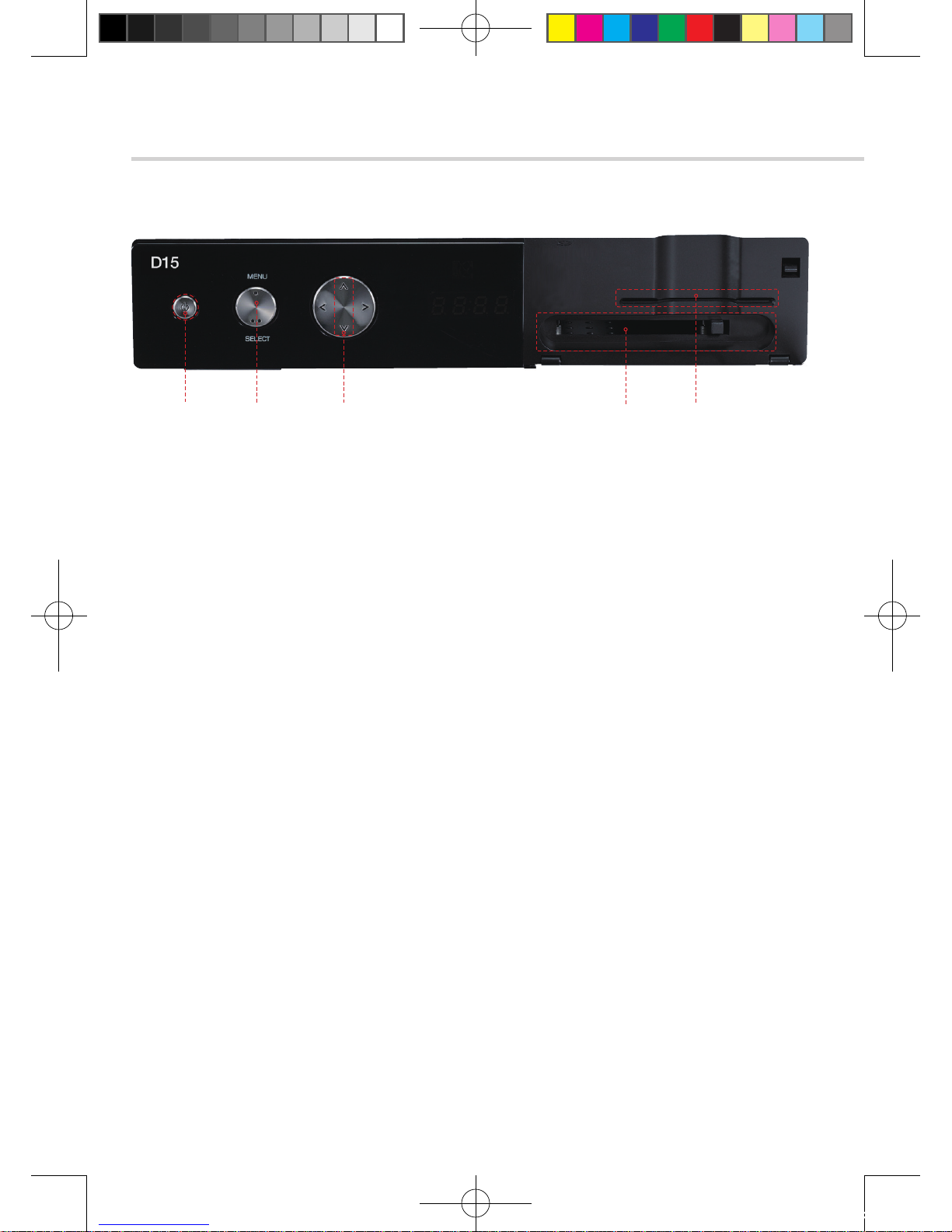
4.1 D15 - Front Panel
❶Standby/Power on Indications Lamp: Flashes red light in ‘Standby’ mode and
shows no light in ‘Power ON’ mode.
❷ Power: Switches the receiver between ‘Standby’ and ‘Power ON’ modes.
❸ CH. (▲/▼): To switch channels or change the cursor position on the
application screen.
❹ Smart Card Reader: Insert smart card for encrypted channel access.
❺Common Interface Slot: For CI module(PCMCIA module) with smart card to watch pay TV channels.
❷ ❶ ❸ ❺ ❹
[2012.10.12]D15+F15_russian+english.indd 78 2012-10-12 11:23:03

79
English
4. Controls/Functions
4.2 D15 - Rear Panel
NO Name Connector Function
❶LNB INPUT IEC 169-24 FEMALE IF input from LNB to digital tuner
❷LOOP OUT IEC 169-24 FEMALE IF loop-through output from digital tuner
❸VIDEO RCA cinch Composite video output
❹AUDIO L RCA cinch Left audio output
❺AUDIO R RCA cinch Right audio output
❻S/PDIF Fiber Optical Digital audio output
❼LAN RJ-45 10/100Mbps Ethernet
❽HDMI HDMI Digital Video/Audio Output
❾RS-232 DB-9 Low speed serial port
❿USB USB A-Type USB 2.0
❶ ❷❿ ❽❾ ❸ ❹ ❺ ❻❼
[2012.10.12]D15+F15_russian+english.indd 79 2012-10-12 11:23:03
80
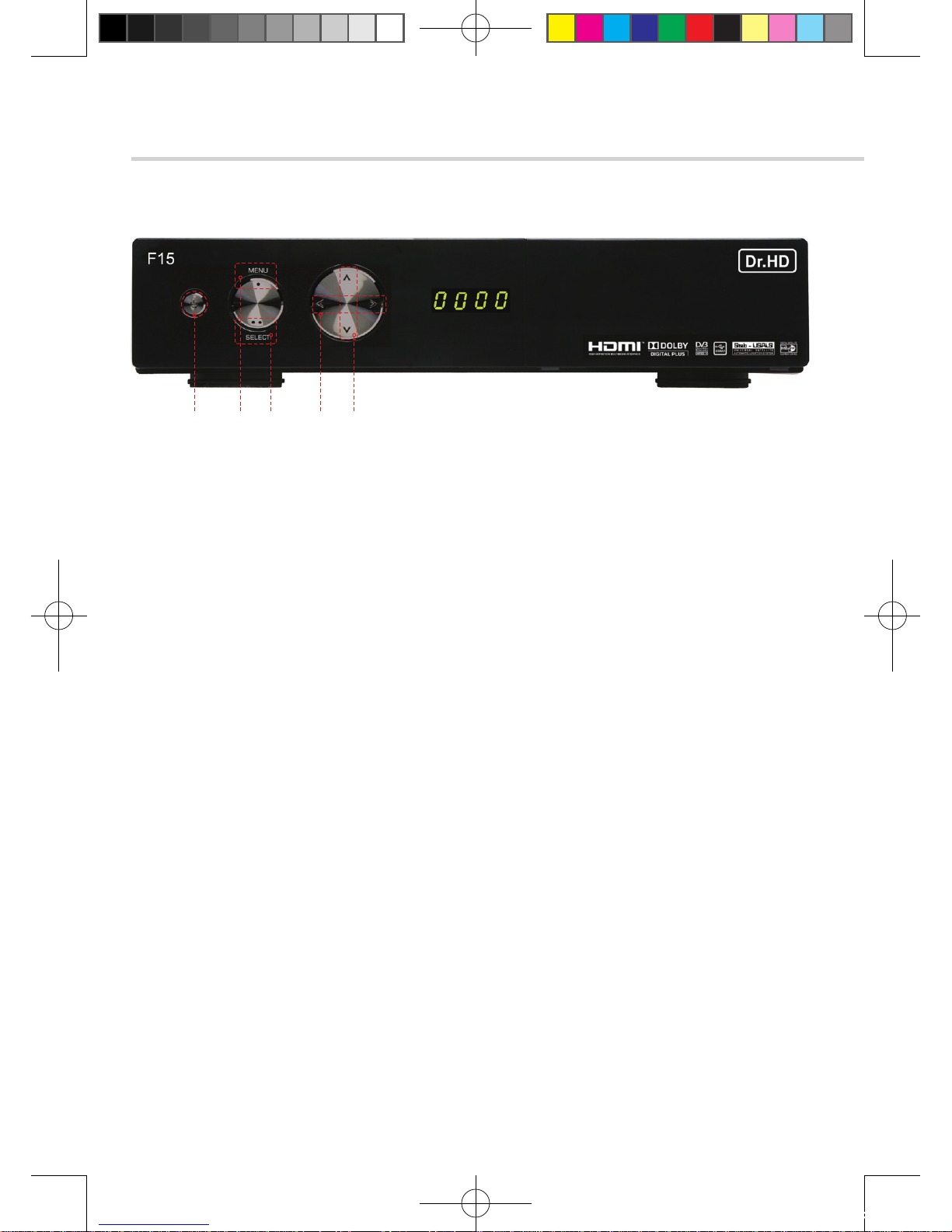
❶ Power: Switches the receiver between “Standby” and “Power ON” modes.
❷ Menu: To enter or exit the main menu.
❸ Select: To show the Channel List in non-menu mode and select on item or confirm in menu mode.
❹VOL ◀/ ▶: Регулировка громкости. (А в режиме «Меню»- установка параметра).
❺CH ▲/ ▼: Переключение каналов. (А в режиме «Меню»- перемещение курсора вверх-вниз
❶ ❷ ❸ ❹ ❺
4. Controls/Functions
4.3 F15 - Front Panel
[2012.10.12]D15+F15_russian+english.indd 80 2012-10-12 11:23:04

81
English
4. Controls/Functions
4.4 F15 - Rear Panel
NO Name Connector Function
❶LNB INPUT IEC 169-24 FEMALE IF input from LNB to digital tuner
❷LNB OUTPUT IEC 169-24 FEMALE IF loop-through output from digital tuner
❸S/PDIF Fiber Optic Digital audio output (Optical)
❹USB USB A-type USB 2.0
❺TV SCART SCART Video output(CVBS, RGB)
Audio output(R, L)
❻RS-232C DB-9 Low speed serial port
❼LAN RJ-45 10/100Mbps Ethernet
❽HDMI HDMI Digital Video/Audio Output
❾VIDEO RCA cinch Composite video output
❿AUDIO L RCA cinch Left audio output
⓫AUDIO R RCA cinch Right audio output
⓬Y RCA cinch Component video output(Y)
⓭Pb RCA cinch Component video output(Pb)
⓮Pr RCA cinch Component video output(Pr)
❶ ❷ ❾
❿⓭
⓫ ⓬ ⓮
❹❽
❸ ❹ ❺ ❻ ❼
[2012.10.12]D15+F15_russian+english.indd 81 2012-10-12 11:23:04
Inhaltsverzeichnis
Andere Dr.HD Empfänger Handbücher


