DVTEL Quasar CM-3211-00 Handbuch

CCM-3211 Series Installation Manual
UIG3211-20121001as1.1
Quasar CM-3211
Series Mini-Dome
Camera User and
Installation Guide
Installation and configuration instructions
for the CM-3211 Series IP Mini-dome
Camera
CM-3211-00 Indoor camera with
varifocal lens
CM-3211-01 Outdoor camera with
varifocal lens
CM-3211-10 Indoor camera with
motorized lens
CM-3211-10-I Indoor camera with
motorized lens and infrared LED
illuminator
CM-3211-11 Outdoor camera with
motorized lens
CM-3211-11-I Outdoor camera with
motorized lens and infrared LED
illuminator
All text and figures included in this publication are the exclusive property of DVTel Inc., and may not be copied, reproduced or
used in any way without the express written permission of DVTel Inc. Information in this document is subject to change without
notice. This document also contains registered trademarks and service marks that are owned by their respective companies or
organizations.
Copyright © 2012, DVTel Inc., All Rights Reserved.

CCM-3211 Series Installation Manual
i
Contents
Contents.................................................................................................................................i
1Overview ................................................................................................................1
1.1 Features...................................................................................................................1
1.2 Package Contents....................................................................................................2
2Introduction to the CM-3211 Series IP Mini-dome Camera................................3
2.1 CM-3211-00 Indoor Varifocal Camera Dimensions..................................................3
2.2 CM-3211-01 Outdoor Varifocal Camera Dimensions...............................................4
2.3 CM-3211-10/10-I/11/11-I Indoor and Outdoor Motorized Camera Dimensions........5
2.4 Camera Connectors.................................................................................................6
3System Requirements...........................................................................................7
4Installation .............................................................................................................8
4.1 Indoor Installation.....................................................................................................8
4.2 Outdoor Installation..................................................................................................8
4.3 Power and Ethernet Cable Connection....................................................................9
4.4 Initial Camera Configuration...................................................................................10
4.5 Remove the Base Plate.........................................................................................11
4.6 Mounting Instructions.............................................................................................12
4.6.1 Mounting the CM-3211-00, CM-3211-10, or CM-3211-10-I Indoor Camera.....12
4.6.2 Mounting the CM-3211-01, CM-3211-11, or CM-3211-11-I Outdoor Camera ..15
4.7 Adjusting and Framing-Up the Camera View....................................................18
5Searching and Accessing the Camera with Device Search.............................20
6Configuration and Operation..............................................................................25
6.1 Browser-Based Viewer Introduction.......................................................................26
6.2 Home Page............................................................................................................28
6.2.1 CM-3211-00/01 Varifocal Camera Home Page................................................28
6.2.2 CM-3211-10/10-I/11/11-I Motorized Camera Home Page................................30
6.3 System-Related Settings .......................................................................................33
6.3.1 Host Name and System Time Setting...............................................................34
6.3.2 Security.............................................................................................................36
6.3.2.1 User ...........................................................................................................37
6.3.2.2 HTTPS.......................................................................................................40
6.3.2.3 IP Filter.......................................................................................................46
6.3.2.4 IEEE 802.1X ..............................................................................................47
6.3.3 Network ............................................................................................................49
6.3.3.1 Basic..........................................................................................................50
6.3.3.2 QoS............................................................................................................53
6.3.3.3 SNMP Settings...........................................................................................54
6.3.3.4 UPnP..........................................................................................................56
6.3.4 DDNS ...............................................................................................................58

CCM-3211 Series Installation Manual
ii
6.3.5 Mail...................................................................................................................60
6.3.6 FTP...................................................................................................................61
6.3.7 HTTP................................................................................................................62
6.3.8 Application........................................................................................................63
6.3.9 Motion Detection...............................................................................................69
6.3.10 Network Failure Detection.............................................................................73
6.3.11 Tampering Alarm...........................................................................................75
6.3.12 Storage Management....................................................................................77
6.3.13 Recording......................................................................................................81
6.3.14 File Location..................................................................................................82
6.3.15 Iris Adjustment...............................................................................................83
6.3.16 View Information............................................................................................84
6.3.16.1 View Log File.............................................................................................85
6.3.16.2 User Information........................................................................................86
6.3.16.3 View Parameters.......................................................................................88
6.3.17 Factory Default..............................................................................................89
6.3.18 Software Version...........................................................................................91
6.3.19 Software Upgrade .........................................................................................92
6.3.20 Maintenance..................................................................................................95
6.4 Video and Audio Streaming Settings .....................................................................97
6.4.1 Video Resolution and Rotate Type...................................................................98
6.4.1.1 NTSC System Settings ..............................................................................99
6.4.1.2 PAL System Settings................................................................................102
6.4.2 Video Compression ........................................................................................107
6.4.3 Video OCX Protocol .......................................................................................110
6.4.4 Video Frame Rate ..........................................................................................111
6.4.5 Audio Mode and Bit Rate Settings..................................................................114
6.5 Camera Settings..................................................................................................116
6.5.1 Exposure Setting............................................................................................117
6.5.2 White Balance Setting ....................................................................................118
6.5.3 Picture Adjustment .........................................................................................119
6.5.4 Backlight.........................................................................................................120
6.5.5 Digital Zoom ...................................................................................................120
6.5.6 IR Function.....................................................................................................120
6.5.7 WDR Function................................................................................................121
6.5.8 Noise Reduction.............................................................................................121
6.5.9 TV System......................................................................................................123
6.6 Logout..................................................................................................................123
7Appendix............................................................................................................124
7.1 Appendix A: Technical Specifications ..................................................................125
7.2 Appendix B: Internet Security Settings.................................................................129
7.3 Appendix C: Install UPnP Components ...............................................................133
7.4 Appendix D: Deleting the Existing DC Viewer......................................................136

CCM-3211 Series Installation Manual
iii
7.5 Appendix E: Deleting Temporary Internet Files....................................................137
7.6 Appendix F: Contacting DVTel.............................................................................139
7.7 Appendix G: Accessories.....................................................................................140

CCM-3211 Series Installation Manual
1
1Overview
The Quasar CM-3211 Series IP Mini-dome Camera provides real-time, Full HD H.264 multi-
streaming with the highest quality image. Its compact, sophisticated mechanical design and
snap-in camera chassis facilitate easy installation.
The CM-3211 series includes the following models (collectively referred to as CM-3211-xx):
CM-3211-00 Indoor Camera with varifocal lens
CM-3211-01 Outdoor Camera with varifocal lens
CM-3211-10 Indoor Camera with motorized lens
CM-3211-10-I Indoor Camera with motorized lens and infrared IR illuminator
CM-3211-11 Outdoor Camera with motorized lens
CM-3211-11-I Outdoor Camera with motorized lens and infrared IR illuminator
Important: If you are using DVTel Latitude, we recommend that you configure the
camera’s settings via the AdminCenter. This is because the camera’s web-based
interface might be overwritten by Latitude settings. Refer to the Latitude online help
for information regarding configuring camera settings.
1.1 Features
Following are key features of the CM-3211-xx cameras:
H.264 and MJPEG compression
HTTP streaming MJPEG
Progressive scan CMOS sensor
Edge motion detection
Motion detection with region of
interest masking
Historical motion-detection levels
detected /recorded at frame levels.
Detection event driven alarms
Alarm input driven events
Relay output actions on alarm
Built-in web application/web
server
FTP upload (up to two
locations)
Upload alarm images to FTP
Dual HTTP notification server
support (up to two servers)
Send images on alarm to e-
mail
E-Mail SMTP alarm notification (up to
two e-mails)
Micro SD recording support
Record snapshots to SD card
on alarm
Sequential snapshot numbering
SNMP v1/v2 and SNMP traps
Security IP restricted access
allow/deny list
UPnP support
Electronic day/night (ICR)
Analog video output
Full-time BNC analog output
Privacy masks
WDR and ATW
3DNR image noise reduction
ONVIF support
RTSP support
Supports PoE /12VDC/24VAC
Multiple users
Group permissions
Per-user permissions
Tampering detection and
notification
Two encoder streams
available
Low-lux mode and backlight
compensation
Vandal-proof IP66 enclosure
(CM-3211-01/11/11-I)
Motorized lens
(CM-3211-10/11/11-I)
Infrared LED illuminator
(CM-3211-10-I/11-I)

CCM-3211 Series Installation Manual
2
NOTE: MJPEG is not supported by Latitude.
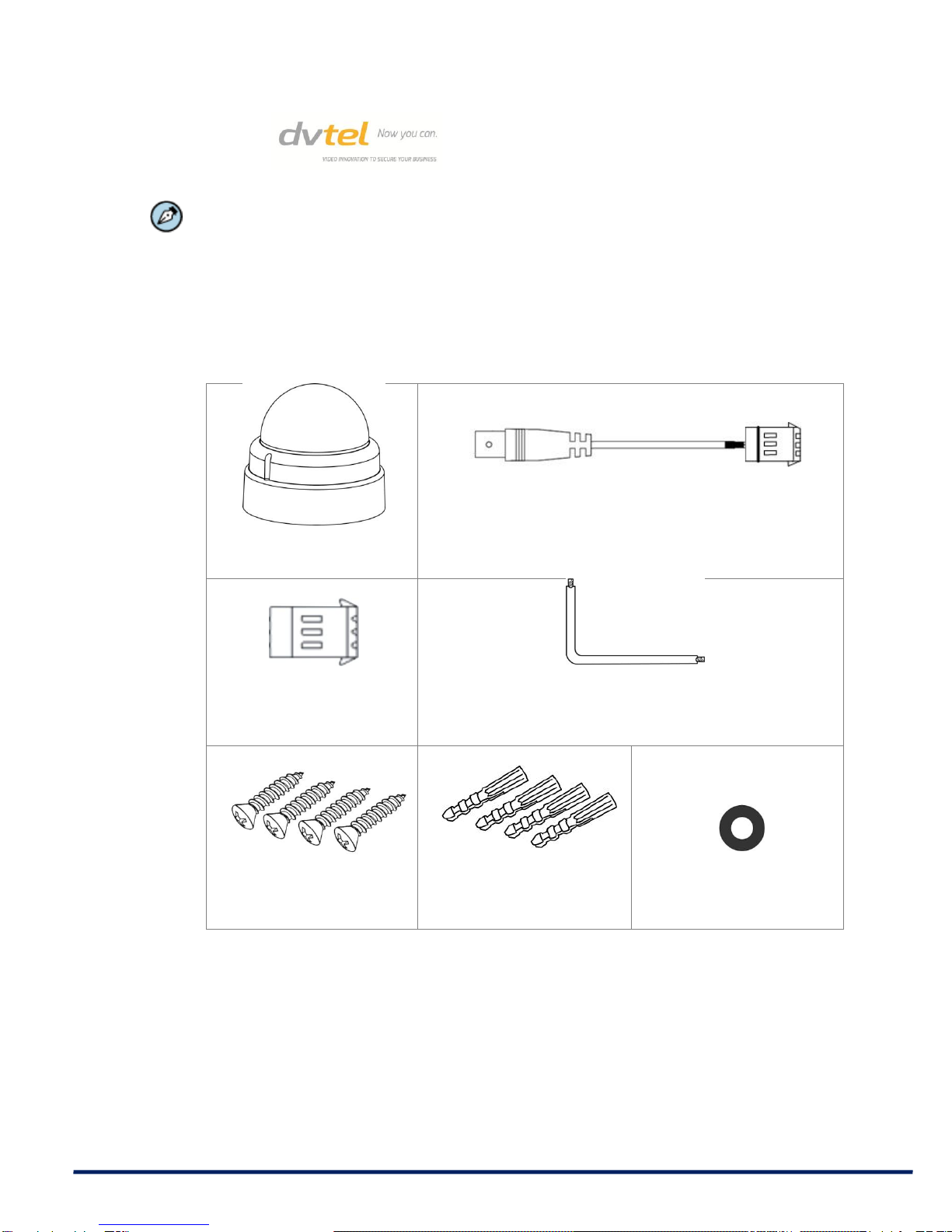
1.2 Package Contents
Check that the package contains the items listed below.
Indoor and Outdoor Camera Package Contents
Mini-dome camera
DC jack cable
Power terminal block
Star-bit tool (Torx wrench)
Self-tapping screws
(×4)
Plastic screw anchors
(×4)
Rubber washers (×6)

CCM-3211 Series Installation Manual
3
CD
(Bundled software and
documentation)
Quick-start guide
2Introduction to the CM-3211 Series IP
Mini-dome Camera
This chapter provides the camera dimensions for reference before installation. Definition of
each connector on the camera’s PCB board is also specified.
Related Links
CM-3211-00 Camera Dimensions
CM-3211-01 Camera Dimensions
CM-3211-10, CM-3211-10-I, CM-3211-11, and CM-3211-11-I Camera Dimensions
Camera Connectors
Appendix A: Technical Specifications
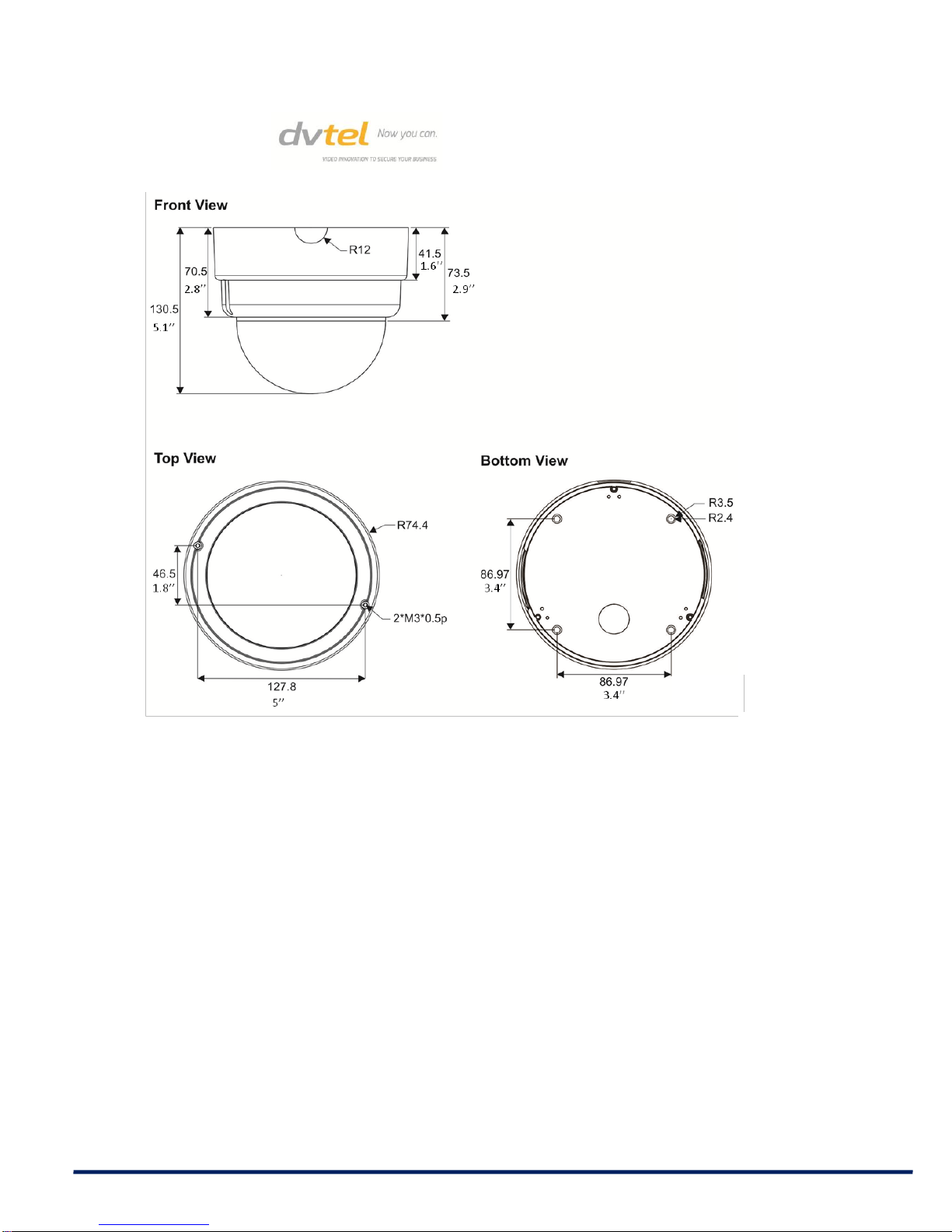
2.1 CM-3211-00 Indoor Varifocal Camera
Dimensions
The CM-3211-00 IP Indoor Mini-dome Camera’s dimensions are shown below.

CCM-3211 Series Installation Manual
4
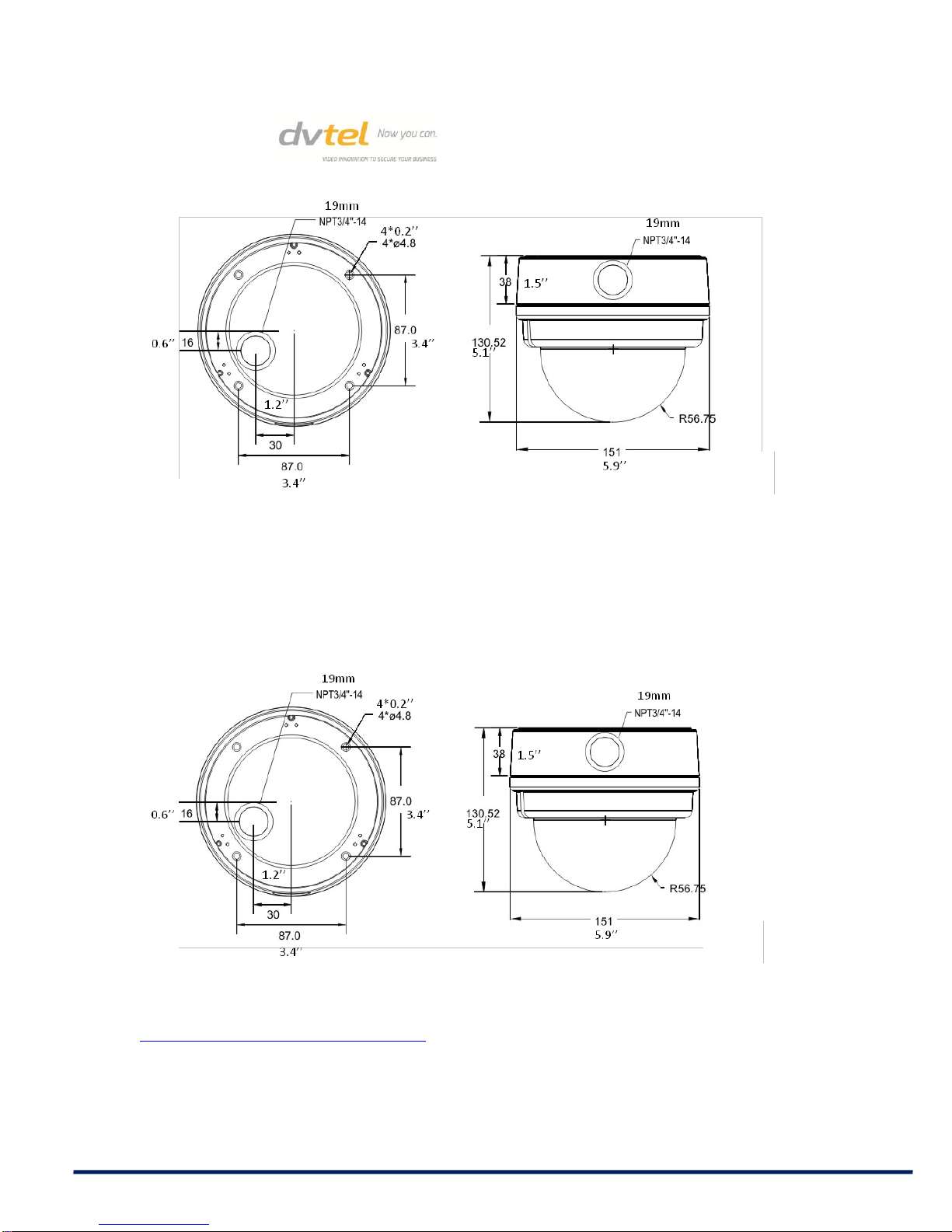
2.2 CM-3211-01 Outdoor Varifocal Camera
Dimensions
The CM-3211-01 Varifocal IP Outdoor Mini-dome Camera’s dimensions are shown below.

CCM-3211 Series Installation Manual
5
Top View Side View
2.3 CM-3211-10/10-I/11/11-I Indoor and
Outdoor Motorized Camera Dimensions
The CM-3211-10, CM-3211-10-I, CM-3211-11, and CM-3211-11-I Indoor and Outdoor
Motorized IP Mini-dome Camera dimensions are shown below.
Top View Side View
Related Link
Appendix A: Technical Specifications

CCM-3211 Series Installation Manual
6
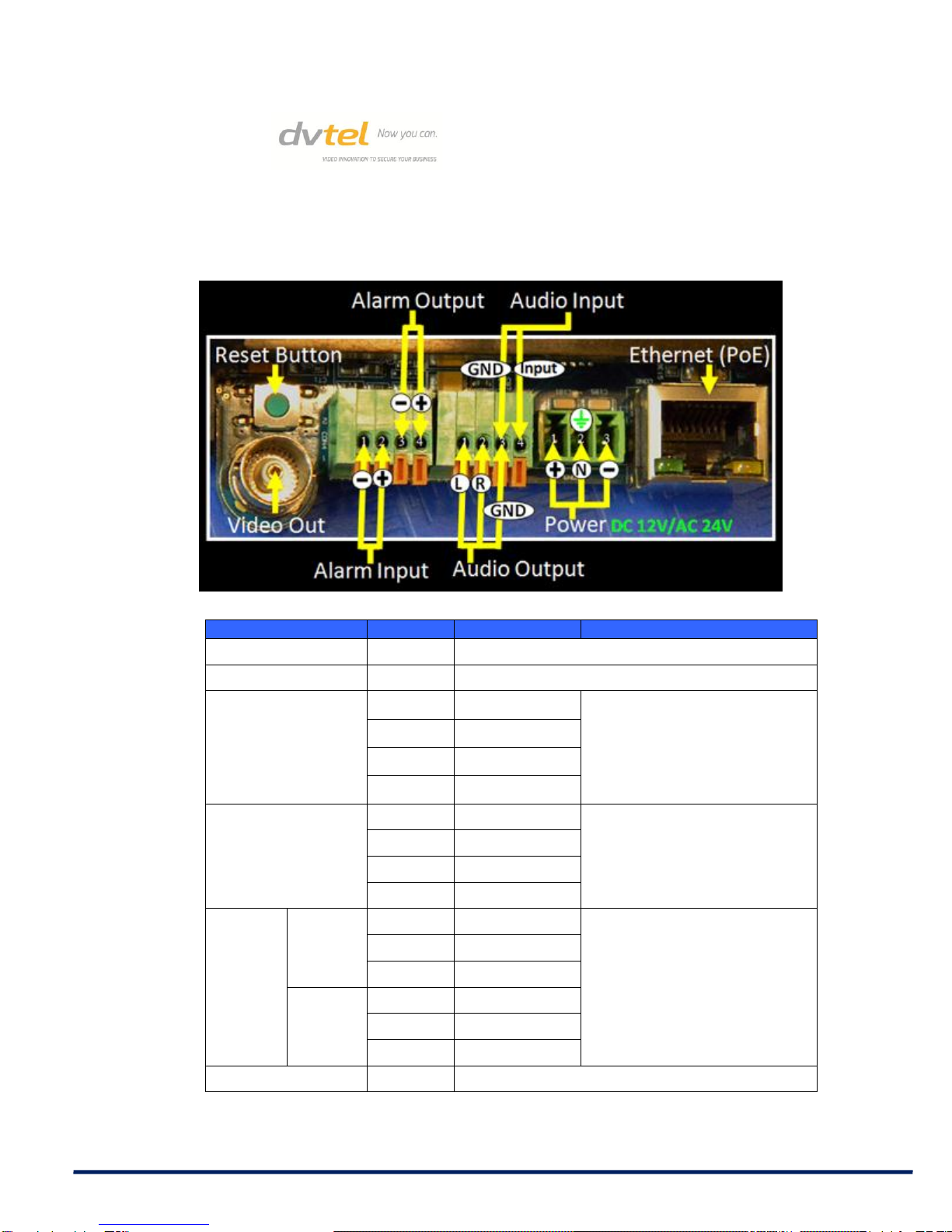
2.4 Camera Connectors
The diagram below shows the CM-3211-xx’s reset button and various connectors. Definition
for each connector is given as follows.
Connector
Pin No.
Definition
Remarks
Reset Button
-
Restore to factory default
BNC
-
Analog Video Output
Alarm I/O
1
GND (Input-)
Alarm connection
2
Input+
3
Output-
4
Output+
Audio I/O
1
Output (L)
Two-way audio
transmission
2
Output (R)
3
GND
4
Input
Power
12VDC
1
Power
Power connection
2
Reserved
3
GND
24VAC
1
Power-1
2
Earth GND
3
Power-2
RJ-45
-
10/100 Mbps Ethernet/PoE
Dieses Handbuch passt für folgende Modelle
5
Inhaltsverzeichnis
Andere DVTEL Sicherheitskamera Handbücher

DVTEL
DVTEL Quasar CP-3211 Bedienungsanleitung

DVTEL
DVTEL ioimage CP-2202-361P/N Handbuch

DVTEL
DVTEL CM-3211 Bedienungsanleitung

DVTEL
DVTEL CM-3211 Technisches Handbuch

DVTEL
DVTEL ioimage mmp100dn Bedienungsanleitung

DVTEL
DVTEL Pro Line 9460A Bedienungsanleitung

DVTEL
DVTEL 9600 Series Bedienungsanleitung

DVTEL
DVTEL 9520 Bedienungsanleitung

DVTEL
DVTEL Quasar CP-3211-180 Handbuch

DVTEL
DVTEL Ariel CM-3011 Handbuch