DVTEL Quasar CP-3211-180 Handbuch

Quasar CP Series HD PTZ
Camera User and Installation
Guide
Installation and configuration instructions
for the Quasar CP Series PTZ Cameras
CP-3211-180 Indoor camera with
18x Optical Zoom
CP-4221-200 Indoor camera with
20x Optical Zoom
CP-3211-181 Outdoor camera with
18x Optical Zoom
CP-4221-201 Outdoor camera with
20x Optical Zoom
Copyright © 2012, DVTel Inc., All Rights Reserved.
All text and figures included in this publication are the exclusive property of DVTel Inc., and may not be copied, reproduced or used in any way
without the express written permission of DVTel Inc. Information in this document is subject to change without notice. This document also contains
registered trademarks and service marks that are owned by their respective companies or organizations. Trademarks used in this document: Dell,
the trademark is a trademark of Dell Inc.; Microsoft Windows and Windows, the trademarks are trademarks of Microsoft Corporation. DVTel
disclaims and repudiates interest to claim to use their respective trademarks and service marks.
V0.2_Oct17_2012
Copyright © 2012, DVTel Inc., All Rights Reserved.

Quasar CP Series HD PTZ Camera User and Installation Guide
Contents
Chapter 1 - Safety ...............................................................................................1
Chapter 2 - Overview ..........................................................................................2
2.1 Features ................................................................................................................................... 3
2.2 Package Contents ..................................................................................................................... 4
Chapter 3 - Introduction to the Quasar HD PTZ Camera ......................................6
3.1 Quasar HD PTZ Indoor Camera Dimensions................................................................................ 6
3.2 Quasar HD PTZ Outdoor Camera Dimensions............................................................................. 6
3.3 Camera Connectors................................................................................................................... 7
Chapter 4 - System Requirements.......................................................................9
Chapter 5 - Installation .....................................................................................10
5.1 Indoor Installation .................................................................................................................. 10
5.2 Outdoor Installation ............................................................................................................... 10
5.3 Power and Ethernet Cable Connection..................................................................................... 11
5.4 Initial Camera Configuration.................................................................................................... 11
5.5 Preparing the Camera for Mounting ........................................................................................ 12
5.6 Mounting Instructions............................................................................................................. 12
5.6.1 Ceiling Mount............................................................................................................................ 13
5.6.2 Wall Mount ............................................................................................................................... 22
5.6.3 Corner Mount ........................................................................................................................... 26
5.6.4 Pole Mount ............................................................................................................................... 30
Chapter 6 - Searching and Accessing the Camera with Device Search................33
6.1 To configure the communication settings of the Quasar CP series camera: ............................... 33
6.2 Adjusting and Framing-Up the Camera View............................................................................ 36
Chapter 7 - Configuration and Operation ..........................................................37
7.1 Browser-Based Viewer Introduction ........................................................................................ 37
7.2 Home Page ............................................................................................................................. 39
7.3 System-Related Settings.......................................................................................................... 42
7.3.1 Host Name and System Time Setting........................................................................................ 43
7.3.2 Security ..................................................................................................................................... 44
7.3.3 Network .................................................................................................................................... 53
7.3.4 DDNS ......................................................................................................................................... 61
7.3.5 Mail ........................................................................................................................................... 62
7.3.6 FTP............................................................................................................................................. 63
7.3.7 HTTP.......................................................................................................................................... 64
7.3.8 Application (Alarm Settings) ..................................................................................................... 65
7.3.9 Motion Detection...................................................................................................................... 72

Quasar CP Series HD PTZ Camera User and Installation Guide
7.3.10 Network Failure Detection........................................................................................................ 76
7.3.11 Storage Management ............................................................................................................... 78
7.3.12 Recording .................................................................................................................................. 80
7.3.13 File Location.............................................................................................................................. 82
7.3.14 View Information ...................................................................................................................... 83
7.3.15 Factory Default ......................................................................................................................... 87
7.3.16 Software Version....................................................................................................................... 88
7.3.17 Software Upgrade..................................................................................................................... 88
7.3.18 Maintenance............................................................................................................................. 90
7.4 Video and Audio Streaming Settings........................................................................................ 91
7.4.1 Video Resolution and Rotate Type ........................................................................................... 92
7.4.2 Video Compression................................................................................................................... 96
7.4.3 Video OCX Protocol................................................................................................................... 98
7.4.4 Video Frame Rate...................................................................................................................... 99
7.4.5 Audio Mode and Bit Rate Settings.......................................................................................... 100
7.5 PTZ Settings.......................................................................................................................... 101
7.5.1 Preset ...................................................................................................................................... 102
7.5.2 Pattern .................................................................................................................................... 103
7.5.3 Auto Pan.................................................................................................................................. 104
7.5.4 Sequence................................................................................................................................. 105
7.5.5 Home....................................................................................................................................... 107
7.5.6 Tilt Range ................................................................................................................................ 108
7.5.7 Privacy Mask ........................................................................................................................... 109
7.5.8 Camera –Exposure ................................................................................................................. 110
7.5.9 Camera –WB (White Balance)................................................................................................ 111
7.5.10 Camera –Misc1 (Miscellaneous Settings Menu 1)................................................................. 113
7.5.11 Camera –Misc2 (Miscellaneous Settings Menu 2)................................................................. 115
7.5.12 Camera- Default...................................................................................................................... 116
7.6 Logout .................................................................................................................................. 117
Appendix A - Technical Specifications.............................................................. 118
Appendix B - Internet Security Settings ........................................................... 120
Appendix C - Install UPnP Components ........................................................... 123
Appendix D - Deleting the Existing DCViewer................................................... 125
Appendix E - Deleting Temporary Internet Files .............................................. 126
Appendix F - Optional Accessories .................................................................. 127
Dome Camera Accessories ............................................................................................................. 127
Mounting Accessories.................................................................................................................... 128
Appendix G - Contacting DVTel ........................................................................ 134

Quasar CP Series HD PTZ Camera User and Installation Guide
1
Safety
Observe due diligence and proper security and safety standards when installing and operating the unit.
To help ensure safety and to help reduce risk of injury or damage, observe the following:
Do not disassemble the camera. To prevent electric shock, do not remove screws or covers. There are
no user serviceable parts inside. Ask a qualified service person for servicing.
Ensure the unit is installed and operating in an indoor environment or in the protective outdoor
mount kit supplied with the outdoor model.
Place or install the unit on a secure flat surface or mount it using optional hardware.
Ensure the operating environment is not contaminated by dust, particles, chemicals, smoke, or water.
Use proper maintenance to ensure that the unit is clean and dry.
Do not block cooling holes on the bracket. This camera has a cooling fan inside. Blocking the cooling
holes leads to build up of heat in the camera and may cause malfunction.
Operating temperature should be maintained within 14ºF to 122ºF (-10ºC to 50ºC), with no more
than 90% non-condensing humidity.
Use the properly rated power supply unit or PoE Plus and protect against static electricity, ground
faults and power surges.
Observe local codes and laws and ensure installation is in accordance with fire, security and safety
standards.

Quasar CP Series HD PTZ Camera User and Installation Guide
2
Overview
The Quasar CP Series HD PTZ Camera provides real-time video in high-definition quality at either HD1080p or
HD720p. With 18x or 20x optical zoom and high-speed pan-tilt-zoom functionality, the Quasar HD PTZ Camera can
cover a wide monitoring area quickly and with a high level of detail. Multiple streams can be run simultaneously,
providing an ideal solution when differing levels of image quality are required, including increasing frame rate and
level of detail when events are triggered. In addition, DVTel’s Scene Adaptive Algorithms provide the highest image
quality at the lowest bandwidth and storage requirements.
The Quasar HD PTZ’s snap-in camera chassis and use of Power over Ethernet Plus facilitate easy installation.
The Quasar HD PTZ series includes the following models:
CP-3211-180 Indoor camera with18x Optical Zoom
CP-4221-200 Indoor camera with 20x Optical Zoom
CP-3211-181 Outdoor camera with 18x Optical Zoom
CP-4221-201 Outdoor camera with 20x Optical Zoom
Important: If using DVTel Latitude, we recommend that you configure the camera’s settings via the
AdminCenter as the camera’s web-based interface might be overwritten by Latitude settings. Refer to the
Latitude online help for information regarding configuring camera settings.

Quasar CP Series HD PTZ Camera User and Installation Guide
3
Features
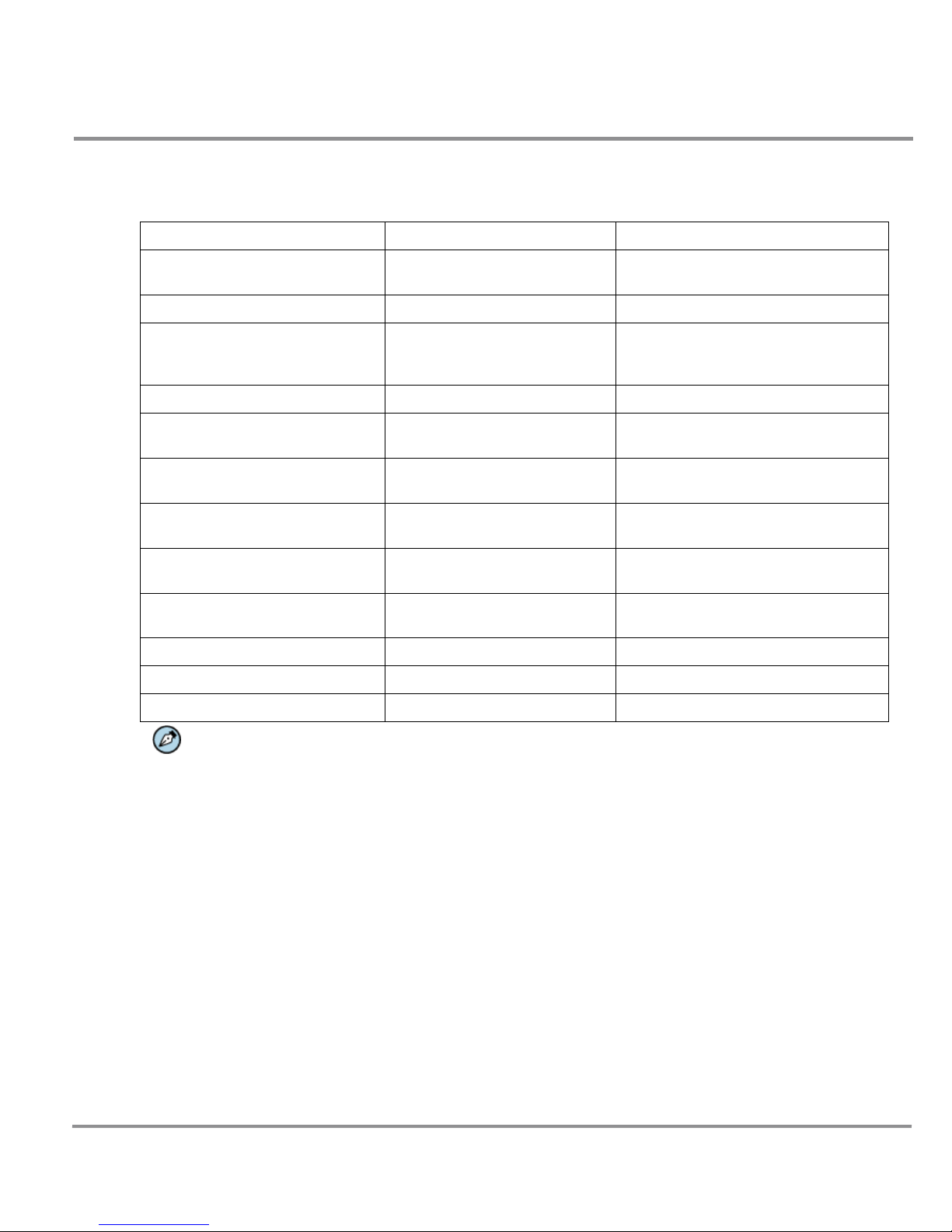
Following are key features of Quasar HD PTZ cameras:
18x, 20x optical zoom
10x digital zoom
H.264 and MJPEG compression
Full HD real-time resolution
Dual encoder streams (Full HD
real-time and D1 real-time)
Dual codecs (H.264 Baseline and H.264
Main)
Bidirectional audio
Progressive scan CMOS sensor
Edge motion detection
Motion detection with region of
interest masking
Historical motion-detection
levels detected /recorded at
frame levels.
Detection event driven alarms
Alarm input driven events
Relay output actions on alarm
Built-in web application/web server
FTP upload (up to two locations)
Upload alarm images to FTP
Dual HTTP notification server support
(up to two servers)
Send images on alarm to e-mail
E-Mail SMTP alarm notification
(up to two e-mails)
MicroSD recording support
Record snapshots to SD card on
alarm
Presets and Preset Sequences
Pattern Lines and Auto Pan Paths
SNMP v1/v2 and SNMP traps
Security IP restricted access
allow/deny list
Removable IR Cut Filter
Image Flip/Mirror/Inverse/Vertical
View
Privacy masks
WDR and ATW
Backlight compensation
Digital noise reduction
ONVIF support
UPnP support
Supports PoE Plus/12VDC/24VAC
RTSP support
Per-user and Group permissions
Multiple users
Optional vandal-proof enclosure
NOTE: MJPEG is not supported by Latitude.

Quasar CP Series HD PTZ Camera User and Installation Guide
4
Package Contents
Before proceeding, please check the box contains the items listed here. If any item is missing or has defects, DO
NOT install or operate the product and contact your dealer for assistance.
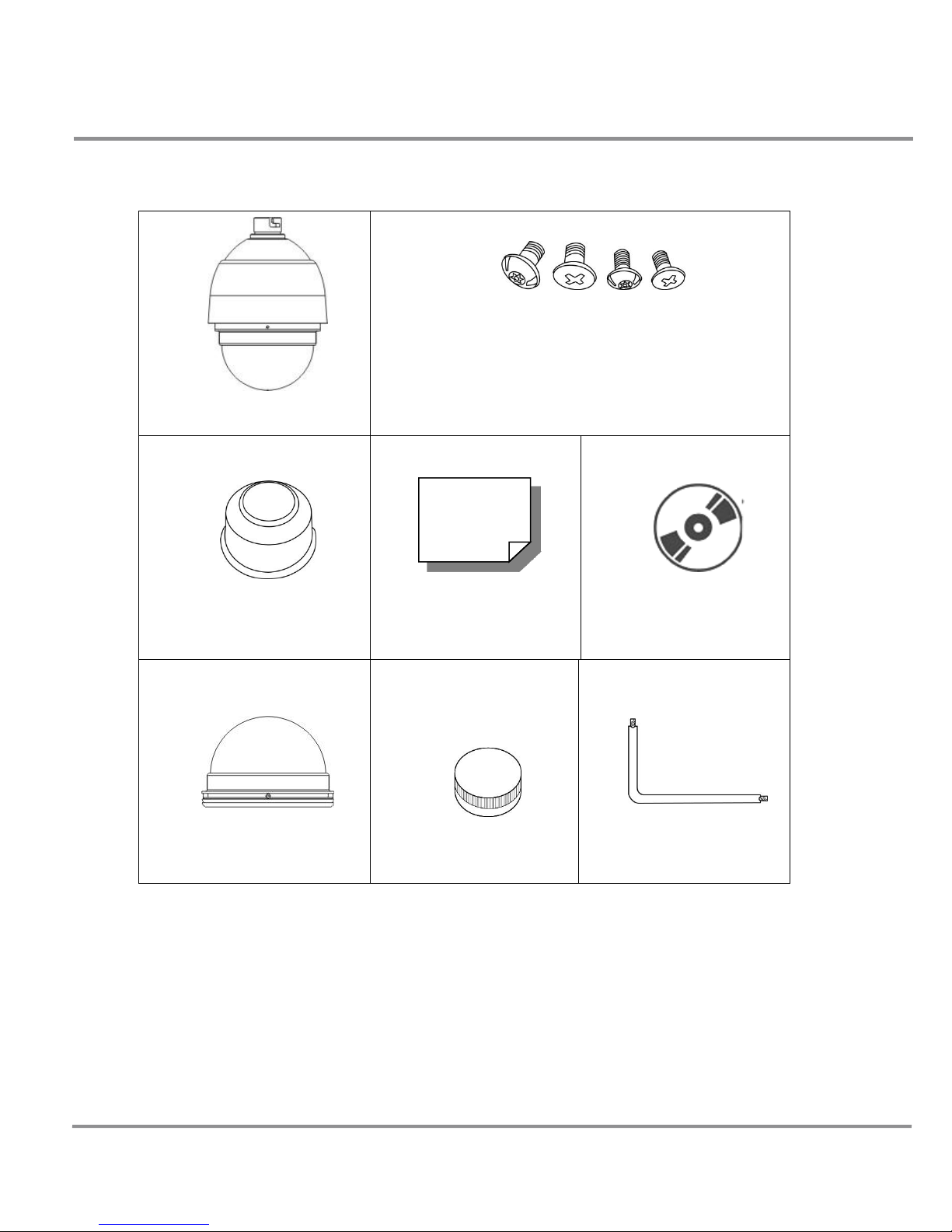
Indoor Camera Package Contents
Camera Body
Optical Cover
Hard Ceiling Mount
M4 Screw (x4)
Plastic Anchors (x4)
Quick Guide
CD: (Bundled software and
documentation)

Quasar CP Series HD PTZ Camera User and Installation Guide
5
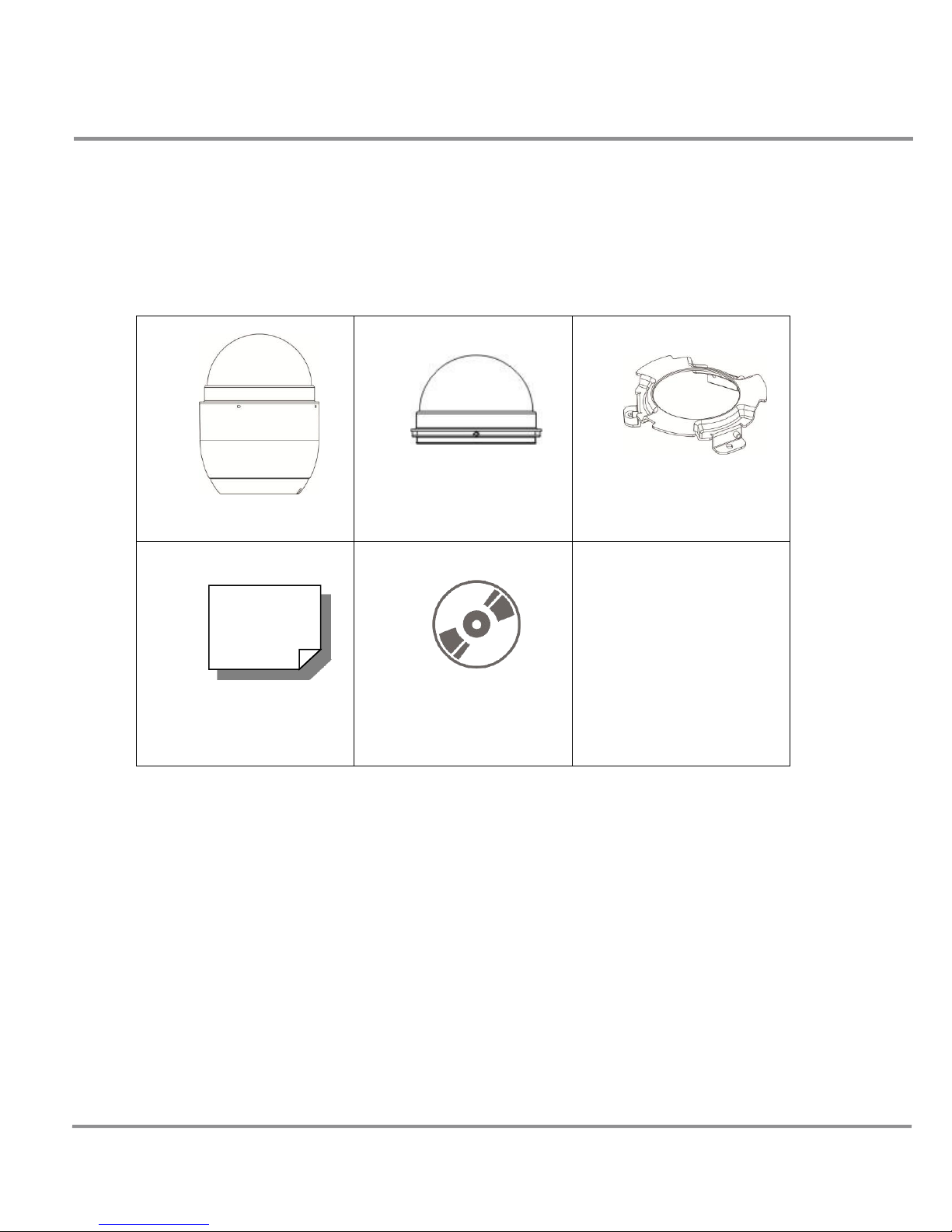
Outdoor Camera Package Contents
Camera Body with Outdoor
Mount Kit
M3 Standard Screw (x1)
M3 Security Screw (x1)*
M5 Standard Screw (x1)
M5 Security Screw (x1)*
Waterproof Gasket
Quick Guide
CD: Operation Manuals
Optical Cover
Lubricant
Security Torx*
*Optional: For Vandal Proof Cover only.

Quasar CP Series HD PTZ Camera User and Installation Guide
6
Introduction to the Quasar HD PTZ Camera
This chapter provides the camera dimensions for reference before installation. Definition of each connector on the
camera’s back plate is also specified.
Related Links
Appendix A: Technical Specifications
Quasar HD PTZ Indoor Camera Dimensions
The Quasar HD PTZ Indoor Camera’s dimensions are shown below.
Top View Side View
Quasar HD PTZ Outdoor Camera Dimensions
The Quasar HD PTZ Outdoor Camera’s dimensions are shown below.
Top View Side View

Quasar CP Series HD PTZ Camera User and Installation Guide
7
Camera Connectors
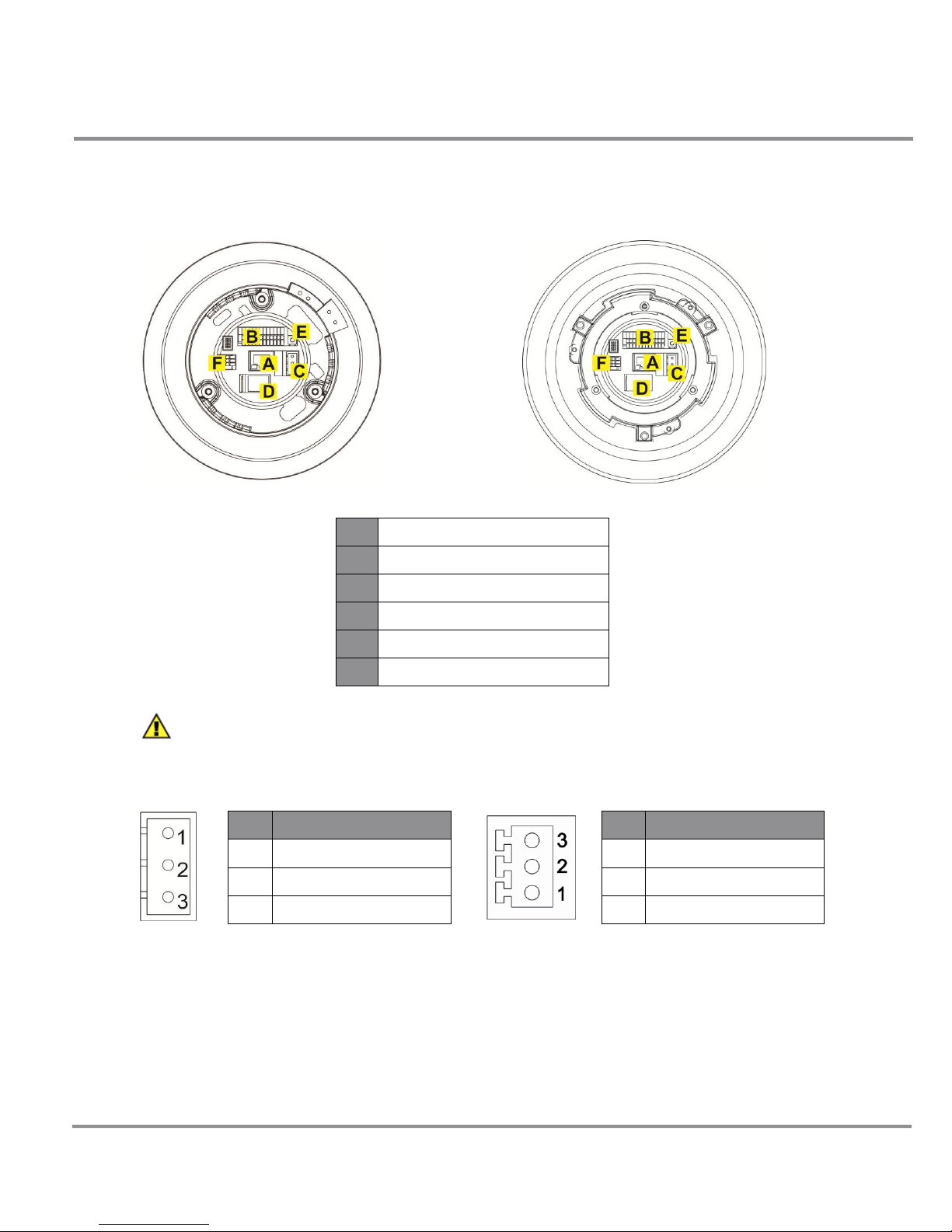
Various connectors are located on the Quasar HD PTZ Camera’s back plate as shown in the diagrams below.
Definitions for each connector follow.
Indoor Outdoor
A
RJ-45 Connector
B
Alarm I/O
C
Power
D
MicroSD Card Slot
E
Factory Reset Button
F
Audio I/O
NOTE: DO NOT change the Quasar HD PTZ Camera’s Communication Switch factory default
settings.
Power Connector Audio Connector
Pin
Definition
1
AC 24-
2
FG
3
AC 24+
Pin
Definition
1
LINE_OUT
2
GND
3
LINE_IN
Dieses Handbuch passt für folgende Modelle
3
Inhaltsverzeichnis
Andere DVTEL Sicherheitskamera Handbücher

DVTEL
DVTEL 9520 Bedienungsanleitung

DVTEL
DVTEL CM-3211 Bedienungsanleitung

DVTEL
DVTEL CM-3211 Technisches Handbuch

DVTEL
DVTEL Quasar CP-3211 Bedienungsanleitung

DVTEL
DVTEL ioimage mmp100dn Bedienungsanleitung

DVTEL
DVTEL CB-5222 Bedienungsanleitung

DVTEL
DVTEL ioimage CP-2202-361P/N Handbuch

DVTEL
DVTEL Quasar Bedienungsanleitung

DVTEL
DVTEL Ariel CM-3011 Handbuch

DVTEL
DVTEL Pro Line 9460A Bedienungsanleitung