Freeview DTVS-DSR1 Bedienungsanleitung

DTVS-DSR1 User Guide
Digital Satellite Receiver
DTVS-DSR1.indd 1 11-6-28 上午9:27

DTVS-DSR1.indd 2 11-6-28 上午9:27

Contents
Safety Instructions ....................................................................................................................5
Warning ................................................................................................................................................................. 5
Copyright Statement ........................................................................................................................................ 5
Disclaimer ............................................................................................................................................................. 5
About the Set Top Box...............................................................................................................6
Main Features ...................................................................................................................................................... 6
Package Contents............................................................................................................................................... 6
Product Overview......................................................................................................................7
Front Panel............................................................................................................................................................ 7
Rear Panel.............................................................................................................................................................. 7
Remote Control..........................................................................................................................8
Installing the Batteries............................................................................................................10
Caution.................................................................................................................................................................10
Using the Remote Control.............................................................................................................................10
Connecting to Equipment.......................................................................................................11
How to get good reception..........................................................................................................................11
Connections to a TV ........................................................................................................................................11
First Time Installation..............................................................................................................14
Switch Program........................................................................................................................14
Volume Control........................................................................................................................14
Text ...........................................................................................................................................14
Info ...........................................................................................................................................15
Information Banner.................................................................................................................16
Timer.........................................................................................................................................16
Quick Select .............................................................................................................................16
Audio Selection........................................................................................................................17
TV/Radio...................................................................................................................................17
Subtitles ...................................................................................................................................17
Teletext Selection ....................................................................................................................17
EPG (Electric Program Guide) .................................................................................................18
Select a Programme in EPG ..........................................................................................................................18
Button Functions in EPG................................................................................................................................18
Recording .................................................................................................................................19
Start Recording .................................................................................................................................................19
Stop Recording..................................................................................................................................................19
Time shift Recording.......................................................................................................................................20
PlayBack & Trick Mode....................................................................................................................................21
Button Functions in Playback ......................................................................................................................21
DTVS-DSR1.indd 3 11-6-28 上午9:27


Main Menu ...............................................................................................................................22
Customising the Channel Manager........................................................................................22
Channel Organizer...........................................................................................................................................22
Program Guide(EPG) ......................................................................................................................................23
New Channel......................................................................................................................................................24
Edit Channel.......................................................................................................................................................25
Delete All.............................................................................................................................................................26
Customising the System Installation .....................................................................................27
Installation ..........................................................................................................................................................27
– Satellite Scan.........................................................................................................................................28
– Blind Scan...............................................................................................................................................29
– Auto Scan ...............................................................................................................................................30
– New Transponder ................................................................................................................................30
– Edit LNB...................................................................................................................................................31
– Delete Satellite .....................................................................................................................................31
– Delete Transponder ............................................................................................................................32
Factory Default..................................................................................................................................................33
S/W Upgrade via OTA......................................................................................................................................33
Country Setup ...................................................................................................................................................34
Version..................................................................................................................................................................34
Customising the System Conguration .................................................................................35
Language Setup................................................................................................................................................35
OSD Setup...........................................................................................................................................................35
TV Setup ..............................................................................................................................................................36
Time Setup..........................................................................................................................................................37
Wakeup Timer....................................................................................................................................................37
RF Setup...............................................................................................................................................................38
Customising the Media Manager ...........................................................................................39
Thumbnail Browser .........................................................................................................................................39
– Record Bookmark ...............................................................................................................................40
– Record Editing ......................................................................................................................................41
– Rename ...................................................................................................................................................42
Recording Booked List ...................................................................................................................................42
Media Information...........................................................................................................................................44
Troubleshooting .....................................................................................................................45
Specications...........................................................................................................................46
Warranty ..................................................................................................................................47
DTVS-DSR1.indd 4 11-6-28 上午9:27

5
Safety Instructions
• Always read the safety instructions carefully.
• Keep this User's Manual for future reference.
• Keep this equipment away from humidity.
• Lay this equipment on a reliable at surface before setting it up.
• Do not stand it on soft furnishings.
• If any of the following situation arises, get the equipment checked by a service Technician:
- The equipment has been exposed to moisture.
- The equipment has been dropped and damaged.
- The equipment has obvious sign of breakage.
- The equipment has not been working well or you cannot get it work according to User's
Manual.
Warning
• To prevent the risk of electric shock, do not open the cover or the back of the receiver.
• Do not block the ventilation holes of the device. Leave an appropriate gap above and around it to
allow for adequate ventilation.
• Do not place the device in an unventilated cabinet or on top of a unit which emits heat.
Copyright Statement
No part of this publication may be reproduced in any form by any means without the prior written
permission. Other trademarks or brand names mentioned herein are trademarks or registered
trademarks of their respective companies.
Disclaimer
Information in this document is subject to change without notice. The manufacturer does not make
any representations or warranties (implied or otherwise) regarding the accuracy and completeness
of this document and shall in no event be liable for any loss of prot or any commercial damage,
including but not limited to special, incidental, consequential or other damage.
This symbol indicates that this product incorporates double insulation between hazardous
mains voltage and user accessible parts. When servicing use only identical replacement
parts.
To reduce the risk of re or electric shock, do not expose this apparatus to water or colds.
DTVS-DSR1.indd 5 11-6-28 上午9:27

6
About the Set Top Box
This DVB-S Satellite Receiver is a Free-To-Air digital satellite receiver, allowing you to access free-to-
air digital Satellite TV channels and radio broadcasts on your TV set. Its digital reception covers C &
Ku band. TSR is supported for this Receiver. Compared with analog TV programs, digital TV programs
eliminate the noise and interference by oering high quality video and audio. An on-screen initial
installation guide is provided so that you can easily start to enjoy watching the programs. In addition,
a fully featured remote control is included that oers you access to every feature with a simple press
of a button.
Main Features
• Fully compliant with New Zealand DVB-S standards
• Full MPEG2 ISO/IEC 13818 transport stream compliant audio/video decoding
• QPSK demodulator
• Automatic/manual channel search
• Channel edit and deletion
• Parental lock control
• EPG (Electronic Program Guide) and teletext function (where available)
• Tuner RF in/loop through
• CVBS / YCbCr / HDMI / Digital Audio via coaxial
• Digital Audio and Video via HDMI output
• Recording via USB, Time shift recording
• RF Modulator support
• Full function remote control
Package Contents
Before installation, please check the items of the package. The package should contain the following
items:
1. DVB-S Satellite Receiver x 1
2. Remote Control x 1
3. AAA size Battery x 2
4. Instruction Manual x 1
5. AV Cable x 1
6. HDMI Cable x1
7. Warranty Card x 1
8. Quick Start Guide x 1
DTVS-DSR1.indd 6 11-6-28 上午9:27

7
Product Overview
Front Panel
Rear Panel
LNB IN
LNB OUT
TV ANT IN
TO TV
USB
HDMI VIDEO R
L
YCbCr
L - AUDIO - RS/PDIF
Z1082
AC 110-240V~
50/60Hz 30W Max.
13/18V
500mA Max.
5679 84 3 2 1
1. button
To switch the receiver between on and O mode.
2. CH +/- button
- To switch between channels.
- Press to navigate up and down within the
menu setup.
3. VOL +/- button
- To increase and decrease the volume.
- Press to navigate left and right within the menu
setup.
4. MENU button
To open the menu so that you can change the
settings of your receiver.
1. LNB IN
Connect to your satellite antenna.
2. LNB OUT
Connect to your TV if supported satellite or your
another receiver.
3. USB
Upgrade for your recevier or use external hard
drive to record.
4. HDMI
Output the high quality video and audio to your
TV via HDMI cable.
5. TV ANT IN
Input the TV antenna to your receiver.
5. OK button
To conrm selection in OSD menu/display TV
channel list.
6. LED Display
To display the status of the receiver, in playing
menu it shows "MENU"; in watching TV channel it
shows the channel No.; in standby mode it shows
the time; in searching channels it shows "TUNE".
7. LED indicator light 1
Will appear in red when in standby mode.
8. LED indicator light 2
Will show in amber while watching Live TV.
Will show in green when recording.
9. IR receiver
1
2 4 6 8 9
3 5 7 10 11
6. TO TV
Connect to your TV via coaxial cable.
7. YCbCr
Output the high quality video to your TV via RCA
cable.
8. SPDIF
Output the digital audio.
9. AUDIO L/R
Connect to your TV or other equipment.
10. Video
Connect to your TV or other equipment.
11. AC IN Socket
DTVS-DSR1.indd 7 11-6-28 上午9:27

8
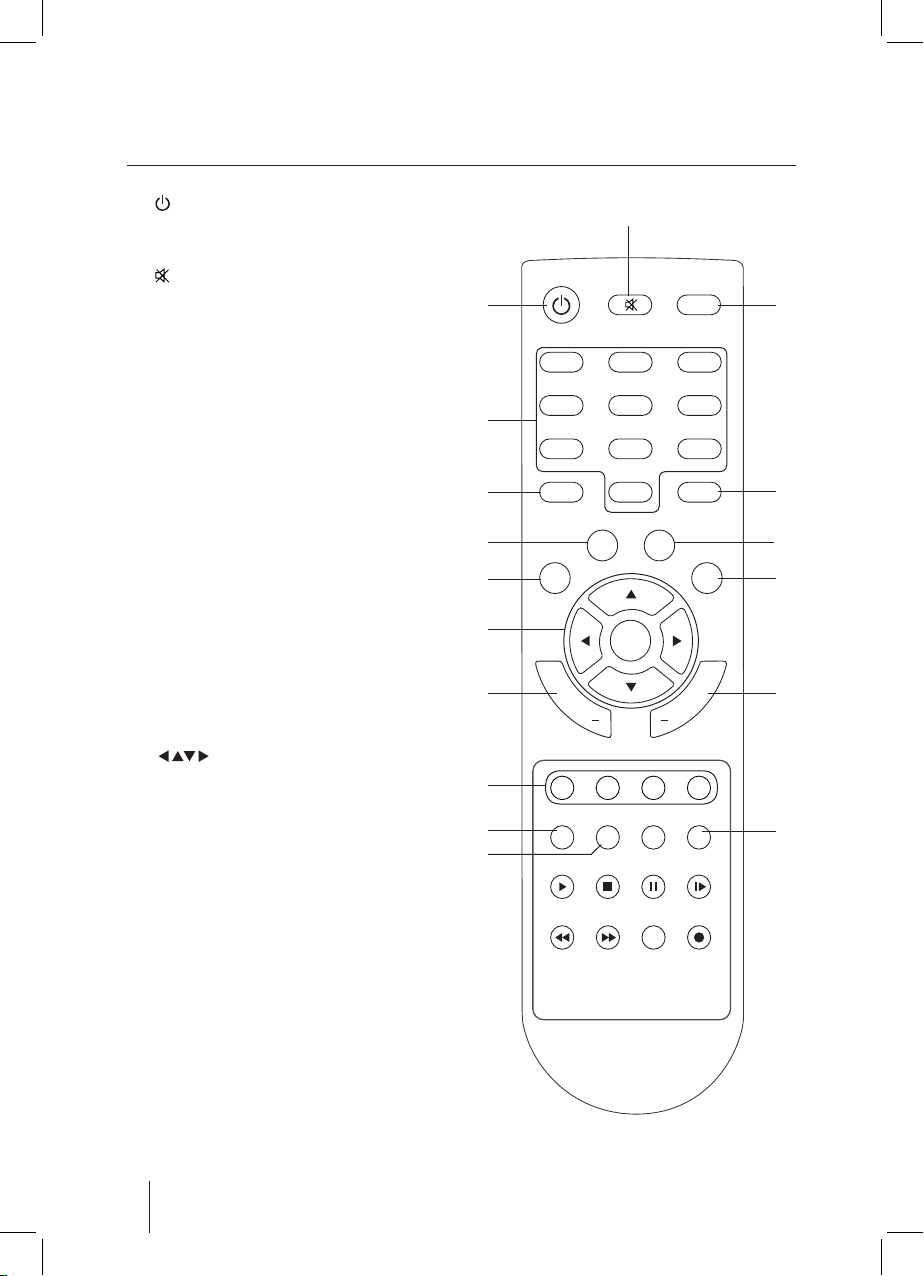
Remote Control
1. button
To switch the receiver between on and o(standby)
mode.
2. button
To mute and restore the sound output.
3. TXT button
To open teletext function.
4. 0-9 buttons
Enter values and select the channel directly by
entering its number.
5. EPG button
Electronic progamme guide.
6. TEXT button
To access to digitaltext service.
7. Back button
To return to the previous progamme.
8. INFO button
• Display the Now / Next EPG menu.
• Display the service information.
9. MENU button
To open the main menu.
10. EXIT button
Exit the menu to normal TV view.
11. buttons
To navigate the menu setup.
OK button
Conrm selection in OSD menu/display TV
channel list.
12. CH+/- buttons
To switch up and down in channels.
13. VOL+/- buttons
To increase and decrease the volume.
14. Coloured buttons
For interactive functions.
15. SUBT button
Change subtitle for current broadast.
16. TV/RADIO button
Switch between TV and Radio mode.
17. TIMER button
To sleep timer of your receiver.
123
654
789
0TEXT
TXT
BACK
EPG
MENU
EXIT
OK
+
CH
SUBT
TV/RADIO
AUDIO TIMER
PLAY STOP PAUSE SLOW
FRW FFW SEARCH REC
+
VOL
INFO
1
4
5
7
9
6
8
10
11
12
14
15
16
13
17
2
3
DTVS-DSR1.indd 8 11-6-28 上午9:27

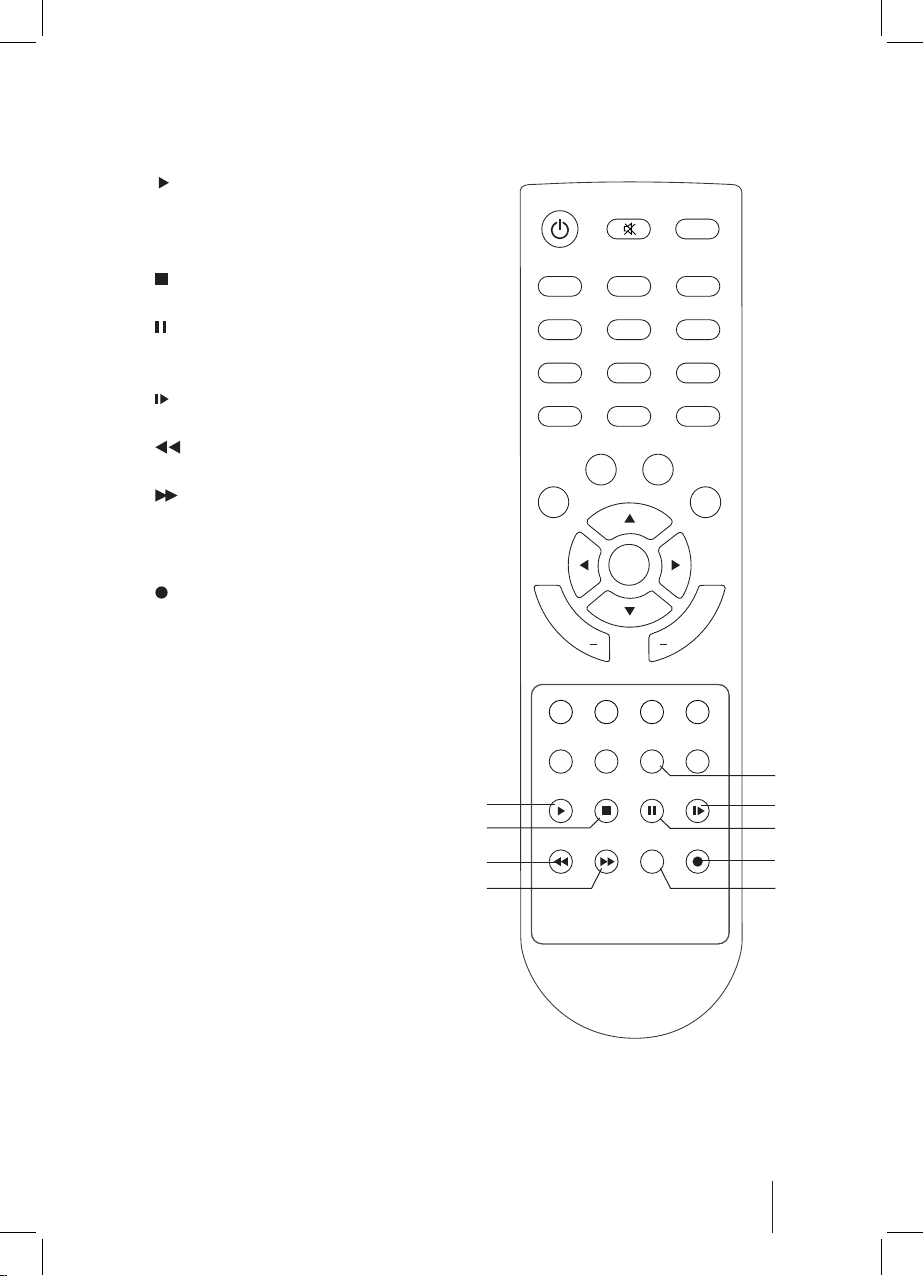
9
18. AUDIO button
To select Audio model.
19. PL AY button
Press once to start playback in the Thumbail
Browse menu when you selected the recorded
progamme.
20. STOP button
To stop the playback or recording.
21. PAUSE button
To pause playback,
To start timeshifting.
22. SLOW button
To slow forward playback.
23. FRW button
To fast rewind playback.
24. FFW button
To fast forward playback.
25. SEARCH button
Invoke Thumbnail Browser menu.
26. REC button
To record the current programme.
123
654
789
0TEXT
TXT
BACK
EPG
MENU
EXIT
OK
+
CH
SUBT
TV/RADIO
AUDIO TIMER
PLAY STOP PAUSE SLOW
FRW FFW SEARCH REC
+
VOL
INFO
19
23
20
24
22
26
25
21
18
DTVS-DSR1.indd 9 11-6-28 上午9:27

10
Installing the Batteries
Remove the battery cover from the remote control
and put two AAA size batteries inside the
compartment. The diagram inside the battery
compartment shows the correct way to install the
batteries.
Caution
• Keep batteries out of childrens’ reach.
• Don’t attempt to recharge, short-circuit, disassemble, heat or throw the batteries into re.
• Always replace both batteries at the same time. Never mix new and old batteries or batteries of a
dierent type.
• If you don’t intend on using the remote control for an extended period, remove the batteries to
prevent possible leakage and corrosion.
• Don’t drop, apply shock or step on the remote control.
• Don’t spill water on the remote control.
Using the Remote Control
• Point the remote control towards the front of your receiver.
• The remote control has a range of up to 7 metres from the receiver at an angle of up to 60 degrees.
• The remote control will not operate if its path is blocked.
If the receiver does not operate when operating the remote control from a close range, you may
need to replace the batteries.
Sunlight or very bright light will decrease the sensitivity of the remote control.
DTVS-DSR1.indd 10 11-6-28 上午9:27
Inhaltsverzeichnis
Andere Freeview Empfänger Handbücher