ADVANCED FUNCTIONS
Selecting humidity sensitivity mode
Bathroom climates may vary depending on a number of
factors: room size, the presence of any natural draught
ventilation, temperature, etc. These factors may have a
bearing on fan humidity response, causing it to start too
quickly or too slowly.
The factory setting is position 2: normal humidity
response, which works best in most cases.
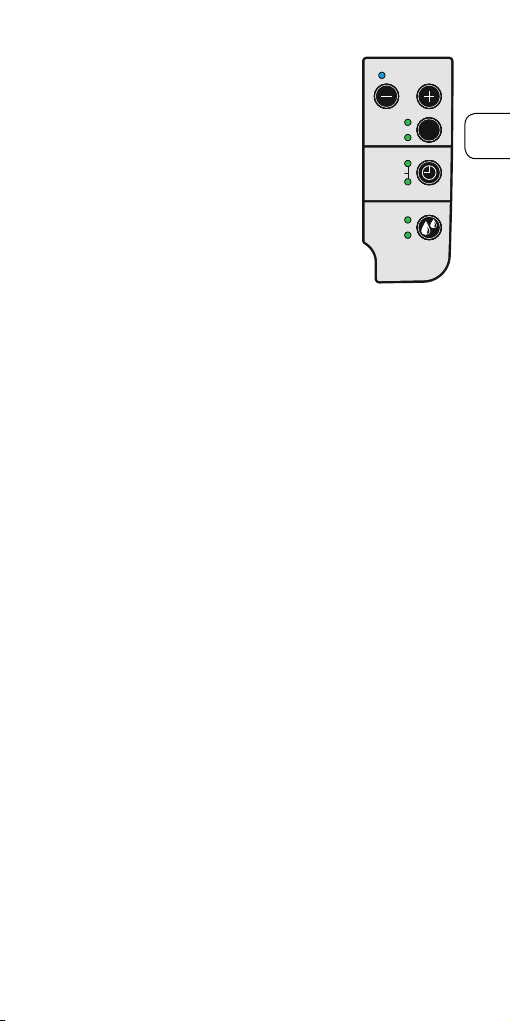
There is also the option of
completely switching o the
humidity function.
1) Press the Speed + and
Humidity mode buttons
simultaneously (the blue and
yellow LEDs ash quickly).
Press the Humidity Mode but-
ton until the desired humidity
sensitivity mode is selected.
Position 1: the Silent LED comes
on – fast humidity response.
Position 2: the Max LED comes
on – normal humidity response.
Position 3: The Silent and Max
LEDs come on together – slow
humidity response.
Position 4: Both the Silent and
Max LEDs stay o – humidity
control is deactivated.
2) Press the Speed + and
Humidity Mode buttons at the
same time (The blue and yellow
LEDs stop ashing).
TIMER
HUMIDITY
TIMER
CONSTANT
5
15
30
SPEED
SILENT
MAX
S
MIN
TIMER
HUMIDITY
TIMER
CONSTANT
5
15
30
SPEED
SILENT
MAX
S
MIN
TIMER
HUMIDITY
TIMER
CONSTANT
5
15
30
SPEED
SILENT
MAX
S
MIN
10