GARO GLB Bedienungsanleitung

GARO GLB Wallbox
Box 203, SE–335 25 Gnosjö
Phone: +46 (0) 370 33 28 00
garo.se
manual 380185-4.2
GARO AB
EN
Assembly instructions / End User Instruction (EN)

2
EN
TABLE OF CONTENT
Assembly instructions 4
Tools and materials required 4
Box content 4
Important information 4
Step by step guide 7
Remote enable function 12
Dynamic Load Management (DLM) for Stand-Alone GLB Wallbox 13
Setting the amperage for main fuses 14
Dynamic Load Management (DLM) for GLB Wallboxes in group 15
Installing the RFID reader 18
DIP Switch settings for RFID reader on individual GLB Wallbox 19
RFID for multiple GLB Wallboxes in group 19
LAN connection via RJ45 21
Mainboard simplified connection diagram 21
Dimensional drawing 22
User instructions 23
Charging electric vehicles 23
Resetting/Conditioning of RCCB or RCBO 24
Web interface 25
Reset of wifi settings 25
Connect device to GLB Wallbox access point 25
Home meny 26
Energy meny 30
Settings 30
Wifi settings 31
Connect GLB Wallbox to local wifi network 31
Ethernet settings 32
RFID (option) 33
Outlet options * 34
G-Cloud 34
Charge current settings / DLM 35
Software Updates / Identification 38
Firmware update for GLB Wallbox not connected to internet via Wifi or LAN 38
Workingflow RFID with multiple wallboxes 39
Care 39
Technical data 41

3
EN
Cautions
Do not use private power generators as a power source
for charging.
Incorrect installation and testing of the GLB Wallbox could
potentially damage either the vehicle’s battery and/or the
GLB Wallbox itself.
Do not operate the GLB Wallbox in temperatures outside
its operating range – see technical specificatrions.
Notes
All installation must be carried out by an authorised
installer and comply with local installation regulations.
If any questions, please contact your local electrical
authority.
Ensure that the GLB Wallbox’s charging cable is
positioned so it will not be stepped on, driven over,
tripped on, or subjected to damage or stress.
Unroll the charging cable to prevent it from overheating.
Do not use cleaning solvents to clean any of the GLB
Wallbox’s components. The outside of the GLB Wallbox,
the charging cable, and the end of the charging cable
should be periodically wiped with a clean, dry cloth to
remove accumulation of dirt and dust.
Be careful not to damage the circuit boards or components
during installation.
Refer to local standards and regulations not to exceed
charging current limitations.
The front cover must always be locked in its upper position
in order to ensure compliance with IP Code IP44.
Avoid to install the GLB Wallbox in direct sunlight to avoid
any heat-problems.
To even out the load, it is important to rotate the phases
when connecting several of GLB Wallboxes to the same
system. Note that 1-phase charging is common in electric
vehicles and L1 in the GLB is used for this purpose.
Ventilation signal from EV is not supported.
Adapters for charging connectors are not allowed to be
used.
Cord extension sets for charging cable is not allowed to
be used.
Dielectric Voltage Withstand Test is not allowed on GLB
Wallbox
This equipment should not be used by anyone (including
children) with reduced physical, sensory or mental
capacity, or anyone lacking in experience or knowledge,
unless they are provided with supervision or prior
instruction in how to use the equipment by the person
responsible for their safety.
The GLB Wallbox range of charging stations is designed
exclusively for charging electric vehicles.
The GLB Wallbox must be grounded according to local
country installation requirements.
Do not install or use the GLB Wallbox near flammable,
explosive, harsh, or combustible materials, chemicals, or
vapors.
Turn off the electrical power at the circuit breaker before
installing, configuring or cleaning of the GLB Wallbox.
Use the GLB Wallbox only within the specified
parameters.
Never spray water or any other liquid directly at the GLB
Wallbox. Never spray any liquid onto the charge handle
or submerge the charge handle in liquid. Store the charge
handle in the dock to prevent unnecessary exposure to
contamination or moisture.
Do not use this equipment if it appears to be damaged or
if the charging cable appears to be damaged.
Do not modify the equipment installation or any part of the
product.
Do not touch the GLB Wallbox’s end terminals with fingers
or any other objects.
Do not insert foreign objects into any part of the GLB
Wallbox.
This document contains general descriptions which are verified to
be accurate at the time of printing. However, because continuous
improvement is a goal at GARO, we reserve the right to make
product and software modifications at any time.
Latest manual can always be found at www.garoemobility.com/
support
Warnings

4
EN
353116
G L B - T 2 2 2 W O
230/400V 32A 50Hz
IP 4 4 E N 6 1 8 5 1 - 1 IE C 6 1 4 3 9 - 7 A E V C S
SN:5022254
B O X 2 0 3 , 3 3 5 2 5 G N O SJ Ö , SW E
EN
GARO Wallbox
Assemblyinstructions/User Instructions (EN)
380175-3
Box content
Language
labels
GLB Wallbox
Keys
Drill template
(see the back of the box)
Manual
Tools and materials required
Type Label example
GLB Type
Important information
ASSEMBLY INSTRUCTIONS
Mandatory: Supply cable, 1-phase or 3-phase depending on GLB
model
Cable entrance from bottom side
Custom (only when extra functions in use):
• Twisted pair cable for Modbus energy meter
• Twisted pair cable for Datalink communication
• 2-wire signal cable for remote control function
• TP Cat6 for LAN connection
Before installing the Garo GLB-Wallbox, gather the following tools
and materials:
• Pen or marker
• Hole punch (optional, to push through cardboard template)
• Wire cutter
• Voltmeter or digital multimeter (to measure AC voltage at the
installation site)
• Small flathead screwdriver
• Medium flathead screwdriver
• Large flathead screwdriver (optional, to remove plastic knock-
outs on backside of GLB Wallbox)
• T20 Torx driver
• 3 screws (and plugs) suitable for wall type
• Ferrules (the diameter of the ferrule depends on the diameter of
the power wiring and the construction)
• Level
• Power drill
• Twisted pair cable (Optional only when DLM is used) Cable:
Suitable for Modbus communication.
• Cable gland for communication cable (Optional only when
knock-outs on backside of GLB Wallbox is used)
The GARO GLB Wallbox is an AC charge-station enabling Mode
3 charging which complies fully with the requirements of IEC
61851-1 and IEC TS 61439-7. The product complies with IP
Code IP44, with a closed front.
It is to be fitted to a wall or GARO Wallbox stand, and all
installation must be carried out by an authorized installer and
comply with local country installation regulations.
Assembly instructions

5
EN
1) GLB Wallbox without RCCB or RCBO included in the
enclosure must have Residual Current protection and
must be protected with a max 32A fuse in the supply
distribution box.
2) GLB Wallbox without RCCB Type B fitted or DC fault
protection in the enclosure must in accordance to IEC
60364-7-722 be protected with a Residual Current
Device (RCD) Type B.
3) 3-phase GLB Wallbox equipped with a Residual Current
Circuit Breaker (RCCB) must be protected with a max
32A fuse in the supply distribution box.
4) 1-phase GLB Wallbox fitted with a Residual Current
Breaker with Overcurrent Protection (RCBO) can be
connected in parallel. This group of chargers must be
protected by a backup fuse in the distribution box. The
backup fuse shall not exceed 125A.
GLB Wallbox protection type
GLB Type
Protection type
1-phase
3-phase
No RCBO or RCCB
RCBO
RCCB type A
RCCB type B
DC-fault protection
GLB..-..37.. 2) 4)
GLB..-..74.. 2) 4)
GLB..-..22.. 1) 2)
GLB..-..22..-A 2) 3)
GLB..-..22..-B 3)
GLBDC..-..37.. 4)
GLBDC..-..74.. 4)
GLBDC..-..11.. 1)
GLBDC..-..22.. 1)
GLBDC..-..22..-A 3)
Assembly instructions

6
EN
Dip Switch Information
SW1
ON OFF
66 Datalink Endtermination ON, OFF
55 ON = Master Mode, OFF = Slave mode
44 Remote enable input function. ON (default) = Open circuit, OFF = Closed circuit
33
22 Fuse value in mains cabinet, see below table for settings
11
ON OFF ON OFF ON OFF ON OFF ON OFF ON OFF ON OFF
3333333
2222222
1111111
16 A 20 A 25 A 32 A 40 A 50 A 63 A
SW2
ON OFF
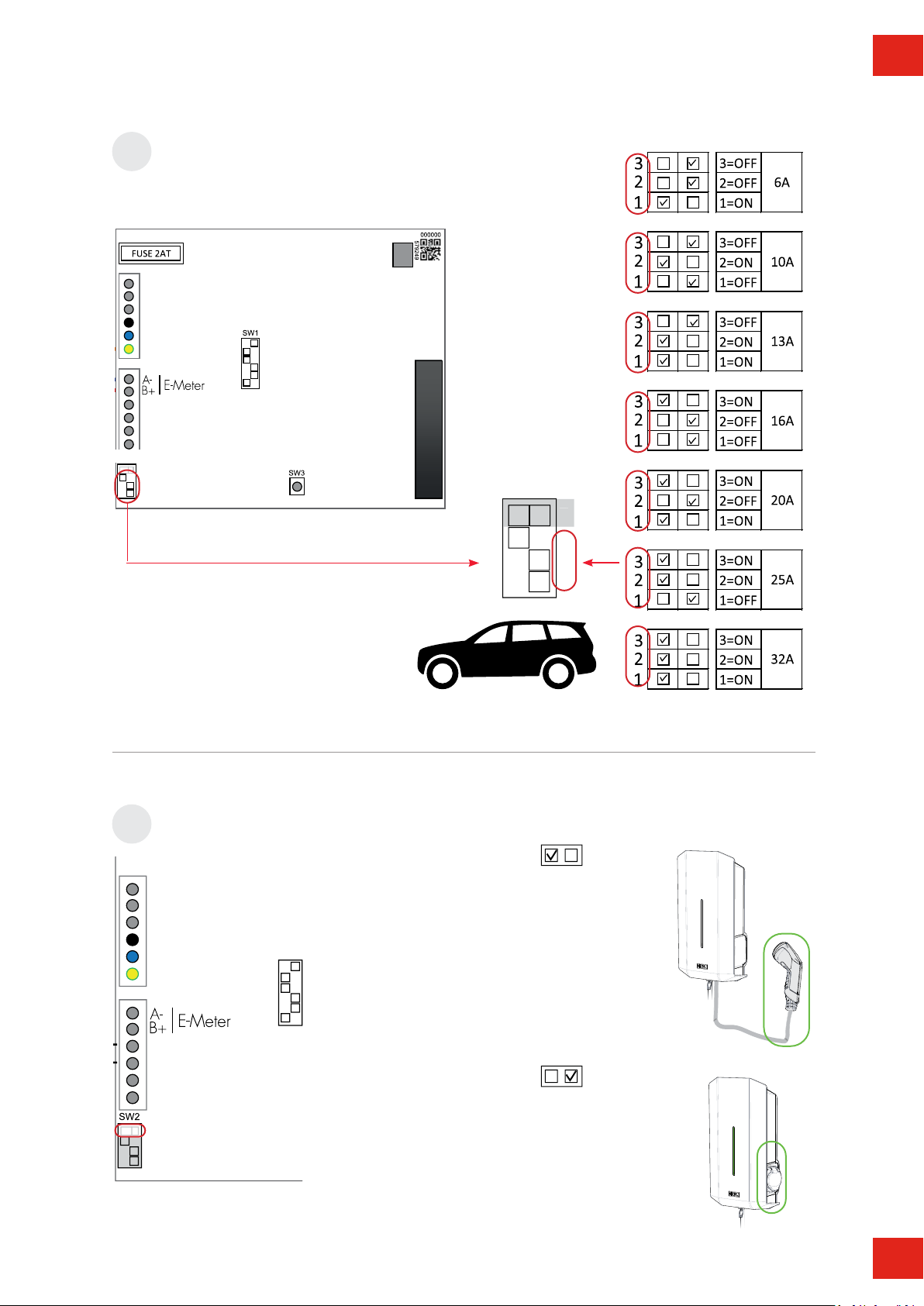
44 ON = Fixed cable, OFF = Outlet
33
22 MAX Ampere for outlet / cable, see below table for settings
11
ON OFF ON OFF ON OFF ON OFF ON OFF ON OFF ON OFF ON OFF
33333333
2 2 2 2 2 2 2 2
1 1 1 1 1 1 1 1
6 A 10 A 13 A 16 A 20 A 25 A 29 A 32 A
Assembly instructions

7
EN
2
CU
PLINT
3-phase
1-phase
AL
713
15
6
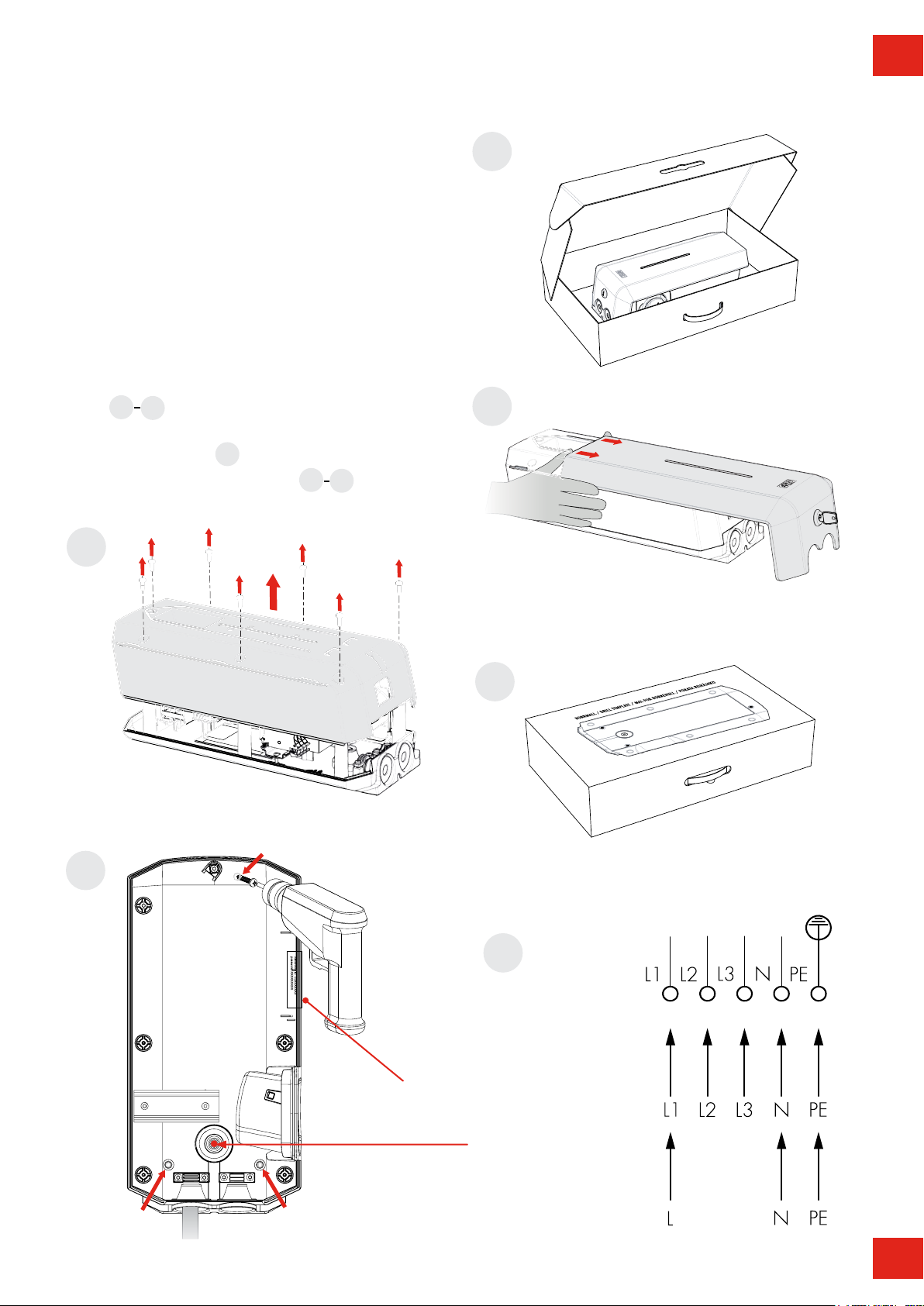
Step by step guide
(7 x T20)
1
3
4
Drill template
(see the back of the box)
5
Serial no./SSID password
6
Signal cable entrance
1. Select the appropriate group fuse (1x6A - 3x32A) and
cable area for the electrical installation. Some countries
require earth fault breakers to be installed. Follow local
country regulations and select the appropriate earth fault
equipment for the electrical installation. NOTE! Due to
high currents for a long time in the cable, there is a high
risk of voltage drop if the cable is under-dimensioned
which can damage the electronics in an EV.
2. Fill in the information in the Warranty form.
3. Install the wallbox according to the installation pictures
4. Install the electrical supply cable according to local
regulations picture
5. Follow the instructions in pictures
Assembly instructions

8
EN
Option
DLM Meter installation (Accessory)
Install the DLM meter in the mains cabinet you want to monitor.
Use shielded twisted pair cable between the DLM meter and
the wallbox.
Suitable cables: CAT5 FTP, CAT5e FTP, CAT6 FTP, ELAKY-S,
ELAQBY-S or similar.
For full DLM manual and settings:
www.garoemobility.com/support
SW1
7
ON OFF
SW2
ON
3
2
1
6
5
4
SW1
OFF
8Set SW1 DIP1-3 to same Ampere as the main fuse in mains cabinet.
GLB
Assembly instructions

9
EN
OFF
4
5
ON (default): Use
when not connected to
external enable relay.
OFF: Use when
connected to external
enable relay.
ON
Remote enable setting
SW1
Master / Slave settings
SW1
Stand allone installation = ON
Cluster installation = See Full manual at
www.garoemobility.com/support
4
Datalink End termination settings
6
SW1
OFF
4
ON
OFF
5
ON (default): Master
OFF: Slave
ON
OFF
5
ON
No function for stand alone installation.
Only for cluster installation via Datalink
Cluster installation = See Full Guide at
www.garoemobility.com/support
OFF
6
ON: Datalink end termination
resistor active.
OFF (default): Datalink end
termination resistor not active.
ON
OFF
6
ON
9
10
11 N/A for stand alone installation)
Assembly instructions

10
EN
ON OFF
SW2
3
2
1
4
4
ON OFF
SWITCH 2
SW2
Set SW2 DIP1-3 to Max charge current (A) to vehicle.
Wallbox type
4
SW1
OFF
4
ON: Fixed cable
OFF: Outlet
ON
OFF
4
ON
12
13
Assembly instructions
Andere Handbücher für GLB
2
Inhaltsverzeichnis
Andere GARO Autozubehör Handbücher