HDPlex H5 Bedienungsanleitung

Page 1of 21
H5 Fanless HTPC Chassis
Installation Guide V 3.0

Page 2of 21
HDPLEX Reward Program
We will reward 30USD to any customer for reviewing HDPLEX fanless computer case. It's simple. Take
two or three photos of your PC build with HDPLEX H5 fanless case, write feedbacks or suggestions in any
language you prefer and post it on one of the following forums: Silentpcreview.com,
Computeraudiophile.com, HKEPC, Chiphell, AVSForum, Hardwareluxx.de, Forum.hardware.fr,
Overclock.net, Hardforum.com, Forum.Kodi.TV, Tweak.dk, or your blog or Facebook page. Send the
review link to rew[email protected]. We will reward you with 30USD right away (either through Paypal or
refund to your order)!
HDPLEX 特典プログラム
HDPLEX ファンレス PC ケースをご購入されたお客様は、以下の手続きを踏むことで 30 ドルの報酬を受け取ることができます。
ブログまたは Facebook などのインターネットコミュニティに、ご購入された PC ケースをインストールしているお客様ご自身の写
真2~3枚をご意見・ご感想(言語は問いません)と共にアップロードしていただきます。その後、掲載したページのリンク(URL
アドレス)を rewar[email protected] までお送りください。30 ドルの報酬を(Paypal または購入時のアカウントへ)お支払い致しま
す!
HDPLEX Reward Programm
Alle Kunden, die ein HDPLEX lüfterloses Gehäuse gekauft haben (egal wo), können eine 30USD
Rückerstattung/Belohnung erhalten Es ist sehr einfach diese Rückerstattung/Belohnung zu bekommen:
2 oder 3 Bilder mit etwas Text/Kritik/Vorschlägen, den Sie in einem beliebigen öffentlichen
Forum/Facebook/Blog posten, reicht dafür aus! Senden Sie den Link an reward@hdplex.com und
erfreuen sich an einer unmittelbaren Paypal/Rückerstattung zu Ihrem Auftrag.
Offre de remboursement HDPLEX
Recevez 30 dollars US pour tout achat d'un boitier HDPLEX. Pour bénéficier de cette offre, rien de plus
simple: prenez deux ou trois photos de votre installation HDPLEX H5 accompagnées de vos
commentaires ou suggestions (dans la langue de votre choix) puis postez-les sur un blog, sur Facebook,
ou sur n'importe quel forum. Envoyez le lien àreward@hdplex.com. Nous vous rembourserons 30 dollars
US dans les plus brefs délais (via Paypal ou déduits de votre commande).
HDPLEX 客戶獎勵活動
任何 購買 HDPLEX 無風扇機箱的客戶,無論您是通過何種渠道購買的,都可以參加本活動。
您只需拍攝 2-3 張用 HDPLEX H5 機箱裝配完成的電腦,並簡單寫幾句略對 HDPLEX 機箱使用的感受和建議。把這篇
評論發表在 HKEPC,Chiphell 論壇或者個人 Blog 上,並將評論的鏈接 email 至reward@hdplex.com。我們會將
30 美金的獎勵立即發到您指定的賬戶(Paypal,支付寶,或者您訂單的返現)。

Page 3of 21
Package Contents
H5 Chassis Body
Top Plate
Bottom Plate
Left Side Panel
Right Side Panel
Back Plate*2 (Dual Slot and Low Profile)
Four Feet with Rubber Cushion
H5 Chassis Faceplate
Faceplate (Silver or Black)
H5 Heatsink System
Aluminum Top Plate
Heatpipe Installation Plate x5
Copper Baseplate
High Quality Thermal Paste 3.5g
Eight 6mm OD Coppper Heatpipes
Dumbbell Tool to apply thermal paste
Installation Screw Kit
Multipurpose CPU Bottom Plate x1
H5 Accessories
Multipurpose HDD Rack x 2
ATX/SFX/FlexPower Supply Rack x 1
Internal USB 3.1 Type C Cable x1
Internal AC Extension Cord x 1
HEX Screw Driver and Allen Wrench
DC Socket Adapter Plate x 1
AC Socket Adapter Plate x 1
PCI Cover Bracket x 4 (Low Profile x 1)
Installation Screw Kit
Internal USB 3.0 Cable x1
Aluminum Power Button w/Cable x 1
Front Handle x 2
Installation Screw List:
A:M3*5mm Round Head Screw with Cushion 12pcs for motherboard installation
B: Hex Socket Cap Head Screws M5*14mm 8pcs For Front and Handle
Installation; M5*8mm 8pcs for Faceplate Front and Back Plate Mounting.
C:M4*8 Flat Head HEX Screw-Black 10pcs For Top Plate/Bottom Plate/Side
Panel Installation
D:M3*5 Flat Head Screw –Black 12pcs For SSD mounting/AC IEC installation
E: 7mm Hexagonal Copper Stud for Motherboard Installation 12pcs
F: 6-32 Thread 6mm Screw- Silver 8pcs For 3.5” HDD Installation
G: Hexagonal Copper Stud for HDD Rack:10mm-8pcs 25mm-8pcs
J: M3 Round Head 8mm Screw 8pcs

Page 4of 21
H5 Chassis Bottom Plate Installation
Install four feet with rubber cushion to the bottom plate back side.
Install Hexagonal Copper Stud 7mm Eto the bottom plate, matching your
motherboard installation position
Install the aluminum power button on the right panel using lock ring from the
internal side. Both PWR and PWR LED plug do not have polarity. PWR LED will
light up in blue color once PC is turned on.
Install the USB 3.1 Type C and USB 3.0 Cable. Please make sure the USB 3.1
Type C port is fully inserted and is even with external surface.

Page 5of 21
Install right heatsink panel onto the H5 bottom plate using 2pcs C.When
installed correctly, the mounting ear should face forward with power button
above the heatpipe groove.
H5 CPU Heatsink System Installation
CPU Heatsink Installation Kit List:
H-1: M3*5mm Flat Head Silver Screw 4pcs
H-2: M3*10mm CUP Head HEX Screw Silver 8pcs
H-3: M3 Hand Turn Screws 4pcs
H-4: M3*14mm Flat Head Screw Black 16pcs
H-5: Multipurpose Bottom Rack for Intel and AMD

Page 6of 21
H-6: Intel CPU LGA115x/1200 Rack 2pcs
H-7: AMD AM4 Rack 2pcs
H-8: Plastic Screw Holder Black 4pcs
H-9: Aluminum Plate for Heatpipe Installation 4pcs
H-10: Aluminum Plate for Heatpipe Installation Half Width 1pcs
H-11:M3 Screws for CPU Bottom Rack Installation 4pcs
Remove protection cover from the copper base plate and install two H-6 for
Intel or H-7 for AMD rack on the copper bottom plate using 4pcs H-1

Page 7of 21
Install the 4pcs H-11 on to the H-5 CPU bottom rack. Remove the original
CPU bottom plate from your motherboard. Install this H11+H5 structure to the
back of motherboard, replacing the original motherboard CPU bottom plate`.
Intall 4pcs H-8 onto the H-11. Apply a thin layer of thermal paste on top of CPU
and install copper base using 4pcs H-3. Don’t overuse the thermal paste. Hand
tight the H-3 and stop when the H-6/H-7 racks begin to bend slightly and touch
the H-8.

Page 8of 21
Install motherboard onto the H5 bottom plate copper stud using Aand install
heatpipe 1-8. Apply thin layer of thermal paste inside copper base groove and
side heatsink panel groove using the dumbbell tool
Warning: Do not over apply thermal paste as it will decrease heat transfer efficiency.

Page 9of 21
Tighten the H-9 to the side panel using H-4 which goes through the hole on the
side panel from outside of the H5 chassis. H-9 is NOT square shape and needs
to be in the correct direction to match the mounting hole.
Usually 3pcs H-9 are needed to fully lock the heatpipes on the side panel.If the
left side H-9 is too close to the H5 back plate. Please use half width H-10 in this
place instead of H-9.
Apply a thin layer of thermal paste on each groove on the aluminum top plate
and install the aluminum top plate using 8pcs H-2.

Page 10 of 21
Power Supply Installation
HDPLEX 400W AC-DC+400W DC-ATX NanoATX Combo
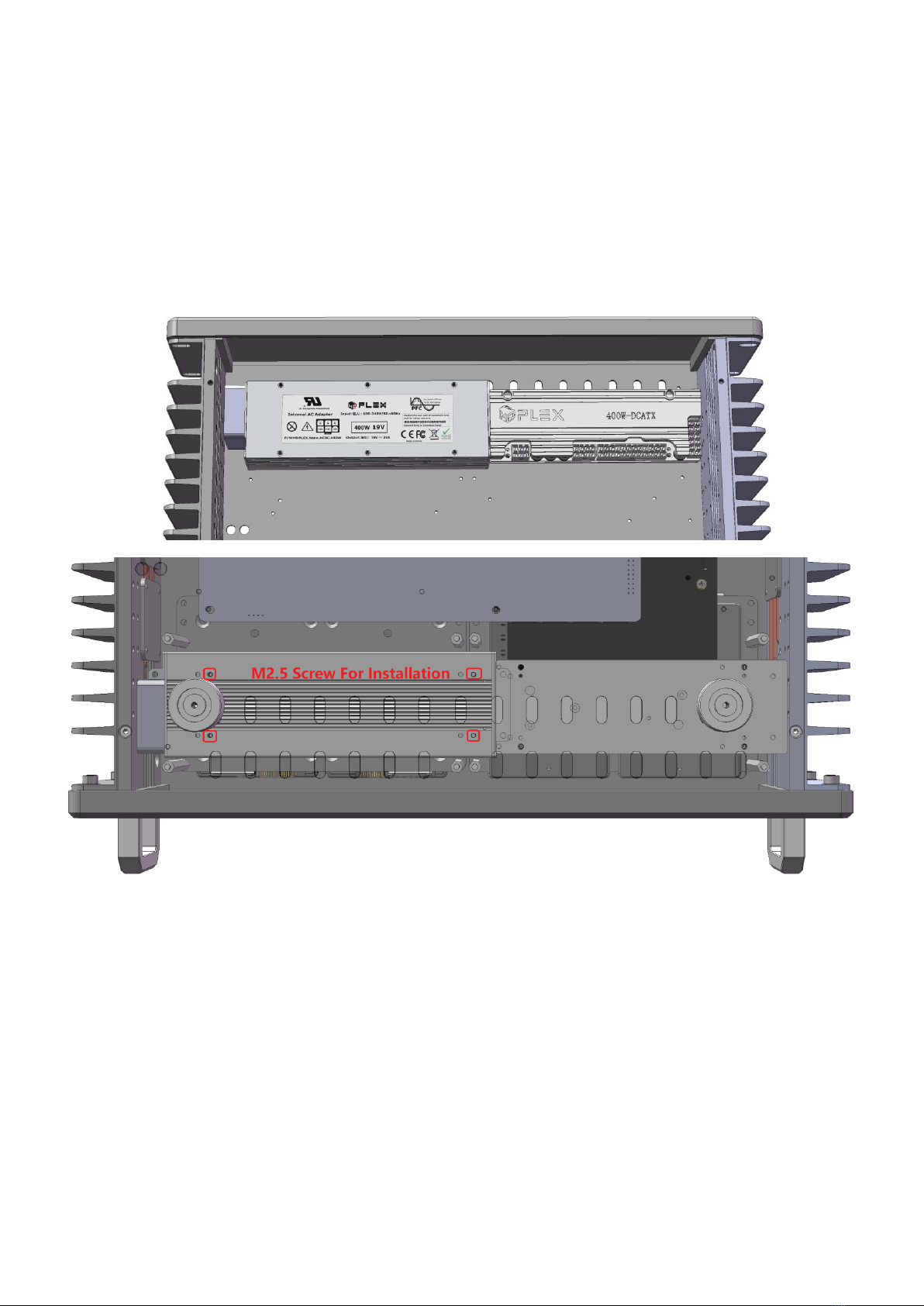
HDPLEX 400W AC-DC is back mounted on the H5 bottom plate via the M2.5
screws come with the HDPLEX 400W AC-DC package. HDPLEX 400W AC-DC
optional mounting ears are NOT used for H5 installation.
Four M2.5 mounting holes are circled in red. H5 bottom plate is made
transparent for clear view. The four M3 holes in the center on the back of the
400W AC-DC adapter are not used for H5 mounting. HDPLEX 400W DC-ATX is
front mounted using M3 screws. One 24PIN extension cable is included in the H5
package.
For ITX motherboard, the 400W DC-ATX can be installed on the same side as
400W AC-DC adapter and in front the ITX motherboard.
Andere Handbücher für H5
3
Dieses Handbuch passt für folgende Modelle
1
Inhaltsverzeichnis
Andere HDPlex Gehäuse Handbücher