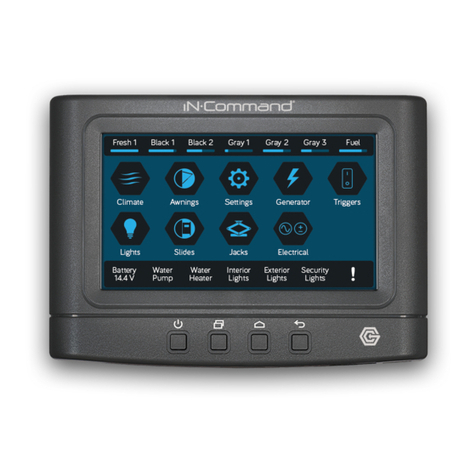
IN-COMMAND NCSP60CM Bedienungsanleitung

RV CONTROL SYSTEM
Installation and Operation Manual
™
™
Patent # US 9,679,735
NCSP60CM NCSP60SP

Read the iN-Command Manual, and these warnings and instructions carefully before using this product. Failure to follow
the use instructions in this owner’s manual, or improper use of the Mobile Application, Display Commander and/or Body
Control Module, could result in personal injury, including death.
Do not operate while vehicle is being driven. The Mobile Application, Display Commander and/or Body Control Module
should not be used while the vehicle is being driven. Use of the Mobile Application, Display Commander and/or Body
Control Module while the vehicle is being driven is dangerous and may cause personal injury or property damage.
For adult use only. The Mobile Application, Display Commander and Body Control Module are intended for adult use only,
and are not to be used by persons under the age of 18. Use by children may cause personal injury or property damage.
Operate only when you have a clear line of sight. Do not operate any moving parts (including, but not limited to,
awnings, jacks and slides), unless you have a clear line of sight to the moving part. The Mobile Application, Display
Commander or Body Control Module may be used only if you are giving instructions to, and receiving instructions from,
another person at least age 18 or older who can clearly see the moving part. Failure to follow these instructions may result
in serious personal injury or property damage.
Do not operate under the inuence of alcohol or drugs. Do not operate the Mobile Application, Display Commander
or Body Control Module while under the inuence of alcohol or drugs. Doing so may result in personal injury or property
damage.
Avoid moisture. To reduce the risk of re or electric shock, do not expose this equipment to rain or moisture.
Use recommended accessories. To reduce the risk of re or electric shock and annoying interference, use only the
recommended accessories.
Important Safety Information

3
TABLE OF CONTENTS ..................................... 3
INTRODUCTION ................................................ 4
Thank You! .................................................... 4
Features ........................................................ 4
Precautions ................................................... 4
Packing List................................................... 4
INSTALLATION .................................................. 5
Tools and Supplies ........................................ 5
Disconnecting the Battery ............................. 5
Selecting the Mounting Location ................... 5
Mounting Switch Plate................................... 5
WIRING (NCSP60CM) ....................................... 6
WIRING (NCSP60SP) ........................................ 7
SYSTEM LAYOUT(NCSP60SP) ........................ 8
SWITCH PLATE BUTTONS ............................. 10
TRAVEL LOCKOUT (SAFETY) * ..................... 10
MOBILE DEVICES: ...........................................11
Paring a Mobile Device ............................... 12
iOS Pairing instructions............................... 12
Pairing Android Mobile Device to DC .......... 14
Passcode Protection ................................... 15
App conguration ..........................................16
Adding 3rd Party Apps. ...................................16
Home Page Operation...................................17
TROUBLE SHOOTING ......................................18
SPECIFICATIONS .............................................19
FEDERAL COMMUNICATIONS COMMISSION
(FCC) STATEMENT .......................................19
• TABLE OF CONTENTS

4
• Thank You!
Thank you for choosing iN-Command. We hope you will
find the instructions in this owner’s manual clear and easy
to follow. If you take a few minutes to look through it, you’ll
learn how to use all the features of your new iN-Command
system for maximum enjoyment.
• Features
Features of iN-Command system:
• Control by either one Android Device or one iOS Device
• Control 3 Light zones
• Control 2 Awnings
• Control 4 Electric Slides
• Control 2 Jacks (non-automatic function)
• Monitor Battery Voltage with Low Voltage Alert
• Precautions
• Use the Proper Power Supply.
This product is designed to operate with a 12 volt DC,
negative ground battery system (the standard system in
a North American vehicle).
• Use Authorized Service Centers.
Do not attempt to disassemble or adjust this precision
product contact a professional for assistance.
• Avoid Moisture.
To reduce the risk of fire or electric shock, do not expose
this equipment to rain or moisture.
(1) Cover(NCSP60CM)
(1) Body Control Module (NCSP60CM)
• Packing List
(1) Switch Plate (NCSP60SP)
• Avoid Cleaning Products.
The front of this unit should only be cleaned with a slightly
damp cloth. Do not use cleaning products.
• Use Recommended Accessories.
TO REDUCE THE RISK OF FIRE OR ELECTRIC SHOCK
AND ANNOYING INTERFERENCE, USE ONLY THE
RECOMMENDED ACCESSORIES.
• INTRODUCTION

5
It’s a good idea to read all of the instructions before
beginning the installation. We recommend having your
iN-Command system installed by a reputable RV dealership
• Tools and Supplies
You will need the following:
• Phillips screwdriver
• Wire cutters and strippers
• Electrical tape
• Volt meter/test light
• Crimping tool
• 10 gauge wire for power and slide connections
• 14 and 18 gauge wire for all other connections
• Four #8 PH (0.164” x 0.5”) screws for the CM
• Four #8 FH (0.164” x 0.5”) screws for the SP
• Disconnecting the Battery
To prevent a short circuit, be sure to turn off 12V power
and remove the negative (-) battery cable prior to instal-
lation.
• Selecting the Mounting Location
Select a mounting location, taking care to avoid the
following:
• Places exposed to heat-radiating appliances such as
electric heaters
• Adjacent to other equipment that radiates heat
• Under thermostats
• Poorly-ventilated or dusty places
• Moist or humid locations
Wall For Reference
HOLE SIZES
Switch Plate (SP) 2.5"
Recommended Cutout
CUTOUT
2.5"
• INSTALLATION
• Mounting Switch Plate
• Cut/Drill hole, allowing space below for future
programming and behind for ventilation
• Route wires through the hole and connect
• Check and ensure correct operation
• Mount the unit using four #8 FH (0.164” x 0.5”) screws

6
• WIRING (NCSP60CM)
The wiring diagram depicts all the wiring connections required for proper operation of the unit.
BODY CONTROL MODULE (BCM) CONNECTIONS
Slide 1 Extend
Slide 1 Retract
Slide 2 Extend
Slide 2 Retract
Slide 3 Extend
Slide 3 Retract
Slide 4 Extend
Slide 4 Retract
Awning 1 Extend
Awning 1 Retract
Awning 2 Extend
Awning 2 Retract
Stabilizer Front Extend
Stabilizer Front Retract
Stabilizer Rear Extend
Stabilizer Rear Retract
Interior Lights ON/OFF
Awning Lights 1 ON/OFF
Awning Lights 2 ON/OFF
Travel Lock Input ON/OFF
12 Volts Input
Ground
PIN 1
PIN 2
PIN 3
PIN 4
PIN 5
PIN 6
PIN 7
PIN 8
PIN 9
PIN 10
PIN 11
PIN 12
PIN 13
PIN 14
PIN 15
PIN 16
PIN 17
PIN 18
PIN 19
PIN 20
PIN 21
PIN 22
OUT
RESET BUTTON
(Max Output 500mA)

7
• WIRING (NCSP60SP)
BLUETOOTH PAIRING
INDICATOR LIGHT(BLUE)
POWER INDICATOR
LIGHT (RED)
BLUETOOTH PAIRING
BUTTON
TRAVEL LOCK
BUTTON
+
-
1
3
4
2
+12VDC
GND
3
1
4
2PIN 1 CAN BUS H
PIN 3 NC
PIN 2 CAN BUS L
PIN 4 NC
INPUT
The wiring diagram depicts all the wiring connections required for proper operation of the unit.
SWITCH PLATE (SP) CONNECTIONS

8
• SYSTEM LAYOUT(NCSP60SP)
NCSP60CM
NCSP60SP

9
CAN +
-
CAN
NCSP60CM
12VDC
500mAOutput Max
FAN
FANFAN
ACACAC
ROOM
SENSOR
ROOM
SENSOR
ROOM
SENSOR
EOL (END OF LINE)
TERMINATOR RESISTOR
REQUIRED AT END OF CAN BUS*
EOL TERMINATOR RESISTOR
DISPLAY COMMANDER
BODY CONTROL MODULE
EOL (END OF LINE)
TERMINATOR RESISTOR
REQUIRED AT END OF CAN BUS*
OPTIONAL SYSTEM UPGRADE:
AN NCSP3DCCT WITH NCSP3DCCTR
CAN REPLACE NCSP60SP
ZONE 1 ZONE 2 ZONE 3
GATEWAYGATEWAYGATEWAY

10
• TRAVEL LOCKOUT (SAFETY) *
iN-Command is equipped with a Travel Lockout feature to
ensure certain system functions are unavailable during transit.
When the Brake on the vehicle is activated, iN-Command
will lock out (disable) all motorized functions. The Travel
Lock LED will be solid red if the brake is actively engaged or
ashing red when the brake signal is removed. Mobile devices
will display "Travel Lock Engaged" and the affected motor
functions will not be availabe.
The light controls will continue to function.
To turn the Travel Lock off press the “Travel Lock” button on
the Switch Plate inside the RV.
Travel Lock on the Switch Plate
Travel Lock on a handheld device app
• SWITCH PLATE BUTTONS
The SP (Switch Plate) has 2 buttons on the front of it.
From left to right, they are:
• Travel Lock
• Bluetooth Pairing
The Travel Lock button turns off the Travel Lock function
when the light is ashing red. The Bluetooth Pairing
button is used to pair and unpair the mobile app to and
from the SP.
Dieses Handbuch passt für folgende Modelle
1
Inhaltsverzeichnis
Andere IN-COMMAND Steuerungssystem Handbücher