
J.P. Instruments FS-450M TWIN Handbuch

Pilot’s Guide
Fuel Scan
FS-450M TWIN
Copyright ©2002 J.P. Instruments, Inc.
All Rights Reserved
Printed in the United States of America
J.P.INSTRUMENTS
Information: P. O. Box 7033
Huntington Beach, CA 92646
Factory: 3185B Airway
Costa Mesa, CA 92626
(714) 557-5434 Fax (714) 557-9840
www.jpinstruments.com
Rev NC 11/03

Table of Contents
Section 1 - Introduction 1
Product Features 1
Fuel Management 1
Section 2 - Displays and Controls 2
Section 3 - Modes and Alarms 4
Modes 4
Alarms 4
Section 4 - Operation 4
Diagnostic Testing on Startup and During Flight 4
Parameter Indexing 7
Section 5 - Personalizing 8
Pilot Programming 8
FS-450M Set Up 13
Fuel Measurement Units, Fuel Capacity, Alarm Limits 15
Section 6 - Data Formats, Diagnostics 16
Navigation Data Input Formats 16
Setting GPS-C Communications Output Format 17
Section 7 - Rear Panel Connector Pin Assignments 18
Section 8 - Technical Support 19
Index 21

Section 1 - Introduction
Product Features
•Fuel quantity measured in gallons,
liters, or pounds
•Low fuel quantity alarm
•Low fuel time alarm
•GPS interface—bi-directional
serial interface
•Solid-state pulse generating rotor
fuel flow transducers
•Instantaneous fuel flow rate
•Total amount of fuel consumed
•Fuel consumed by each engine
•Total fuel remaining
•Time to empty at the current fuel
flow rate
•Fuel required to next waypoint
•Fuel reserve at next waypoint
•Nautical miles per gallon
Fuel Management
Without a means of measuring fuel flow, you must rely on the
aircraft fuel gauges or total time of flight. Aircraft fuel gauges are
notoriously inaccurate (they are only required by the FAA to read
accurately when displaying empty). And measuring time of flight
is only an approximation, and assumes a constant fuel flow rate for
each phase of flight.
The FS-450M Fuel Scan uses small turbine transducers that
measure the fuel flowing into each engine. Higher fuel flow causes
the transducer turbine to rotate faster which generates a faster
pulse rate. Because the transducer turbine generates thousands of
pulses per gallon of fuel, it can measure with high resolution the
amount of fuel that the engines have consumed. Prior to engine
start you inform the FS-450M Fuel Scan of the known quantity of
fuel aboard, and it will keep track of all fuel used.
For fuel calculations to be accurate, it is imperative that you inform
the FS-450M of the correct amount of fuel aboard the aircraft. Do
not rely on fuel flow instruments to determine fuel levels in tanks.
Refer to original fuel flow instrumentation for primary information.

Page 2 FS-450M Fuel Scan
Section 2 - Displays and Controls
The FS-450M helps you manage your fuel. There are two
components of the user interface:
•Digital display for numeric readouts and messages: top display
is fuel flow per hour and the lower display for all other
parameters.
•Two front panel operating buttons: STEP and AUTO
STEP AUTO
FlowScan® 450M
Left Right
Fuel flow function
Flow
per hr
J
PI
Always shows fuel flow
of each engine
shows all other fuel
parameters
AUTO enters the automatic
scan mode
STEP enters manual scan
mode, steps through each
paramerter
2.25" Gauge
Two operating buttons control all functions of the FS-450M.
The term tap will be used to denote pressing a button
momentarily. The term hold will be used to denote pressing and
holding a button for five seconds or longer.
STEP Button
Located on the lower left side near the instrument face.
•Tapping the STEP button will stop Automatic Indexing
and change to the Manual indexing mode. Then each

For Your Safe Flight Page 3
tap of the STEP button will display the next parameter
in the sequence.
•Holding the STEP button will display the previous
parameters in the sequence (rapidly backwards).
•In the programming procedures, described on page 8,
tapping the STEP button will advance to the next item
in the list.
•When an alarm is displayed, tapping the STEP button
will temporarily delete that alarm from appearing for
the next ten minutes.
•When an alarm is displayed, holding the STEP button
until the word appears will delete that alarm
from appearing for the remainder of the flight.
AUTO button
Located on the lower right side near the instrument face.
•The AUTO button will begin the Automatic Indexing
Mode.
•In the pilot programming procedure, holding or tapping
the AUTO button is used to increment or decrement
parameter values and toggle between yes and no
answers to questions.
STEP and AUTO buttons
•Holding both the STEP and AUTO buttons
simultaneously for five seconds changes to the pilot
programming procedure.

Page 4 FS-450M Fuel Scan
Section 3 - Modes and Alarms
Modes
There are two standard operating modes of the FS-450M:
Automatic Indexing, and Manual Indexing. Most of the time you
will operate the FS-450M in the Automatic indexing mode. When
you first turn on the power the FS-450M starts in the Manual
indexing mode, but will enter the Automatic indexing mode after a
minute. Tapping the AUTO button will begin the Automatic
Indexing Mode.
Alarms
The FS-450M has programmable alarms. When the remaining
amount of fuel falls below the alarm limit the lower display will
show the amount of fuel REMaining and REM will flash on the
lower right display.
When the remaining time falls below the alarm limit the lower
display will show the MINutes of fuel remaining and HRMN will
flash on the lower right display.
When an alarm is displayed, tapping the STEP button will
temporarily disable the alarm indication for the next ten minutes.
When an alarm is displayed, holding the STEP button until the
word appears will disable that alarm indication for the
remainder of the flight.
Section 4 - Operation
Diagnostic Testing on Startup and During Flight
When your FS-450M is first turned on, all digits light up in each
display for a short time, permitting you to check for non-functional
segments. Then the FS-450M tests internal components, and
integrity of the system.

For Your Safe Flight Page 5
Start Up Fuel
After initial self-test, you will be asked to inform the FS-450M of
start up fuel. The FS-450M will display
(or LITERS or POUNDS)
for one second, and then flash .
During flight you may also inform the FS-450M of startup fuel
using the pilot program mode, beginning on page 8, if you forgot
to do so at start up.
Refer to the column in the chart below corresponding to your fuel
tank configuration. Tap the AUTO button to select one of the four
following fueling choices on the left column of the chart.
AUTO to
choose⇓Main tanks
only, no tabs Main tanks
with tabs Main & Auxiliary tanks
Did not add any fuel since last shutdown.
*
Topped the
main tanks. Filled only
to the tabs. Topped the main tanks.
The auxiliary tanks are
empty.
*
(not
applicable) Topped the
main tanks. Topped both the main
and auxiliary tanks.
Did not top, but added additional fuel to the aircraft, or
removed fuel from the aircraft.
* These values are examples and will be customized for your
aircraft.
Then tap the STEP button to complete the entry and advance to
the Manual indexing mode.

Page 6 FS-450M Fuel Scan
Adding Fuel and Auxiliary Tanks
main tank
auxiliary tank
main tank with tab
tab
Auxiliary capacity
Main capacity
If your aircraft has tank fill tabs and no auxiliary tanks, you can
use the auxiliary tank feature to select either filling to the tank tabs
or topping the tank. See “Main Tank Capacity” and “Auxiliary
Tanks” beginning on page 15 to program the FS-450M for this
feature. The FS-450M does not differentiate fuel flow between the
main and auxiliary tanks; it considers only total fuel in the aircraft.
If you added less than full fuel, then tap AUTO to select
. Then tap STEP. The next display will ask
you how much you added: (or selected
units). Hold the AUTO button to count up, tap the AUTO button to
count down. The count up will stop at full tanks, since you cannot
add more fuel than would top the tanks. Tap STEP to complete the
entry and advance to the Manual indexing mode.
If you removed fuel from the aircraft or wish to correct the total
quantity of fuel on board, you can “add” a negative amount of fuel.

For Your Safe Flight Page 7
Accumulate Total—Trip Total
You may either display total fuel used
•since the last time you informed the FS-450M that the
aircraft was refueled, or
•for an extended trip with multiple fuel stops.
This selection affects only the USed parameter, . How to select
whether to accumulate for a extended trip or reset at each refueling
is described in “Pilot Programming” beginning on page 8.
Resetting “USed”
Every time you inform the FS-450M that the aircraft is refueled,
the amount of fuel used is set to zero, unless the instrument is
programmed to accumulate for an extended trip. The display of
fuel used pertains only to the fuel used since the last time you
informed the FS-450M that the aircraft was refueled.
In the manual mode with left and right engine USed displayed,
holding the AUTO button for three seconds will reset the left, right
and total used to 0.
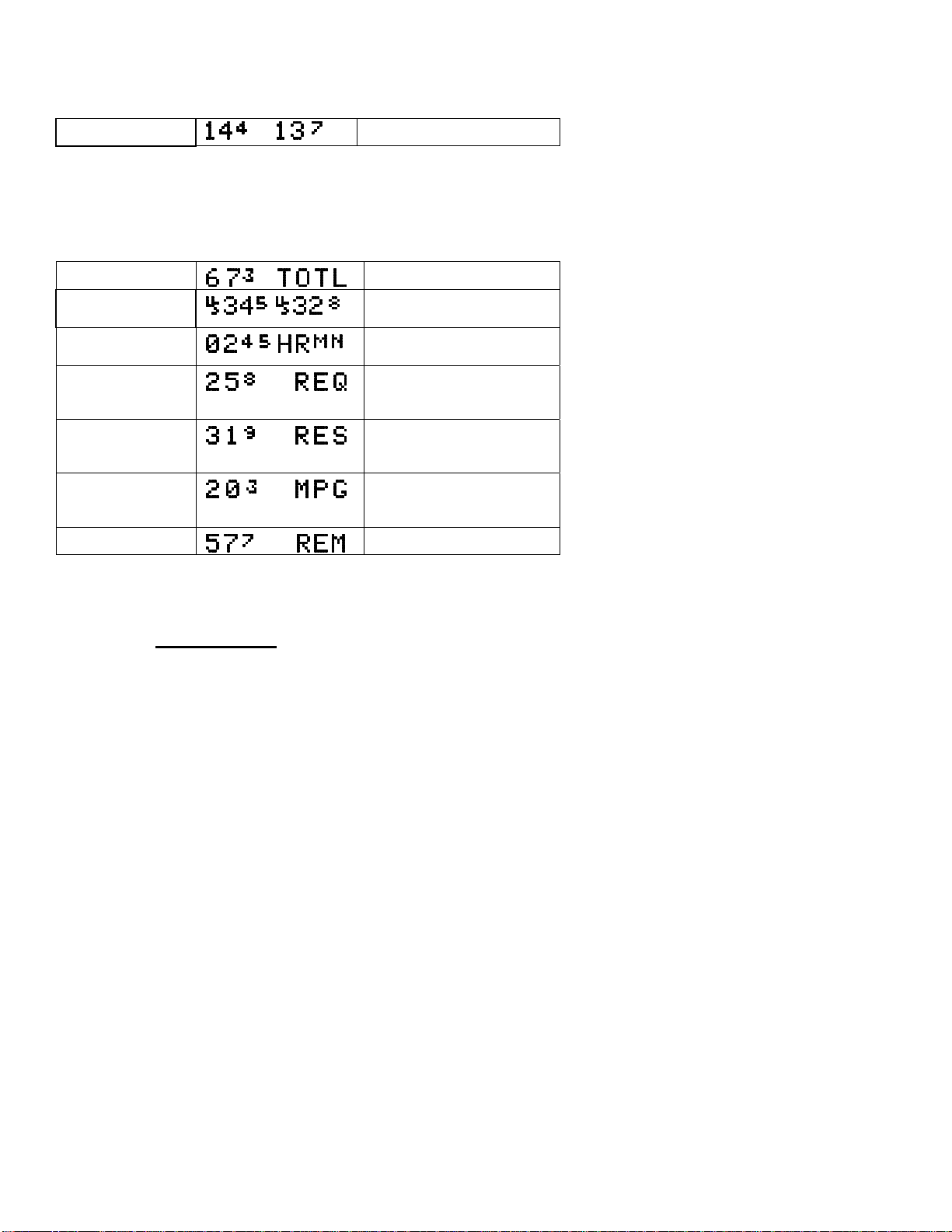
Parameter Indexing
The FS-450M steps through the engine parameters in a specific
sequence. Listed below is the indexing sequence, parameter
description and example of the digital display. The display will
pause at each parameter for a few seconds in the Automatic
indexing mode. In the Manual indexing mode, tap the STEP
button to advance to next parameter. Holding the STEP button
will display the previous parameters in the sequence (rapidly
backwards).
Page 8 FS-450M Fuel Scan
Parameter Indexing Sequence
Fuel flow rate is always shown on the top display.
Fuel Flow Rate GPH (or LPH, or PPH)
The lower display shows the following parameters in this
sequence.
Parameter
Description
Example
Comments
Total fuel used Total used by both engines
Fuel USed by each
engine Left and right engines shown
separately.
Time to Empty HoursMinutes Remaining at
current fuel burn
Fuel required to
next GPS WPT or
Destination Present with GPS interface
Valid signal and way point
Fuel Reserve at
next GPS WPT or
Destination Present with GPS interface
Valid signal and way point
Nautical Miles per
Gal Present with GPS interface
and valid signal or MPL,
MPP
Fuel Remaining In gallons, liters or pounds
Note that liter and pound parameters are displayed as whole
numbers without the decimal fraction.
Section 5 - Personalizing
Pilot Programming
You can program the Automatic Indexing rate (1 to 9 second wait
periods or 0 for no Automatic Indexing), the K-factor, and whether
to accumulated fuel used or reset at each refueling.
To start the Pilot Programming Procedure, simultaneously hold the
STEP and AUTO buttons for five seconds. You will see the words
Inhaltsverzeichnis


