KMS IB/IA23 Bedienungsanleitung


KMS IB/IA23 manual
Version 3.01 2
Contents
1KMS (Kronenburg Management System) .............................................3
2Software installation ....................................................................4
3KMS software ..............................................................................5
3.1 The ignition characteristic diagram .............................................5
3.2 The function bar.....................................................................6
3.2.1 Function key F1 .................................................................6
3.2.2 Function key F2 .................................................................6
3.2.3 Function key F3 .................................................................6
3.2.4 Function key F4 .................................................................6
3.2.4.1 RPM pickup .................................................................7
3.2.4.2 RPM Limiters and Powershift ............................................8
3.2.4.3 Engine-load sensor ........................................................9
3.2.4.4 Shift-Light................................................................. 10
3.2.4.5 Warning message ........................................................ 10
3.2.4.6 Remarks................................................................... 11
3.2.4.7 Communicationport ..................................................... 11
3.2.5 Function key F6 ............................................................... 12
3.2.6 Function key F7 ............................................................... 12
3.2.7 Function key F10.............................................................. 13
3.3 The communication bar..........................................................14
4Programming.............................................................................15
4.1 Manual changing ...................................................................15
4.2 Bar charts ...........................................................................15
5Hardware installation .................................................................16
5.1 Fitting the ECU.....................................................................16
5.2 Connecting the communication cable.........................................16
6Fault tracing.............................................................................17
7Specifications............................................................................18
8Wiring Diagrams ........................................................................19
9Wiring examples ........................................................................21

KMS IB/IA23 manual
Version 3.01 3
1KMS (Kronenburg Management System)
This management system can be used as an independent ignition system for virtually all types of
Otto engine (engines in which the fuel mix is ignited via a spark plug).
This system provides the opportunity to give the desired spark timing at any running condition, in
order to achieve maximum torque and fuel efficiency at any rpm and load. This system also contains
options as; shift-light, RPM-limiters, launch control and powershift.
The set-up of the system software is kept as clear and simple as possible, so that even people with
little computer experience will be able to use this system. Working with the software is simple, but
if the settings are incorrectly configured, there is a serious risk of engine damage. We recommend
you leave the programming to specialists.

KMS IB/IA23 manual
Version 3.01 4
2Software installation
The software is supplied together with the system, on a CD-ROM. Installing the software is very
simple. The CD-ROM carries the KMS installation program, which launches automatically when the
CD is inserted.
Once installed, the program is set to work via communication port COM1. If this port is already
being used or not available, another communication port can be used. For the procedure to change
the communication port, see 3.2.4.6.

KMS IB/IA23 manual
Version 3.01 5
3KMS software
When the program is started, the main screen will appear, which is composed of three parts:
- The ignition characteristic diagram
- The function bar
- The communication bar
The following sections describe the possibilities and functions of the system.
3.1 The ignition characteristic diagram
The spreadsheet is a two-dimensional
diagram showing engine speed against
engine load.
The engine speed range stretches from
500 rpm to 20,000 rpm.
The engine load range is sub-divided into
16 boxes dividing the range that has been
set for the engine load sensor.
The rows and columns are shown in
graphs (in the form of bar charts), when
the left mouse button is clicked on an
engine speed or a load value. For further
information, see section 4.2.
In the ignition spreadsheet, figures can
be entered that indicate the ignition
advance angle in degrees of crankshaft
rotation. This means that for any engine
speed and engine load, the desired
ignition moment can be entered.

KMS IB/IA23 manual
Version 3.01 6
3.2 The function bar
The vertical bar on the right-hand side of the screen shows several function keys, which can be
activated using the mouse arrow or the relevant function keys on the keyboard. An explanation on
the different function keys is given in the following sections.
3.2.1 Function key F1
This function key gives access to the manual in Acrobat reader. Acrobat reader 3.0 or higher is
required. Acrobat reader 5.0 can be found on the installation CD-ROM.
3.2.2 Function key F2
This function key enables a previously saved file to be retrieved from the hard disk, floppy, CD-ROM
etc. The files can be recognised by a red floppy icon and by the extension .i0*
3.2.3 Function key F3
This function key is used to save modified files.
The names of these files automatically receive the extension .i03
3.2.4 Function key F4
When this function key is activated, a menu will appear on the screen, which gives the option of
several settings.
The options will be explained in the following sections.

KMS IB/IA23 manual
Version 3.01 7
3.2.4.1 RPM pickup
In this menu, the settings for the crankshaft signal, the type of ignition and the injection frequency
can be entered.
RPM Range: By clicking on the function you can set the rpm range for the main parameter maps.
Crank type: The engine speed signal should be obtained from an inductive sensor in combination
with a cog that matches one of the types shown in the 'Crank type' drop-down.
Reference point: The reference point (the position of the piston at the moment the first tooth
after the missing tooth/teeth passes the sensor) of the cog is between 0 and
180 degrees before TDC. The 6+1 cog (delphi system) is an exception to this
rule. The correct place for it is explained in the diagram shown in Appendix
1.
Number of cylinders: The number of cylinders of the engine can be filled in here. If the engine has
six cylinders, the 60-2, 36-2 or 36-1 cogs are the only ones that can be used.
Firing tooth under 500 rpm: This is for setting the number of teeth before TDC at which an
ignition impulse is given (under 500 rpm). Keep this number as low
as possible to prevent backfiring when the engine is started. For
engines with a high compression ratio do not set this to a number
higher than 1.
Coil on time: A coil should be charged before every discharge (plug spark). The coil charging time
is indicated in milliseconds. It should normally be 3.0 to 3.5 milliseconds. Longer
coil charging leads to unnecessarily high power consumption and heat development,
shortening the service life of the coil.
Dis coil: The choice is between dis coil and single coil control (rotor and distributor cap).
Ticking the box selects dis coil mode.

KMS IB/IA23 manual
Version 3.01 8
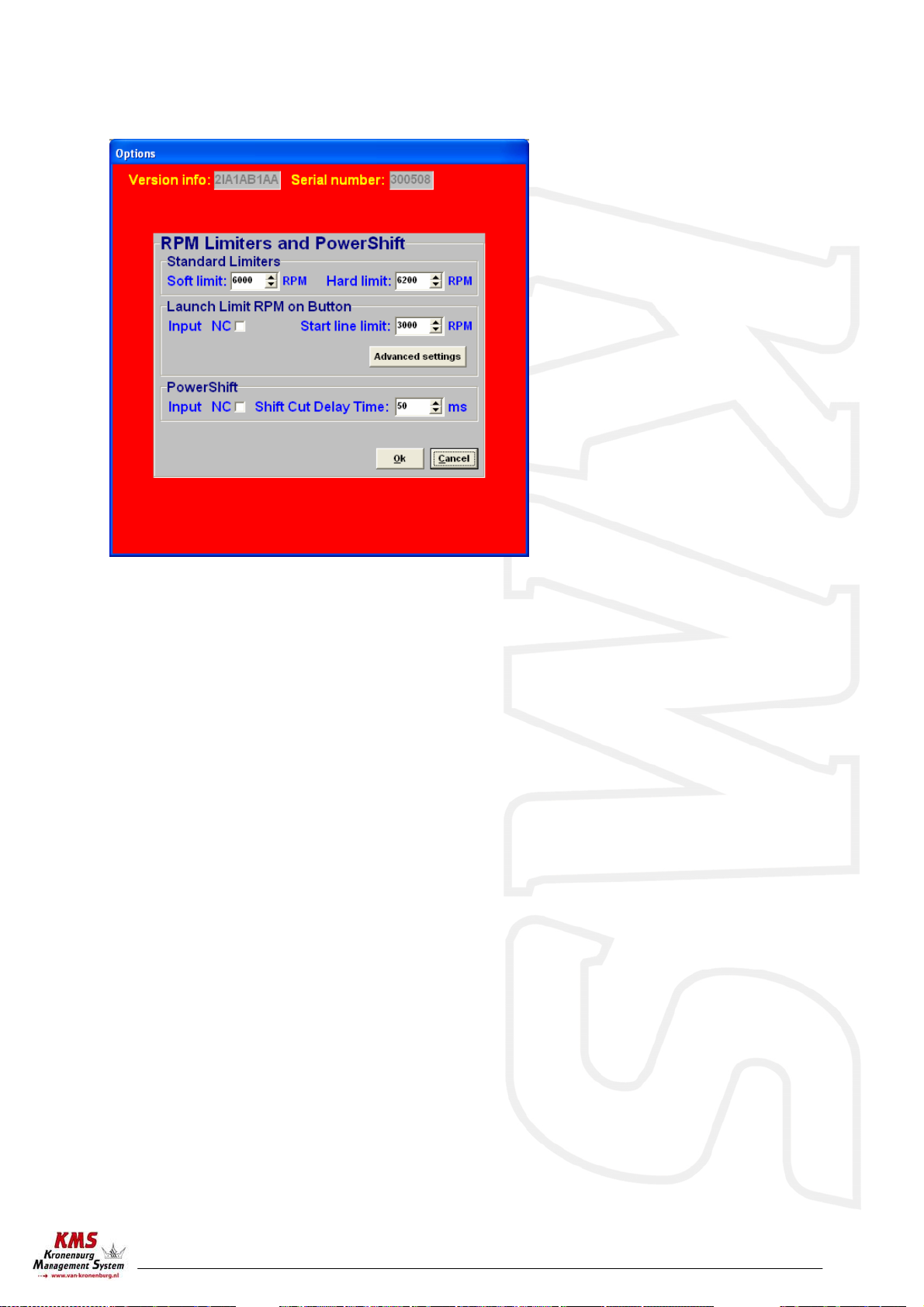
3.2.4.2 RPM Limiters and Powershift
This menu can be used to set various speed limiters and PowerShift.
The standard limiters include a soft and a hard limiter. The soft limiter stops ignition partially so
that power is lost. The hard limiter switches off ignition completely.
Under Launch limit an extra limiter can be set, which is activated, for instance, by a button.
Depending on the type of button, NC (normally closed) or NO (normally open), 'Input NC' will have to
be ticked or not. If the NO type is used, do not tick the box. 'Advanced settings' gives the possibility
of setting the ignition moment for several engine speeds at a maximum of 54 degrees after TDC
(retarded ignition is indicated by a negative number). This enables a high boost pressure to be built
up in turbocharged engines without further increasing the engine speed. Should the engine speed
increase in spite of ‘retarded ignition’, the extra limiter will intervene by stopping ignition and
injection.
Warning: When ignition-advance is applied, the temperature of the exhaust gasses may rise so
high that the exhaust valves, exhaust manifold and turbocharger are damaged. We recommend
you do not activate this function for longer than a few seconds!
PowerShift is a function that can be used for changing gear in sequential gearboxes. A switch on
the gearbox enables the engine output to be briefly interrupted, so that a gear change can be made
with the throttle valve fully open. This minimises the duration of gear-changing. The duration of the
interruption can be set to a maximum of 200 milliseconds.
Depending on the type of switch, the 'NC' box should be ticked.

KMS IB/IA23 manual
Version 3.01 9
3.2.4.3 Engine-load sensor
The engine load sensor connected to the system will have to be calibrated.
The range within which the sensor operates can be set here. A load sensor issues a voltage of 0 to
5V. The range is divided into 8 bits (256 steps). In practice a load sensor does not run through its
full range. For this reason, the upper and lower limits must be set, so that the 16 columns in the
spreadsheets can be best utilised.
There are two ways of calibrating the load sensor:
1) Automatic calibration
2) Manual calibration
When a throttle valve potentiometer is used, it is easy to opt for automatic calibration. Select
'Automatic cal.' and then keep the throttle valve in rest position, pressing OK.
Then turn the throttle valve to full load and press OK again.
The minimum and maximum values of the throttle
positions will now be shown.
A warning will appear if automatic calibration
cannot be finished correctly. For possible causes,
see 'Fault tracing'.
When a map sensor or an air mass sensor is used,
automatic calibration is not easy, because the
minimum and maximum output signals of the sensor are not known before the engine has run. We
recommend filling in the figures by hand, making sure that the output signal of the sensor under any
engine operating condition is between the two figures set. Tip: make the minimum value 15 and the
maximum value 250.

KMS IB/IA23 manual
Version 3.01 10
3.2.4.4 Shift-Light
This menu enables a shift light to be activated at a certain engine speed or engine load. So an extra
output can be activated, providing an ground-switching output directly (up to 15 watts) or via a
relay.
3.2.4.5 Warning message
In this option menu you can select the warning messages the ECU software must give when the
connections are short-circuit.
Inhaltsverzeichnis
Andere KMS Autozubehör Handbücher