Lake Shore F71 Bedienungsanleitung

1 http://www.lakeshore.com/products/Gaussmeters/F71-F41-teslameters/
F71/F41 Teslameter Quick Start Guide
Quick Start Guide
F71 Multi-axis teslameter
F41 Single-axis teslameter

2
F71/F41 Teslameter Quick Start Guide
Safety Precautions
Observe these general safety precautions during all phases
of instrument operation, service, and repair. Failure to comply
with these precautions or with specific warnings elsewhere in
this manual violates safety standards of design, manufacture,
and intended instrument use. Lake Shore Cryotronics, Inc.
assumes no liability for Customer failure to comply with these
requirements.
The F71/F41 teslamter protects the operator and surrounding
area from electric shock or burn, mechanical hazards,
excessive temperature, and spread of fire from the instrument.
Environmental conditions outside of the conditions below may
pose a hazard to the operator and surrounding area.
Indoor use
Altitude to 2000 m
-20 °C to 70 °C, <90% relative humidity non-condensing
Overvoltage category II
Pollution degree 2
Ground the Instrument
To minimize shock hazard, the instrument is equipped with
a 3-conductor AC power cable. Plug the power cable into an
approved 3-contact electrical outlet or use a 3-contact adapter with
the grounding wire (green) firmly connected to an electrical ground
(safety ground) at the power outlet. The power jack and mating
plug of the power cable meet Underwriters Laboratories (UL) and
International Electrotechnical Commission (IEC) safety standards.
Ventilation
The instrument has ventilation holes in its side covers. Do not block
these holes when the instrument is operating.
Do Not Operate in an Explosive Atmosphere
Do not operate the instrument in the presence of flammable
gases or fumes. Operation of any electrical instrument in such an
environment constitutes a definite safety hazard.
Keep Away from Live Circuits
Operating personnel must not remove instrument covers. Refer
component replacement and internal adjustments to qualified
maintenance personnel. Do not replace components with power
cable connected. To avoid injuries, always disconnect power and
discharge circuits before touching them.
Do Not Substitute Parts or Modify Instrument
Do not install substitute parts or perform any unauthorized
modification to the instrument. Return the instrument to an
authorized Lake Shore Cryotronics, Inc. representative for service
and repair to ensure that safety features are maintained.

3 http://www.lakeshore.com/products/Gaussmeters/F71-F41-teslameters/
F71/F41 Teslameter Quick Start Guide
Cleaning
Do not submerge instrument. Clean only with a damp cloth and mild detergent.
Exterior only.
Desktop Installation
When installing the instrument in a desktop environment, ensure it is mounted on a
flat, level surface.
Improper Use
If the instrument is used in a manner that is not specified by Lake Shore, the safety
protections provided by the instrument are no longer guaranteed, and may be
impaired.
Child Safety
This equipment is not suitable for use in locations where children are likely to be
present.
Key specifications
Power requirement
100 V to 240 V (universal input), 50 Hz
to 60 Hz, 30 VA
Size
216 mm wide × 87 mm high ×
369 mm deep (8.5 in × 3.4 in × 14.5 in),
half rack
Weight
3.2 kg (7 lb)
Approval
CE mark, FCC, Giteki mark
Operating conditions
Rated accuracy: 18 °C to 28 °C,
<70% relative humidity non-condensing
Reduced accuracy: -20 °C to 70 °C,
<90% relative humidity non-condensing
NOTE: Not all specifications are listed.
For full specifications, see http://www.
lakeshore.com/products/Gaussmeters/F71-
F41-teslameters/pages/Specifications.aspx.
!
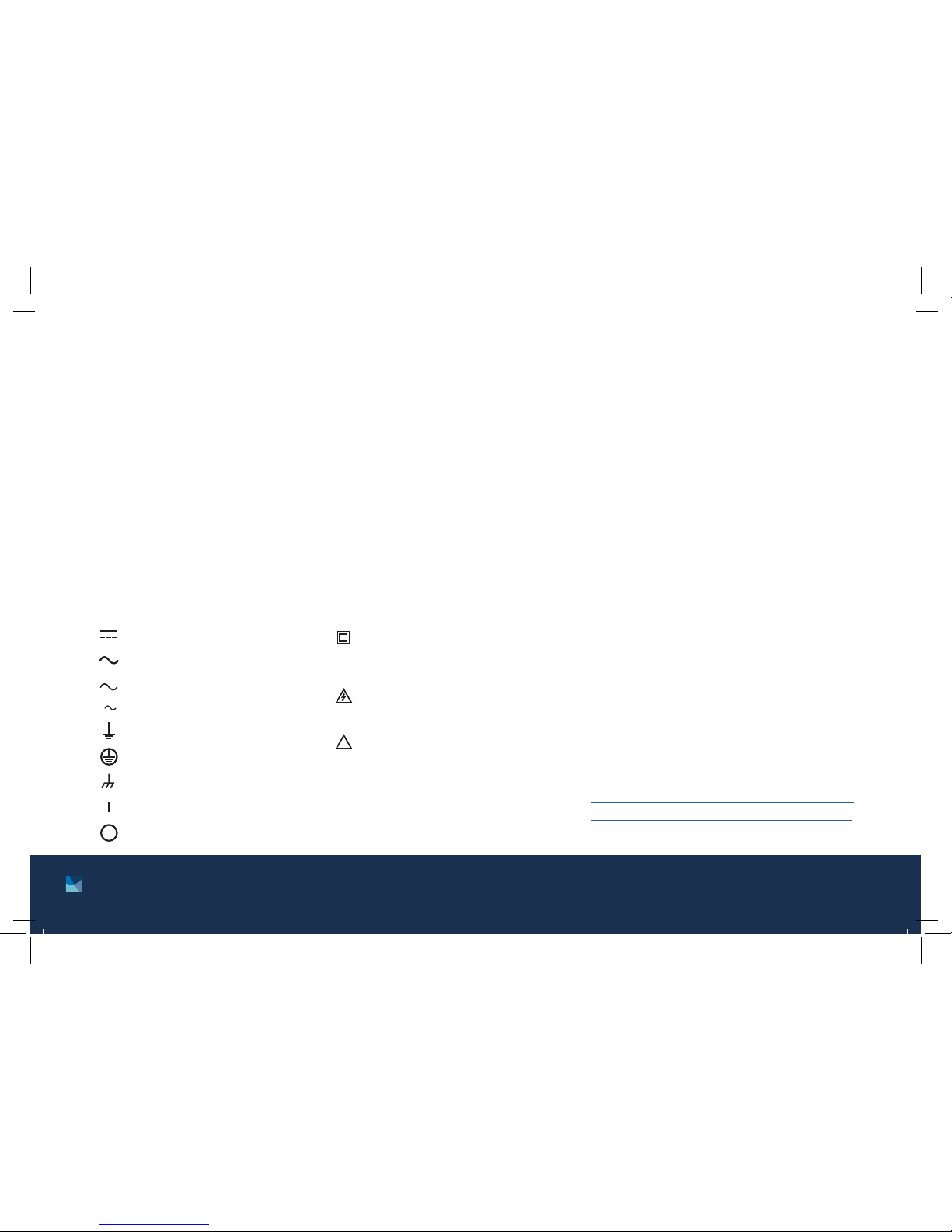
Direct current (power line) Equipment protected throughout
by double insulation or reinforces
insulation (equivalent to Class II of
IEC 536—see Annex H)
CAUTION: High voltages; danger of
electric shock; background color:
yellow; symbol and outline: black
CAUTION or WARNING: See
instrument documentation;
background color: yellow;
symbol and outline: black
Off (supply)
On (supply)
Frame or chassis terminal
Protective conductor terminal
Earth (ground) terminal
3Three-phase alternating current (power line)
Alternating or direct current (power line)
Alternating current (power line)

4
F71/F41 Teslameter Quick Start Guide
Introduction
This guide provides basic information for getting started
with your Lake Shore F71/F41 teslameter. For further
documentation and information, see our website.
Items included with the F71/F41 teslameter:
F71/F41 teslameter
6-pin terminal block, two count
Line power cord
Wi-Fi antenna
USB A to USB-Type C™ adapter
Unpacking
1. Inspect all items for both visible and hidden damage
that occurred during shipment. If there is visible
damage to the contents, contact the shipping
company and Lake Shore immediately.
NOTE: Procedures vary with shipping companies.
Keep all damaged shipping materials and contents
until instructed to either return or discard them.
2. Keep the container and shipping materials until all
contents have been accounted for.
3. Check off each item on the packing list as it is
unpacked.
Features
The F71/F41 teslameter includes features such as:
DC and RMS measurement
Peak to peak measurement
Autoranging
Variable averaging window
Min/Max hold
Relative readings
Temperature compensation
Frequency measurement of field
TruZero™ technology to reduce measurement noise
and offset
TiltView™ touchscreen for improved viewing angles
Smaller, ultra-thin Hall sensor active areas for
improved accuracy
Multiple probe types to suit your application
Fast warm up
Isolated input and output relays
Analog Hall voltage output
3-year standard warranty
High-speed data acquisition
Field control option
USB, Ethernet and Wi-Fi connectivity

5 http://www.lakeshore.com/products/Gaussmeters/F71-F41-teslameters/
F71/F41 Teslameter Quick Start Guide
The front panel consists of:
1. Power button
2. TiltView™ touchscreen
Front panel Rear panel
The rear panel consists of:
1. Option card slot
2. Line input assembly
3. USB Type-C™ interface
4. USB serial communications interface
5. RJ-45 Ethernet interface
6. WLAN antenna connector
7. Digital I/O port
8. Probe input connector
9. BNC analog output connector
q
o i u
y
t
r
e
w
q
w

6
F71/F41 Teslameter Quick Start Guide
Placement
The F71/F41 teslameter is an out-of-the-box benchtop
instrument with an adjustable TiltView™ screen for an
improved viewing angle. The screen adjusts from a
0° to a 37° viewing angle, whether mounted in a rack or
on a bench top.
Rack mounting
The teslameter can be installed into a full rack or half
rack mount using the optional Lake Shore rack mount
kits (half rack mounting is shown below).
NOTE: Ensure that there is 1 in (25 mm) clearance on
both sides of the instrument after rack mounting.
Assemble the blank
panel and tray to the
rack mount ear before
mounting the tray to
the instrument
If a non-XIP full rack
instrument will be installed
above, temporarily install
supplied spacers to allow
screen to tilt freely
*A third-party shelf may be used, though more space may be required above instrument
Expose threads by
removing the feet
using a flat blade
screwdriver
Item Description Qty
1 Rack mount panel 1
2 Rack mount ear 1
3 Half rack mount tray 1
4 Screw, M4 × 5 mm FHM Phillips 6
5 Washer, 1.6 to 1.8 mm THK 2
2U*
1 in (25 mm)
clearance
Standard 19 in (483 mm)
rack width

7 http://www.lakeshore.com/products/Gaussmeters/F71-F41-teslameters/
F71/F41 Teslameter Quick Start Guide
Connections and Installation
The teslameter includes a 3-conductor power cord that
mates with the IEC 320-C14 line cord receptacle on the
back of the teslameter.
WARNING: Always plug the power cord into an easily
accessible, properly grounded receptacle to ensure safe
instrument operation.
Startup
Connection
Plug in the teslameter using the supplied power cord.
The instrument will begin its power-up sequence, after
which the Home screen is displayed.
NOTE: The screens you see may differ, depending on
your software version. Some screens are scrollable.

8
F71/F41 Teslameter Quick Start Guide
Basic operation
Readings
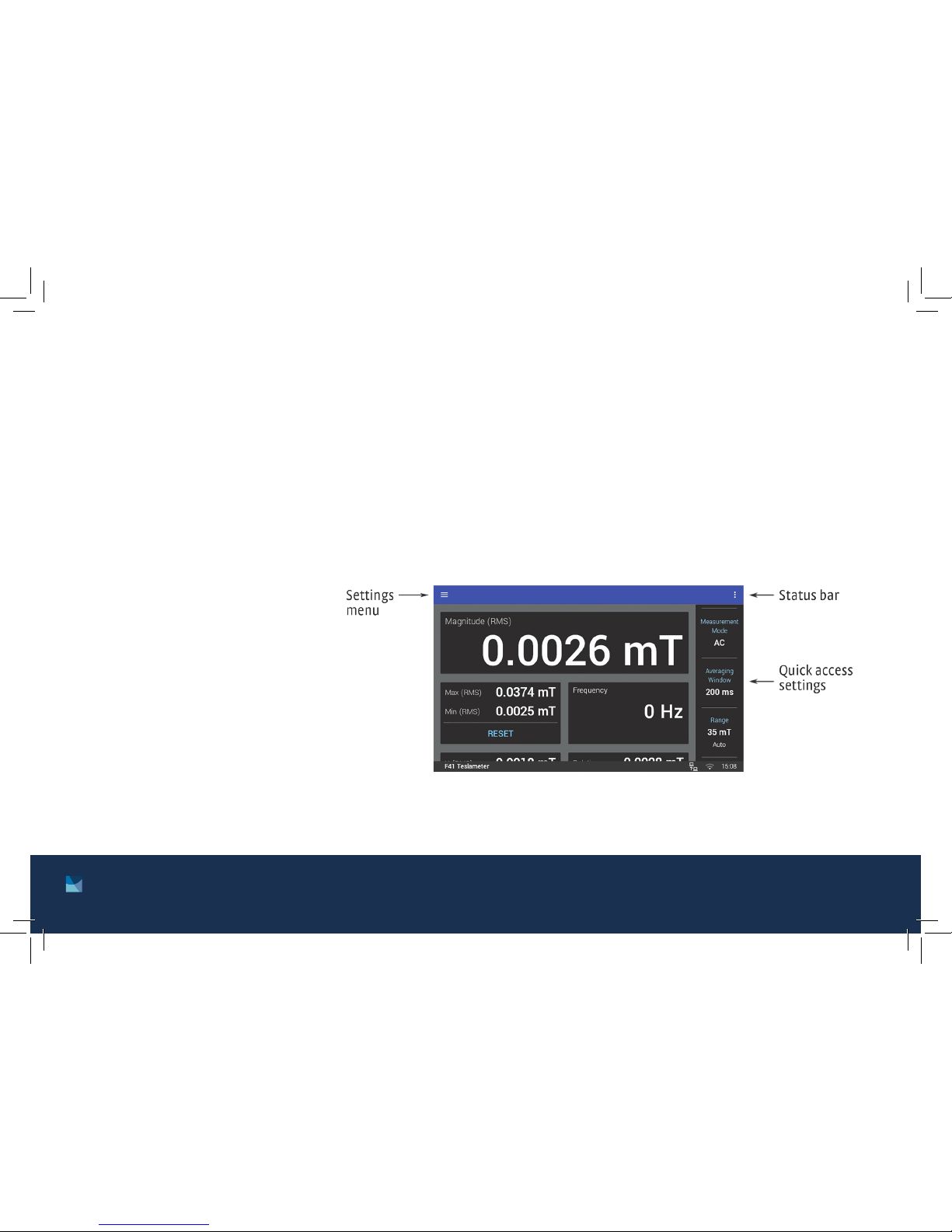
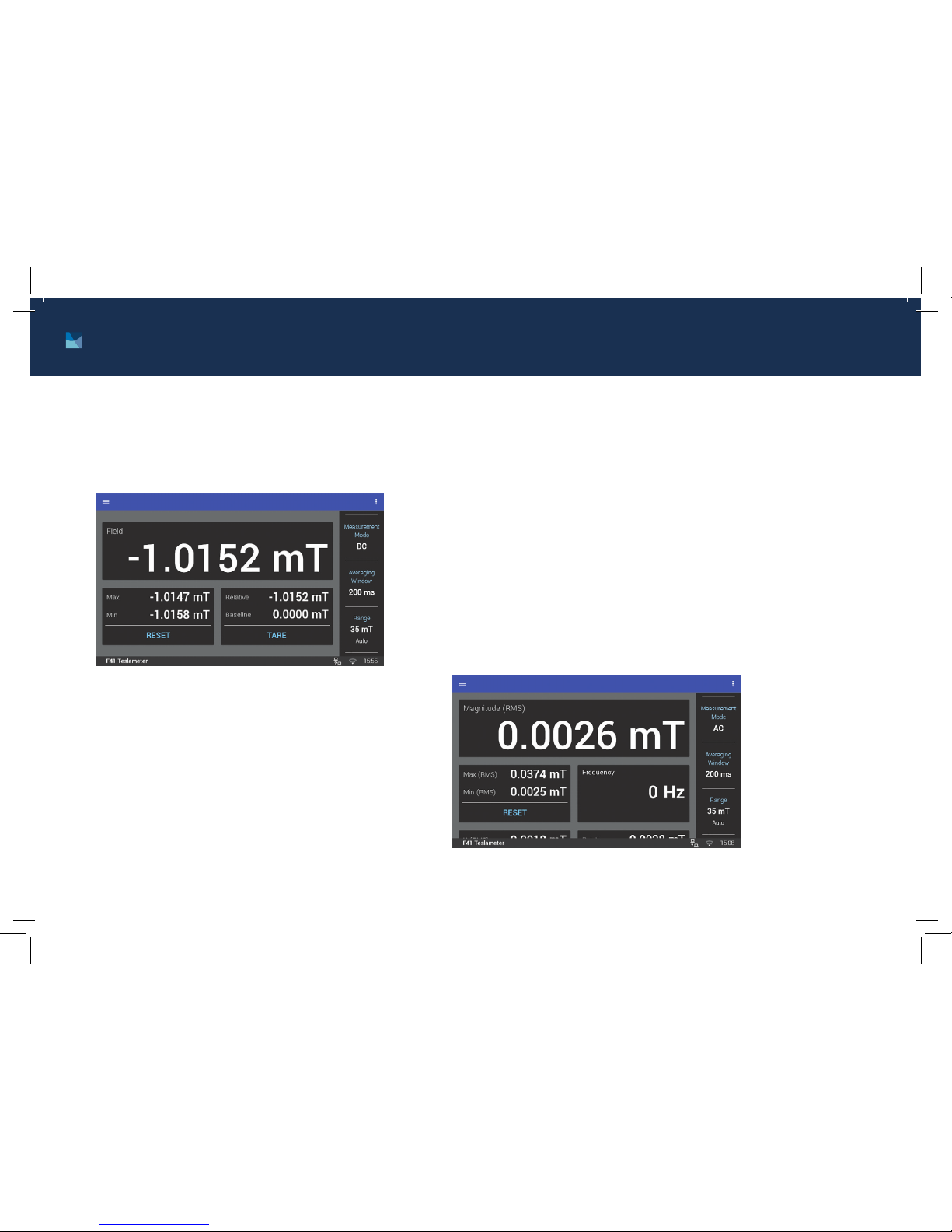
The Home screen displays readings such
as magnitude, max hold, relative, XYZ (F71),
and frequency. Touch a value to navigate to
a detail page containing more information.
The Magnitude detail screen for a single
axis probe measuring an AC field is shown
below.
From the quick access sidebar, you may change parameters such as:
Measurement
Mode: On this
screen, choose the
mode you wish to
use, then click OK.
Averaging Window:
Select a time
interval setting,
then click OK. A
longer averaging
window will result
in more stable
readings, but will
respond more
slowly to field
changes.

9 http://www.lakeshore.com/products/Gaussmeters/F71-F41-teslameters/
F71/F41 Teslameter Quick Start Guide
Range: Sets the maximum readable field and
display resolution. The F71/F41 teslameter is
equipped with an autoranging feature that will
automatically select the appropriate range for
the measured field. Select the range you wish to
use, then click OK.
NOTE: Autorange is the default setting.
Navigation drawer
Tap the Settings menu to go to the navigation
drawer to adjust settings.
Measurement setup: Includes settings for
Measurement mode, Averaging window, Range,
Units, and Temperature compensation.
Sensor Information: Provides general
information about the probe.
Analog output: Selects which channel’s analog
signal is routed to the output.
Digital I/O: Use this screen to configure the
functionality of the inputs and outputs.
System settings: Use this screen to adjust
settings, including Wi-Fi, display and sound,
firmware updates, and privacy

10
F71/F41 Teslameter Quick Start Guide
Measurement modes
DC measurement mode
In DC measurement mode, the display
shows the measured DC field, the DC max
hold, the DC relative measurement.
AC measurement modes
In this mode, the display shows the RMS reading as well as the
frequency, RMS max hold, and the RMS relative measurement.
The F71/F41 teslameter offers two AC measurement bands to improve
overall AC measurement performance:
AC mode: has an operating range from DC to 500 Hz, but
should be limited to frequencies less than 60 Hz for rated
accuracies (reports both AC and DC components, and has
improved measurement performance)
High frequency mode: 50 Hz to 100 kHz (does not display DC
component, but can connect an oscilloscope to the analog
output to view higher frequency signals, allowing high speed
pulse capture)
Dieses Handbuch passt für folgende Modelle
1
Inhaltsverzeichnis
Andere Lake Shore Messgerät Handbücher

Lake Shore
Lake Shore Model 421 Bedienungsanleitung

Lake Shore
Lake Shore 480 Bedienungsanleitung

Lake Shore
Lake Shore 74046 Bedienungsanleitung

Lake Shore
Lake Shore 475 Bedienungsanleitung

Lake Shore
Lake Shore 340 Bedienungsanleitung

Lake Shore
Lake Shore 425 Bedienungsanleitung

Lake Shore
Lake Shore 460 Bedienungsanleitung

Lake Shore
Lake Shore Measure Ready FastHall M91 Bedienungsanleitung

Lake Shore
Lake Shore 211 Bedienungsanleitung

Lake Shore
Lake Shore 420 Bedienungsanleitung