
McIntosh MPM4000 Bedienungsanleitung

McIntosh Laboratory, Inc. 2 Chambers Street Binghamton, New York 13903-2699 Phone: 607-723-3512 FAX: 607-724-0549
MPM4000
Power Output Meter
OWNERS
MANUAL
2
Serial Number:
Thank You
For your decision to own this McIntosh MPM4000 Power
Output Meter ranks you at the very top among discriminat-
ing music listeners. You now have The Best. The McIn-
tosh dedication to Quality, is assurance that you will
receive many years of enjoyment from this unit.
Please take a short time to read the information in this
manual. We want you to be as familiar as possible with all
the features and functions of your new McIntosh
MPM4000. This will ensure that you receive all the perfor-
mance benefits this equipment can offer you, and that it will
become a highly valued part of your Automotive entertain-
ment system.
Please Take A Moment
The serial number, purchase date and McIntosh dealer name
are important to you for possible insurance claim or future
service. The serial number is located on the rear panel of the
equipment. The spaces below have been provided for you to
record that information:
Thank You, Please Take A Moment

3
Customer Service
If at any time you have questions about your MPM4000
Power Output Meter, please contact:
McIntosh Laboratory, Inc.
2 Chambers Street
Binghamton, New York 13903
Phone: 607-723-3512
FAX: 607-724-0549
Copyright 1997 by McIntosh Laboratory, Inc.
Purchase Date:
Dealer Name:
Please Take A Moment cont,
Customer Service

4
Table of Contents
Thank You.......................................................................... 2
Please Take a Moment ....................................................... 2
Customer Service ............................................................... 3
Table of Contents ............................................................... 4
Safety Instructions ............................................................. 5
Introduction ........................................................................ 8
Performance Features ........................................................ 8
Supplied Items ................................................................... 9
Installation ....................................................................... 10
Illustration 1 ..................................................................... 10
Illustration 2 ..................................................................... 11
Illustration 3 ..................................................................... 12
Illustration 4 ..................................................................... 13
How to Connect ............................................................... 14
How to Operate ................................................................ 14
Specifications ................................................................... 15
Packing Instruction .......................................................... 15
Table of Contents

5
IMPORTANT SAFETY
INSTRUCTIONS!
PLEASE READ THEM BEFORE
OPERATING THIS EQUIPMENT.
General:
1. Read all the safety and operating instructions, contained
in this owners manual, before operating this equip-
ment.
2. Retain this owners manual for future reference about
safety and operating instructions.
Safety Intructions
WARNING SHOCK HAZARD -
DO NOT OPEN.
AVIS RISQUE DE CHOC -
NE PAS OUVRIR.
NO USER-SERVICEABLE
PARTS INSIDE. REFER
SERVICING TO
QUALIFIED PERSONNEL

6
3. Adhere to all warnings and operating instructions.
4. Follow all operating and use instructions.
5. Warning: To reduce risk of fire or electrical shock,
do not expose this equipment to rain or moisture.
Installation:
6. Do not attempt to install the unit yourself, please have an
authozied dealer install the unit for you.
7. Locate the equipment away from heat sources such as
heater ducks that produce heat.
8. Mount the equipment only as described in this owners
manual
Connection:
9. Connect this equipment only to the type of DC power
source as marked on the unit.
10. Route cords so that they are not likely to be pinched by
items placed upon or against them, paying particular
attention to the point where they exit from the instru-
ment.
Care of Equipment:
11. Clean the instrument by dusting with a dry cloth or with
a cloth moistened with a window cleaner.
12. Do not permit objects of any kind to be pushed into
and/or fall into the equipment through enclosure
Safety Instructions cont

7
openings. Never spill liquids into the equipment through
enclosure openings.
Repair of Equipment:
13. Refer servicing to a qualified service personnel under
the following conditions:
A. The cords or the connectors have been damaged,
B. Objects have fallen on to, or liquid has been spilled
into the equipment,
C. The equipment has been exposed to rain or water,
D. The equipment does not operate normally by
following the operating instructions contained
within this owners manual.
E. The equipment has been dropped or damaged in any
way,
F. The equipment exhibits a distinct change in perfor-
mance - this indicates a need for service.
14. When replacement parts are required, be sure the
service technician has used replacement parts specified
by McIntosh or have the same characteristics as the
original part. Unauthorized substitutions may result in
fire, electric shock, or other hazards.
15. Upon completion of any service or repairs to this
product, ask the service technician to perform safety
checks to determine that the product is in proper
operating condition.
Safety Instructions cont

8
Performance FeaturesIntroduction
Introduction and Performance Features
The McIntosh MPM4000 Power Output Meters provides
you with the capability of seeing the actually power output
from your McIntosh Power Amplifier even though it is
mounted elsewhere in your car. The direct reading wattage
meters are calibrated to read from one hundredth of a watt
up to 200 watts.
•Compatible with a McIntosh Control Center and Power
Amplifier.
•McIntosh Traditional Analog Meter Display
•Wide dynamic range
•Elegantly Refined McIntosh Blue Illumination
•The meter display will illuminate by turning power ON

9
Supplied Items
Supplied Items
Quantity Description Reference No.
1 Main Unit, with Spring Brackets 1
1 DIN Bracket 2
2 Bracket L/R 3
4 M4 x 8 Flat Head Screws 3
2 M5 x 8 Flat Head Screws 3
6 M5 x 8 Sems hexagonal Bolts 3
1 Spacer Cushion 4
2 Cushions 4
1 Mounting Strip 5
2 Hook Plates 6
1 Warranty Card, Owners Manual 7&8
5
2
1
3
4
6
7
8
10
Illustration 1
Installation
Installation and Illustration 1
It is extremely important for proper operation of this equip-
ment that it be installed by an experienced professional in-
staller. This will help to assure your long term satisfaction.
There are several different methods of mounting the
MPM4000 in the dash. Please refer to the following appro-
priate illustration(s) on the following pages.
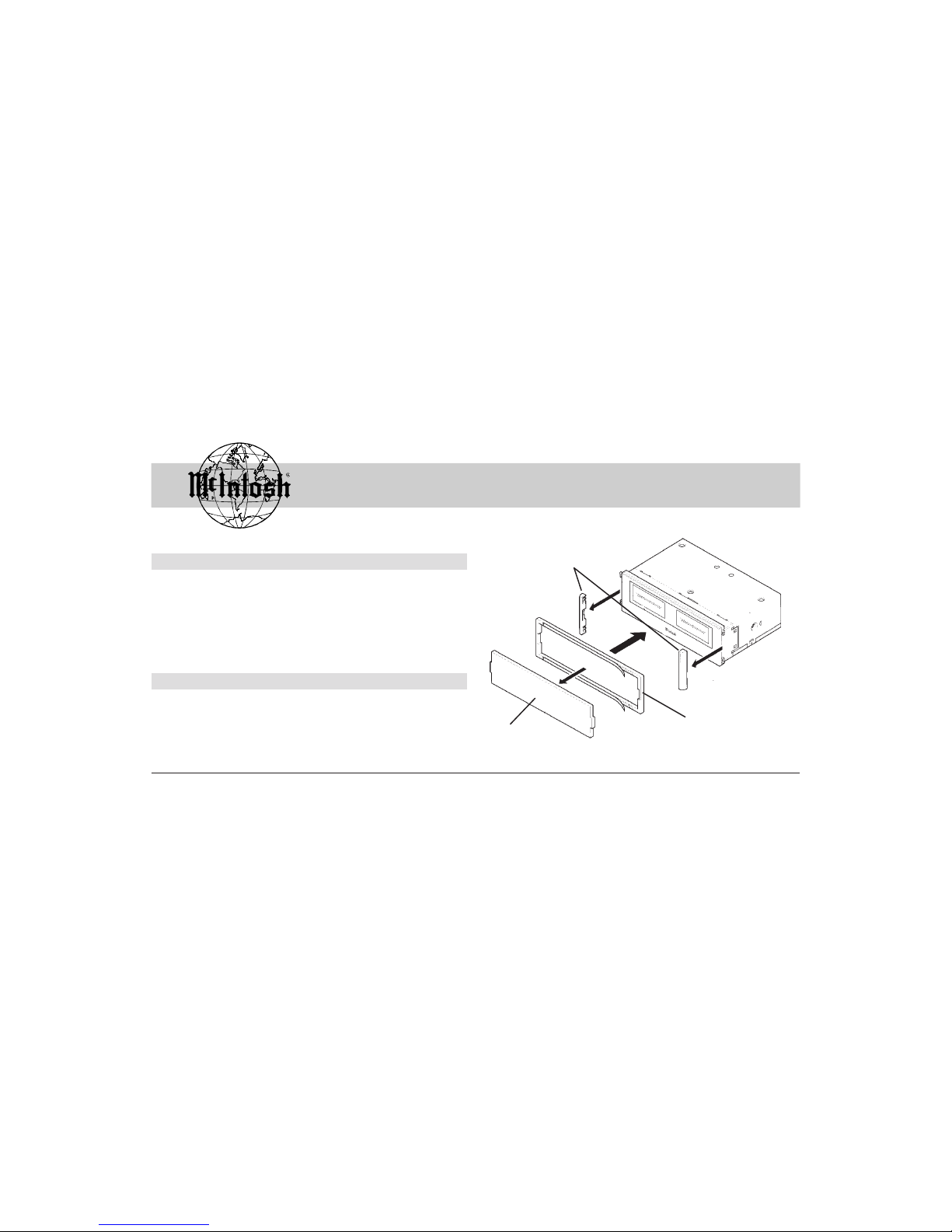
In certain vehicle models, the space between the rear side of
the escutcheon and the center panel surface may be too deep
when the MPM4000 is stalled. In such a case, stick the at-
tached spacer cushion to the MPM4000 refer to figure 1.
Spacer Cushion
End Caps
Remove Figure 1
Andere Handbücher für MPM4000
1
Inhaltsverzeichnis
Andere McIntosh Messgerät Handbücher


