Microelectronic NH MicroM30/12 HDMI USB Bedienungsanleitung

1
Digital Satellite Receiver
MicroM30/12 HDMI USB
Operating manual
Modifications and errors reserved.
We do not assume any liability for printing errors.
Version 1.0 GB, 20.08.2009

2
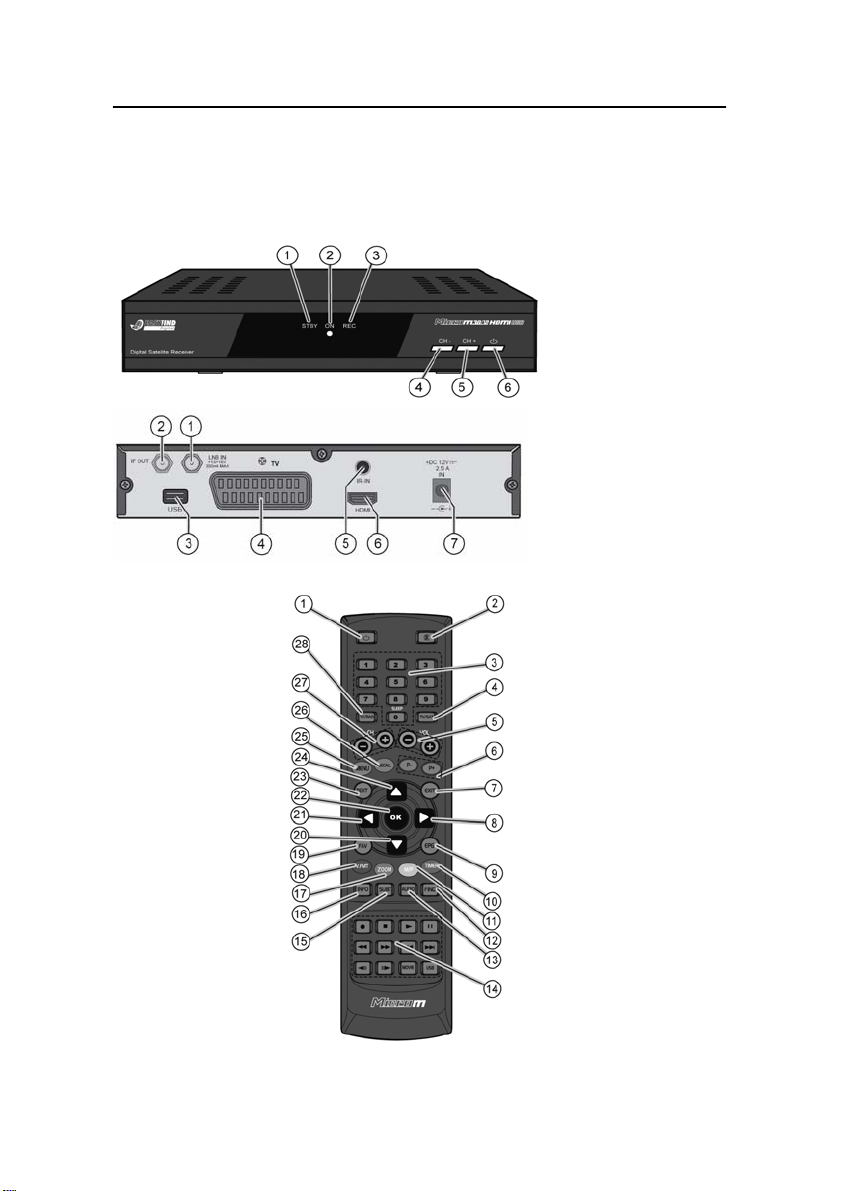
Overview of equipment MicroM30/12 HDMI
USB
Front side of the receiver
Rear side of the receiver
Remote control

3
Overview of equipment
Front side of the receiver
Rear side of the receiver
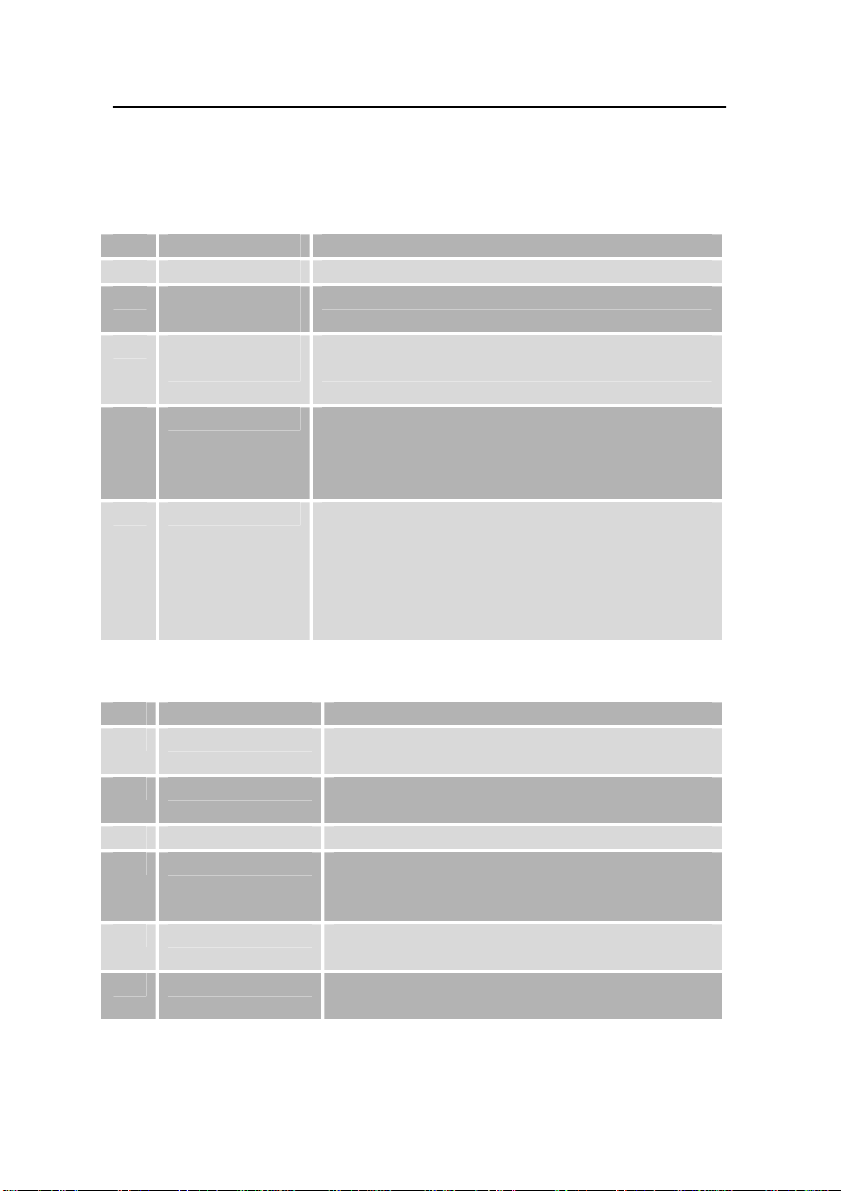
1 LNB-IN LNB connection for the antenna cable
2 IF-OUT LNB connection for a second satellite
receiver
3 USB interface For connecting an external storage
medium
4 TV (output) SCART connection for the TV set
5 IR-IN Connection for the infrared receiver for
receiving the signals of the remote control
unit
6 HDMI Connection for digital transmission of
audio and video signals
7 +12V DC For connecting the external power pack or
12V cable
1 LED Standby Red LED is only lit in standby mode.
2 LED ON Green LED is only lit in normal mode.
3 LED Rec
Is lit if the receiver is in record mode
4 CH-
Switches to the next lower channel location
Cursor moves downwards
5 CH+ Switches to the next higher channel
location
Cursor moves upwards
6 Standby key Switches on and to the standby mode
The default settings will be restored if you
keep this key pressed for more than 10
seconds.
Caution! By doing this, your personal
settings will be deleted.

4

5
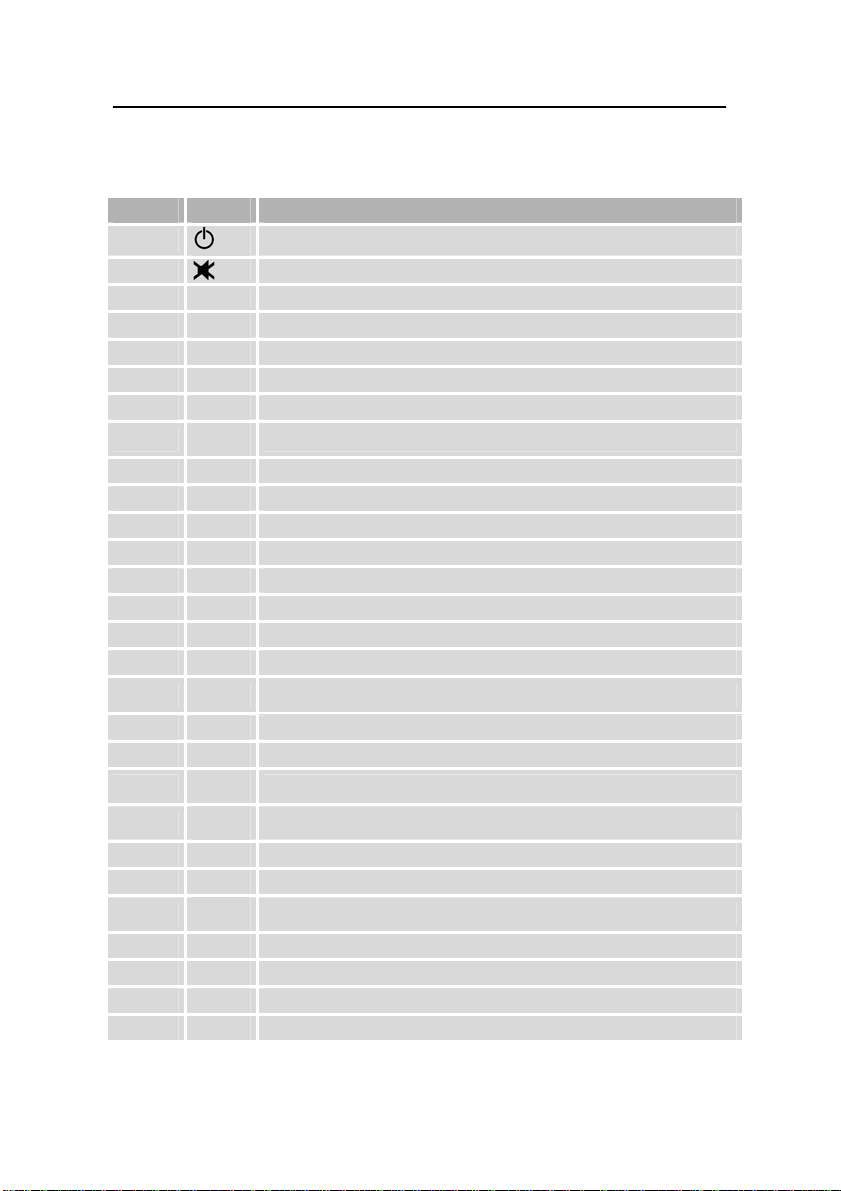
Remote control
No. Key Description
1 Switches on / Standby
2 Volume / Mute
3 0-9 Numerical input (A-Z); 0: Sleep timer
4 TV/SAT Switches between TV and satellite mode
5 VOL-/+ Decreases/increases volume
6 P- / P+ With active channel list: switches between the channel lists.
7 EXIT Exits menu / removes display messages
8 Cursor key, increases volume in normal mode
9 EPG Electronic Programme Guide
10 TIMER Invokes timer menu, blue function key
11 M/P Multi-picture, yellow function key
12 FIND Searches channel by name
13 AUDIO Audio track
14 PVR PVR functions
15 SUBT Enables/disables subtitles (if offered)
16 INFO Invokes channel parameters
17 ZOOM Zooming image, green function key
18 V-FMT Aspect ration selection, red function key
19 FAV Shows favourites lists
20 Cursor key, switches channel in normal mode
21 Cursor key, decreases volume in normal mode
22 OK Confirms your inputs (menu, etc.), invokes channel list
23 TEXT Shows video text (makes it transparent)
24 Cursor key, switches channel in normal mode
25 MENU Invokes menu / returns to the previous menu level
26 RECALL Switches to the previously watched channel
27 CH-/+ Switches to the last / next channel
28 TV/ RAD Switches between TV and radio mode

6
Preface
This operating manual will help you in the
•appropriate
•safe and
•favourable
usage of the digital satellite receiver, in short, the
“receiver”. We assume that the user of the receiver has
overall knowledge regarding the handling of audio and
video equipment.
Each person who
•installs,
•connects,
•operates,
•cleans
•disposes of
this receiver must be familiar with the entire content of this
operating manual. Always keep this operating manual in
the proximity of the receiver.
Style features
Specific style features have been given in different
sections of the operating manual. Thus, you can easily
differentiate whether it concerns
normal text,
•enumerations,
or
action sequences.

7
Contents
Overview of equipment ....................................................................... 3
Remote control ................................................................................... 5
Preface............................................................................................... 6
Style features .................................................................................... 6
Contents ............................................................................................ 7
Safety instructions ........................................................................... 9
Basic safety instructions ..................................................................... 9
Explanation of safety instructions ..................................................... 13
Appropriate use ................................................................................ 13
Scope of supply .............................................................................. 14
Description ...................................................................................... 15
Connecting the receiver................................................................. 19
LNB cable installation ....................................................................... 21
Connection with the SCART cable ................................................... 24
Connection with the HDMI cable ...................................................... 26
Connection diagram.......................................................................... 27
Connection with the IR-Receiver……………………………………….29
Connection diagram……………………………………………………..30
Connection and rough direction of the antenna ............................... 28
Getting started ................................................................................ 35
remote control................................................................................... 35
The receiver...................................................................................... 37
Operation......................................................................................... 39
Screen display messages when switching channels........................ 39
User interface on the TV screen....................................................... 40
Menu structure.................................................................................. 41
Menu structure……………………………………………………………37
Menu navigation ............................................................................... 43
Editing channel list (symbol: TV) ...................................................... 44
Installation (symbol: satellite antenna) ............................................. 49
System setup (symbol: gearwheel) ..................................................57
Settings (symbol: tools) .................................................................... 62

8
Games (symbol: game pieces)......................................................... 69
External memory (symbol: film reel) ................................................. 70
Keys with special functions .......................................................... 74
Switching between TV and radio ...................................................... 74
0 - Sleep timer .................................................................................. 74
Switch between TV and SAT............................................................ 74
CH- / CH+ .........................................................................................75
VOL+ / VOL- ..................................................................................... 75
MENU ............................................................................................... 75
RECALL ............................................................................................ 75
P+ / P-............................................................................................... 75
TEXT................................................................................................. 75
EXIT .................................................................................................. 76
OK..................................................................................................... 76
◄/ ►................................................................................................ 76
▲/ ▼................................................................................................ 76
FAV ................................................................................................... 76
EPG .................................................................................................. 77
V-FMT ............................................................................................... 78
ZOOM ............................................................................................... 79
M/P - Multi-picture............................................................................. 79
TIMER............................................................................................... 79
INFO - acoustic signal for directing the satellite antenna ................. 79
SUBT ................................................................................................ 80
AUDIO .............................................................................................. 80
FIND.................................................................................................. 80
Keys with PVR functions (optional).............................................. 81
Editing of recorded programmes (optional) ................................ 83
Cleaning........................................................................................... 84
Tips & tricks/trouble shooting....................................................... 85
Disposal ........................................................................................... 89
Specifications ................................................................................. 90
Manufacturer ................................................................................... 92
Declaration of conformity .............................................................. 93
Glossary .......................................................................................... 94
Attachment………………………………………………………………101

9
Safety instructions
Please read the safety instructions carefully before
operating the receiver.
Please follow all warnings and instructions on the
equipment and in the operating manual.
Basic safety instructions
Electrical connection
•Separate the receiver from the power source in case of
operational disruptions. Please note: The receiver will
remain live, even if it is turned off with the mains switch
on the rear side.
•Do not expose the receiver to rain or any kind of
humidity to avoid risk of fire and electric shock.
•Never open the casing. Otherwise, there is a risk of
electric shock.
•Connect the receiver only to a professionally installed
mains socket. This is either:
- for external power pack:
oan approved mains socket 100-240 V~, 50-
60 Hz or
- for 12V cable
oan approved d.c. source of 11V - max. 14V
•The total current at the antenna connection of the
receiver ‘LNB IN’ must not exceed 300 mA.
•Pull out the mains plug or the 12 V cable from the
socket if the equipment is not in use for a longer period
of time. Only pull at the plug, not at the cable.

10
•Use for the operation of the receiver only the included
external power adapter or 12-volt cable for the
cigarette lighter.
•In case of storms pull out the mains plug of the
receiver from the socket.
•In case of a storm, loosen the LNB cable from the
receiver.
•If foreign bodies or fluids enter the receiver,
immediately pull out the mains plug from the socket.
Ask a qualified person to check the equipment before
operating it once again. Otherwise, there is a risk of
electric shock.
•Ensure that the power source (socket) is easily
accessible.
•Do not bend or crimp the mains cable.
•If the mains cable is damaged, the
receiver must be repaired by an expert before reusing
it. Otherwise, there is a risk of electric shock.
•Never allow children to operate the receiver or to play
with the antenna unit unless supervised.
•Always ask qualified personnel to carry out
maintenance jobs. Otherwise, you are putting yourself
and others at risk.
•Disconnect the receiver from the power source in case
of operational disruptions.
•Spare parts must be ordered directly from the
manufacturer
•Modifications of the device lead to an extinction of the
manufacturer’s liability.
•Remove the protection films.
Inhaltsverzeichnis