Power Up 3.0 Bedienungsanleitung

PowerUp®
3.0
Smartphone Controlled Paper Airplanepoweruptoys.com
®
Version 1.0
March 2014
User Guide
Tailor Toys L.L.C • 8345 NW 66TH ST #5711 • MIAMI FL 33166 USA
• info@poweruptoys.com • Visit us at – www.facebook.com/poweruptoys
• For tips and trouble shooting visit: www.poweruptoys.com • PowerUp®
is a trademark of Tailor Toys L.L.C. • Manufacturer part number: 500-004
• Copyrights© 2014 Tailor Toys L.L.C. All rights reserved • Made in China

PowerUp®
3.0
Smartphone Controlled Paper Airplane
User Guide
www.poweruptoys.com

Safety Information 2
Charging Warnings 2
Contents of the Kit 6
Welcome 7
Preight 11
Before Your First Flight 11
Before Every Flight 15
Folding a Paper Airplane 16
Preparing the Airplane’s Control Surfaces 19
Assembling the Smart Module 20
Adjusting the Airplane’s Control Surfaces 21
TestFlights 22
Testing the Airplane: Motor Off 23
Testing the Airplane: Motor On 24
Flight 26
Contents

Planning Your Flight Path 26
Taking Off 27
Flying 28
Flying at a Constant Altitude 28
Banking 28
Controlling an Airplane When it is Coming Toward You 29
Landing 30
Observe, Identify, Adjust 31
Stalling 31
Diving 31
Flying Upside Down (Inverted) 32
Unwanted Left or Right Banking 32
CorrectingProblems 33
Failure to Charge 33
No Communication Between Smart Module and App Before Flight 34
Loss of Communication During Flight 34
Total Loss of Control with Uninterrupted Communication 35
Loss of Control of the Rudder 36
Loss of Control of the Motor 36
Incoming Calls During Flight 37
Maintenance 38
Attaching the Propeller 38
Reinstalling the Electric Rudder 39
Dos and Don’ts of Flying 40
Appendix 41
Appendix A: Indicator Light on Smart Module 41
Appendix B: Smartphone App Settings 42
Appendix C: Glossary 43
Appendix D: Invader Airplane Folding Instructions 47

PowerUp 3.0 User Guide | 3
Safety Information
2 | PowerUp 3.0 User Guide
Safety Information
Age Recommendation: Not for children
under 14 years. This is not a toy. Keep these
instructions for future reference - do not
discard. Nevertheless, be sure to take the
following precautions:
• Individuals with long hair should pull
their hair back and fasten it with an
elastic band. If hair becomes caught in the
propeller, detach the propeller from the
motor to release the hair.
• Never allow the propeller to get close to
anyone’s eyes.
• Before holding the airplane in your hand
or making any adjustments to it, move the
throttle slider in the smartphone app
to minimum so that the propeller stops
turning.
• Never hold propeller while throttle is
raised. If propeller is jammed reduce
throttle immediately. Resolve the reason
before raising the throttle again.
• To avoid damaging the PowerUp Smart
Module, always attach it to a paper
airplane before activating the propeller.
ChargingWarnings
Read the following safety instructions and
warnings before handling, charging or using
the Li-ion battery.
Caution: All instructions and warnings must
be followed exactly. Mishandling of Li-ion
batteries can result in a re, personal injury,
and/or property damage.
• By handling, charging or using the included
Li-ion battery, you assume all risks
associated with lithium batteries.
• If at any time the battery begins to balloon
or swell, discontinue to use immediately.
If charging or discharging, discontinue and
disconnect. Continuing to use, charge or
discharge a battery that is ballooning or
swelling can result in re.
• Always store the battery at room
temperature in a dry area for best results.
• Always transport or temporarily store the
battery in a temperature range of -20oC
to 35oC. Do not store battery or aircraft
in a car or direct sunlight. If stored in a
hot car, the battery can be damaged or
even catch re.
• Always charge batteries away from
ammable materials.
• Always inspect the battery before
charging and never charge damaged
batteries.
• Always disconnect the battery after
charging, and let the charger cool between
charges.
• Always constantly monitor the
temperature of the battery pack while
charging.
• Onlyusechargerspeccially
designedtochargeli-ionbatteries.
Failure to charge the battery with a
compatible charger may cause re
resulting in personal injury and/or
property damage.
• Never cover warning labels with hook
and loop strips.
• Never leave charging batteries
unattended.

PowerUp 3.0 User Guide | 5
Safety Information
4 | PowerUp 3.0 User Guide
• Never charge batteries outside
recommend levels.
• Never attempt to dismantle or alter the
charger.
• Never allow minors to charge battery
packs.
• Never change batteries in extremely hot
or cold places (recommended between
0oCto 45oC) or place in direct sunlight.
This device complies with Part 15 of the FCC
rules. Operation is subject to the following
two conditions: (1) This device may not cause
harmful interference, and (2) this device must
accept any interference received, including
interference that may cause undesired
operation.
Warning: Changes or modications to this
unit not expressly approved by the party
responsible for compliance could void the
user’s authority to operate the equipment.
Note: This equipment has been tested and
found to comply with the limits for a Class
B digital device, pursuant to part 15 of the
FCC rules. These limits are designed to
provide reasonable protection against harmful
interference in a residential installation. This
equipment generates, uses and can radiate
radio frequency energy and if not installed
and used in accordance with the instructions,
may cause harmful interference to radio
communications. However, there is no
guarantee that interference will not occur in a
particular harmful installation. If this equipment
does cause interference to radio and television
reception, which can be determined by
turning the equipment off and on, the user is
encouraged to try to correct the interference
by one or more of the following measures:
• Reorient or relocate the receiving
antenna
• Increase the separation between the
equipment and the receiver
• Connect the equipment into an outlet on
a circuit different from that to which the
receiver is connected
• Consult the dealer or an experienced
radio/TV technician for help
FCC ID: WL2500004TTL
The declaration of conformity and
further information can be found at
www.poweruptoys.com

PowerUp 3.0 User Guide | 76 | PowerUp 3.0 User Guide
Welcome
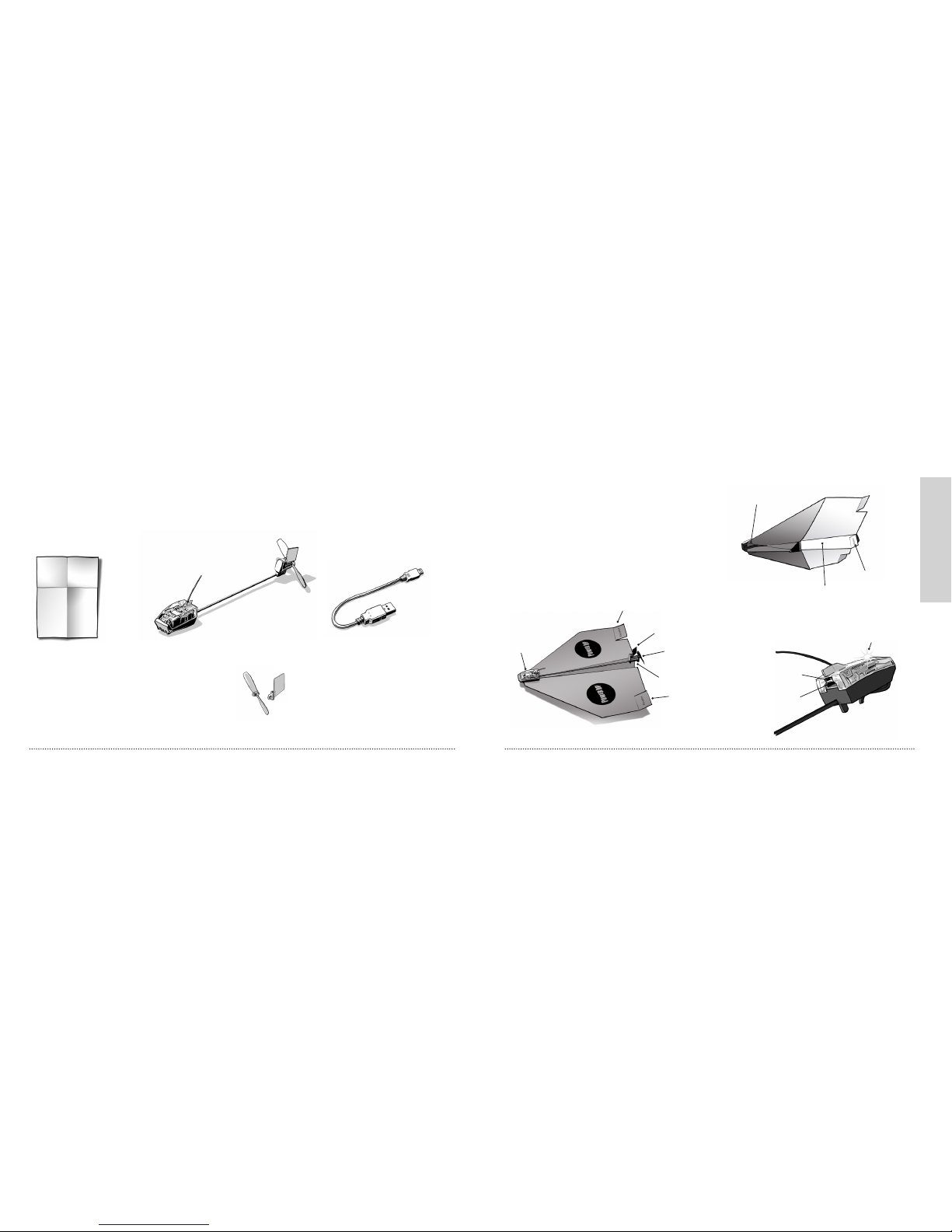
Electric rudder
Motor
Elevator
Propeller
Elevator
Smart module
Contents of the Kit
To remove the Smart Module from the packaging, carefully cut the rubber bands
that are holding module in place, starting from the bottom of the plastic base.
Note: A lithium-ion charger for charging the Smart Module is available separately.
On/off switch
USB socket
Indicator light
Trim rudder
Keel
Smart module clips
Micro-USB cable for charging
Smart module
4 A4 colorful printed templates
1 waterproof paper
PowerUp 3.0
Smart module
Welcome to the PowerUp
3.0 Smart Module &
Smartphone App
With the PowerUp® 3.0 Smart
Module, you can y the world’s rst
smartphone-controlled paper airplane.
Spare propeller
and Rudder

PowerUp 3.0 User Guide | 98 | PowerUp 3.0 User Guide
Welcome
The PowerUp smartphone app enables you to communicate with the Smart Module
and control your airplane.
The app is compatible with
smartphones that have Bluetooth Smart.
For the complete list of compatible
smartphones check
www.poweruptoys.com
For downloading instructions, see the
section Before Your First Flight. The
throttle controls the motor’s thrust.
Full thrust makes the airplane climb.
Note: You can raise or lower the
throttle by sliding your nger up or
down anywhere in the lower part of
the screen. You don’t have to drag the
actual throttle.
Magnetic
compass
Battery status
Thrust level
Throttle
Articial
horizon
Battery charge
level
Signal
strength
Heading direction:
N, S, E, or W
Control tower
Controlling
the throttle

PowerUp 3.0 User Guide | 1110 | PowerUp 3.0 User Guide
On/off switch
USB socket
Indicator light
Preight
Tilting the smartphone makes the airplane bank.
Tapping the control tower icon adds some spice to your ight, with
simulated announcements from a control tower.
Quick start
video tutorial
Preight
BeforeYourFirstFlight
1. Turn on the Smart Module, the
indicator light starts to ash.
2. Charge the Smart Module’s battery.
Important: If the micro-USB plug
is inserted into the Smart Module
incorrectly, the plug can damage the
module.
a. Insert the micro-USB plug into the
socket on the rear of the Smart
Module.
b. Plug the other end of the USB cable
into any USB power source (such
as a power bank, a computer, or
the PowerUp 3.0 lithium-ion charger,
available separately).
The indicator light on the Smart Module
starts to ash rapidly. After about 20
minutes, the Smart Module is fully charged,
and the indicator light stops ashing
rapidly. A message on the smartphone app
will change from Charging to In Use,
fuel gauge will indicate 100%.

PowerUp 3.0 User Guide | 1312 | PowerUp 3.0 User Guide
Preight
For information about the Smart
Module’s indicator light, see Appendix
A page 41: Indicator Light on Smart
Module.
3. On your smartphone, turn on
Bluetooth.
4. If possible, turn off WiFi in your
smartphone, because WiFi can
interfere with the Bluetooth
connection.
5. Download the PowerUp 3.0 app for your smartphone.
Download
free app
Inhaltsverzeichnis