
Promattex PromaCut PC-730 E Bedienungsanleitung

USER MANUAL
Address: 7 bis impasse Denis Dulac, 94700 MAISONS-ALFORT, FRANCE
Phone: 00 33 141 79 00 45 - Fax : 00 33 143 53 93 57
CUTTING PLOTTER
PC - 730E

TABLE OF CONTENTS
01
PROMACUT PC-730E
Safety precautions
Standard accessories
p.2 - 3
p.4
Definition of principal components p.5
Technical specifications p.6
Loading of vinyl p.8
Tools / blade holder p.9
Control panel p.10
Point of origin p.11
Pressure adjustment / cutting test p.12
A
Flexi Starter p.21 - 24
Flexi Starter p.25 - 26
Cutting launch via SD card p.27 - 30
Red point settings p.31 - 32
Cutting with Flexi Starter p.33 - 41
Stand assembly p.7
djustment of the speed p.13
USB driver setting + configuration of port COM p.14 - 17
Flexi Starter p.18 - 20
the
Installation
Configuration
Cutting launch with
Address: 7 bis impasse Denis Dulac, 94700 MAISONS-ALFORT, FRANCE
Phone: 00 33 141 79 00 45 - Fax : 00 33 143 53 93 57

1/ SAFETY PRECAUTIONS
WA R N I N G
CAUTION
Any improper operation possibly results in hazard of life.
Any improper operation possibly results in damage of
equipment.
The symbol is prepared to arouse operator's highly attention. The symbols
in triangles specify the cases to be attentive. The symbol in the left warns
you of electric shock.
Definition of warning symbols
Definition of signs and symbols
The symbol specifies the activities to be forbidden. The symbol in the circle
specifies the acts to be forbidden. The symbol in the left tells you no
detachment.
WARNING
CAUTION
Do not use the power source not meeting rating voltage, otherwise fire or
electric shock may be resulted in.
If the machine gives out smoke or unpleasing smell, or noise sounds
please do not use it. In such cases, continuing using it may result in fire
or electric shock.
Do not put out the plug when the power is on to avoid damage to the
machine.
Make sure the machine grounded otherwise electric shock or mechanic
default may be resulted in.
Do not detach, repair or reconstruct the machine, otherwise fire, electric
shock, hazard of life may be resulted in.
Do not leak any liquid or drop metal into the machine,
such things may result in fire.
Do not touch the knife top with your finger to prevent
injury or perspiration of knife head.
02
PROMACUT PC-730E
Address: 7 bis impasse Denis Dulac, 94700 MAISONS-ALFORT, FRANCE
Phone: 00 33 141 79 00 45 - Fax : 00 33 143 53 93 57

Do not damage or random replace the supplied power
cable. Do not excessively bend, pull, bundle the power
cable or place weight on it, otherwise the power source
may be damaged even fire or electric shock is thus
incurred.
If you are not going to use the machine for a long time,
please unplug the power cable from the receptacle,
otherwise fire possibly happens.
When operating the machine, do not place either of your
hands on capstan to avoid injury.
Place the machine on a stable surface, otherwise the
machine may fall therefore get damaged.
To unplug the power cable from receptacle, please hold
the plug instead of the cable, strongly pulling of the
cable possibly results in electric shock or fire.
Any operation is forbidden in case of storm or lighting to
prevent damage of the machine.
03
PROMACUT PC-730E
Address: 7 bis impasse Denis Dulac, 94700 MAISONS-ALFORT, FRANCE
Phone: 00 33 141 79 00 45 - Fax : 00 33 143 53 93 57

2/ STANDARD ACCESSORIES
Please first check following accessories after unpacking. Please contact
the seller or our company if you find anything missing.
Promacut PC-730E
Power cord
RS232C
+ USB
Blade holder
Blade
(in the blade holder)
SD Card +
USB adaptor
USB d
+ user manual
river disk
Cutting software
(option)
x 1
x 1
x 1
x 1
x 1
x 1
x 1
x 1
04
PROMACUT PC-730E
Address: 7 bis impasse Denis Dulac, 94700 MAISONS-ALFORT, FRANCE
Phone: 00 33 141 79 00 45 - Fax : 00 33 143 53 93 57

3/ DEFINITION OF PRINCIPAL COMPONENTS
3456
7
2
1
8
11
1
2
3
4
5
6
– Reset button
– Transmission belt
*
– Paperweight wheel
– Runner
– Slider + blade / tools holder
– Display
10
7
8
9
10
11
– Control panel
– RS232C port (serial) / USB port
– Stand
– SD card reader
– Teflon stripe
* : Reset buttons on the left and right side of the plotter allow resetting the plotter
when the slider touches one of the buttons. In this case you shall adjust the cutting
dimensions so that the slider remains in the cutting area without touching the extremities
of the plotter. As well, the point of origin of cutting cannot be set at the extremity of the
right side of the plotter. It must be set before the slider touches the reset button (see page 10).
ATTENTION
9
05
PROMACUT PC-730E
Address: 7 bis impasse Denis Dulac, 94700 MAISONS-ALFORT, FRANCE
Phone: 00 33 141 79 00 45 - Fax : 00 33 143 53 93 57

4/ TECHNICAL SPECIFICATIONS
Central Processor Unit (CPU)
Motor
Maximum paper Feed width
Maximum cutting width
Maximum cutting speed
Maximum cutting force
Mechanism precision
Interfaces
Buffer memory
Power source
Plotting instruction
Size (LxWxH)
Operating temperature
Weight
Operating humidity
Guarantee
Conformity
32 bit
Step by step
730 mm
635 mm
500 mm/s
600 gf
0,025 mm
RS232C (serial) & USB 2.0
4 MB
220 / 110 V - 50 Hz
Compatible DM/PL , HP/GL
850 x 300 x 270 mm (850 x 950 x 1110 with stand)
5 - 35°C
22 Kg (including stand)
30 - 70%
1 year
CE certification
06
PROMACUT PC-730E
Address: 7 bis impasse Denis Dulac, 94700 MAISONS-ALFORT, FRANCE
Phone: 00 33 141 79 00 45 - Fax : 00 33 143 53 93 57
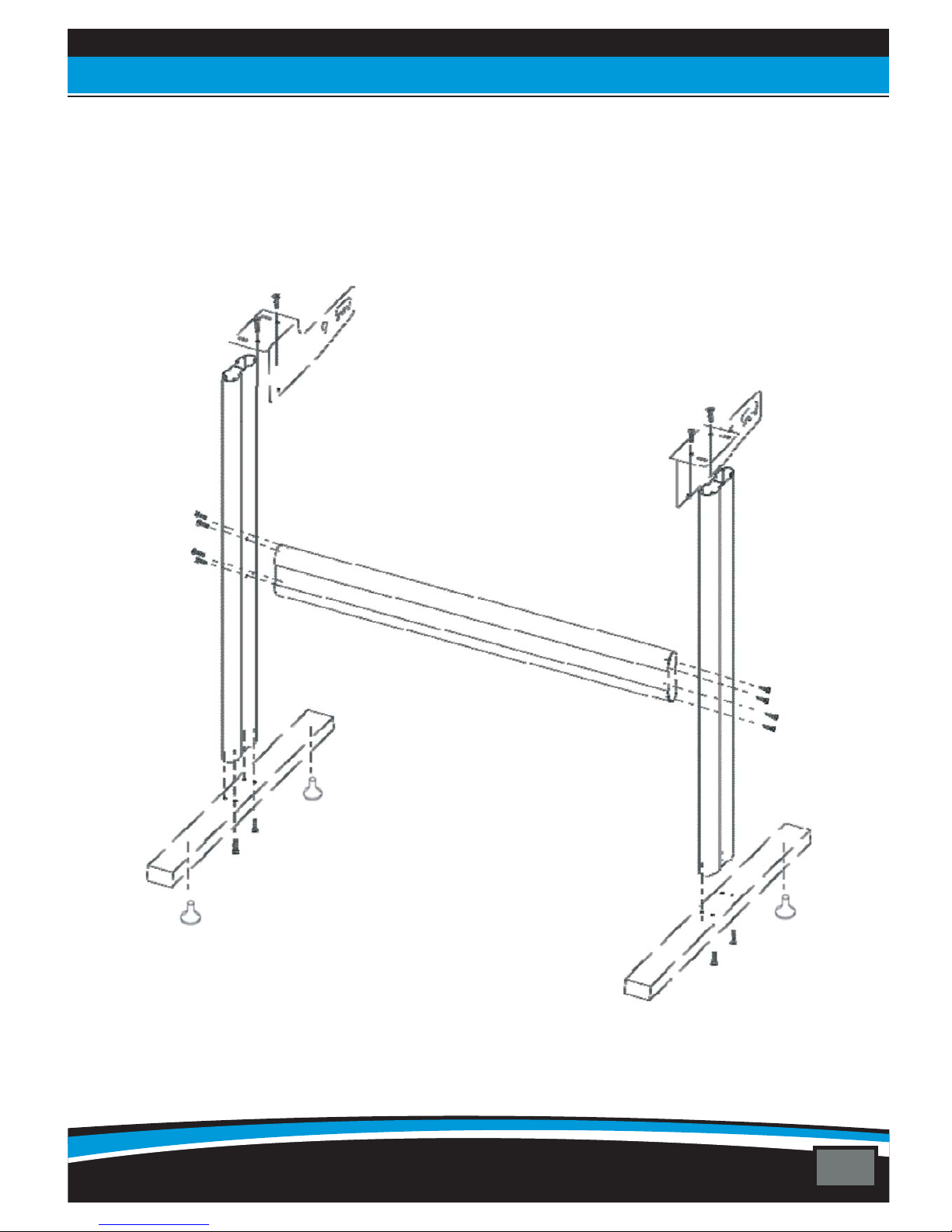
5/ STAND ASSEMBLY
07
PROMACUT PC-730E
Address: 7 bis impasse Denis Dulac, 94700 MAISONS-ALFORT, FRANCE
Phone: 00 33 141 79 00 45 - Fax : 00 33 143 53 93 57

6/ LOADING OF VINYL
1
2
– Place the plotter on a flat and stable area or on its stand
Place the roll on the roll holder fixing it with disks:–
6–:Close down the rollers by raising the levers located at the back
4
5
–
– Attention: the pinch rollers should be always placed above the scratched parts of the
driving roll to allow the proper holding of vinyl:
Put the vinyl on the roll holder and load the vinyl from the back of the plotter and place
it as straight as possible to avoid any movement
Raise to close
down rollers
Lower to
raise rollers
5– Place the pinch rollers at the left and right ends side of vinyl by leaving approximately
1 cm of margin outside the rollers like below:
YES NO
08
PROMACUT PC-730E
Address: 7 bis impasse Denis Dulac, 94700 MAISONS-ALFORT, FRANCE
Phone: 00 33 141 79 00 45 - Fax : 00 33 143 53 93 57

7/ TOOLS / BLADE HOLDER
2– The blade must slighty overtake the blade holder. It shouldn’t exceed the vinyl
thickness and the liner to be cut. Be careful to respect this condition if you don’t want to
wear your blades.
NO YES NO
Vynil
Plastic base
1– To install a blade on a blade holder, just press the metal stem located on the top (1) to
make bring out the blade (4) and be able to remove it. Make slip a new blade in the place
of the old one, side slicing downwards, then to screw/unscrew the cap (3) in a more or
less important way according to the blade going beyond which one wishes to obtain (4).
1/ Stem to remove the blade
2/ « Body » of the blade holder
3/ Adjustment of going
beyond of the blade
4/ Going beyond
of the blade
There are two blades for PROMACUT :
- : for thin material cuts
- for thick extra-thin cuts**.
45°blade
60°blade:
**The 60° blades are much sharper, thiner and
more fragile and require the respect of the r
blade overtaking adjustment mentioned above.
plotters
material or
ule of
45°
60°
09
PROMACUT PC-730E
Address: 7 bis impasse Denis Dulac, 94700 MAISONS-ALFORT, FRANCE
Phone: 00 33 141 79 00 45 - Fax : 00 33 143 53 93 57
Inhaltsverzeichnis


