PSI SpectraPen mini Leitfaden

SpectraPen mini
Manual and User Guide
Please read this manual before operating this product
PSI, spol. s r. o., Drásov 470, 664 24 Drásov, Czech Republic
FAX: +420 511 440 901, TEL: +420 511 440 012, www.psi.cz

© PSI (Photon Systems Instruments), spol. s r. o.
2
© PSI (Photon Systems Instruments), spol. s r. o. (hereinafter PSI), April 2019
This document and its parts can be copied or provided to a third party only with the express permission of PSI.
The contents of this manual have been verified to correspond to the specifications of the device. However, deviations cannot
be ruled out. Therefore, a complete correspondence between the manual and the real device cannot be guaranteed. The
information in this manual is regularly checked, and corrections may be made in subsequent versions.
The visualizations shown in this manual are only illustrative.
This manual is an integral part of the purchase and delivery of equipment and its accessories and both Parties must abide
by it.

© PSI (Photon Systems Instruments), spol. s r. o.
3
TABLE OF CONTENTS
1Information Before Using SpectraPen mini.................................................................................................................... 4
2Technical Specification ................................................................................................................................................... 5
3General Information....................................................................................................................................................... 6
3.1 Device Description................................................................................................................................................. 6
4List of Equipment............................................................................................................................................................ 8
5Care and Maintenance ................................................................................................................................................... 9
6Getting Started ............................................................................................................................................................. 10
7Device Operation.......................................................................................................................................................... 13
7.1 Charging............................................................................................................................................................... 13
8Menu Description......................................................................................................................................................... 15
8.1 Main Menu .......................................................................................................................................................... 15
8.2 Spectrometer....................................................................................................................................................... 16
8.3 Light Meter.......................................................................................................................................................... 20
9Troubleshooting and Customer Support...................................................................................................................... 21
10 Warranty Terms and Conditions .................................................................................................................................. 22

© PSI (Photon Systems Instruments), spol. s r. o.
4
1INFORMATION BEFORE USING SPECTRAPEN MINI
Read this manual carefully before operating the device. If you are not sure about anything in the manual, contact the
manufacturer for clarification.
By accepting the device, the customer agrees to follow the instructions in this guide.
Always follow corresponding manual while working with the SpectraPen mini device or doing the maintenance.
It is forbidden to interfere with the hardware or software of the SpectraPen mini device in any way without previous
agreement with the manufacturer.
The following table presents basic highlight symbols used in this manual.
Symbol
Description
Important information, read carefully.
Additional information.
Tab. 1 Used symbols.

© PSI (Photon Systems Instruments), spol. s r. o.
5
2TECHNICAL SPECIFICATION
Optical entrance:
Cosine corrector
FWHM bandwidth:
15 nm max
Spectral response range:
340 –850 nm
Wavelength reproducibility:
+/- 0.5 nm
Integration time:
Automatic, 300 µs to 1 s
System data:
16 bit A/D conversion
Communication:
Bluetooth Low Energy 4.2
SpectraPen mini application:
Android™version 5.0 and higher
Power supply:
Li-Ion rechargeable battery
Battery capacity:
650 mAh
Max. charging current:
500 mA
Charging via USB port:
PC, power bank, USB charger etc.
Battery life:
Continuous measurement: 25 hours
Size:
50 mm x 70 mm x 28 mm
Weight:
60 g
Case:
Splash-proof
Operating conditions:
Temperature: 5 to +55 °C; Relative humidity: 0 to 95 % (non-condensing)
Storage conditions:
Temperature: -20 to +70 °C; Relative humidity: 0 to 95 % (non-condensing)
Warranty:
1 year parts and labor (see the last page of this Operation Manual for precise warranty conditions)

© PSI (Photon Systems Instruments), spol. s r. o.
6
3GENERAL INFORMATION
SpectraPen mini is a small, portable and affordable calibrated spectroradiometer and quantum light meter, which is
controlled via mobile application called SpectraPen accessible on Google Play. The communication with the mobile phone
is provided by Bluetooth Low Energy module.
The SpectraPen mini measures Irradiance spectrum and light intensity in three units –Irradiance, Photon flux density and
Illuminance. The device is calibrated for visible light in the range from 340 to 850 nm.
The SpectraPen mini serves for real-time measurement of light quality and intensity. It is ideal as a multi-purpose
instrument for research, industrial and agricultural applications.
Parameters measured by the SpectraPen mini:
Spectrometer - quantitative light intensity at different wavelengths
•Irradiance spectrum [µW.cm-2.nm-1]
Light Meter - absolute light intensity at defined range of wavelengths of the electromagnetic spectrum
•Irradiance [W.m-2] in user defined range of the electromagnetic spectrum
•Photon flux density [µmol.m-2.s-1] in user defined range of the electromagnetic spectrum
•Illuminance [Lux] - total luminous flux incident on a surface, per unit area
3.1 DEVICE DESCRIPTION
Sensor with cosine corrector
The optical part of the SpectraPen mini, cosine corrector, is placed in the middle of the white side of the device and is
protected by sealing against dirt and moisture.
Integration time of the internal detector is set automatically according to the ambient light intensity.
The sensor part should be always dust and dirt free and maintained carefully as any scratches on the
surface might interfere with the correct results of the measurement.
Connector for charging
USB connector is used for charging of the SpectraPen mini device using PC, USB wall adapter, USB power bank etc.
Power button
Power button is the main Switch ON/OFF button.
Magnetic holder
The magnetic holder is placed under the green cover and serves for attaching of the device to metal surface.

© PSI (Photon Systems Instruments), spol. s r. o.
7
Fig. 1 SpectraPen mini.

© PSI (Photon Systems Instruments), spol. s r. o.
8
4LIST OF EQUIPMENT
Carefully unpack the carton. You should have received the following items:
•SpectraPen mini
•Carrying case
•Magnetic holder for tripods
•USB cable
•QuickStart guide
Other Accessories or Optional Features (according to your specific order)
If any item is missing, please, contact PSI. Also check the carton for any visible external damage. If
you find any damage, notify the carrier and PSI immediately. The carton and all packing materials
should be retained for inspection by the carrier or insurer.
For customer support, please contact us: support@psi.cz

© PSI (Photon Systems Instruments), spol. s r. o.
9
5CARE AND MAINTENANCE
•Never submerge the device in water!
•The device should not come in contact with any organic solvents, strong acids or bases.
•Keep the optical part clean and dry. If cleaning is needed, use soft, non-abrasive tissue.
It is recommended to re-calibrate the device by the manufacturer every 2 years.

© PSI (Photon Systems Instruments), spol. s r. o.
10
6GETTING STARTED
1. Download and install the application to your smartphone or tablet. The SpectraPen application is free available on
Google Play or can be also downloaded from product websites available via the QR code placed on the bottom of the
device.
The application is compatible with Android version 5.0 and higher.
2. Before you start operating the device, please connect the SpectraPen mini to USB charger to charge the battery.
3. To initialize the SpectraPen mini, please press the power button for about 10 seconds until the green indication light
indicates initial state. The device can be switched on/off by short press the power button followed by green (power
on) or red (power off) light flash.
4. While the SpectraPen mini is on, the state is indicated by light flashing. The device turns off automatically after 2
minutes or any time after pressing the power button.
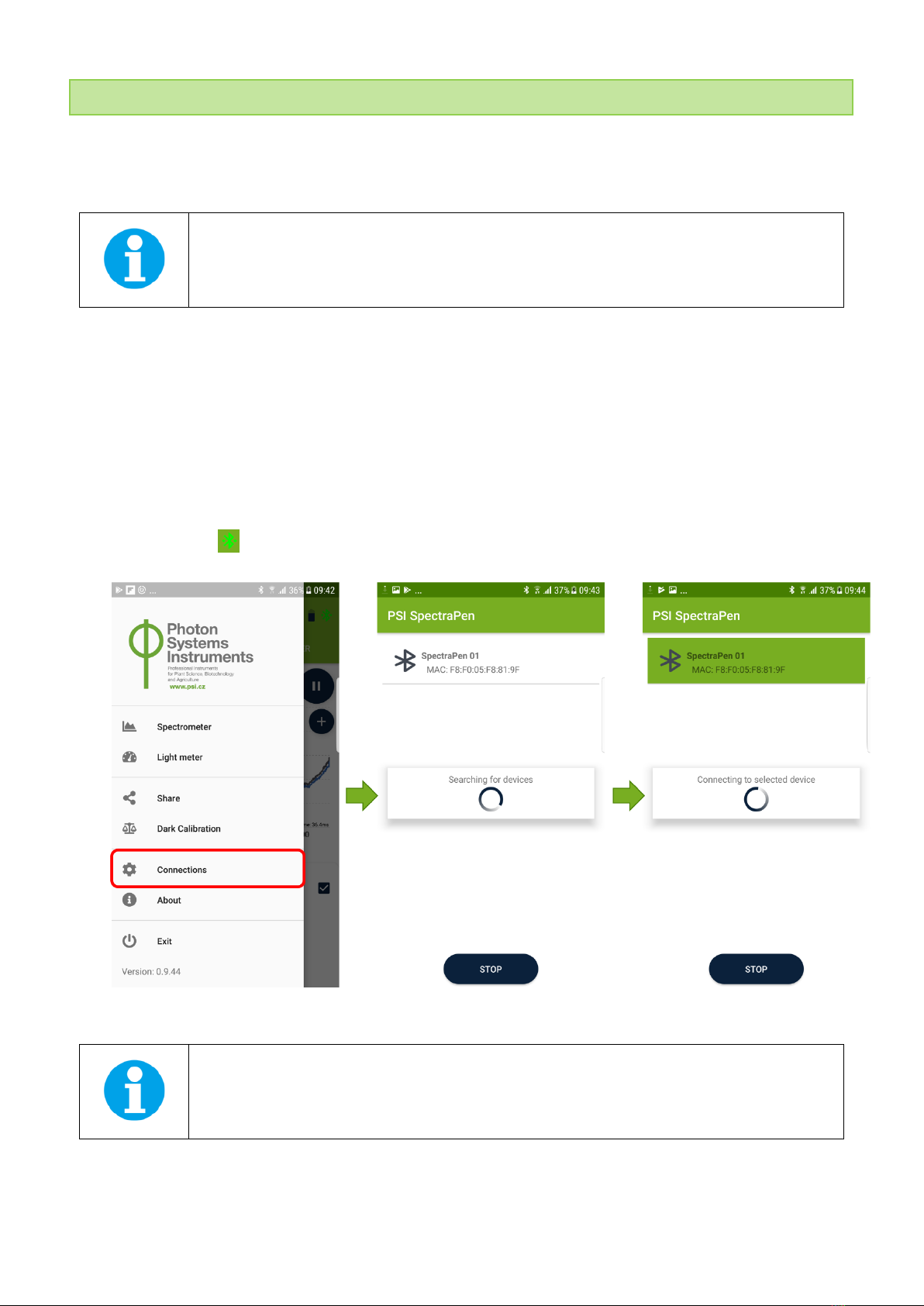
5. Open the SpectraPen application and navigate in the side bar menu to Connections. The application automatically
searches the available SpectraPen mini devices; then select the required one. Last two numbers in the name of
searched devices correspond to the last two numbers of serial number placed on the bottom of the device. Once the
SpectraPen mini device is paired with the application the Bluetooth mark in the right corner of the application window
changes to green .
Fig. 2 Pairing of the SpectraPen mini with the mobile application.
Last two numbers in the name of SpectraPen mini device visible in the application corresponds to
serial number written on the bottom green side of the device.
6. From the side bar menu select the Dark calibration (Fig. 4). Before you start calibration process please make sure that
the sensor is completely covered. Please note that covering by finger is insufficient for the infrared part of the
Inhaltsverzeichnis
Andere PSI Messgerät Handbücher

PSI
PSI PolyPen RP400 Leitfaden

PSI
PSI FluorPen FP 110 Handbuch

PSI
PSI PlantPen/N-Pen N 110 Handbuch

PSI
PSI PlantPen NDVI Handbuch

PSI
PSI FluorPen FP 110 Leitfaden

PSI
PSI LaiPen LP 110 Handbuch

PSI
PSI FluorPen FP 100 Bedienungsanleitung

PSI
PSI RG-3W Bedienungsanleitung

PSI
PSI PlantPen PRI 200 Bedienungsanleitung

PSI
PSI SpectraPen LM 510 Handbuch