
Rocktrail z29592 Bedienungsanleitung
HandHeld WeatHer Station
Operation and Safety Notes
tragbare WetterStation
Bedienungs- und Sicherheitshinweise
Kannettava SääaSema
Käyttö- ja turvallisuusohjeet
bärbar väderStation
Bruksanvisning och säkerhetsanvisningar
bærbar vejrStation
Betjenings- og sikkerhetshenvisninger
3
Z29592

GB/IE Operation and Safety Notes Page 4
FI Käyttö- ja turvaohjeet Sivu 35
SE Bruksanvisning och säkerhetsanvisningar Sidan 65
DK Brugs- og sikkerhedsanvisninger Side 93
DE/AT/CH Bedienungs- und Sicherheitshinweise Seite 123
3
5
6
7
8
9
10
11
12
13
1 2 3 4

4 GB/IE
Introduction
Intended Use....................................................................Page 6
Description of parts and features ...................................Page 7
Technical data .................................................................Page 8
Scope of Supply..............................................................Page 9
General Safety Information.......................Page 9
Safety Instructions for the Battery ...................................Page 11
Starting the weather station up..............Page 12
Regulating the default settings
for language, time, date, time zone ...............................Page 13
Deactivating/activating the display ..............................Page 16
Switching the touch beep on/off...................................Page 16
Switching off the automatic display/
activating the sleep function ...........................................Page 17
Setting the alarm time and activating the daily alarm...Page 18
Activating the hourly alarm.............................................Page 19
Using the stopwatch........................................................Page 19
Timing/storing and retrieving lap times ........................Page 20
Using the countdown counter.........................................Page 21
Displaying the world times..............................................Page 22
Using the barometer........................................................Page 23
Adjusting the barometer..................................................Page 24
Using the altimeter...........................................................Page 25
Adjusting the altimeter.....................................................Page 26

5GB/IE
Measuring the difference in height.................................Page 26
Weather forecast.............................................................Page 27
Reading off the temperature and humidity ....................Page 28
Retrieving the maximum and minimum values...............Page 29
Battery display.................................................................Page 31
Changing the battery ......................................................Page 31
Cleaning and Maintenance..........................Page 32
Disposal.........................................................................Page 32
Declaration of conformity.............................Page 34
6 GB/IE
Handheld Weather Station
Q
Introduction
Familiarise yourself with the product before using it
for the first time. In addition please refer carefully
to the operating instructions below and the safety
advice. Use the product only as described and for the
indicated purpose. Keep these instructions in a safe place.
If you pass the product on to anyone else, please ensure
that you also pass on all the documentation.
Q
Intended Use
The portable weather station displays the temperature
in Celsius (°C) or Fahrenheit (°F), the air humidity in per
cent (% RH) and their maximum and minimum values. The
weather station also displays the weather forecast, the time
in 12/24-hour clock modes and the date. In addition, the
weather station also has an alarm and calendar function as
well as a barometer and an altimeter. Other uses or changes
to the device are considered to be contrary to the intended
use and may result in personal injury and /or damage to the
device. The manufacturer accepts no liability for damage
7GB/IE
caused through the use of the device in contradiction of its
intended use. The device is not intended for commercial use.
Q
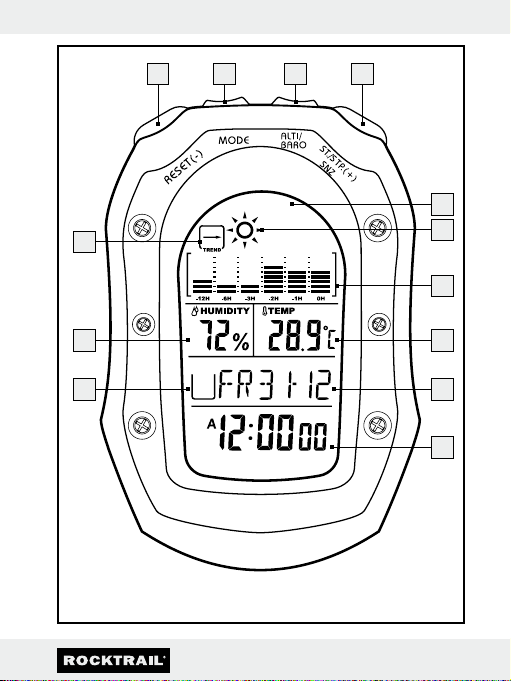
Description of parts and features
1RESET button
2MODE button (“configuration”)
3ALTI/ BARO button (“altimeter/barometer”)
4ST./STP button (start/stop)
5Display
6Weather symbol
7Barometric pressure bar display
8Temperature display
9Date display
10 Time display
11 Daily alarm display
12 Relative humidity display
13 Barometric pressure trend display

8 GB/IE
Q
Technical data
Temperature
Resolution: 0.1°C (0.1 °F)
Measuring range: –10 - +60 °C
14 - +140 °F
Humidity
Resolution: 1% RH (% RH – relative humidity =
% relative humidity)
Measuring range: 25 - 99%
Altimeter
Resolution: 1m
Measuring range: –706 m - 9164m
–2316 ft - 30065ft
Barometer
Resolution: 0.1mb /hPa (millibar/hectopascal)
Measuring range: 300mb /hPa - 1100mb/ hPa
Battery: 1x Lithium button cell 3V
(CR 2032) (included in delivery)
9GB/IE
Q
Scope of Supply
Please check the supplied items immediately after unpacking
the device to ensure that there is nothing missing and that
the product and all of its parts are in perfect condition.
1x Portable weather station
1x Button cell Lithium 3V (CR 2032) (pre-installed)
1x Directions for use
General Safety Information
J WARNING!
DANGER TO LIFE AND
ACCIDENT HAZARD FOR TODDLERS
AND SMALL CHILDREN! Never allow
children to play unsupervised with the packaging material.
There is a danger of suffocation from the packaging
material. Children frequently underestimate the dangers.
Children should be kept away from the product at all times.
This is not a toy.
mDANGER TO LIFE! Batteries can be swallowed, which
may represent a danger to life. If a battery has been
swallowed, medical help is required immediately.
J Children or persons who lack the knowledge or experi-
ence to use the device or whose physical, sensory or

10 GB/IE
intellectual capacities are limited must never be allowed
to use the device without supervision or instruction by a
person responsible for their safety. Children must never
be allowed to play with the device.
J Do not use the device if it is damaged. Damaged devices
represent a danger of death from electric shock!
J Do not use the device in hospitals or medical facilities, as
otherwise this may result in malfunctions of life-support
systems.
J Do not expose the device to
- extreme temperatures,
- strong vibrations,
- heavy mechanical loads,
- direct sunlight.
Otherwise there is a danger that the device will be
damaged.
J Do not expose the device to an extremely high electro-
magnetic field. This may impair the correct functioning of
the device. Electrostatic charge can result in malfunction
of the device. In case of malfunctions remove the battery
shortly and replace it again.
J Please note that the guarantee does not cover damage
caused by incorrect handling, non-compliance with the
operating instructions or interference with the device by
unauthorised individuals.
Andere Handbücher für z29592
1
Dieses Handbuch passt für folgende Modelle
1
Inhaltsverzeichnis
Sprachen:
Andere Rocktrail Wetterstation Handbücher

Beliebte Wetterstation Handbücher anderer Marken


National Geographic
National Geographic VA Colour RC Bedienungsanleitung

Renkforce
Renkforce 1208067 Bedienungsanleitung

Levenhuk
Levenhuk Discovery Report WA40 Bedienungsanleitung

Instant Transmission
Instant Transmission MA 10410 Bedienungsanleitung

Lutron Electronics
Lutron Electronics PHB-318 Bedienungsanleitung

WAREMA
WAREMA EWFS Weather station eco Bedienungsanleitung