Sequoia LISST-Deep Bedienungsanleitung

LISST-Deep
Particle Size Analyzer
User’s Manual
For serial numbers 4056 and higher
Built March, 2022 and later
Version 5.02
January, 2023
2700 Richards Road, Suite 107
Bellevue, WA 98005
USA
Telephone: (+1) 855-753-3313
Store Software
USB Card Here

Intentionally blank

LISST-Deep User’s Manual Page iii
©
This document is copyrighted by Sequoia Scientific, Inc.

Intentionally blank

LISST-Deep User’s Manual Page v
Welcome to the LISST-Deep Particle Size Analyzer
Using this manual
I. Introduction & Quick Start provides an overview of the
LISST-Deep’s operating principles and basic functions.
II. Operation Details provides details and step-by-step
instructions for using and caring for the instrument.
The Appendices contain specialized details, specifications, and
information about options.
IMPORTANT NOTE: The LISST-Deep design was
extensively upgraded in 2022. This manual only applies to
units with serial number 4056 or higher.
Warranty
See the product warranty at:
http://sequoiasci.com/support/warranty
Technical assistance
For technical assistance please contact your local Distributor or
Sequoia. Please include the instrument serial number with any
correspondence.
Sequoia Scientific, Inc. contact information:
Telephone: (+1) 855-753-3313
Email: [email protected]

Intentionally blank

LISST-200X User’s Manual Page vii
Table of Contents
I. INTRODUCTION & QUICK START........................................................................................1
A. LASER DIFFRACTION AND THE LISST-DEEP............................................................................1
B. GENERAL DESCRIPTION.........................................................................................................4
C. QUICK START TUTORIAL ........................................................................................................6
II. OPERATION DETAILS.........................................................................................................20
A. STEP BY STEP PROCEDURES...............................................................................................21
1. Installing Software ........................................................................................................21
2. Establishing Communication with the LISST-Deep......................................................22
3. Saving and Evaluating Clean Water Backgrounds.......................................................23
4. Configuring Data Collection..........................................................................................26
5. Offloading and Deleting Data Files from Internal Memory ...........................................30
6. Processing a Single Raw Data File ..............................................................................31
7. Batch Processing Multiple Raw Data Files...................................................................33
8. View Processed Data File.............................................................................................35
9. Data Quality Control .....................................................................................................36
10. Real-Time Data Processing with LISST-200X Software..........................................38
11. Autonomous Real-time Data Processing .................................................................40
12. Collecting Data from External Analog Sensors........................................................42
13. Configuring the LISST-Deep as a Sensor for a CTD...............................................43
B. START AND STOP CONDITIONS.............................................................................................44
C. INSTRUMENT COMMUNICATION.............................................................................................46
D. DIRECT COMMAND SUMMARY ..............................................................................................47
E. COMMAND DETAILS .............................................................................................................48
1. Display Commands.......................................................................................................48
2. Setup Commands.........................................................................................................51
3. Acquisition/Action commands.......................................................................................56
F. PERFORMANCE OPTIMIZATION .............................................................................................58
G. MOUNTING AND ORIENTATION,STORAGE .............................................................................61
APPENDIX A: TECHNICAL SPECIFICATIONS...........................................................................62
APPENDIX B: PARTICLE SIZE BINS ..........................................................................................64
APPENDIX C: DATA FILE FORMATS .........................................................................................65
APPENDIX D: MATLAB DATA PROCESSING............................................................................68
APPENDIX E: CONNECTORS .....................................................................................................70
Communications and Power Connector................................................................................70
Auxiliary I/O Connector..........................................................................................................71
Viewing and Setting the Auxiliary I/O Configuration..............................................................72
APPENDIX F: PARTICLE SHAPE MODELS ...............................................................................74
APPENDIX G: ANALOG OUTPUTS.............................................................................................75
APPENDIX H: TROUBLESHOOTING & SUPPORT....................................................................76
REVISION HISTORY.....................................................................................................................77

Page viii LISST-200X User’s Manual
Intentionally blank

LISST-Deep User’s Manual 1 Introduction & Quick Start
I. Introduction & Quick Start
A. Laser Diffraction and the LISST-Deep
Measurement
Principle and
Optics
Particle sizing by laser diffraction is currently the most widely prevalent
method in research and industry. It is a multi-parameter measurement.
Just as a set of 3 equations can be solved for 3 unknowns, a
measurement of light scattering at multiple angles can be solved for
equally as many concentrations in different sizes. For example, the
LISST-Deep measures scattering into 36 angles; consequently, one
obtains concentrations in 36 size classes of particles. This is called the
particle size distribution (PSD).
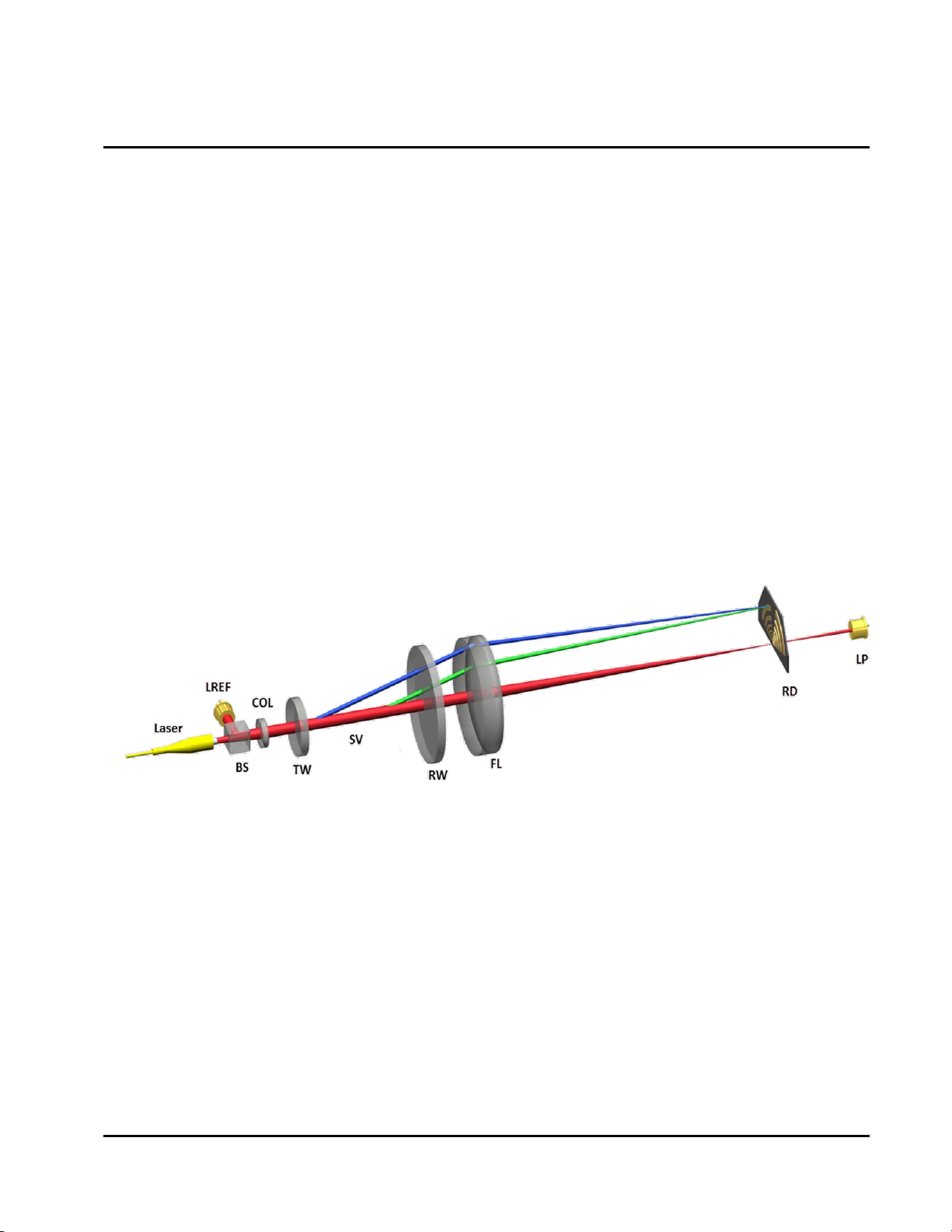
To measure scattering at multiple angles, the LISST-Deep sends a
collimated beam of light into the water. Laser light scattering at an
angle from the beam arrives, through a daylight rejection filter, at the
focal plane of a receive lens at the same angle from lens axis (see
figure). Distance from lens axis in the lens focal plane corresponds to
scattering angle. The photodetectors in the LISST series instruments
are a series of silicon rings spanning 60-degree arcs. Each ring covers
a small range of scattering angles. Rings are used to achieve stability
of inversion –converting of set of multi-angle scattering measurements
to the PSD.
Notice that the laser beam itself is focused by the receive lens and
passes through a small aperture in the ring detector, centered on the
rings. This beam is sensed by a photodiode placed behind the ring
detector. This is the transmission sensor. As light is removed from the
laser beam by scattering, the beam is attenuated, i.e. the light
transmitted through water is reduced in intensity. A similar attenuation
also affects the light that is scattered by particles and sensed by ring
detectors. Thus, the transmission sensor provides a vital measurement
to de-attenuate the measured scattered light.

Introduction & Quick Start 2 LISST-Deep User’s Manual
Clean Water
Backgrounds
Scattering originates not only from particles in the water, but also from
the water itself, and from the windows and internal optics of the LISST-
Deep. This non-particle scattering constitutes a Background. (Formerly
this was called zscat, meaning scattering by zero concentration of
scatterers). Accurate measurements require subtracting the
background scattering from the total signal seen by ring detectors.
The background scattering typically changes gradually throughout the
life of the instrument, due to small changes in the laser and optics, and
wear on the exposed window surfaces. It is also very sensitive to
cleanliness of the windows. Therefore, high-quality measurements
require careful background measurements by the user. A factory
background acts as a reference for comparison. The LISST-Deep
stores its factory background data in its memory, as well as the user’s
acquired background data.
Background
Quality Control
Because the background measurement is so important, the LISST-
Deep firmware and software include procedures for measuring and
evaluating the background scattering. The software checks for signs of
problems such as laser degradation, optics misalignment,
contamination of data by thermal microstructure in the water used for
background, bubbles or particles in the supposedly clean water,
scratches on windows etc.
For details on the background measurement procedure, see Saving
and Evaluating Clean Water Backgrounds on page 23.
Ambient Light
The laser diffraction method requires that the light arriving on the
detector be due entirely to scattering of light that originates with the
laser beam. Therefore, bright light from the sun is an interfering signal
that can degrade the measurements. The firmware includes an ambient
light rejection (ALR) option that measures and subtracts ambient light.
However, ALR also takes time that could otherwise be used to perform
more signal averaging. Because the LISST-Deep physically shields the
detector from most ambient light, and because ambient light is not a
factor over most of the LISST-Deep’s range of operating depths, ALR is
turned off by default. For more about ALR, see Ambient Light Rejection
on page 58.
Quick Estimates
of Total
Concentration
and Mean Size
Converting the LISST-Deep’s measurements of scattering to PSD
requires extensive computations that are time-consuming for a small
microprocessor. However, a much simpler computation, easily done in
real time, provides estimates of the total particle volume concentration
and mean particle size. These quantities are not as accurate as the
fully-processed PSD, but are useful for quick characterization of water
conditions. For example, if used in conjunction with a CTD package in
profiling applications, the CTD software could display the concentration
and mean size as a depth profile, revealing any vertical structure in the
particle distribution. (Note that real-time interface to a CTD requires
Inhaltsverzeichnis
Andere Sequoia Messgerät Handbücher

Sequoia
Sequoia LISST-100X Bedienungsanleitung

Sequoia
Sequoia LISST-VSF Bedienungsanleitung

Sequoia
Sequoia LISST-PORTABLE XR Bedienungsanleitung

Sequoia
Sequoia LISST-Tau Bedienungsanleitung

Sequoia
Sequoia FastTracer Technische Daten

Sequoia
Sequoia LISST-VSF Bedienungsanleitung

Sequoia
Sequoia LISST-200X Bedienungsanleitung

Sequoia
Sequoia LISST-100X Bedienungsanleitung

Sequoia
Sequoia LISST-Infinite Bedienungsanleitung

Sequoia
Sequoia LISST-200X Bedienungsanleitung